Fix My Agent
Turn a finished run into a ranked list of issues and fixes, then hand off to an optimization
Fix My Agent reads a run once it’s finished and turns the calls in it into a short, ranked list of what’s going wrong, each with a recommendation for what to change. You don’t have to scroll through every transcript looking for a pattern yourself: it arrives already grouped, worst first, ready to hand off to an optimization once you’ve read through it.
Open it from a finished run
On a run’s results page, Fix My Agent sits next to the tabs rather than inside one of them. Click it to open a side panel that stays open alongside whichever tab you’re on, with a chevron at the panel’s left edge to collapse it out of the way when you don’t need it.
The button only turns on once the run has enough to analyse: the run has to be completed, and it needs at least 15 connected calls behind it. A run still in progress, or one with fewer calls than that, leaves the button disabled, with a tooltip telling you which of the two is missing.
Generate the analysis
The first time you open the panel on a run, it’s empty: “There are no suggestions yet, click the refresh button to get suggestions.” Click refresh to run the analysis over the run’s calls. If it genuinely finds nothing worth flagging, it says so instead of manufacturing an issue to fill the space.
An analysis is kept against the execution it ran on, stamped Last updated at beside the suggestion count, so reopening the panel later shows you that stored result rather than starting again. That’s also why the empty state is a first-time-only thing: once a run has been analysed, it’s the stored analysis you come back to, and refresh is what replaces it.
What a prioritised issue looks like
Each entry in the list is one issue, not one call. A run where a dozen calls fail the same way for the same reason surfaces as a single entry, not a dozen. Every entry carries:
- A short heading naming the issue
- A priority, high, medium, or low, so you know which to read first
- A written recommendation of what to change to address it, truncated behind a see more link
- The calls it’s drawn from, as Calls Affected (n). Click the entry and the calls grid on the page narrows to just those, its header switching from All Chats to (n) Chats selected, so you can read the transcripts behind the pattern before you act on it
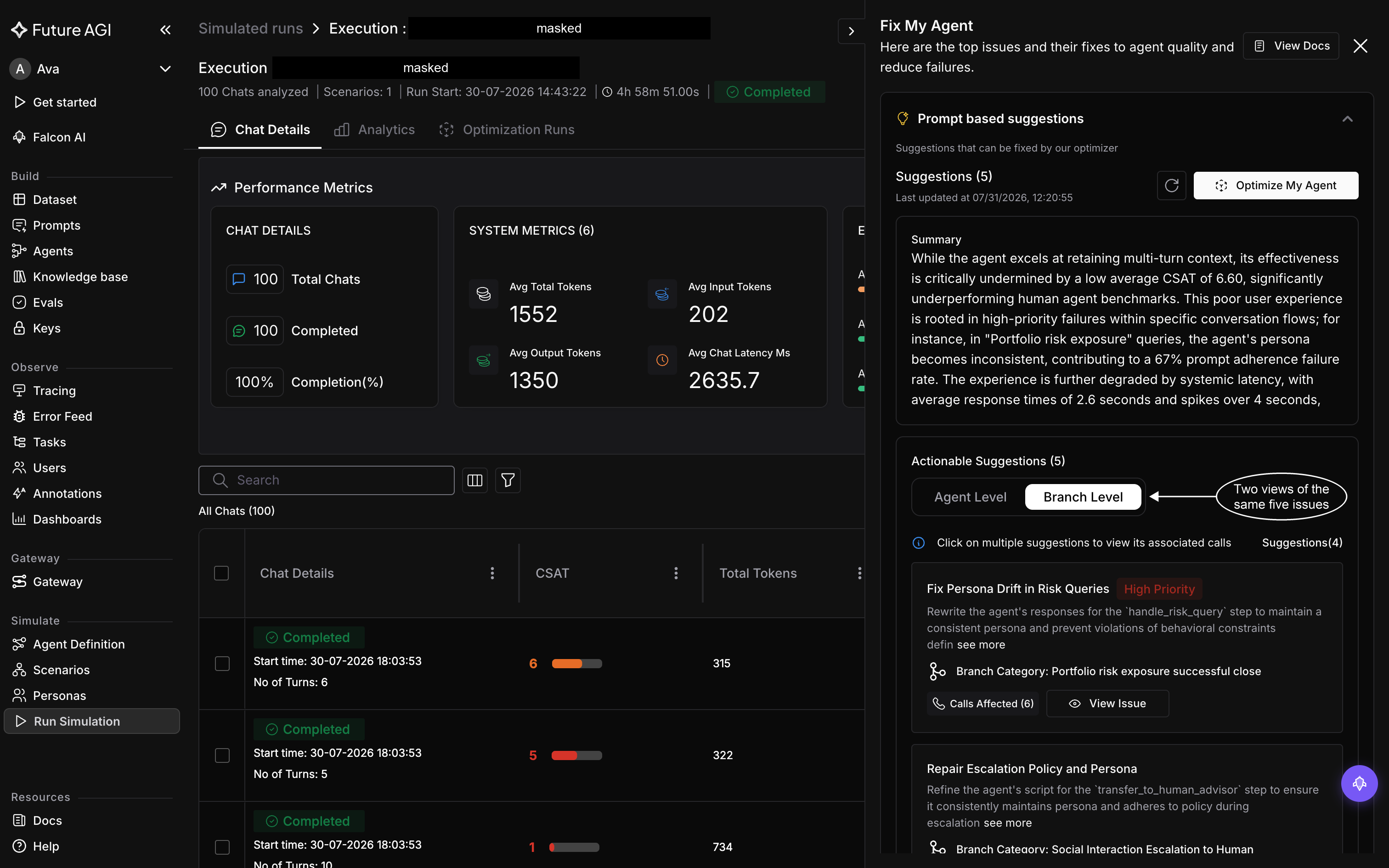
The panel opens over the right of the page and stays there while you move between tabs, which is how you read an issue and its calls side by side
The group is headed Suggestions (n), the number the optimizer can act on, with a Summary of what the run showed overall underneath it. Below that, Actionable Suggestions splits the same set across two tabs: Agent Level, for issues with your agent’s prompt as a whole, and Branch Level, for issues tied to one path through the conversation, which an entry names on a Branch Category line. The per-tab count beside them tells you how many of the total you’re currently looking at, so the two tabs always sum to the heading.
Infra based suggestions is a separate group, for what the run showed about the agent’s runtime rather than its prompt: response latency, timeouts, conversations that loop. Entries look the same as the prompt-based ones, priority and recommendation and the calls behind them, but as the group says, they aren’t supported by the optimizer and you make those updates manually. The group also opens with a Human Comparison Summary, which reads the run’s latency, turn count, and CSAT against what a human agent typically achieves.
Hand off to an optimization
Once you’ve read through the actionable suggestions, Optimize My Agent is the button that moves you from reading recommendations to acting on them automatically. It opens the optimization setup scoped to this run and the issues you were just looking at.
Running optimizations walks through finishing that setup and starting the run. What the run does once it starts, searching for a better prompt and scoring each candidate against your evals, is covered in Optimization.
The optimization you start this way lands back on the same run’s results page, under its Optimization Runs tab, alongside any others you’ve started from here.
Dive deeper
Questions & Discussion