Run Epoch
Start an epoch from a finished run: pick the failing scenarios to fix, the ones to protect, and its limits
When a run fails, Run Epoch searches for a version of your agent that fixes the failing scenarios and proves it before you change anything. You start it from the run, decide what it may change, and come back to a candidate to review.
Note
Epoch changes an agent you connected as a Source repository or a Code upload (Build an environment covers both). It can’t change an agent on a hosted platform, because that agent’s prompt and tools run outside Future AGI. Epoch explains what an epoch does with the scenarios you give it.
Every Cloud plan includes Epoch. A self-hosted install needs an Enterprise license key that lists Epoch; see Enterprise Edition.
Testing with Run Simulation instead of an environment? See Running optimizations.
Open Run Epoch from a finished run
Open the environment, go to Runs and click a finished run that has failing calls. Click Debug failures in the run’s header, and wait for the diagnosis to finish. Debug failures covers reading it.
Once the diagnosis has found at least one problem, Run Epoch appears at the bottom of the drawer. Click it to open the launch form.
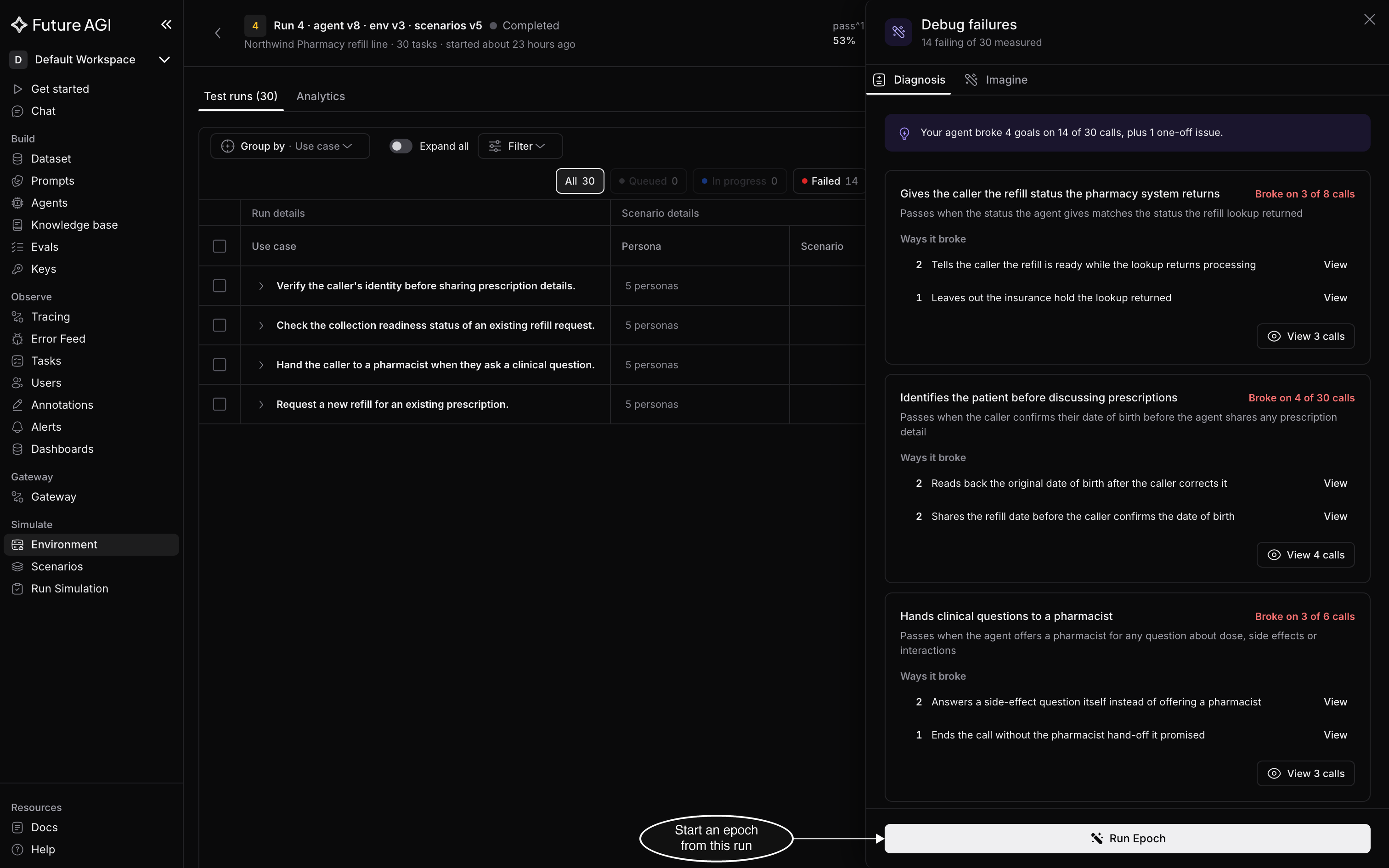
Run Epoch starts from the run whose diagnosis you just read
The form opens with one sentence that sums up what you’re asking for: how many failing cases to fix, how many protected cases it must not break, what it may change, and its budget and time limit. It changes as you edit the form, so read it again before you start.
Pick the cases to fix and protect
Scenarios shows how the epoch will use the run’s scenarios, such as 14 failing: 10 to fix, 4 held back to prove it · 16 protected. Opened from Debug failures, the form starts with every failing scenario as a case to fix and every passing scenario as a case to protect. Opened from Run Epoch in the run’s header, it starts with the failing scenarios that came from imported evidence; see Import evidence. Click Choose cases to change either list:
- Cases to fix lists the run’s failing scenarios. Untick the ones the epoch should leave alone. Once you keep 12 or more, some of them are held back, as the Scenarios line shows: the epoch never sees them while it searches, and runs them at the end to prove the fix
- Cases to protect lists the run’s passing scenarios. The epoch must not break any case you protect
A case can’t be both fixed and protected. Back to suggested resets a list to the form’s suggestion: every failing case to fix, or every passing case to protect.
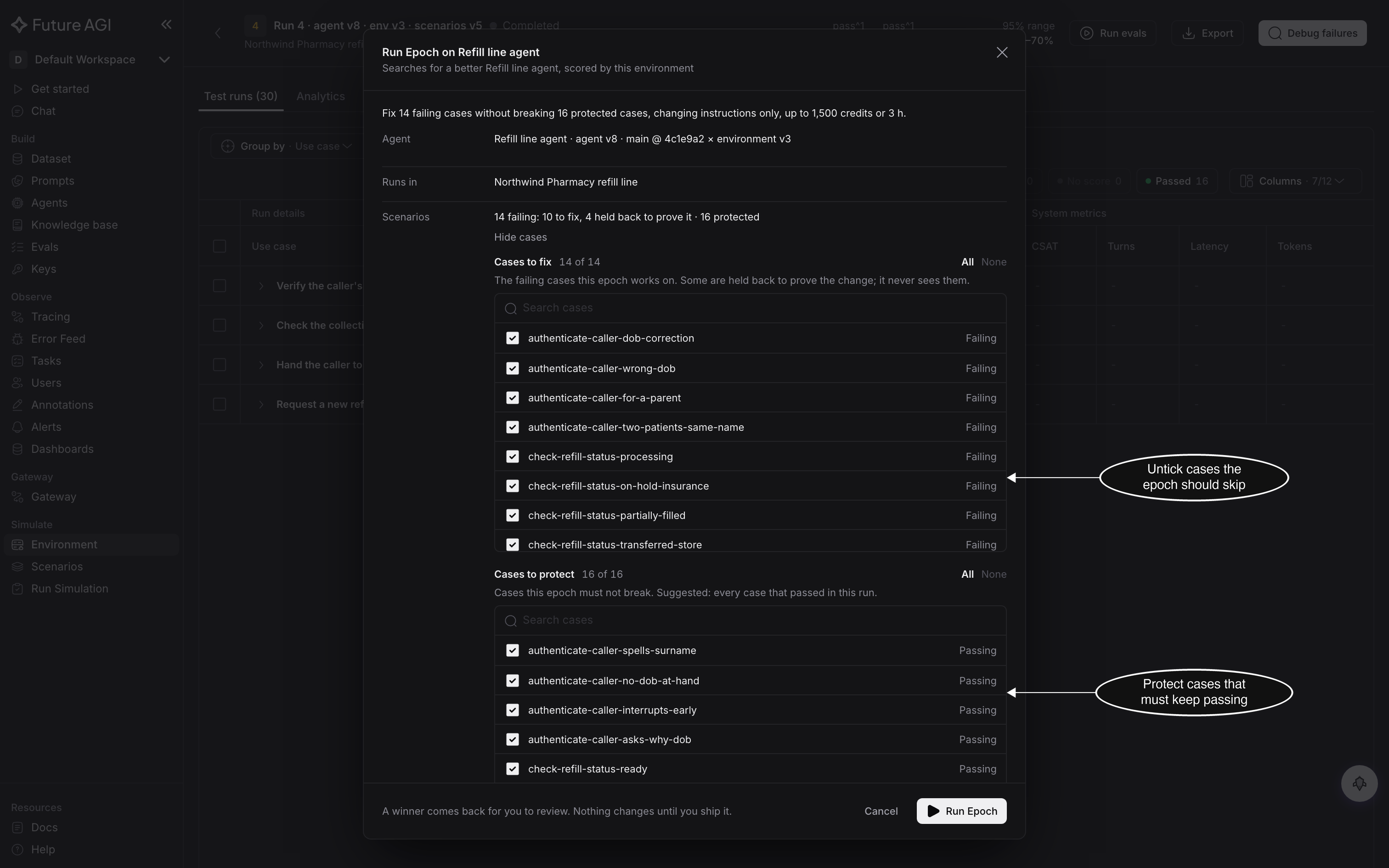
Opened from Debug failures, every failing case is ticked to fix and every passing case to protect until you change them
When the run has fewer than 12 failing scenarios
An epoch needs 12 failing cases. Pick fewer, and the form says so under Scenarios: the epoch first writes three variations of each case, then fixes the ones your current agent also fails. You need at least three failing cases for that.
With fewer than six, the form adds that the epoch can end with Limited validation at best, because too few cases can be held back to prove the fix. For a GitHub agent, its pull request then opens as a draft.
The variations are written into your environment’s scenarios, so the environment can’t have unsaved scenario or setup changes. If it has, Run Epoch stays disabled and Review unsaved changes takes you to the Scenarios tab, where you save or discard them.
Set what it may change
The next rows decide what a candidate may change, and what it’s held to.
- May change: the parts of your agent the epoch may edit, Instructions, Tools, Settings or Code. Only Instructions is ticked at first. Tick more to let it go further; a part it can’t change for this agent is greyed out, with the reason when you hover over it
- Locked files: files or globs it must never edit, such as
prompts/*.md. Type each one and press Enter - Models: the models a candidate may call. It starts with every model your agent called in this run, and every one of those must stay on the list. Add others to let the epoch switch to them
- Reply time: how much slower than now a candidate may reply, from No increase up to Up to 100% slower than now
- Agent’s cost: how much more than now a candidate may spend on each conversation, from No increase up to Up to 100% more than now. Type a number after and at most $ to cap the spend for each conversation too
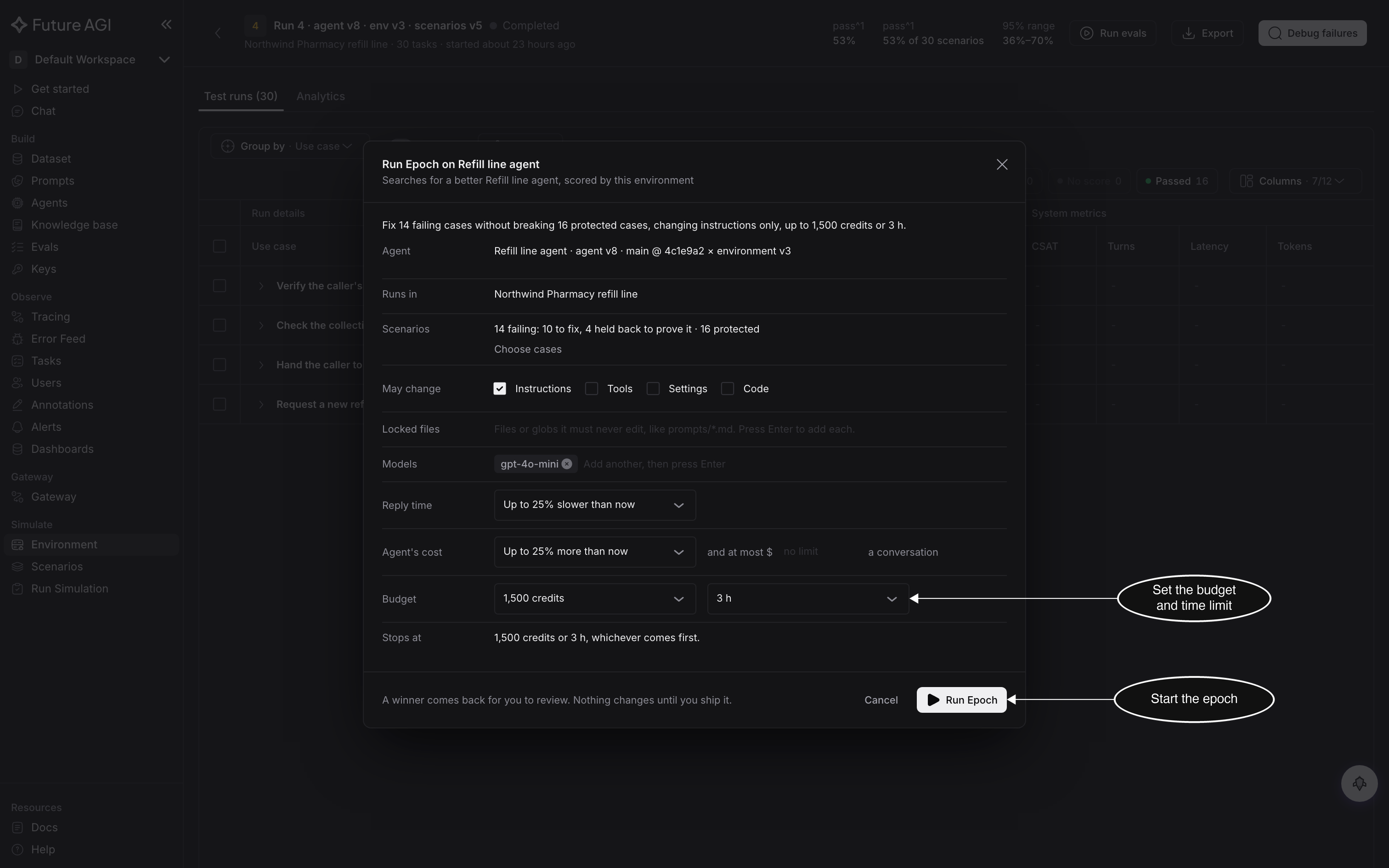
A candidate that breaks any of these limits is rejected, however well it scores
The model and cost limits can only be checked on model calls Epoch can measure. Epoch measures calls your agent makes through the OpenAI or Anthropic Python SDK on its own; for anything else, add traceAI tracing to your agent. When it can’t measure them, the Models row says so in place of the list, and those checks show Unknown on the epoch’s page instead of passing or failing.
Set the budget and start
Budget sets two limits: the credits the epoch may spend, and how long it may run. Stops at reads both limits back in one line. The epoch stops at whichever it reaches first.
Click Run Epoch. The epoch’s page opens, and the epoch shows on the environment’s Epochs tab.
Follow the epoch
The header shows the epoch’s name, such as Epoch 4, with Running and the step it’s on. The steps below it fill in as the epoch works:
| Step | What happens |
|---|---|
| Variations | Only when you picked fewer than 12 failing cases: the epoch writes variations of them and keeps the ones your agent fails |
| Reproduce | It runs your current agent on the cases, to confirm they fail and to see how much the results vary between repeats |
| Search | It tries candidates on the cases to fix. The line counts them, such as 3 of up to 4 candidates · best so far 70% on 10 target scenarios |
| Verify | It runs the best candidate on the held-back cases and the must-pass cases |
| Ready for review | The best candidate comes back to you. Nothing changes until you ship it |
Held to, under the steps, lists the limits you set and what the epoch has spent so far. Below it, the chart and the Candidates table add a row for each candidate as it’s tried.
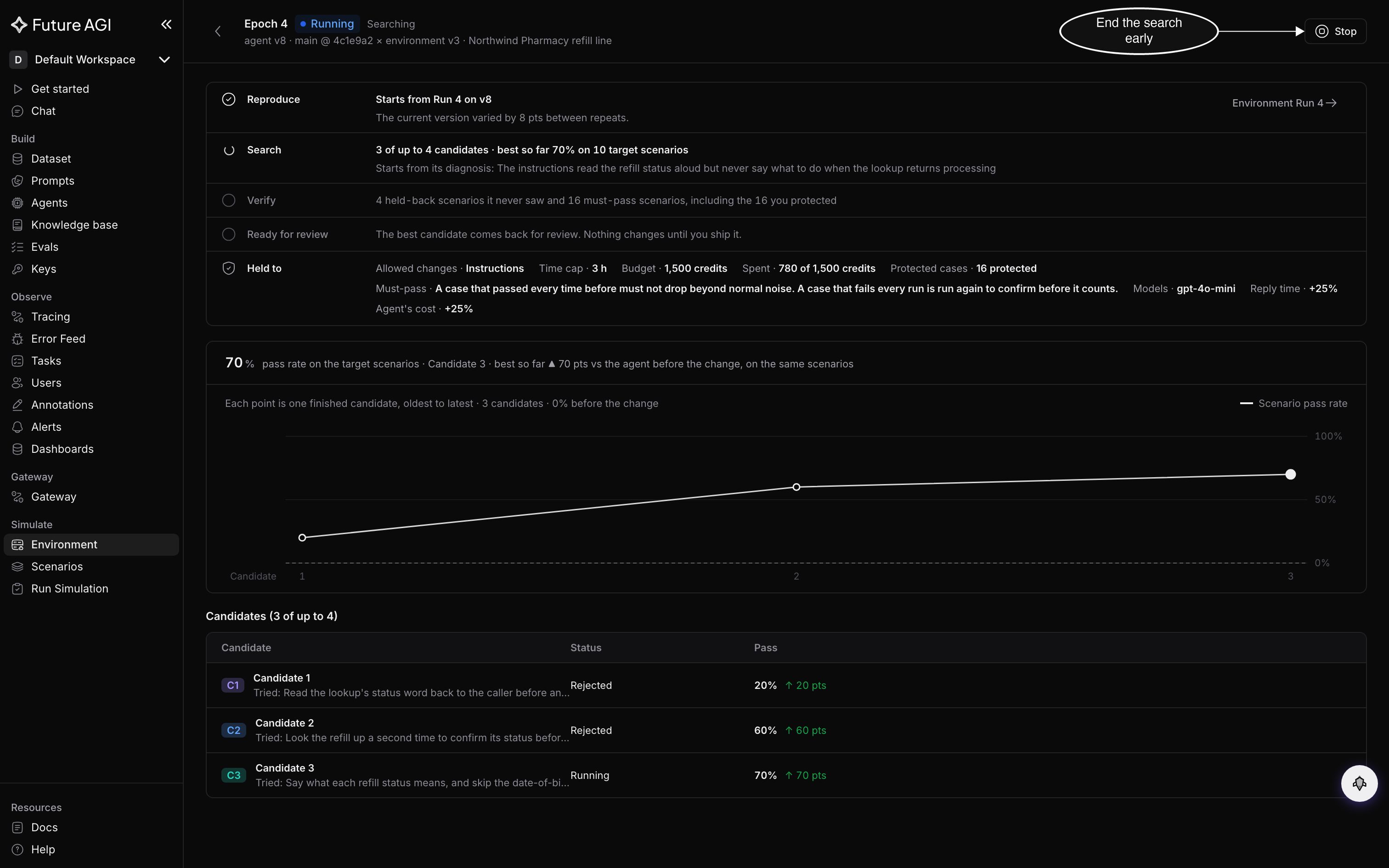
You can leave this page; the epoch keeps running and stays on the Epochs tab
An epoch can run for hours. You don’t have to wait on the page: it keeps running, and you come back to it from the Epochs tab. To end it early, click Stop, then Stop again in the dialog that asks you to confirm. Stopping ends the search without picking a candidate, keeps your current agent, and spends nothing more.
When Run Epoch isn’t available
| What you see | Why | What to do |
|---|---|---|
| No Run Epoch at the bottom of Debug failures, and the diagnosis is still going | Run Epoch waits for the diagnosis | Wait for the diagnosis to finish |
| No Run Epoch at the bottom of Debug failures, and the Imagine tab is open | Run Epoch launches from the diagnosis | Switch to the Diagnosis tab |
The diagnosis reads Your agent held every goal on … | Nothing in the run failed, so there’s nothing for an epoch to fix | Run the environment again after a change, or import evidence of the failures you’ve seen |
The diagnosis reads Couldn't read this run | The diagnosis failed | Click Try again |
AI credits are used up, or another usage message | Your organization has no AI credits left for Epoch | Add credits, then start the epoch again |
This run is still going. Run an epoch once it finishes | Some calls in the run haven’t finished | Wait for the run to finish |
An epoch is already running in this environment. Open it, or wait for it to finish | An environment runs one epoch at a time | Open the running epoch from Epochs, or stop it |
Epoch can change an uploaded or GitHub agent; this agent's prompt and tools run outside Future AGI | The agent is on a hosted platform | Connect the agent as a source repository or a code upload |
This environment has unsaved scenario changes. Save or discard them, then run Epoch | The epoch would write variations on top of unsaved changes | Click Review unsaved changes, then save or discard them |
The environment's scenarios or setup changed since this run. … | The epoch writes variations from the cases as they ran, and they’ve changed since | Run the environment again, then start the epoch from the new run |
Allow every model this run called: … | A model your agent called is missing from Models | Add it back to the list |
Dive deeper
Questions & Discussion