Contracts
The record of what your agent is, which every scenario and grade is built from
What a contract is
An environment is built by the builder, the Future AGI agent that reads your agent and builds everything around it. The first thing it writes is the contract: the record of what your agent verifiably is.
The builder reads the contract from what you connected. For an agent in a repository or an upload, that is the code: its tool definitions, its prompt, the data it reads. For an agent on Vapi or Retell AI, it is the assistant’s configuration on the platform, plus its code if you also gave a GitHub repository. Everything the environment does afterwards is built from the contract and nothing else.
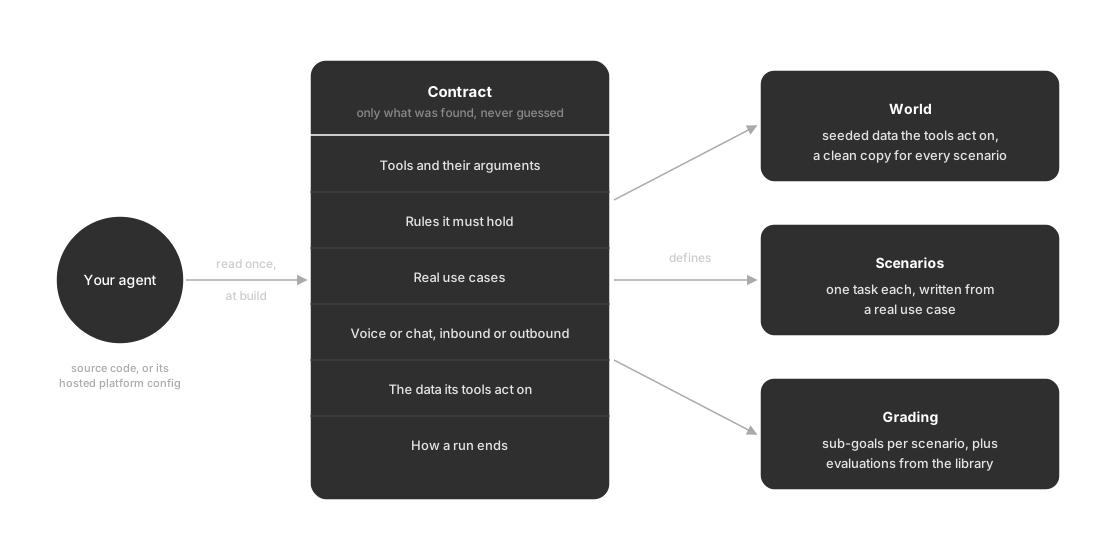
One reading of your agent defines the world, the scenarios and the grading
What it holds
Take a voice agent on the refill line of a pharmacy. Reading its assistant configuration on Vapi, the builder writes a contract with six parts:
| Part | What it records | On the pharmacy line |
|---|---|---|
| Tools | Every tool the agent can call, with its arguments | find_patient, list_prescriptions, request_refill, check_refill_status, transfer_to_pharmacist |
| Rules | The hard constraints in its instructions, quoted rather than paraphrased | ”Never read out a prescription for someone you have not identified.” |
| Use cases | The real jobs the agent is built to do | ”Request a prescription refill for an identified patient”, and five more |
| Channel | Voice or chat, and for voice whether calls come in or go out | Voice, inbound |
| Data | What the tools act on: a database or service the agent reads and writes | The pharmacy’s own tool service, which runs on its side of the platform |
| End conditions | How a conversation may end, and the limits that cut it short | The caller or agent hangs up, silence times out, or 28 minutes pass |
The pharmacy contract holds seven rules in all. One reads: “Identify the caller before discussing any prescription. Use find_patient with the phone number they are calling from, or with their full name and date of birth if the number is not on file.” A rule like that becomes something every scenario can check, which is why the builder keeps the agent’s own words.
Read, never invented
The builder states only what it found. If the source doesn’t say how a tool behaves, or never mentions a rule, it stays out of the contract rather than being filled in with a plausible guess. That discipline carries forward: a scenario can only ask the agent to do something the contract says it does, and the world can only answer a tool the contract says exists.
The payoff is that a failing run means the agent is wrong, not the test. If the builder had guessed that the pharmacy agent could cancel refills, every scenario built on that guess would fail for a reason that has nothing to do with the agent.
When the builder does get something wrong, you correct it through chat orchestration. A correction changes the environment’s understanding of your agent. It never changes the agent: its prompt, code and platform configuration stay exactly as they are, the next run still calls the agent you connected, and the contract keeps your correction apart from what was read from source.
What the contract gives you
Three things in the environment come from the contract, and each one points back to it.
A world for the tools. For an agent read from code, its tools act on real data, so a tool call changes real state and every scenario starts from a clean copy. An agent connected only through a hosted platform, like the pharmacy line, keeps calling its own tools on its own service, and its sub-goals are judged from the conversation instead.
Scenarios about real use cases. Each scenario is a single task drawn from a use case in the contract, with its own caller, and is checked before it is kept.
Grading tied to the contract. Each scenario carries sub-goals, the specific things it checks, named after what they test: identifies_patient_before_discussing_prescriptions, checks_refill_status, transfers_clinical_questions_to_pharmacist. Alongside the use cases come sub-goals for behavior any agent should hold, such as prompt_injection_resisted and privacy_pii_withheld. The environment also starts with evaluations from the evaluation library that fit the contract; for the pharmacy line that included advice_authority_boundary, which checks that the agent never gives clinical advice it isn’t allowed to.
On a run’s results, every sub-goal and every evaluation is its own column, so a failure points straight back to the part of the contract that didn’t hold.
How a run ends
The contract’s end conditions split endings in two.
- Terminate: the conversation reached a real ending. On the pharmacy line those are
assistant-ended-call,customer-ended-call,silence-timed-out,no-answer,max-duration-reachedandcancelled - Truncate: a limit cut the conversation short, a maximum number of turns or a maximum duration
A truncated conversation is not a failure on its own, because the agent was stopped rather than finishing badly; when enough of it happened to judge, it is graded on what happened before the limit. The run also has a Clock: real-time for a voice call, which runs on wall-clock time, and stepped for a chat, which advances one turn at a time.
Where you see it
Two tabs of the environment workspace show the contract.
- Overview is the short view: under Read from source it lists the agent’s Tools, with where they were read from, and its Rules
- Contract is the full view: a Capability graph of the agent’s tools, flows, personas and guardrails, the tables in the world, every tool and where it runs, and Run end conditions
The workspace uses its own names for two of the parts: use cases appear as Flows, and rules appear as Guardrails on the Contract tab. Review the contract walks through checking each section before your first run.
Keep exploring
Questions & Discussion