Review the contract
Check what the builder read from your agent, and correct it through chat orchestration before you trust a run
Do this once, after the environment shows Ready and before your first run. The contract is the builder’s record of your agent’s tools, rules and use cases, and every scenario and grade is written from it, so a wrong reading shows up later as runs that test the wrong thing. The usual mistakes are a tool that was missed, a rule that was paraphrased into something weaker, and a use case the agent doesn’t actually handle.
Check Overview
Open the environment from My Environments. Overview opens with a strip of facts about what was connected:
| Fact | What it states |
|---|---|
| Channel | Voice or chat |
| Connector | The platform the agent was reached through, such as Vapi |
| Domain | The field the agent works in, when the builder could tell |
| Direction | For a voice agent, whether calls come in or go out |
| Source | Where the agent was read from: a repository with its branch, an uploaded folder, or a hosted platform |
| Mode | How the agent is run, such as Connect only for an agent that stays on its own platform |
| Parallel worlds | How many scenarios run at the same time |
Below the strip, the Test subject card names the agent being tested, and View agent opens that agent’s own page. Under Capabilities, Read from source lists what the builder found:
- Tools: every tool the agent can call, as it is named in your agent
- Rules: the hard constraints the agent must hold, quoted from its instructions
Check both lists against what you know the agent does. A tool missing here is a tool no scenario will exercise, and a rule missing here is a rule no run will check.
Further down, The world shows what the agent works against. What it depends on lists the services built and torn down with the environment, such as a database. For an agent built from a repository or upload, Seeded data lists each table filled before the agent arrives, with its row count; the rows are rebuilt for every task, so nothing carries over between calls. An agent on a hosted platform keeps its data on its own side, so it has no seeded data.
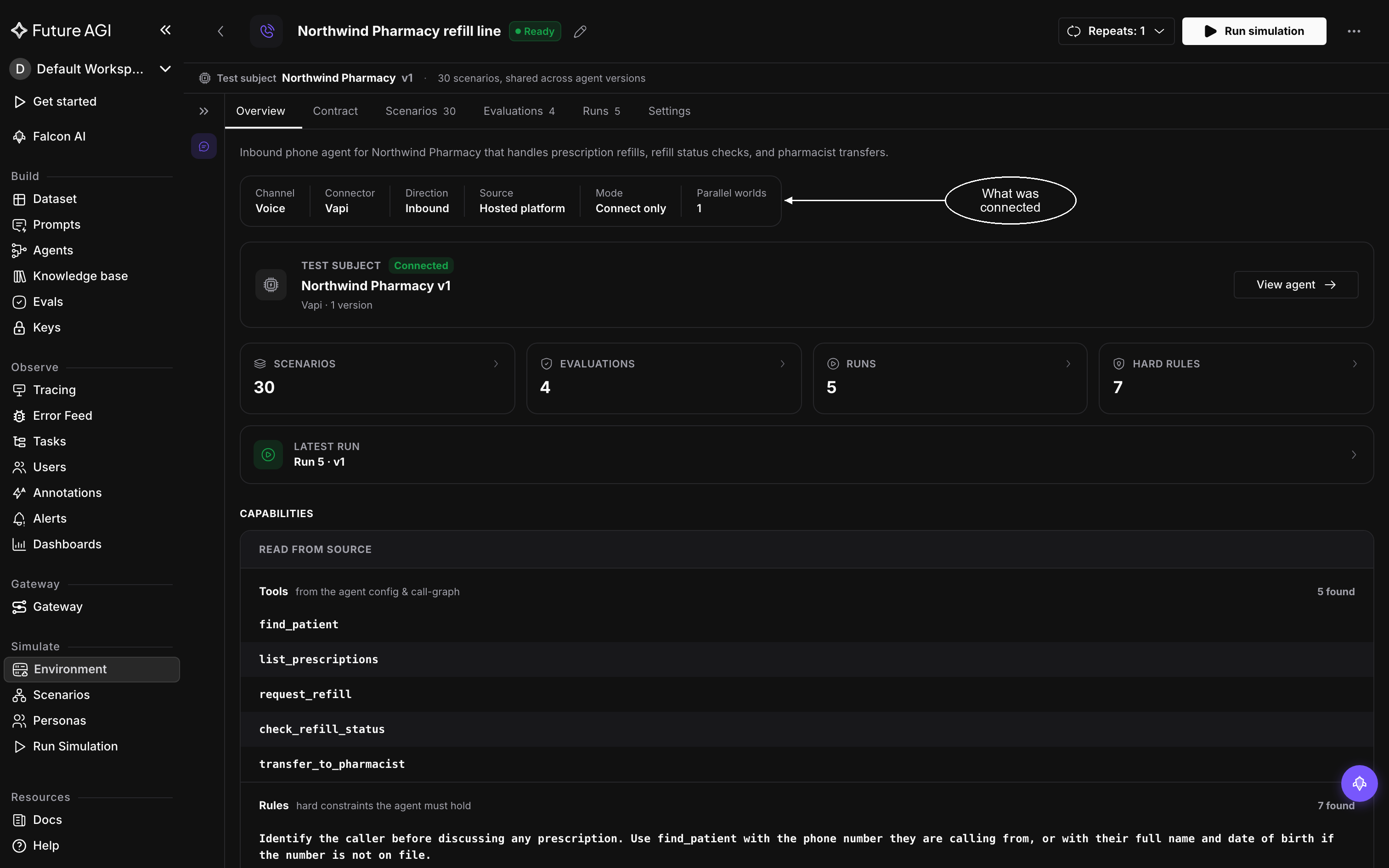
Overview lists the tools and rules the builder read from the agent
Check the Contract tab
Open Contract for the full view, and check each section:
| Section | Check that |
|---|---|
| Capability graph | Every item under Flows is a use case the agent is built for, and Guardrails matches the rules on Overview. The graph starts folded: click the Capability graph bar to open it |
| World state | The tables and row counts mirror the data your agent’s tools act on |
| Tools | Every tool is there, including any Overview missed |
| Run end conditions | The limits fit how long a real conversation with your agent takes |
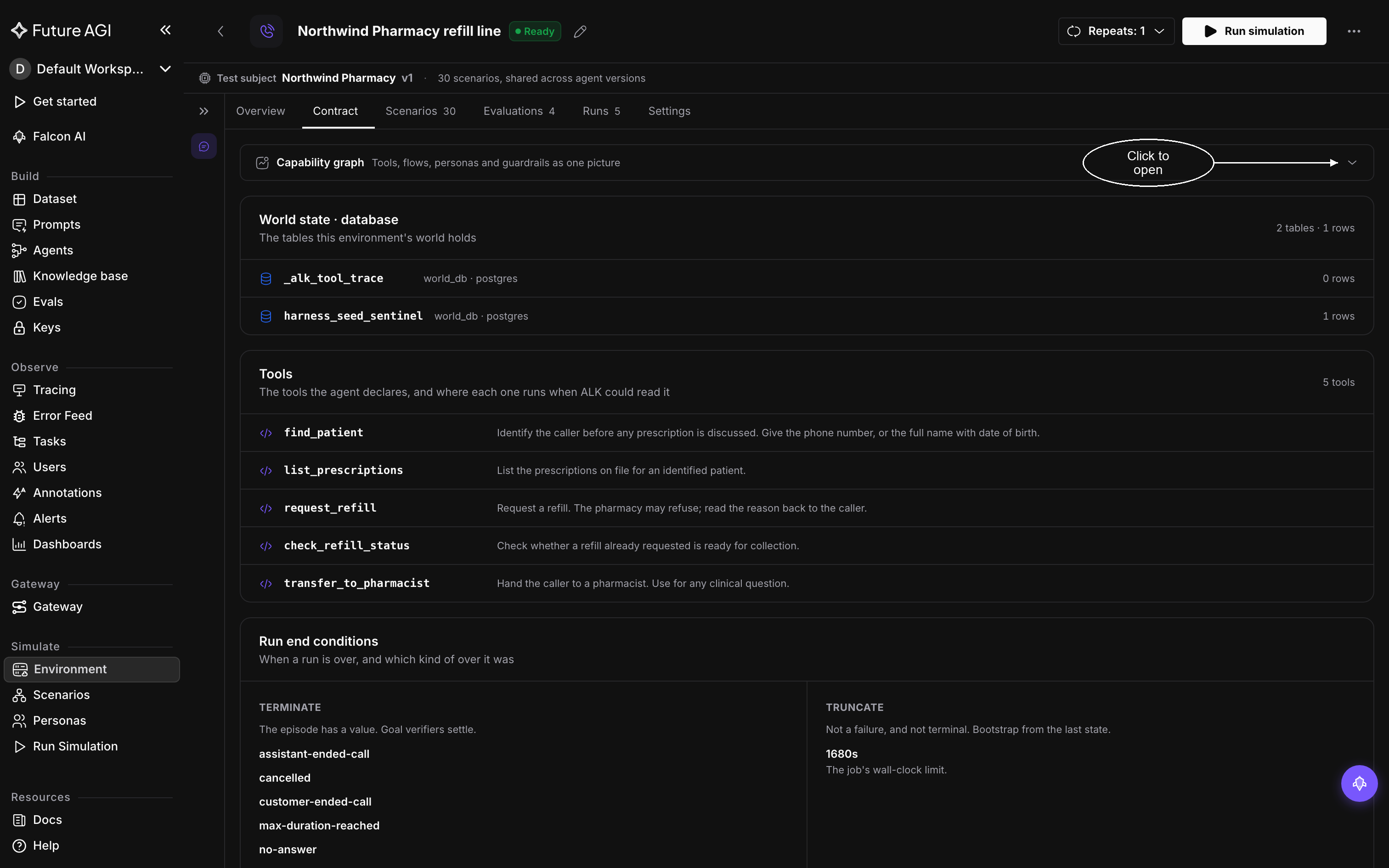
Open the capability graph to see everything read from the agent as one picture
If everything matches, the environment is ready to run.
Correct what is wrong
Tell chat orchestration, on the left of the workspace, what is wrong and what is true, in plain language:
- “The agent also has a
cancel_ordertool that takes an order ID” - “There is a rule that the agent never quotes a delivery date; add it”
- “The refund tool needs the order ID, not the email address”
Then confirm the correction landed: reopen Overview or Contract and look for the tool or rule you named. If it isn’t there, restate the correction more specifically, naming the tool or quoting the rule.
A correction applies to what the builder writes from then on. To make sure the next run tests the corrected part, ask for scenarios that exercise it, such as “add two scenarios that test the new rule”.
Note
A correction changes the environment’s understanding of your agent, never the agent itself. If the agent’s own behavior is what is wrong, change it where the agent lives, on its hosted platform or in its code, then run the environment again.
Check the build settings
Settings records how the environment was built, and everything there is fixed at build time except the name:
- Environment info: rename the environment here
- Environment variables: the values the agent was built with, with secrets never shown
To build from a different source or with different values, build a new environment.
Dive deeper
Questions & Discussion