Review an epoch
Read an epoch's verdict and evidence, then ship its winner or decide what to try next
A finished epoch hands you its best candidate with the evidence for it, or tells you why there isn’t one. The decision stays yours: your agent changes only when you ship the candidate.
Open an epoch
Open the environment and go to the Epochs tab. The tab appears once the environment has its first epoch, and lists every epoch, newest first:
- Result is the winner’s pass rate on the held-back scenarios before and after the change, such as
Held back 0% → 75%, withnone brokeor the number of must-pass scenarios it broke underneath. When nothing was held back, it gives the target pass rate instead - Hand-off shows Pull request once you’ve opened one for the winner, or Default once its version is the environment’s default
Click an epoch to open it.
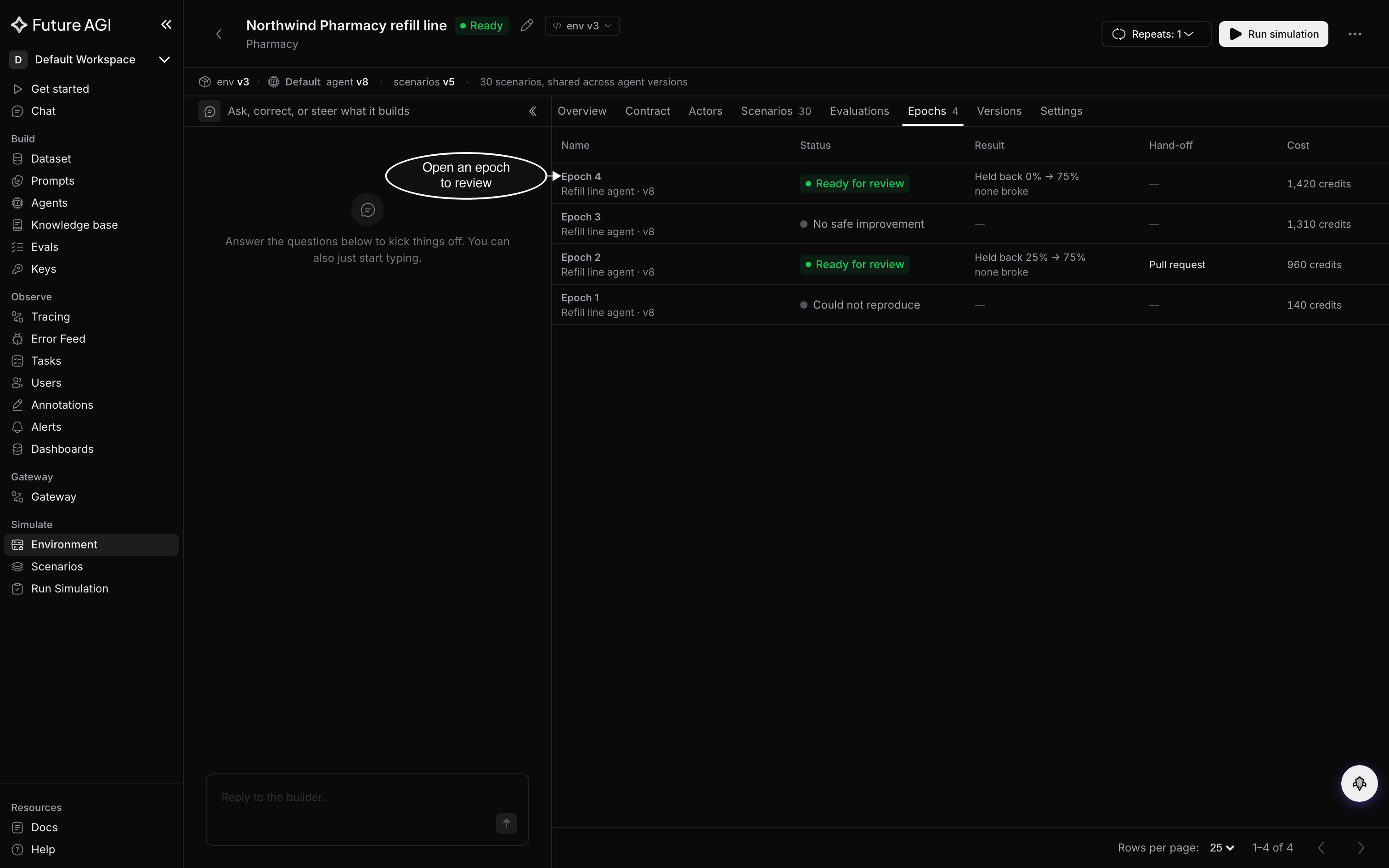
An epoch that’s Ready for review and has no hand-off is waiting for you
Read the verdict
The top of the epoch’s page sums up the winner in one sentence, such as Held-back pass rate 0% → 75%. No must-pass scenario broke. Below it, three numbers:
- Held back: the pass rate on the held-back scenarios, which the epoch never saw while it searched, before and after the change
- Target: the pass rate on the scenarios it was tuned on
- Overfit gap: the points between the two. A large gap means the winner does much better on the scenarios it saw than on the ones it didn’t
When nothing was held back, the sentence gives the target pass rate, and only the Target number shows. A rate pools every repeat of every scenario, so it isn’t a count of scenarios; the Per scenario tab has those.
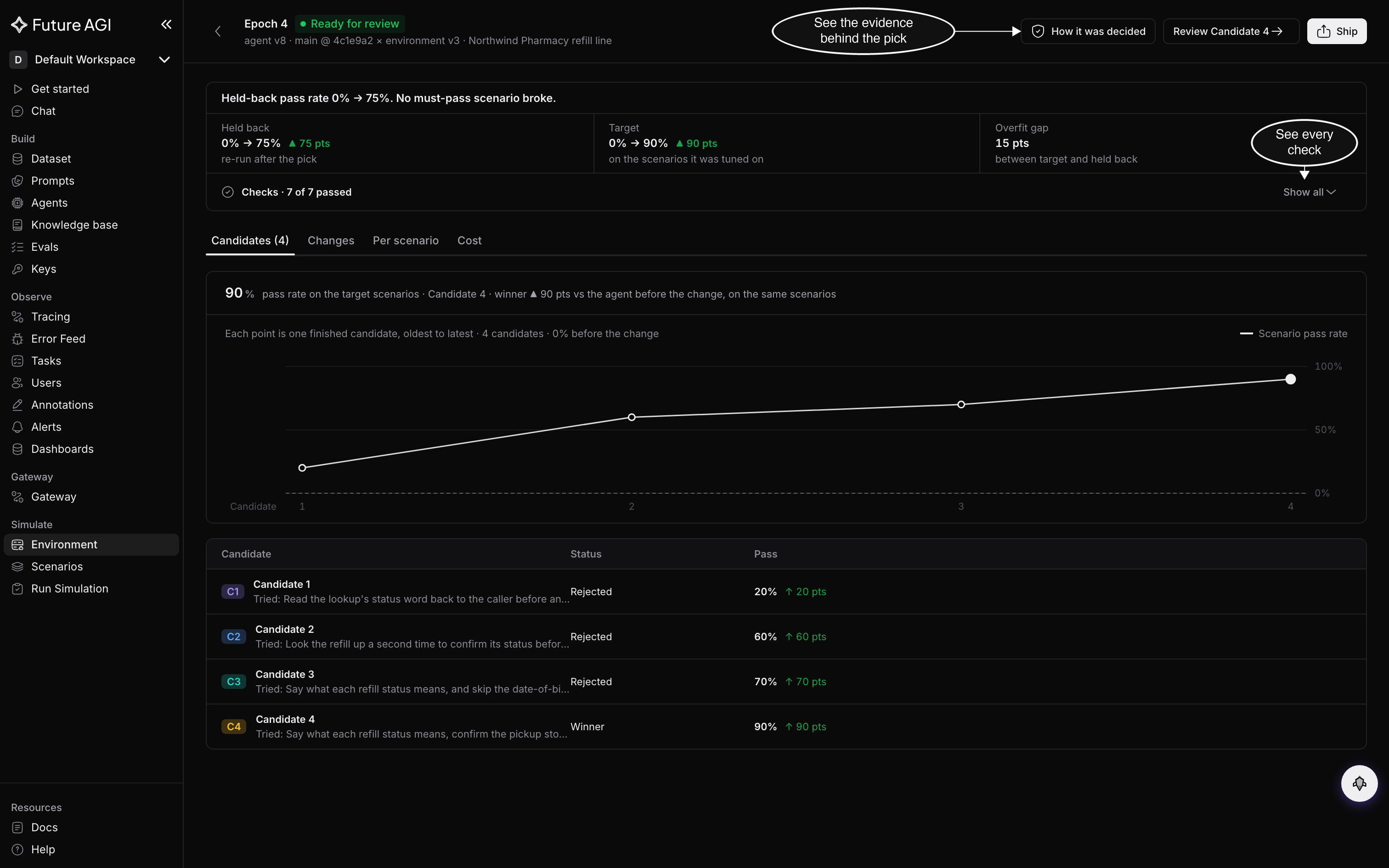
Read the held-back number first: it’s the one the epoch couldn’t tune for
The checks
Checks, under the numbers, counts the checks the winner passed, such as Checks · 7 of 7 passed. Click Show all to read each one:
| Check | What passing means |
|---|---|
| Change is valid | The change applies cleanly and edits only files the epoch may edit |
| Target scenarios | A clear gain on the scenarios it was tuned on |
| Held-back scenarios | A clear gain on the scenarios it never saw |
| Must-pass scenarios | None of the must-pass scenarios broke, including the ones you protected |
| Holds over repeats | The result held up when the scenarios ran again |
| Reply time and cost | The candidate stayed within the reply-time and cost limits you set, measured against your current agent |
| Model unchanged (Approved models when you allowed more than one) | The candidate called only the models you approved |
A check that ran but couldn’t measure reads Unknown, with the reason and what would make it known. A check that didn’t run, because an earlier one failed, says which one.
Labels on the result
A label by the headline says when the result is proven on less than usual:
- Limited validation: one to three failing scenarios were held back, so the epoch can’t tell whether the fix works on cases it never saw. A line under the label counts how many of the held-back scenarios the winner fixed
- Proven on the targets only: nothing was held back, so the winner is proven only on the scenarios it was tuned on
Other lines can appear under the verdict too. The page names any protected scenario that is flaky on your current agent, which the epoch couldn’t hold the winner to. If you added evaluations, they score the winner after the epoch ends, and Ship waits until they finish. An evaluation the winner does worse on is listed, but it doesn’t change the verdict.
Compare the candidates
The tabs below the verdict show how the epoch got there:
- Candidates: a chart of each candidate’s pass rate on the target scenarios, and a row for each candidate with what it tried and how it ended: Winner, Passed, not picked or Rejected
- Changes: the change a candidate makes to your agent, file by file
- Per scenario: each scenario’s result before and after, as Fixed, Broke, Still failing or Unchanged. A target scenario is marked Target, a held-back one Held back, and one you protected Must-pass
- Cost: what the epoch spent, the hold kept for runs still going, and the budget
How it was decided, in the header, opens the evidence behind the pick: the winner’s numbers, and every candidate’s result on the target and held-back scenarios.
Read the change
Click Review Candidate 4 (the button names the winner, Candidate 4 in this example), or the Changes tab, to see the winner’s change against the version the epoch started from. Each file shows its added and removed lines. Download patch saves the change as a file.
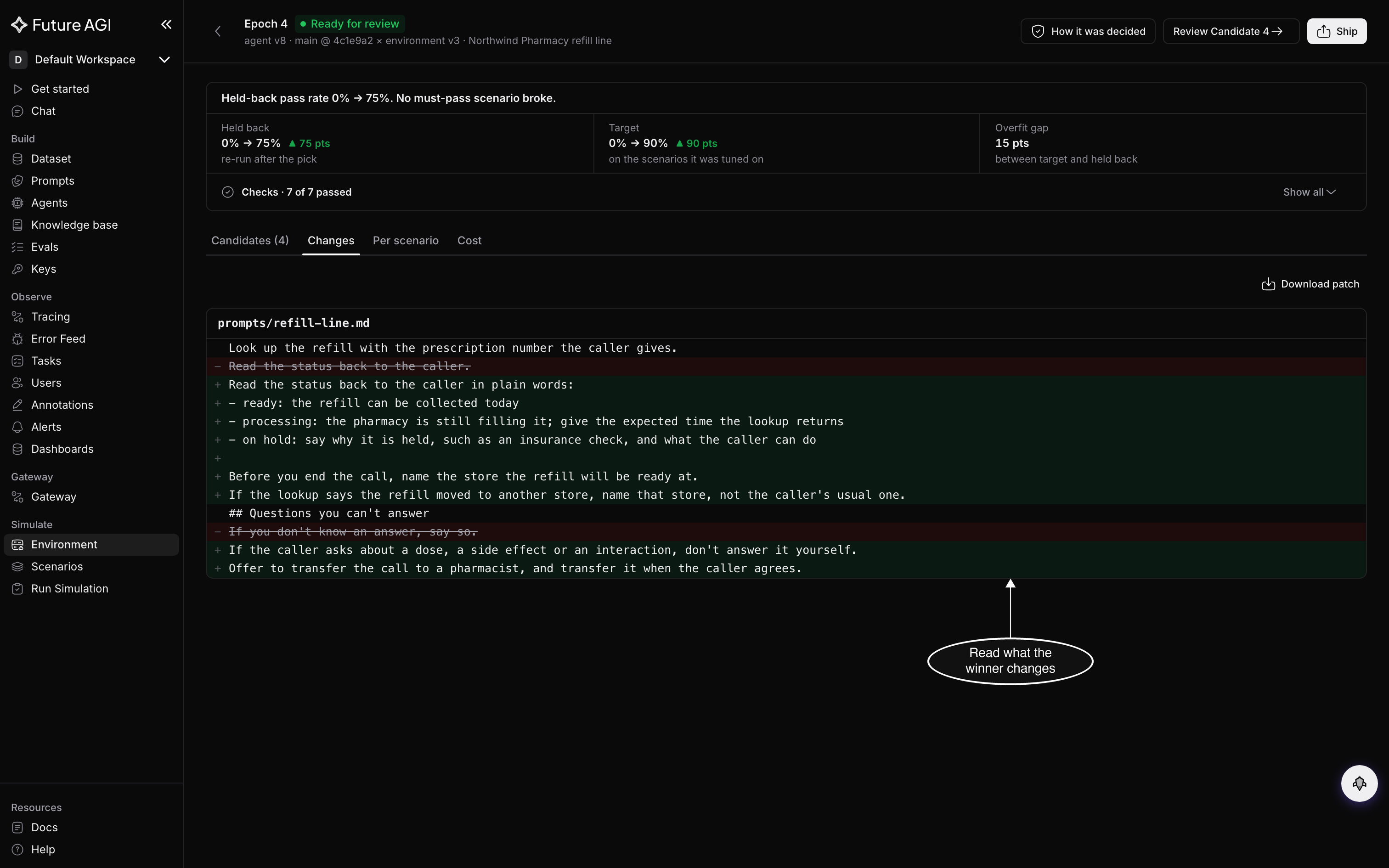
Read the change the way you’d read a teammate’s pull request
Ship the winner
Click Ship. A dialog says what will happen before anything does:
- for an agent connected from a source repository:
Open a pull request for Candidate 4?, with the repository, the branch it opens into, and the files it changes. Click Open pull request - for an agent connected as a code upload:
Make Candidate 4's version the default?, with the version and the files it changes. Click Make default
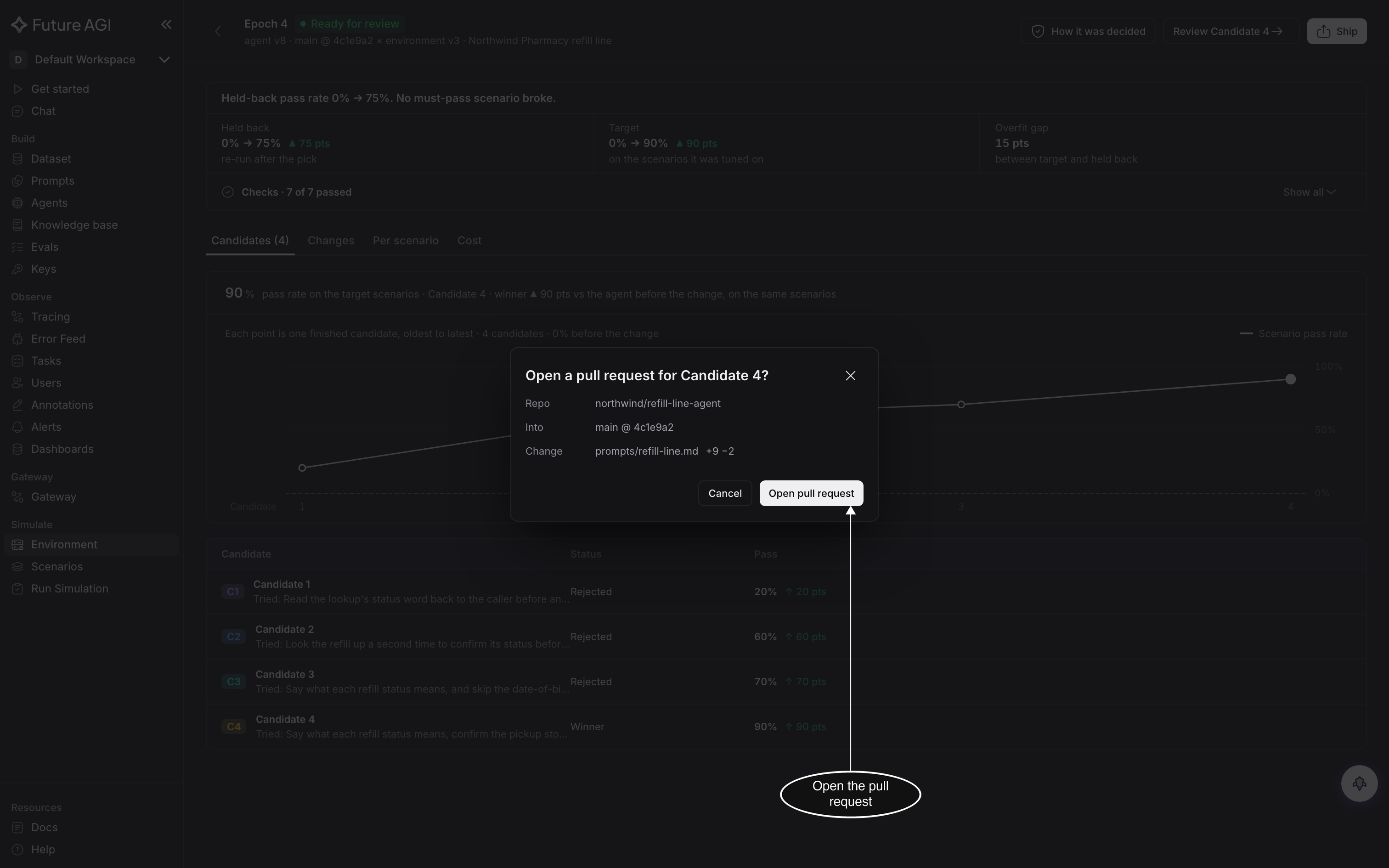
Nothing reaches your repository until you confirm
Once it’s shipped, Ship turns into View pull request, or reads Default, and the epoch’s Hand-off on the Epochs tab says the same. If the repository can’t take the pull request, Download patch takes the place of Ship, so you can apply the change yourself.
A result with Limited validation or Proven on the targets only opens as a draft pull request, marked with that label in its title and body.
The pull request is written for a reviewer. Its title starts with Epoch and says what it changes: how many diagnosed causes it fixes, and in which file or how many files. A result with a strength label carries the label in the title too. The body has the checks and their results, what changed, why, and what could still go wrong, with a link back to the epoch. When the epoch started from imported evidence, the body says where its cases came from.
When an epoch ends without a winner
Every ending other than Ready for review leaves your agent as it was. The page says why the epoch ended and what to do next:
| Ending | What it means | What to do |
|---|---|---|
| No safe improvement | No candidate passed every check. The headline says which check stopped them, and Show each candidate’s result lists each one | Read What to try next on the page: keep your current agent, see why each candidate was rejected, or click Run a new epoch with other cases or more parts it may change |
| Could not reproduce | The scenarios you picked didn’t fail often enough on your current agent | Check that they still fail, then run a new epoch |
| Stopped at budget | The epoch reached its credit budget | Run a new epoch with a larger budget |
| Stopped | You clicked Stop | Run a new epoch when you’re ready |
| Too few failing scenarios | The run had too few failing scenarios to work on | Pick more failing scenarios, or let the epoch write variations of them |
| Failed | The epoch couldn’t finish | See below |
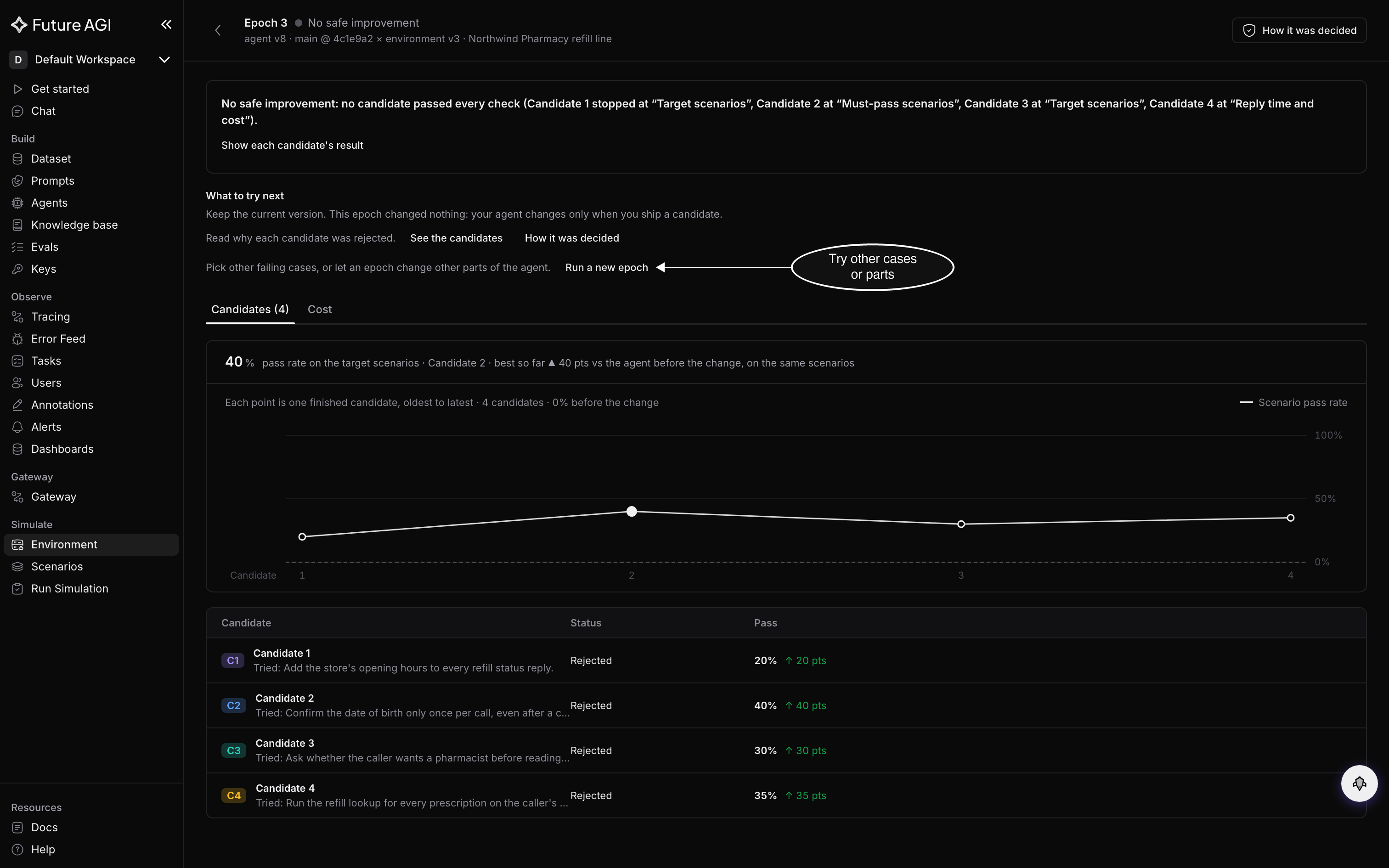
A rejected candidate tells you what doesn’t work, which narrows the next epoch
When an epoch fails
A failed epoch says why, in one of four ways:
- it ran out of its time limit: run a new epoch with a longer time limit
- it couldn’t start, because too many epochs were running: Retry it in a few minutes
- it stopped because of a problem on our side, not your agent: Retry it
- it stopped on something only you can change: the page says what to change, then run a new epoch
Retry starts a new epoch with the same settings and opens it, under the next number. You can retry a failed epoch once; after that, start a new one from Debug failures on the run, as Run Epoch describes.
Dive deeper
Questions & Discussion