Overview

AI agent simulations are controlled environments where AI agents can be tested, evaluated, and refined through various scenarios and interactions


What it is

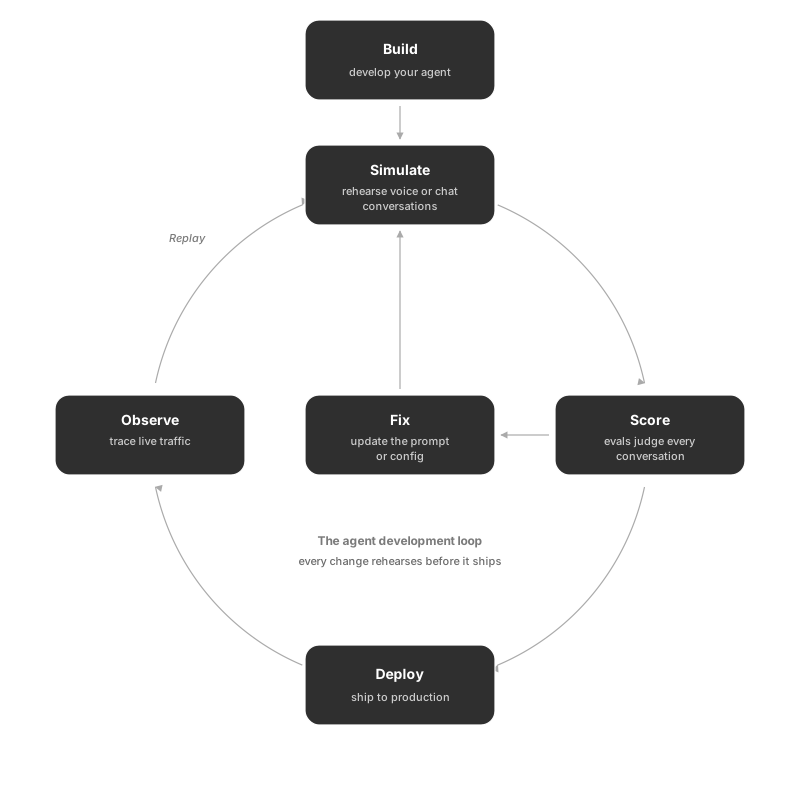
Simulate is a testing and evaluation layer for AI agents and prompts. You define agent definitions (voice or chat) and scenarios (graph-based flows, scripts, or dataset-backed cases). You then create run tests that combine an agent (or prompt template) with selected scenarios and eval configs. When you execute a run test, the system runs test executions: it simulates conversations (voice calls or chat), stores call executions and transcripts, runs evals on the results, and surfaces KPIs, eval summaries, and session comparison so you can see how well the agent performed and where it failed or diverged. Personas and simulator agents help shape how the “customer” side behaves in scenarios. You can also run prompt simulations (e.g. Prompt Workbench) and use agent prompt optimiser to tune prompts based on these runs.

Purpose

Simulate exists to let you run your AI agents and prompt templates through controlled, repeatable tests and evaluate how they perform. The main goals are:

  • Test agents before or after changes – Run the same scenarios against different agent versions or prompt configs so you can compare behaviour and catch regressions.
  • Validate behaviour in realistic flows – Use scenarios (conversation graphs, scripts, or dataset-driven flows) to simulate user intents and paths instead of one-off prompts.
  • Evaluate quality at scale – Execute many calls or chat sessions (voice or chat), collect transcripts and metrics, then run evals and view KPIs, summaries, and session comparisons.
  • Support both voice and chat – Work with voice agents (e.g. via providers like Vapi) and chat simulations so you can test phone-style and chat-style experiences in one place.
  • Improve agents over time – Use eval results, session comparison, and (where available) agent prompt optimiser runs to refine prompts and agent behaviour.

In short: Simulate is for testing, validating, and improving voice and chat AI agents (and related prompts) using scenarios and structured evaluation.

Know the parts

Before diving in, here is what each term in the simulation system means and how they fit together.

Agent Definition — your agent under test

An agent definition is the configuration record for the AI agent you want to evaluate. It stores the agent’s name, type (voice or chat), provider (e.g. Vapi, Retell), assistant ID, API key, and optional settings like contact number, language, and knowledge base. Every simulation run references a specific agent definition so the platform knows which agent to call and how to connect to it.

Agent definitions support versions: each time you update the config, a new version is saved with a snapshot of the settings. You can run simulations against any version, compare them side by side, or roll back.

Learn more about Agent Definition

Scenario — the test case

A scenario defines the test case your agent will be run against. It describes the situation, the customer context, and the conversation flow. There are four scenario types:

  • Workflow builder — A visual graph where you design the conversation flow node by node, branching on what the customer might say.
  • Dataset — A CSV or spreadsheet where each row is one customer profile. Each row drives one simulated conversation.
  • Script — A pre-written back-and-forth script the simulator follows line by line.
  • Call SOP — Objective-based: you define goals and the simulator tries to achieve them naturally.

Learn more about Scenarios

Persona — who the customer is

A persona is a profile that defines the simulated customer’s identity: demographics, personality, communication style, and behavioral traits. The simulator uses the persona to make conversations feel realistic and varied rather than robotic.

Future AGI provides 18 pre-built personas you can use immediately, or you can create your own. Personas are typed as either voice (with settings like accent and conversation speed) or chat (with settings like tone, verbosity, and emoji usage).

Learn more about Personas

Run Test — the execution

A run test ties everything together: you select an agent definition (and version), a scenario, a test agent, and optional evaluation configs. When you run it, the platform launches the conversations — one per scenario row or graph path — records transcripts and metrics (latency, CSAT, talk ratio), and runs your evals on every call.

After a run you can view per-call results, aggregate KPIs, and eval summaries, compare runs side by side, and use Fix My Agent to get AI-powered improvement suggestions.

Evaluations — how results are scored

Evaluations (evals) are scoring configs you attach to a run test. Each eval checks a specific quality dimension — for example: did the agent stay on topic, avoid hallucinations, use tools correctly, or meet a CSAT target. Evals run automatically on every conversation in the run and produce pass/fail or scored results per call.

You can use FutureAGI’s built-in evals or create custom ones tailored to your domain.

Getting started with simulation

Set up

Follow this order: agent definition → scenario → persona → run test.

Was this page helpful?

Questions & Discussion