Scenarios
The test case a simulation runs: a situation, a flow, and the rows that fill it
What a scenario is
A scenario is one test case for your agent definition: the situation a conversation starts from and the flow it should follow. A refund request, a booking change, a billing dispute, each is a scenario the simulator can run.
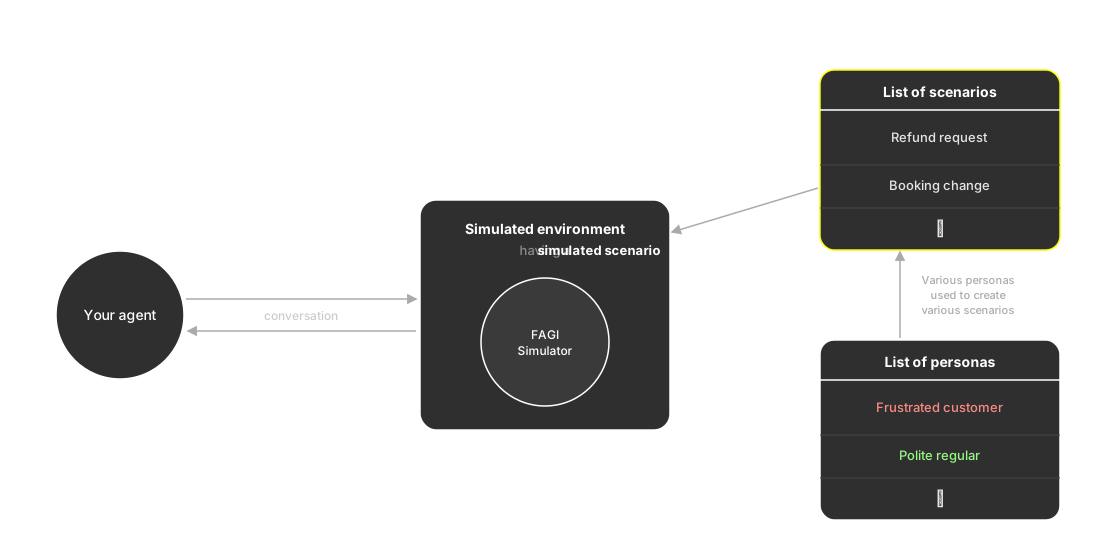
A run picks one scenario from your library and plays it out against your agent. The rest of this page is what a single scenario holds.
The flow
The flow is the path the conversation is meant to take, drawn as a graph. Each step is a node, and the edges between them are the routes the conversation can follow:
| Node | What it does |
|---|---|
| Conversation | A step where the agent and customer talk, the ordinary building block of a flow |
| End call / End chat | Terminates the conversation on that branch |
| Transfer call / Transfer chat | Hands off, typically to a human, and can merge paths |
You never draw the flow by hand unless you want to. It comes out of whichever source you built the scenario from, a workflow graph, a dataset, a script, or an SOP, and Create scenarios covers all four.
Global nodes
A global node is a Conversation node the agent can reach at any point, not only when the flow arrives at it. It fits anything that can interrupt at any moment: an off-topic question, a sudden pricing query, a “talk to a human” request. One global node covers that case from anywhere in the flow, so you don’t draw an edge to it from every step. Only Conversation nodes can be global.
One scenario, many conversations
A scenario is not a single fixed script. It carries a table of rows, and each row plays out as its own conversation through the same flow. That is how one refund request scenario becomes a hundred concrete tests instead of one.
A row pairs a persona with the details of that particular case:
| Persona | Amount | Objection |
|---|---|---|
| Frustrated caller | $240 | Wants an exception to the 30-day window |
| Polite regular | $35 | Confused about the refund timeline |
The personas come from the ones you attach when you build the scenario, which is why the persona never has to be chosen again at run time: it is already in the row.
The simulator prompt
Every scenario carries a simulator prompt: the instructions the simulator follows to play the customer. It draws on the current row, so the same prompt produces a different customer for every row while the situation the scenario describes stays fixed.
Scenarios are reusable
A run pins the scenarios it used, so the set is recorded with the run rather than re-read later. Point the same set at a new agent version and the comparison is honest: the test didn’t move, the agent did. Kept together, they become a regression suite, and any conversation that used to pass and now fails stands out.
Keep exploring
Questions & Discussion