Understanding Simulation
What goes into a simulation, and how the test-and-fix loop runs
What a simulation is
A simulation runs your agent against simulated users so you catch its failures in a test instead of in production. The simulated user plays out a situation, your agent responds, and the whole conversation is scored by evals. It works the same way for a chat agent and for a voice agent on the phone. Run it before you ship, and again after every change, and you have a repeatable read on whether the agent is getting better or worse.
How a simulation works
Three things go into a simulation:
- the agent definition, which is who gets tested and how Simulation reaches it: a phone number for a voice agent, your own code answering through the SDK for a chat agent
- the scenario, the situation the conversation has to handle
- the persona, the character the simulated customer plays, attached to the scenario when you build it
Future AGI’s own agent, the simulator, plays the customer described by the persona and works through the scenario, turn by turn, against your agent. You don’t configure it directly; you configure the three pieces it uses. When you set up the run you also pick the evals that score each conversation.
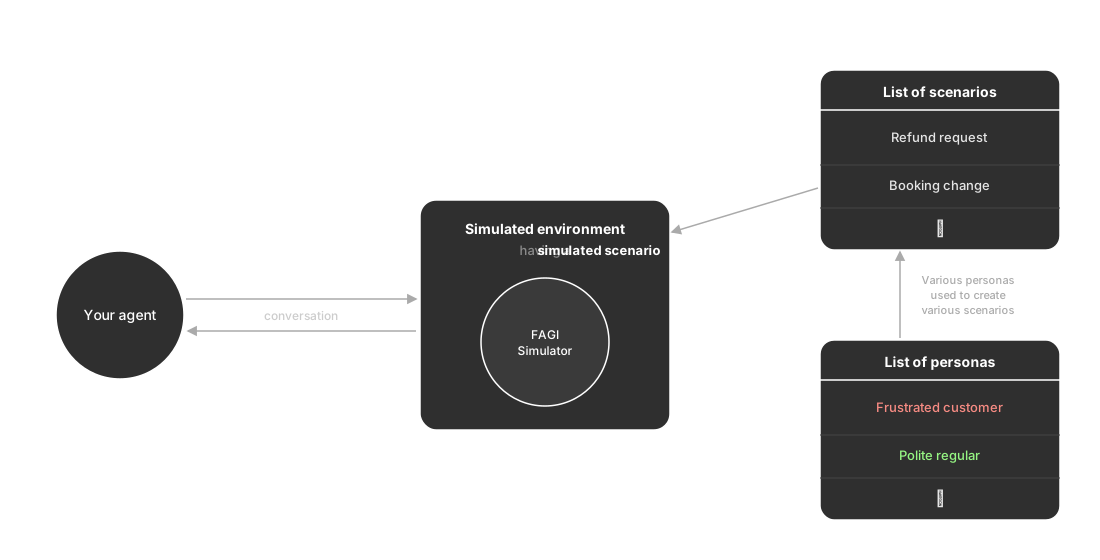
You keep a library of personas and use them to build a range of scenarios. Each run loads one scenario into the simulated environment, where the simulator plays it out against your agent, and hands back a transcript, the metrics, and a score per eval. Build that library once and reuse it, so when a score moves it’s the agent that changed, not the test. Each piece has its own page; everything else is how you run them and read what comes back.
The test-and-fix loop
Say you’re putting a chat support agent in front of customers. In production it meets situations it never saw in development, and any one of them can go wrong in front of a customer. The loop looks like this:
- You write a refund request scenario and pick a frustrated caller persona
- You run it, and the resolution eval fails: the agent quotes the wrong refund window
- You shorten the agent’s prompt and add the missing policy
- You re-run the same scenario with the same persona, and it passes
Same test, changed agent, so once the score flips it’s proof the fix worked, not a hunch. To run this loop on your own agent, start with Run a chat simulation or Run a voice simulation.
Where Simulation fits
Two neighbouring products meet Simulation:
- Observe watches real traffic; Simulation rehearses it before you ship
- Evaluation supplies the scoring: the same templates run in both, so a passing score means the same thing in a test and in production
And two capabilities inside Simulation connect them:
- Replay turns a real conversation from Observe into a scenario you can rerun
- Optimization picks up when a run exposes a weakness and improves the agent automatically
Keep exploring
Questions & Discussion