Personas
Give your test customer a personality, a voice, and a way of talking
What a persona is
Two agents are in play during a run, and they sit on opposite sides of the conversation. Your agent definition is the one under test. A persona is the customer facing it: their demographics, personality, and communication style. The simulator plays the persona so a run feels like a real interaction instead of a fixed script. “The Frustrated Subscriber”, for example, is a voice persona who speaks fast, interrupts often, and pushes back on every answer.
Personas are the pool your scenarios draw from. You pick the personas a scenario should cover when you create it, and each of the scenario’s rows, the individual test cases it holds, carries those traits into the run. A persona reaches a run through its scenario, so there is no persona to pick at launch.
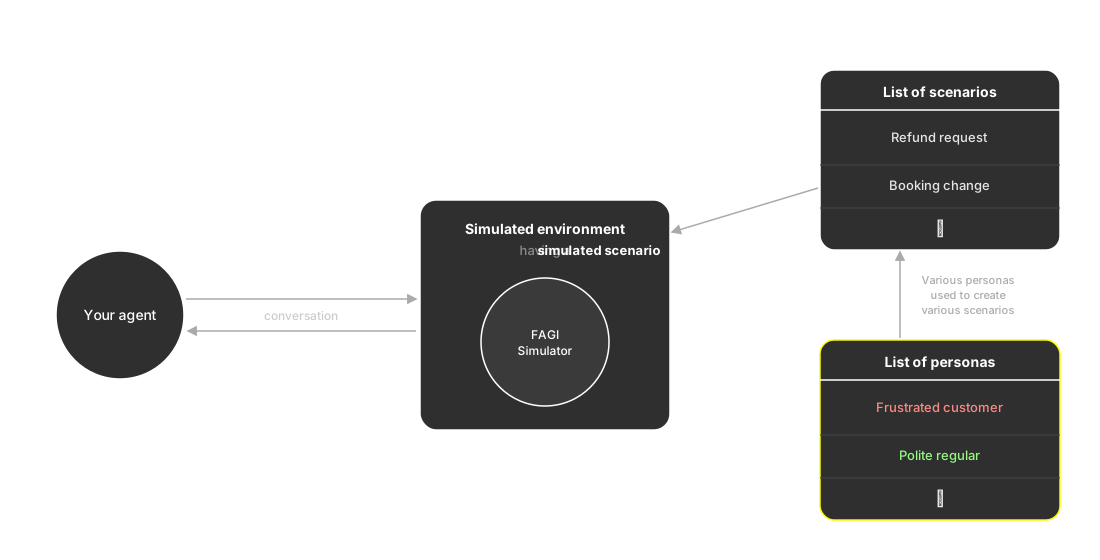
A list of personas feeds the scenarios your agent is put through
What you can customize
Every persona is typed voice or chat, fixed when you create it, and the lists you pick from are filtered to match the simulation you’re building, so a voice run only ever offers voice personas. From there a persona is customizable across a wide surface, from who the customer is to exactly how they sound. Set as much or as little as you need, and every field falls back to a sensible default:
- Basic info: name, description, and demographics, meaning gender, age range, location, and profession
- Behaviour: personality traits and communication style
- Voice traits, on a voice persona: accent, the languages spoken and whether the persona is multilingual, conversation speed, background sound, and turn-taking, split into interrupt sensitivity and finished-speaking sensitivity
- Chat traits, on a chat persona: tone, verbosity, punctuation style, emoji usage, slang, typo frequency, and regional mix
- Custom properties: attributes you name yourself, like
objection_patternorinsurance_type, which travel with the persona into the scenario rows generated from it - Instructions: free-form guidance the simulator always follows, like “ask for a supervisor after the first objection”
The Built-in personas reference lists all 18 alongside every field and the values it accepts.
Built-in and custom personas
Future AGI ships 18 built-in personas you can use as-is, from “The Confused First-Time User” to “The No-Nonsense Executive” to “The Enterprise IT Admin”. When none of them fit, you create a custom persona in your workspace, shape it across the layers above, and reuse it across every run.
The simulator agent
The simulator agent is the actor on the customer side: the model that generates the customer’s turns, the voice it speaks in, and the pacing it keeps. Future AGI runs it, and it isn’t yours to configure.
The persona is how you shape it. Everything you’d otherwise want to tune about the actor, how fast it talks, how readily it interrupts, how it comes across, you set on the persona instead, and the simulator agent plays what it finds there. That is what personas are for.
Keep exploring
Questions & Discussion