Environments Overview
Build the whole test around your agent, then grade each call on what it did
Writing a scenario is the easy part of testing an agent. The hard part is the world it acts in: the records it reads, the tools it calls, and what those tools say back when it gets something wrong.
What is an environment?
An environment is a complete test built around one of your agents, from the world it acts in to the scenarios it has to get through. You connect the agent as a code repository, uploaded code, or an agent running on a platform like Vapi or Retell AI. The builder, an agent that reads yours, then writes its contract, sets up a world with a test version of its data and tools, and generates the scenarios to run against it. You run those scenarios as voice or chat calls, and each call is graded on what the agent did, not just what it said. When a call fails, you fix the agent and run again.
You drive all of this from Environment under Simulate in the dashboard. Beside each environment, a chat with the builder lets you ask about what it made and steer it, as Chat orchestration describes. Understanding Environments explains each piece.
Catch the call that sounded right
An agent can tell a caller their ride is cancelled while the booking stays active, and the transcript reads as a pass. An environment checks the world after every call, so the booking that never cancelled shows up in a test run, not on a customer’s bill. An agent hosted on a platform keeps its data on that platform, so its environment has no world and its calls are judged on the conversation.
Every run is inspectable. Each call comes back with:
- the full transcript, with every tool call the agent made, and the recording for voice
- a score for each of the scenario’s sub-goals and each evaluation you added, so a failure is something you open and read
- call metrics like turns and latency
- Debug failures, which reads the whole run and explains its failures goal by goal
The testing loop
You build the environment from your agent, then run the same scenarios against it every time you change it.
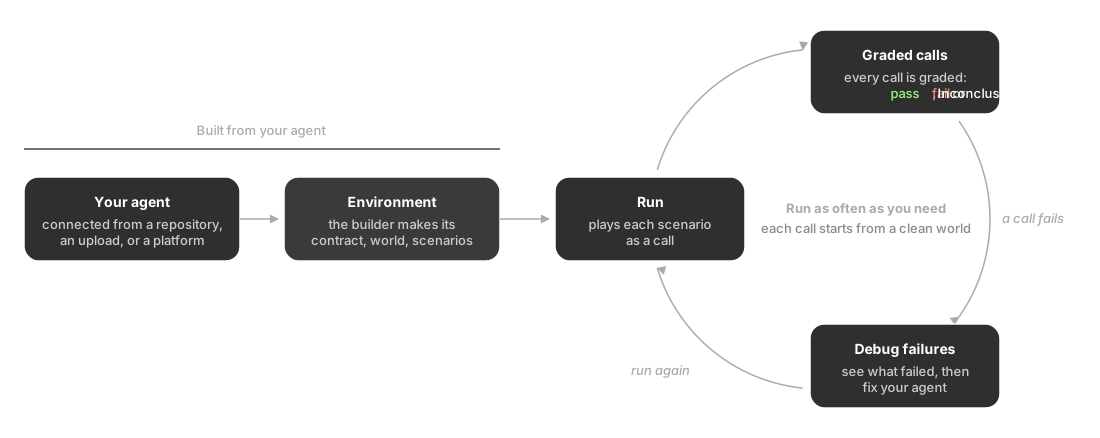
Each call starts from the same clean world, so a failing call points to something in your agent to change, and running the same scenarios again shows whether the fix worked.
How it connects
- Evaluation provides the evaluations that grade every call alongside each scenario’s own sub-goals
Start here
Questions & Discussion