Scenarios & Trials
Proved test cases for your agent, played as many times as you need
What a scenario is
A scenario is one test case in an environment: a situation a simulated caller brings to your agent, the person they are, the starting state of the world, and the sub-goals that decide whether your agent handled it. For a ride-booking agent, a driver running late, a caller who tries to skip the code check, and a card that expires mid-booking are each a scenario. Each time a scenario plays against your agent is one call, a phone call for a voice agent or a conversation for a chat agent. A call is also called a trial.
The builder writes the scenarios when it builds the environment, one or more for each use case in the contract and the ways that use case can go. Understanding Environments explains the world they play in and the builder that writes them.
What a scenario holds
Each scenario carries five things:
- the situation, what the caller wants and how they go about it, written as instructions for the simulated caller (“your driver is twenty minutes late and you want to cancel”)
- the persona, the caller playing it: name, gender, age group, personality, communication style, language, and accent, plus the few facts they know, like their booking ID, which they share only when asked
- the starting state, the change made to the world before the call, like adding a ride that’s already running late
- the sub-goals, the checks that decide pass or fail
- the ideal outcome, one line saying what a pass looks like for the whole scenario
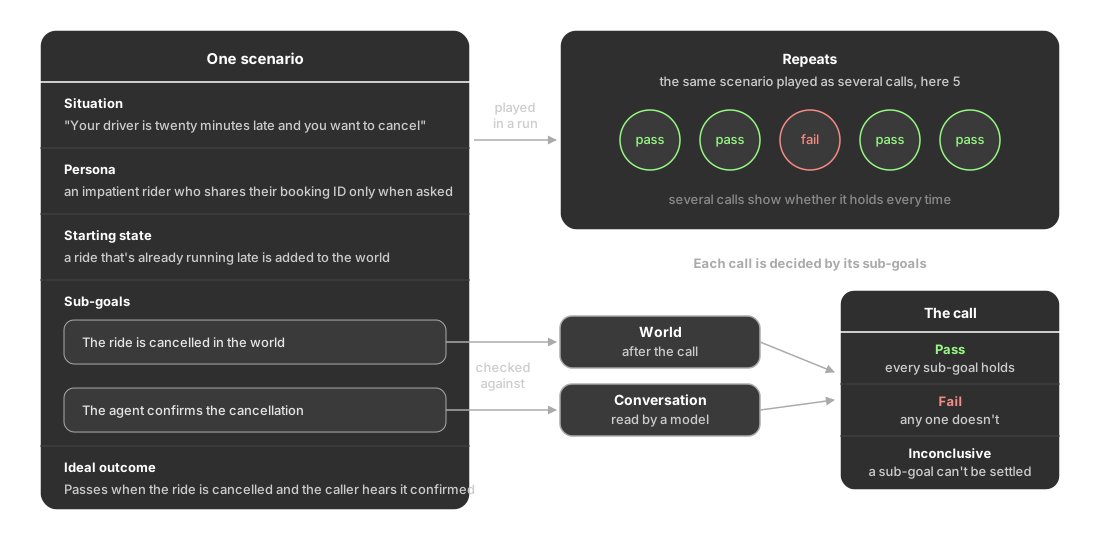
Scenarios share the environment but never each other’s data: each one starts from the same clean world and makes its own change on top.
Repeats and trials
A run plays the scenarios you pick against your agent. Each call is one trial, and Repeats sets how many trials each scenario gets, from 1 to 20. Run a simulation covers starting one.
One repeat tells you whether your agent can handle a case. Several tell you whether it handles it every time.
Why one pass isn’t enough
Playing the same scenario again doesn’t replay the same conversation. The situation, the persona, and the starting state stay fixed, but the conversation built on them changes from one call to the next:
- the simulated caller isn’t reading a script: it phrases things differently each time, gives details in a different order, and sometimes cuts in
- your agent, if it runs on a language model, can answer the same question in a different way or take its steps in a different order
- on a voice call, a misheard word or a pause in the wrong place changes what happens next
Most of the time those differences don’t matter. Sometimes one of them sends the call down a path your agent doesn’t handle, and a single pass would never show you that.
Say you’re checking how a ride-booking agent handles a late driver:
- You pick the scenario where the driver is twenty minutes late and the caller wants to cancel, and run it with 5 repeats
- Four calls pass: in each, the agent cancels the booking first and then tells the caller it’s done
- One call fails: this time the caller says “just cancel it, I’m in a hurry” and starts to hang up, the agent replies “it’s cancelled” before actually cancelling, and the booking is still active
- You fix the agent so it always cancels the booking before confirming, run the same scenario again with 5 repeats, and all five pass
A single repeat would most likely have shown you a pass and hidden the problem. Same scenario, same starting state, changed agent, so the second run shows the fix holds every time, not just once.
How a scenario earns its place
A scenario is only useful if its result means something, so the builder proves every scenario before it reaches you and keeps only the ones that hold. There’s nothing for you to set up or run here. Every scenario on the Scenarios tab has already been proved; one that couldn’t be was dropped during the build and never shows up.
That’s also why the Edit scenario panel shows the sub-goals as proved rather than editable. To change what a scenario tests, ask the builder in the chat beside the environment: it rewrites the scenario and proves it the same way before keeping it. Chat orchestration covers how.
How a call is decided
Most sub-goals read what the call left behind: whether the booking was cancelled, whether the right tool was called. Where nothing in the world can settle it, like whether the agent explained a refusal, a model reads the conversation against the written criteria. For an agent hosted on a platform, every sub-goal is read from the conversation.
A call passes when every sub-goal holds and fails when any one doesn’t. If a sub-goal that the model reads can’t be settled either way, the call is marked Inconclusive rather than counted as a pass or a fail. Any evaluations you add to the environment grade every call on top of its sub-goals.
How scenarios cover your agent
The builder spreads the scenarios over eight axes, kinds of variation, so the suite tests more than the easy path. You don’t set these yourself; they’re what Coverage measures when you check which situations a run will tell you about.
| Axis | What it varies |
|---|---|
| Task | What the caller came for, one value for each use case in your agent’s contract |
| Who is calling (Who is asking for a chat agent) | The kind of person or account being served |
| Their situation | How the person behaves, like hurried, confused or changing their mind, or a state of their account that changes the right answer |
| Line and speech (How they write) | The conditions the conversation runs under, like background noise on a call |
| How the call goes (How the chat goes) | The shape of the exchange |
| Attack | What deliberately makes it hard, like social engineering or a fraud attempt, or a situation that needs care, like an emergency or a vulnerable caller |
| Attack method | Where that pressure comes from in the conversation |
| Attack intensity | Whether it is absent, subtle or overt |
Each scenario takes one value on each of the eight, so the eight together make far more combinations than any suite has scenarios. The builder spreads the scenarios across them instead of trying every one.
Coverage in the Scenarios tab’s toolbar shows which of these your scenarios reach, including five situations worth testing for any agent, like emergencies and attempts to override its instructions. To widen the suite further, ask the builder in the chat beside the environment for more scenarios of the kind you want.
Keep exploring
Questions & Discussion