

Overview
Agent optimization in Future AGI is a data-driven approach to improving your AI agent’s behavior based on actual simulation results. Instead of manually tweaking prompts through trial and error, the platform:- Analyzes simulation performance metrics and call data
- Identifies specific issues and failure patterns
- Suggests targeted improvements with priority levels
- Optimizes agent prompts using advanced algorithms
- Validates improvements through iterative refinement
Accessing Optimization Suggestions
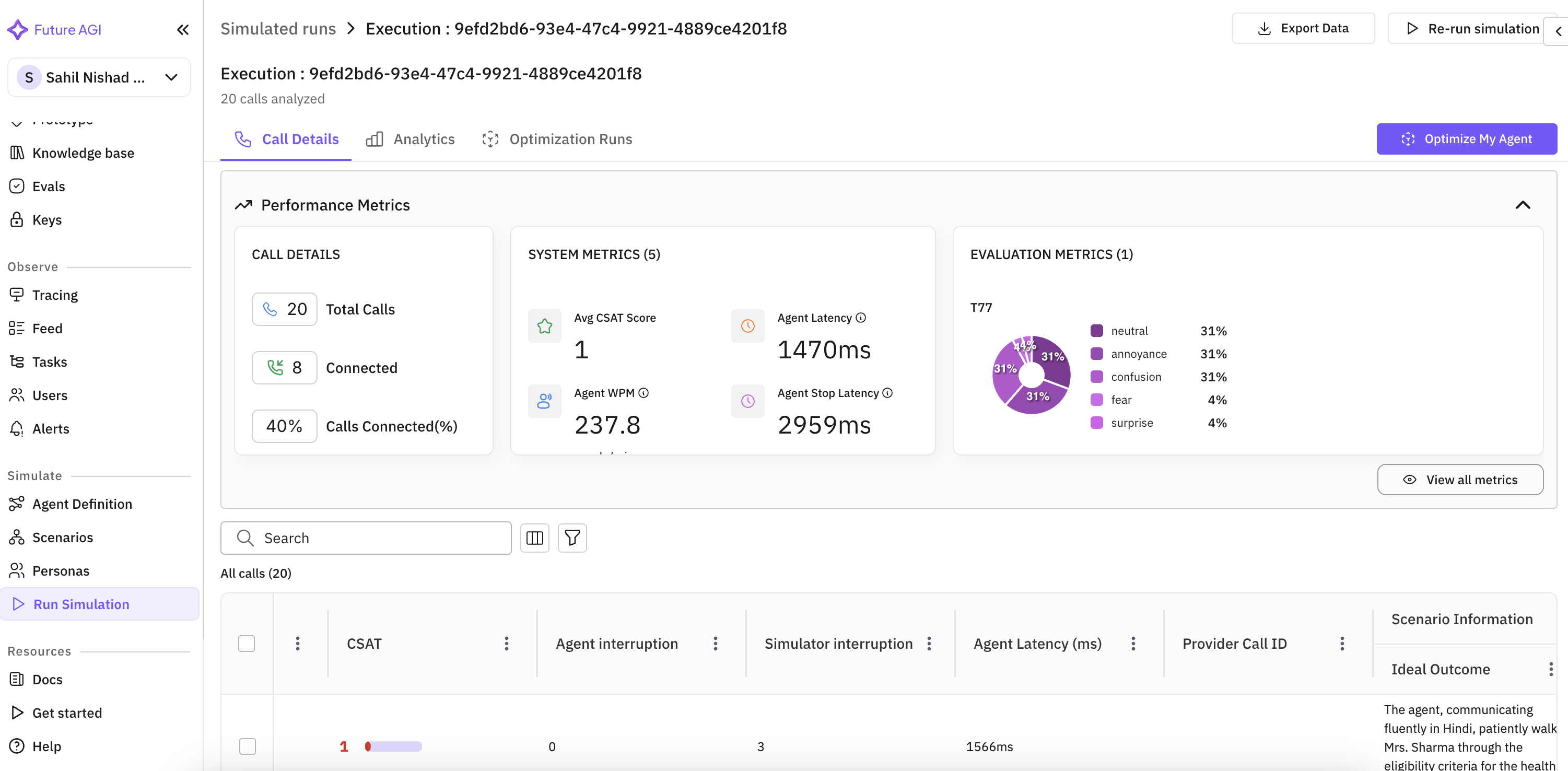
After running a simulation, you can access optimization insights directly from the execution results page.Step 1: Navigate to Simulation Results
Once your simulation run completes, you’ll see the execution details page with performance metrics including:- Call Details: Total calls, connected calls, connection rate
- System Metrics: CSAT scores, agent latency, WPM (Words Per Minute)
- Evaluation Metrics: Custom evaluation results
Step 2: Open Optimization Panel
Click the “Optimize My Agent” button in the top-right corner of the execution page. This opens a side panel showing:- All Suggestions: Total number of optimization recommendations
- Priority Levels: High, Medium, or Low priority for each suggestion
- Issue Categories: Specific problems identified (latency, response brevity, detection tuning)
- Affected Calls: Number of calls impacted by each issue
- Last Updated: Timestamp of the latest analysis
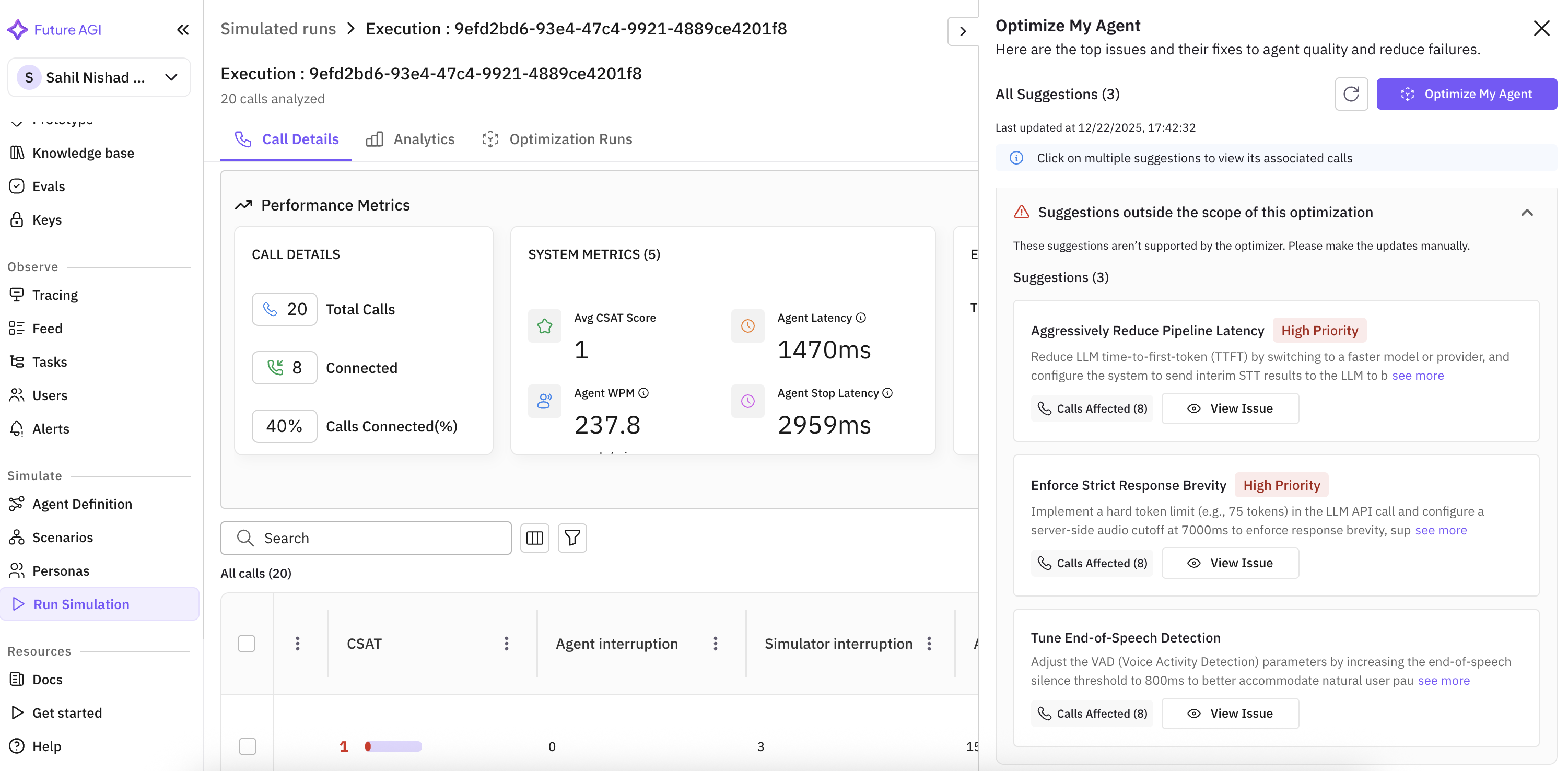
Suggestions are automatically generated by analyzing your simulation results. The system identifies patterns, edge cases, and failure modes that can be addressed through optimization.
Understanding Suggestions
Each suggestion provides:- Issue Description: Clear explanation of the identified problem
- Recommended Fix: Specific action to address the issue
- Priority Level: Urgency of the fix (High/Medium/Low)
- Affected Calls: Which calls exhibited this issue
- View Issue Button: Deep-dive into specific call examples
- Aggressively Reduce Pipeline Latency - Reduce LLM time-to-first-token (TTFT) by switching to a faster model
- Enforce Strict Response Brevity - Implement a hard token limit to enforce concise responses
- Tune End-of-Speech Detection - Adjust VAD parameters for better conversation flow
Running Agent Optimization
Once you’ve reviewed the suggestions, you can run an optimization process to systematically improve your agent’s prompts.Step 3: Configure Optimization
Click the “Optimize My Agent” button to open the optimization configuration dialog.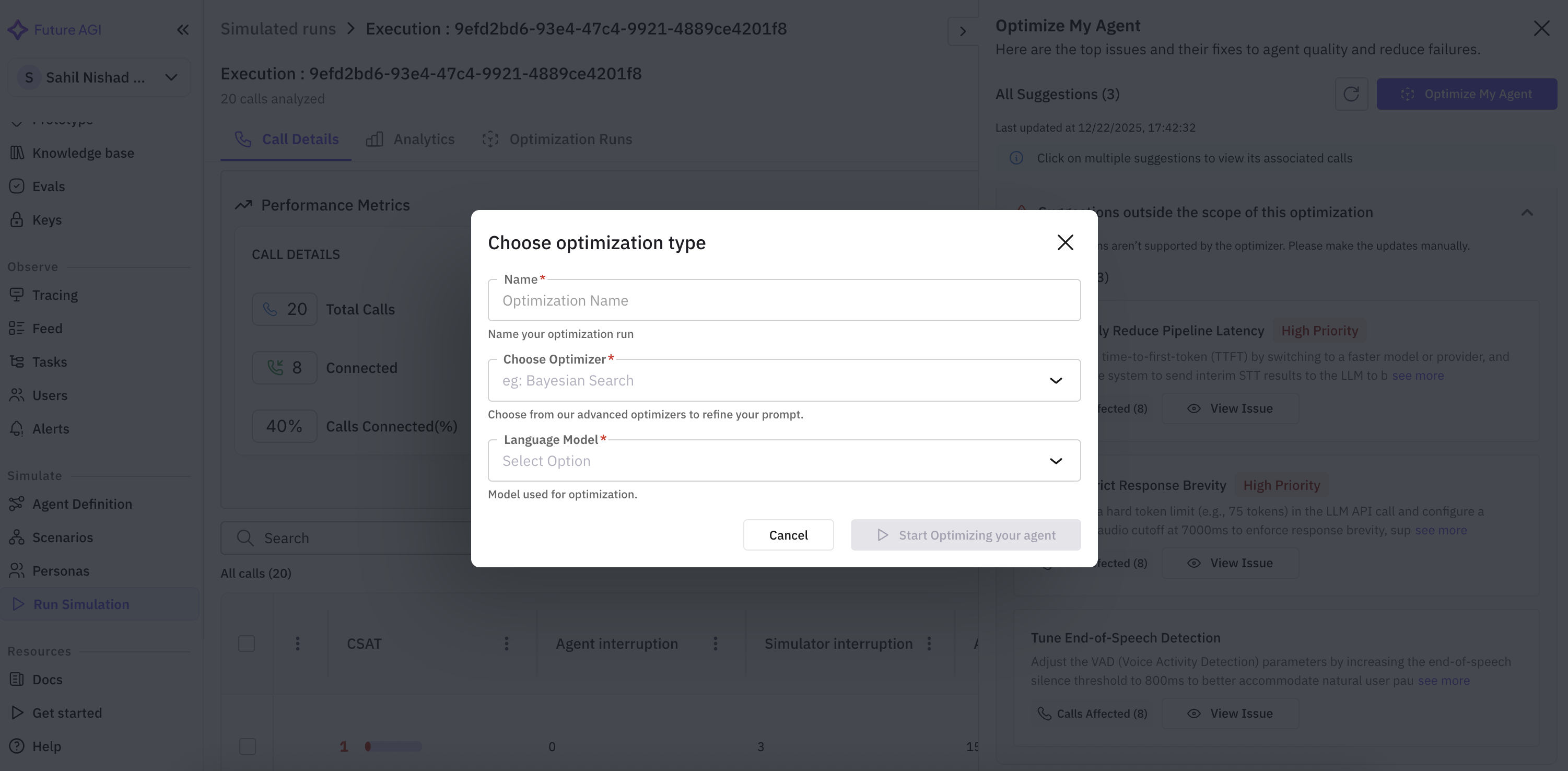
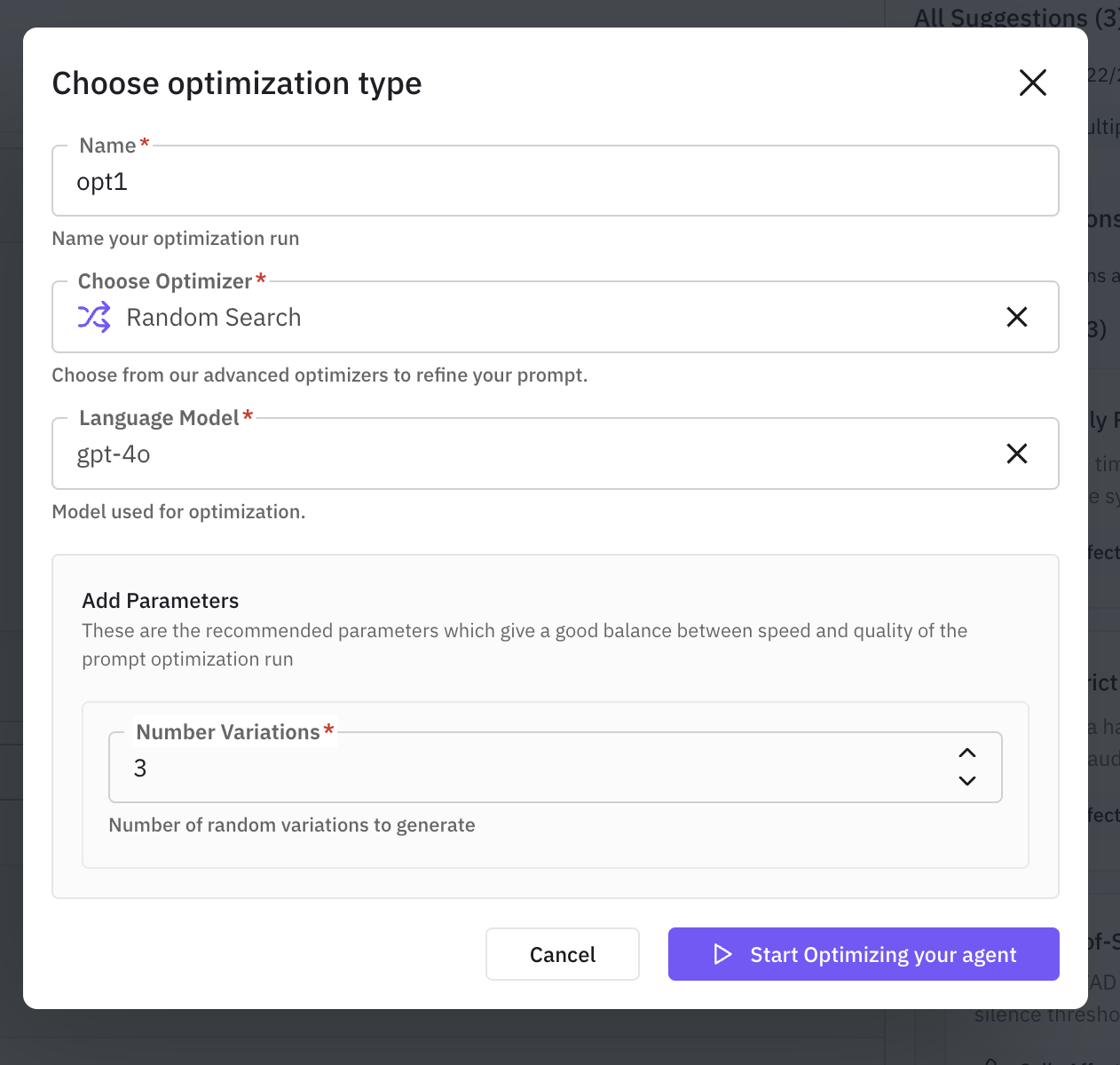
Required Configuration:
1. Name Your Optimization Run- Enter a descriptive name (e.g., “opt1”, “latency-optimization-v2”)
- This helps track multiple optimization experiments
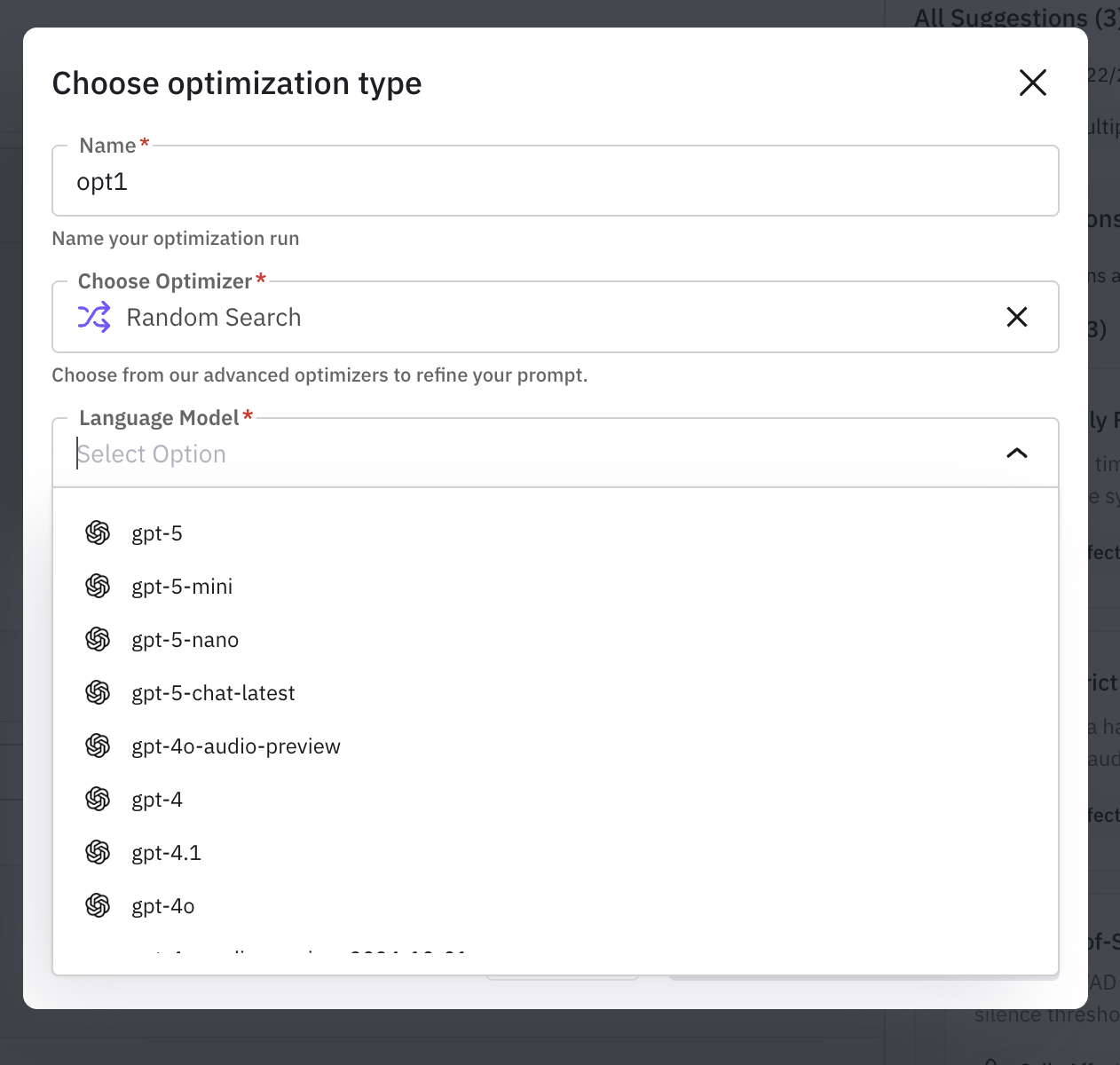
Random Search
Random Search
Best for: Quick baseline testing and initial explorationHow it works: Generates random prompt variations using a teacher model and evaluates each candidate.Characteristics:
- ⚡⚡⚡ Fast execution
- ⭐⭐ Basic quality improvements
- 💰 Low cost
- Ideal for: 10-30 examples
Bayesian Search
Bayesian Search
Best for: Few-shot learning tasks and intelligent example selectionHow it works: Uses Bayesian optimization to intelligently select few-shot examples and prompt configurations.Characteristics:
- ⚡⚡ Medium speed
- ⭐⭐⭐⭐ High quality
- 💰💰 Medium cost
- Ideal for: 15-50 examples
Meta-Prompt
Meta-Prompt
Best for: Complex reasoning tasks requiring deep analysisHow it works: Analyzes failed examples, formulates hypotheses, and rewrites the entire prompt through deep reasoning.Characteristics:
- ⚡⚡ Medium speed
- ⭐⭐⭐⭐ High quality
- 💰💰💰 Higher cost
- Ideal for: 20-40 examples
ProTeGi
ProTeGi
Best for: Identifying and fixing specific error patternsHow it works: Generates critiques of failures and applies targeted improvements using beam search to maintain multiple candidates.Characteristics:
- ⚡ Slower execution
- ⭐⭐⭐⭐ High quality
- 💰💰💰 Higher cost
- Ideal for: 20-50 examples
PromptWizard
PromptWizard
Best for: Creative exploration and diverse prompt variationsHow it works: Combines mutation with different “thinking styles”, then critiques and refines top performers.Characteristics:
- ⚡ Slower execution
- ⭐⭐⭐⭐ High quality
- 💰💰💰 Higher cost
- Ideal for: 15-40 examples
GEPA (Genetic-Evolutionary Prompt Algorithm)
GEPA (Genetic-Evolutionary Prompt Algorithm)
Best for: Production deployments requiring state-of-the-art performanceHow it works: Uses evolutionary algorithms with reflective learning and mutation strategies inspired by natural selection.Characteristics:
- ⚡ Slower execution
- ⭐⭐⭐⭐⭐ Excellent quality
- 💰💰💰💰 Highest cost
- Ideal for: 30-100 examples
- gpt-5 series (gpt-5, gpt-5-mini, gpt-5-nano, gpt-5-chat-latest)
- gpt-4 series (gpt-4, gpt-4.1, gpt-4o, gpt-4o-audio-preview)
- Other supported models from your configuration
- Number Variations: How many prompt variations to generate and test
- Start with 3-5 for quick iterations
- Use 10-20 for thorough optimization
- Consider cost vs. quality tradeoff
Each optimizer may have additional parameters. The platform shows recommended defaults that balance speed and quality.
Step 4: Start Optimization
Click “Start Optimizing your agent” to begin the process. The optimization engine will:- Analyze your simulation data and identified issues
- Generate prompt variations using the selected algorithm
- Evaluate each variation against your test scenarios
- Score performance improvements
- Select the best-performing optimized prompt
Optimization Algorithms Explained
Future AGI’s optimization uses advanced prompt refinement techniques. Understanding how each algorithm works helps you choose the right strategy for your use case.Quick Selection Guide
| Your Goal | Recommended Algorithm | Why |
|---|---|---|
| Quick improvement baseline | Random Search | Fast, simple, establishes performance floor |
| Reduce latency issues | Bayesian Search | Efficiently explores configuration space |
| Fix conversation logic errors | ProTeGi or Meta-Prompt | Targets specific failure patterns |
| Improve complex reasoning | Meta-Prompt | Deep analysis and systematic refinement |
| Optimize for production | GEPA | State-of-the-art evolutionary optimization |
| Explore creative approaches | PromptWizard | Diverse variations with structured refinement |
Algorithm Comparison
| Algorithm | Speed | Quality | Cost | Best Dataset Size |
|---|---|---|---|---|
| Random Search | ⚡⚡⚡ | ⭐⭐ | 💰 | 10-30 examples |
| Bayesian Search | ⚡⚡ | ⭐⭐⭐⭐ | 💰💰 | 15-50 examples |
| Meta-Prompt | ⚡⚡ | ⭐⭐⭐⭐ | 💰💰💰 | 20-40 examples |
| ProTeGi | ⚡ | ⭐⭐⭐⭐ | 💰💰💰 | 20-50 examples |
| PromptWizard | ⚡ | ⭐⭐⭐⭐ | 💰💰💰 | 15-40 examples |
| GEPA | ⚡ | ⭐⭐⭐⭐⭐ | 💰💰💰💰 | 30-100 examples |
- Speed: ⚡ = Slow, ⚡⚡ = Medium, ⚡⚡⚡ = Fast
- Quality: ⭐ = Basic, ⭐⭐⭐⭐⭐ = Excellent
- Cost: 💰 = Low, 💰💰💰💰 = High (based on API calls)
Decision Tree
Viewing Optimization Results
After optimization completes, you can view the results in the Optimization Runs tab on your simulation execution page.Analyzing Results
The optimization results show:-
Performance Comparison
- Original prompt baseline scores
- Optimized prompt scores
- Improvement percentage
-
Best Prompt
- The highest-performing optimized prompt
- Changes made from the original
- Evaluation scores across metrics
-
Optimization History
- All variations tested
- Performance trajectory
- Iteration details
Deploying Optimized Prompts
Once you’ve identified an improved prompt:- Review the optimized prompt carefully
- Test it with additional scenarios if needed
- Update your agent definition with the new prompt
- Re-run simulations to validate improvements
- Monitor performance in production
Best Practices
1. Run Multiple Optimization Iterations
Don’t stop after one optimization run:- Start with Random Search to establish a baseline
- Use ProTeGi or Meta-Prompt to fix identified issues
- Apply GEPA for final production-grade refinement
2. Use Sufficient Test Data
Optimization quality depends on your simulation data:- Run at least 20-50 simulation scenarios before optimizing
- Ensure scenarios cover diverse situations and edge cases
- Include examples of both successful and failed interactions
3. Choose the Right Optimizer
Match the algorithm to your problem:- Latency issues: Bayesian Search (efficient parameter tuning)
- Conversation logic errors: ProTeGi (targeted error fixing)
- Complex reasoning: Meta-Prompt (deep analysis)
- Production deployment: GEPA (robust evolutionary search)
4. Balance Cost and Quality
Optimization uses API calls:- Start with fewer variations (3-5) for quick iterations
- Increase variations (10-20) when you’re close to deployment
- Use faster algorithms (Random Search, Bayesian Search) for experimentation
- Reserve expensive algorithms (GEPA, Meta-Prompt) for critical optimizations
5. Validate Improvements
Always verify optimization results:- Run new simulations with the optimized prompt
- Compare metrics against the baseline
- Test on scenarios not included in the optimization dataset
- Monitor for overfitting or unexpected behaviors
6. Track Optimization Experiments
Maintain good experiment hygiene:- Use descriptive names for optimization runs
- Document which suggestions you’re addressing
- Keep notes on what worked and what didn’t
- Version your prompts alongside optimization results
Optimization Workflow Example
Here’s a complete workflow for optimizing an insurance sales agent:Initial State
- Agent has 40% call connection rate
- High latency (1470ms response time)
- Mixed sentiment scores
Step 1: Run Comprehensive Simulations
Step 2: Review Optimization Suggestions
Step 3: First Optimization - Quick Baseline
Step 4: Targeted Optimization - Fix Latency
Step 5: Advanced Optimization - Production Ready
Step 6: Validation
Troubleshooting
No Suggestions Appearing
Possible causes:- Not enough simulation data (need 20+ calls)
- Agent performed perfectly (no issues detected)
- Evaluation metrics not configured
- Run more comprehensive simulations
- Add diverse scenarios including edge cases
- Configure custom evaluation metrics
Optimization Not Improving Performance
Possible causes:- Insufficient training data
- Wrong optimizer for the problem type
- Too few variations tested
- Overfitting to evaluation set
- Increase simulation scenario count
- Try a different optimization algorithm
- Increase number of variations (10-20)
- Validate on held-out test scenarios
Optimization Taking Too Long
Possible causes:- Using slow optimizer (GEPA, ProTeGi)
- Too many variations configured
- Large dataset size
- Start with Random Search or Bayesian Search
- Reduce number of variations to 3-5
- Use a smaller sample of representative scenarios
Advanced Topics
Combining Optimization with Manual Refinement
You can mix automated optimization with manual improvements:- Run automated optimization to get AI-generated suggestions
- Review the optimized prompt for insights
- Manually refine based on domain expertise
- Run another optimization starting from your manual refinement
- Compare results to see which approach performs better
Custom Evaluation Metrics
For optimization to be most effective, configure evaluation metrics that match your business goals:- Conversion Rate: Did the agent successfully convert the customer?
- Compliance: Did the agent follow regulatory requirements?
- Customer Satisfaction: Sentiment and CSAT scores
- Efficiency: Response latency, call duration, token usage
Optimization for Different Agent Types
Different agent types benefit from different optimization strategies: Voice Agents:- Focus on: Latency, brevity, natural conversation flow
- Best optimizers: Bayesian Search (parameter tuning), ProTeGi (error fixing)
- Focus on: Response quality, accuracy, helpfulness
- Best optimizers: Meta-Prompt (reasoning), PromptWizard (diverse styles)
- Focus on: Conversion rate, objection handling, compliance
- Best optimizers: GEPA (production-grade), Meta-Prompt (complex logic)
- Focus on: Problem resolution, empathy, efficiency
- Best optimizers: ProTeGi (error patterns), Bayesian Search (few-shot examples)
Next Steps
Run Simulation
Learn how to run comprehensive agent simulations
Optimization Algorithms
Deep dive into optimization algorithm details
Create Scenarios
Build diverse test scenarios for better optimization
Agent Definition
Configure your agent for optimal performance
Related Resources
- Prompt Optimization Overview - Learn about the
agent-optlibrary - GEPA Algorithm - Evolutionary optimization deep dive
- Meta-Prompt Algorithm - Deep reasoning refinement
- ProTeGi Algorithm - Error-driven improvement
- Evaluation Metrics - Using different evaluation strategies