Simulation Overview
Rehearse your agent on hard conversations, score each one, and fix what fails
Simulation runs your agent through realistic conversations before real customers ever reach it. You assemble a test from three pieces, an agent definition, a scenario, and a persona, run it as voice or chat, and score every conversation with evals you attach to the run. When a run turns up a failure, you fix the agent and run it again.
You drive all of this from the dashboard. Chat simulations can also run from your own code with the SDK, and prompt versions can be simulated straight from Prompt Workbench with no deployed agent at all.
Catch failures before customers do
A production incident is expensive to learn from. Simulation moves that learning earlier: the refund your agent botches or the caller it talks over shows up in a test run, not in front of a customer.
Every run is inspectable. Each conversation comes back with:
- the full transcript, and the audio recording for voice
- conversation metrics like latency, interruptions, and talk ratio
- an eval score per conversation, so a failure is something you open and read rather than guess at
The agent development loop
Simulation is the rehearsal stage of the agent development lifecycle: every change to your agent passes through it before production, and production feeds the next rehearsal.
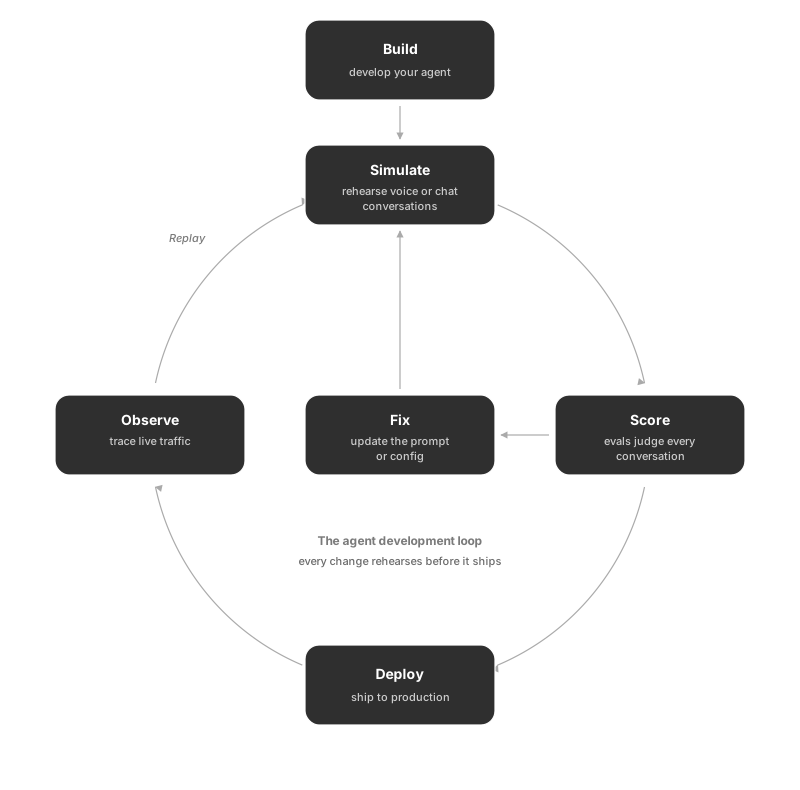
The loop closes on itself twice: a failing score sends you back to fix and re-simulate, and a production trace you replay becomes a new test case.
How it connects
- Evaluation provides the templates that score each conversation
- Observe is the production counterpart: its traces flow back in through replay
- Optimization improves the agent’s prompt automatically from the results
- Datasets seed scenarios in bulk and take results back for analysis
- Prompt Workbench runs its prompt versions through the same simulations
Start here
Questions & Discussion