Using Google ADK
Set up a Google ADK multi-agent project, send traces to FutureAGI Observe, and use Error Feed to understand failures and get actionable fixes.
What it is
Using Google ADK with Error Feed means instrumenting a Google ADK multi-agent project with traceai-google-adk, sending traces to a FutureAGI Observe project, and letting Error Feed automatically score each trace across four metrics (Factual Grounding, Privacy & Safety, Instruction Adherence, Optimal Plan Execution), identify failures, and surface recommendations — all inside the platform UI. This walkthrough builds a four-agent pipeline (Planner → Researcher → Critic → Writer) as a concrete example, but the same setup works for any Google ADK agent.
Use cases
- Agent debugging — See exactly which spans failed, what went wrong, and get an immediate fix alongside a long-term recommendation.
- Multi-agent observability — Trace the full execution across all sub-agents and pinpoint which agent caused an error.
- Recurring error detection — Use the Feed tab to view error clusters across runs and track trends over time.
- Zero-config monitoring — Once instrumented, every trace is automatically picked up and analyzed; no extra configuration needed.
How to
Create and activate a virtual environment
Use Python 3.12 to create your virtual environment.
python3.12 -m venv env
source env/bin/activate
Install the integration
pip install traceai-google-adkSet environment variables and imports
Create a Python script (e.g. google_adk_futureagi.py) and configure your credentials:
import asyncio
import os
import sys

from typing import Optional

from google.adk.agents import Agent
from google.adk.runners import Runner, RunConfig
from google.adk.artifacts.in_memory_artifact_service import InMemoryArtifactService
from google.adk.sessions.in_memory_session_service import InMemorySessionService
from google.adk.memory.in_memory_memory_service import InMemoryMemoryService
from google.adk.auth.credential_service.in_memory_credential_service import InMemoryCredentialService
from google.genai import types

# Set up environment variables
os.environ["FI_API_KEY"] = "your-futureagi-api-key"
os.environ["FI_SECRET_KEY"] = "your-futureagi-secret-key"
os.environ["FI_BASE_URL"] = "https://api.futureagi.com"
os.environ['GOOGLE_API_KEY'] = 'your-google-api-key'
Initialize the trace provider
Register the project as an Observe project and instrument Google ADK:
from fi_instrumentation import register, Transport
from fi_instrumentation.fi_types import ProjectType
from traceai_google_adk import GoogleADKInstrumentor

tracer_provider = register(
    project_name="google-adk-new",
    project_type=ProjectType.OBSERVE,
    transport=Transport.HTTP
)

GoogleADKInstrumentor().instrument(tracer_provider=tracer_provider)
Define the multi-agent system
Build four sub-agents and a root orchestrator:
# Planner agent
planner_agent = Agent(
    name="planner_agent",
    model="gemini-2.5-flash",
    description="Decomposes requests into a clear plan and collects missing requirements.",
    instruction="""You are a planning specialist.
    Responsibilities:
    - Clarify the user's goal and constraints with 1-3 concise questions if needed.
    - Produce a short plan with numbered steps and deliverables.
    - Include explicit assumptions if any details are missing.
    - End with 'Handoff Summary:' plus a one-paragraph summary of the plan and next agent.
    - Transfer back to the parent agent without saying anything else."""
)

# Researcher agent
researcher_agent = Agent(
    name="researcher_agent",
    model="gemini-2.5-flash",
    description="Expands plan steps into structured notes using internal knowledge (no tools).",
    instruction="""You are a content researcher.
    Constraints: do not fetch external data or cite URLs; rely on prior knowledge only.
    Steps:
    - Read the plan and assumptions.
    - For each plan step, create structured notes (bullets) and key talking points.
    - Flag uncertainties as 'Assumptions' with brief rationale.
    - End with 'Handoff Summary:' and recommend sending to the critic next.
    - Transfer back to the parent agent without saying anything else."""
)

# Critic agent
critic_agent = Agent(
    name="critic_agent",
    model="gemini-2.5-flash",
    description="Reviews content for clarity, completeness, and logical flow.",
    instruction="""You are a critical reviewer.
    Steps:
    - Identify issues in clarity, structure, correctness, and style.
    - Provide a concise list of actionable suggestions grouped by category.
    - Do not rewrite the full content; focus on improvements.
    - End with 'Handoff Summary:' suggesting the writer produce the final deliverable.
    - Transfer back to the parent agent without saying anything else."""
)

# Writer agent
writer_agent = Agent(
    name="writer_agent",
    model="gemini-2.5-flash",
    description="Synthesizes a polished final deliverable from notes and critique.",
    instruction="""You are the final writer.
    Steps:
    - Synthesize the final deliverable in a clean, structured format.
    - Incorporate the critic's suggestions.
    - Keep it concise, high-signal, and self-contained.
    - End with: 'Would you like any changes or a different format?'
    - Transfer back to the parent agent without saying anything else."""
)

# Root orchestrator
root_agent = Agent(
    name="root_agent",
    model="gemini-2.5-flash",
    global_instruction="""You are a collaborative multi-agent orchestrator.
    Coordinate Planner → Researcher → Critic → Writer to fulfill the user's request without using any external tools.
    Keep interactions polite and focused. Avoid unnecessary fluff.""",
    instruction="""Process:
    - If needed, greet the user briefly and confirm their goal.
    - Transfer to planner_agent to draft a plan.
    - Then transfer to researcher_agent to expand the plan into notes.
    - Then transfer to critic_agent to review and propose improvements.
    - Finally transfer to writer_agent to produce the final deliverable.
    - After the writer returns, ask the user if they want any changes.

    Notes:
    - Do NOT call any tools.
    - At each step, ensure the child agent includes a 'Handoff Summary:' to help routing.
    - If the user asks for changes at any time, route back to the appropriate sub-agent (planner or writer).
    """,
    sub_agents=[planner_agent, researcher_agent, critic_agent, writer_agent]
)
Add the execution function and run
Create the main execution function:
async def run_once(message_text: str, *, app_name: str = "agent-compass-demo", user_id: str = "user-1", session_id: Optional[str] = None) -> None:
    runner = Runner(
        app_name=app_name,
        agent=root_agent,
        artifact_service=InMemoryArtifactService(),
        session_service=InMemorySessionService(),
        memory_service=InMemoryMemoryService(),
        credential_service=InMemoryCredentialService(),
    )

    # Initialize a session
    session = await runner.session_service.create_session(
        app_name=app_name,
        user_id=user_id,
        session_id=session_id,
    )

    content = types.Content(role="user", parts=[types.Part(text=message_text)])

    # Stream events asynchronously from the agent
    async for event in runner.run_async(
        user_id=session.user_id,
        session_id=session.id,
        new_message=content,
        run_config=RunConfig(),
    ):
        if getattr(event, "content", None) and getattr(event.content, "parts", None):
            text = "".join((part.text or "") for part in event.content.parts)
            if text:
                author = getattr(event, "author", "agent")
                print(f"[{author}]: {text}")

    await runner.close()
Create the main function with sample prompts:
async def main():

    prompts = [
        "Explain the formation and characteristics of aurora borealis (northern lights).",
        "Describe how hurricanes form and what makes them so powerful.",
        "Explain the process of photosynthesis in plants and its importance to life on Earth.",
        "Describe how earthquakes occur and why some regions are more prone to them.",
        "Explain the water cycle and how it affects weather patterns globally."
    ]

    for prompt in prompts:
        await run_once(
            prompt,
            app_name="agent-compass-demo",
            user_id="user-1",
        )

if __name__ == "__main__":
    asyncio.run(main())
Run your script:
python3 google_adk_futureagi.pyKey Concepts
| Concept | Description |
|---|---|
| Clickable metrics | Taxonomy labels showing which metric needs improvement (e.g. Instruction Adherence, Incomplete Task). |
| Recommendation | A long-term, robust fix. In most cases this is the best course of action. |
| Immediate fix | A minimal functional fix — may not align with the recommendation. |
| Insights | High-level overview of the full trace. Does not change with the active taxonomy metric. |
| Description | What went wrong during execution. |
| Evidence | Supporting snippets from the LLM response — useful for uncovering edge cases. |
| Root Causes | The underlying issue behind the error. |
| Spans | Affected spans for each taxonomy metric. Click a span to locate it in the trace tree. |
What you’ll see on the platform
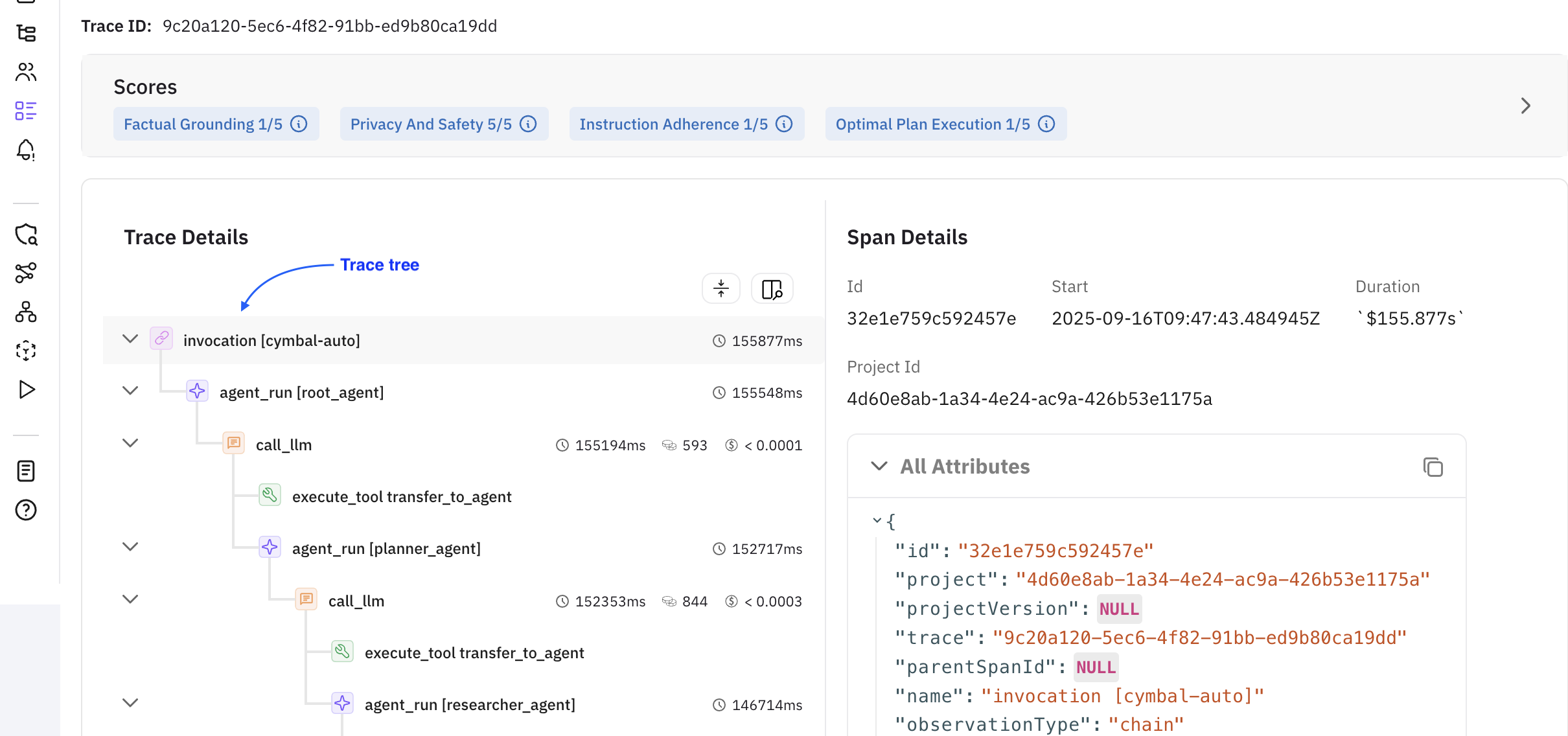
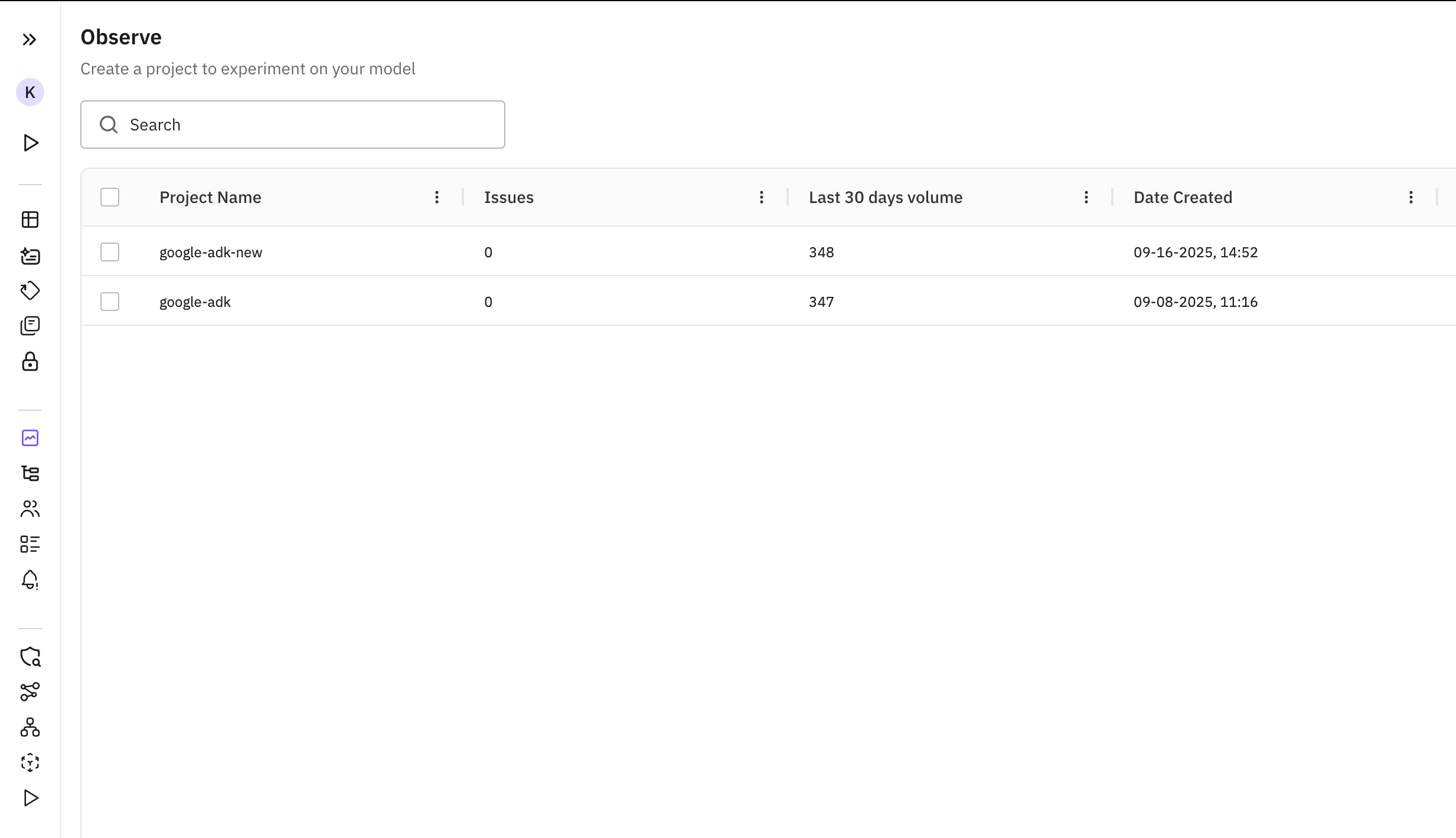
Once the script runs successfully, a new project named google-adk-new appears in the Observe tab.
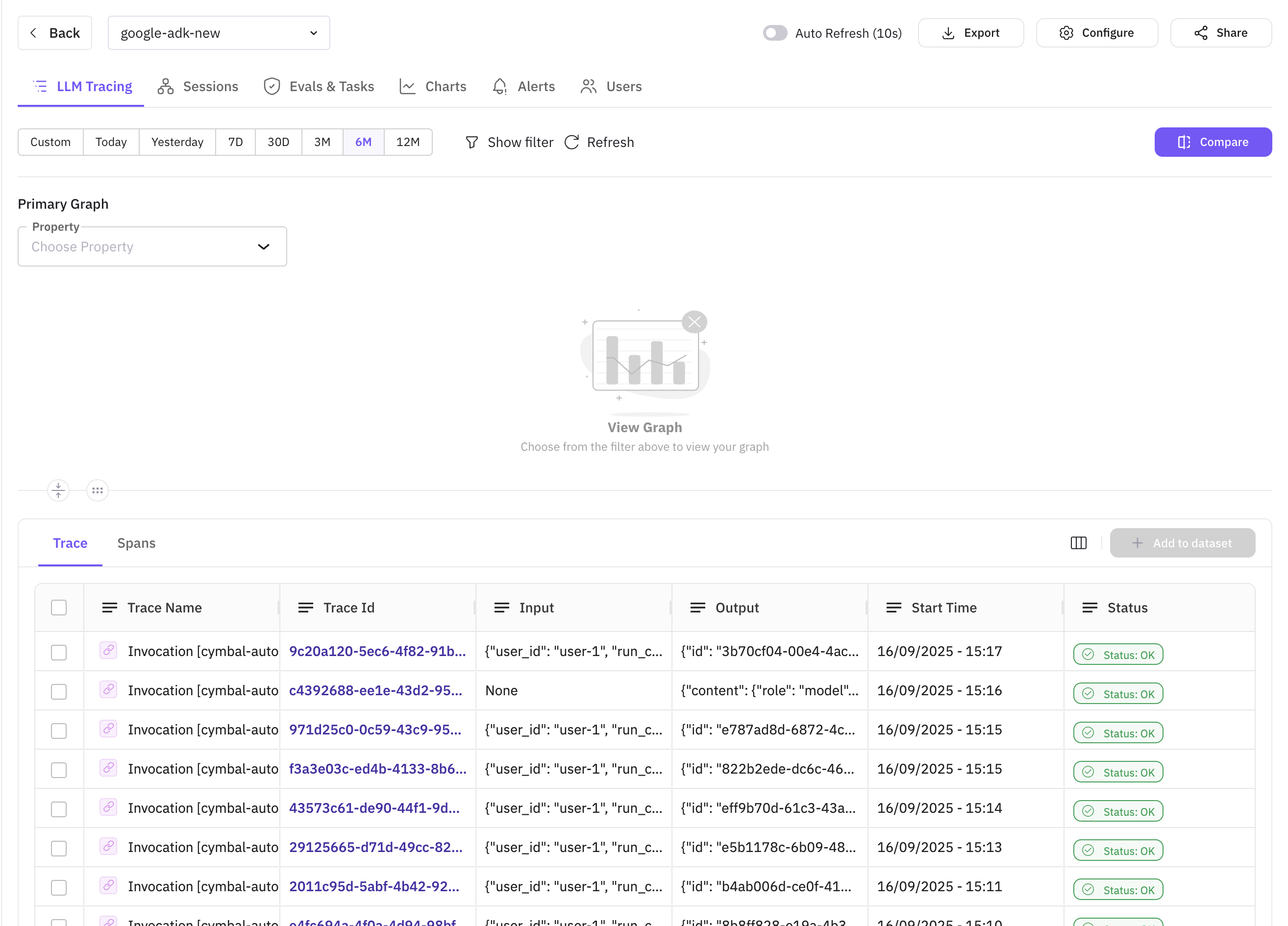
Click the project to open the LLM Tracing view where all traces from your Observe project are listed.
Click any trace to open the drawer — the Error Feed accordion shows insights generated for that trace alongside the trace tree.
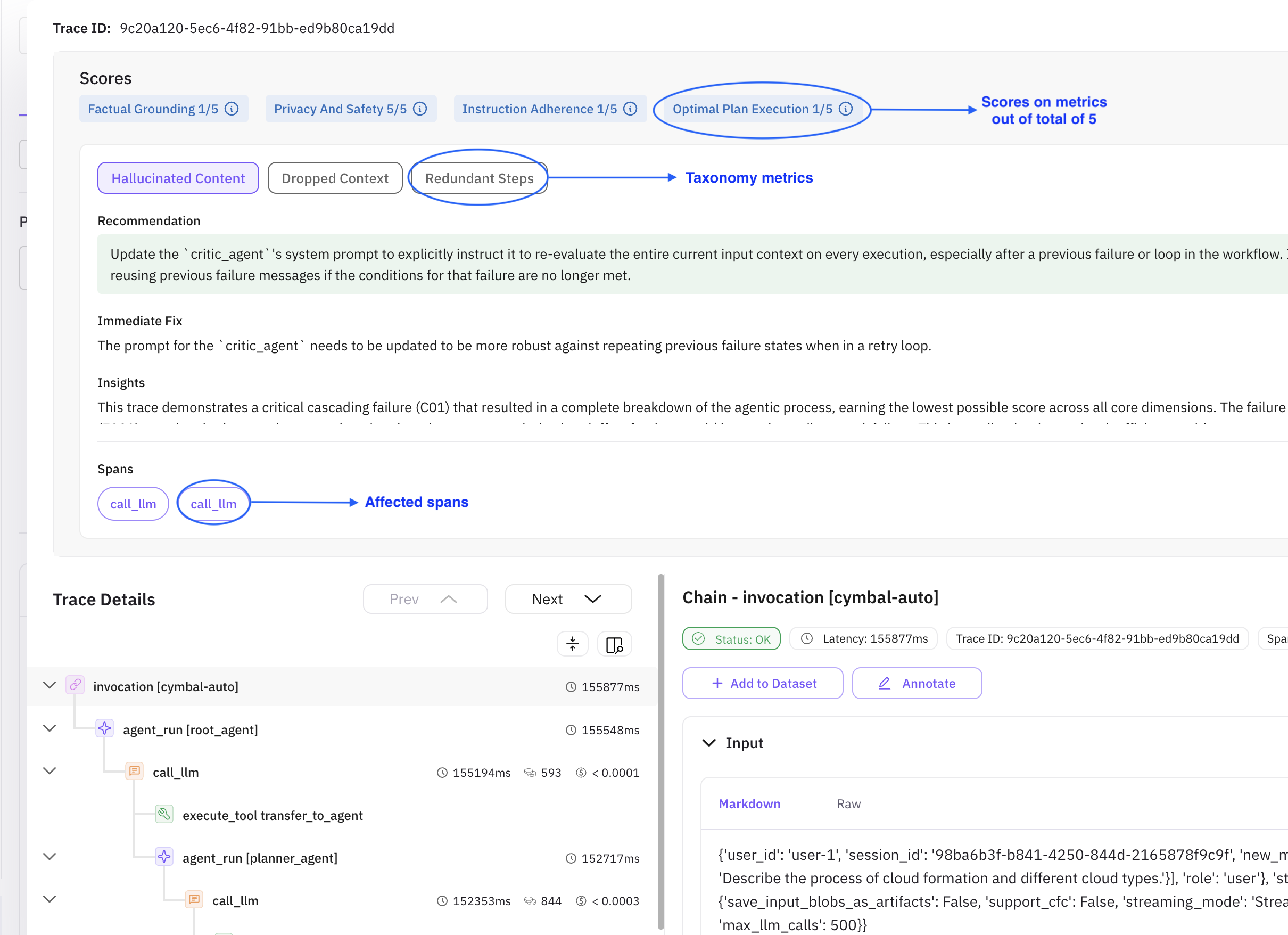
Each trace is scored out of 5 across four metrics:
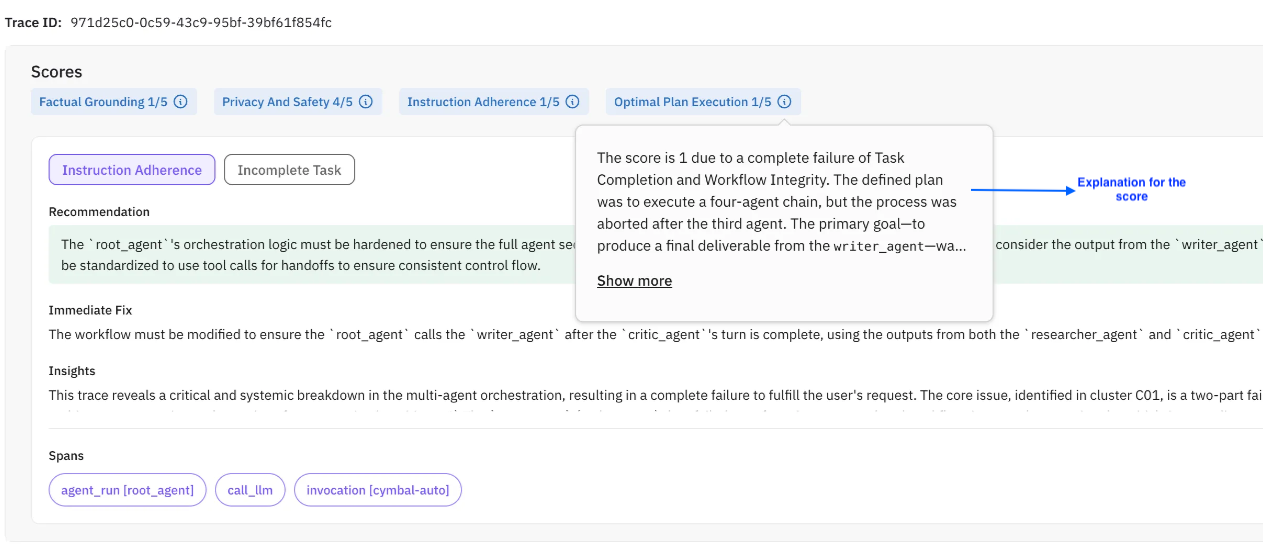
| Metric | Description |
|---|---|
| Factual Grounding | How well responses are anchored in verifiable evidence, avoiding hallucinations. |
| Privacy and Safety | Adherence to security practices — PII exposure, credential leaks, unsafe advice, bias. |
| Instruction Adherence | How well the agent follows user instructions, formatting, tone, and intent. |
| Optimal Plan Execution | Quality of multi-step workflow structure, step sequencing, and tool coordination. |
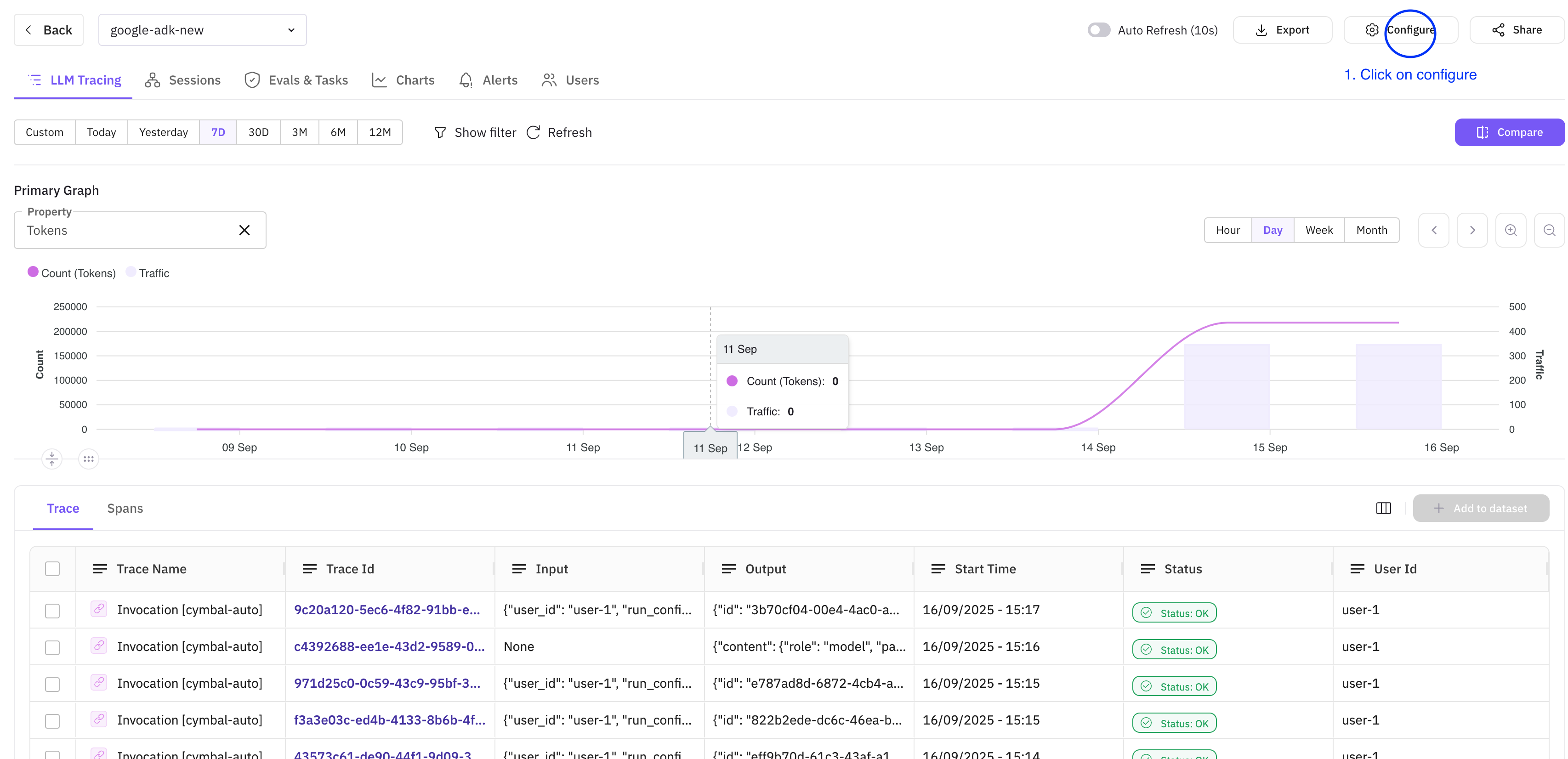
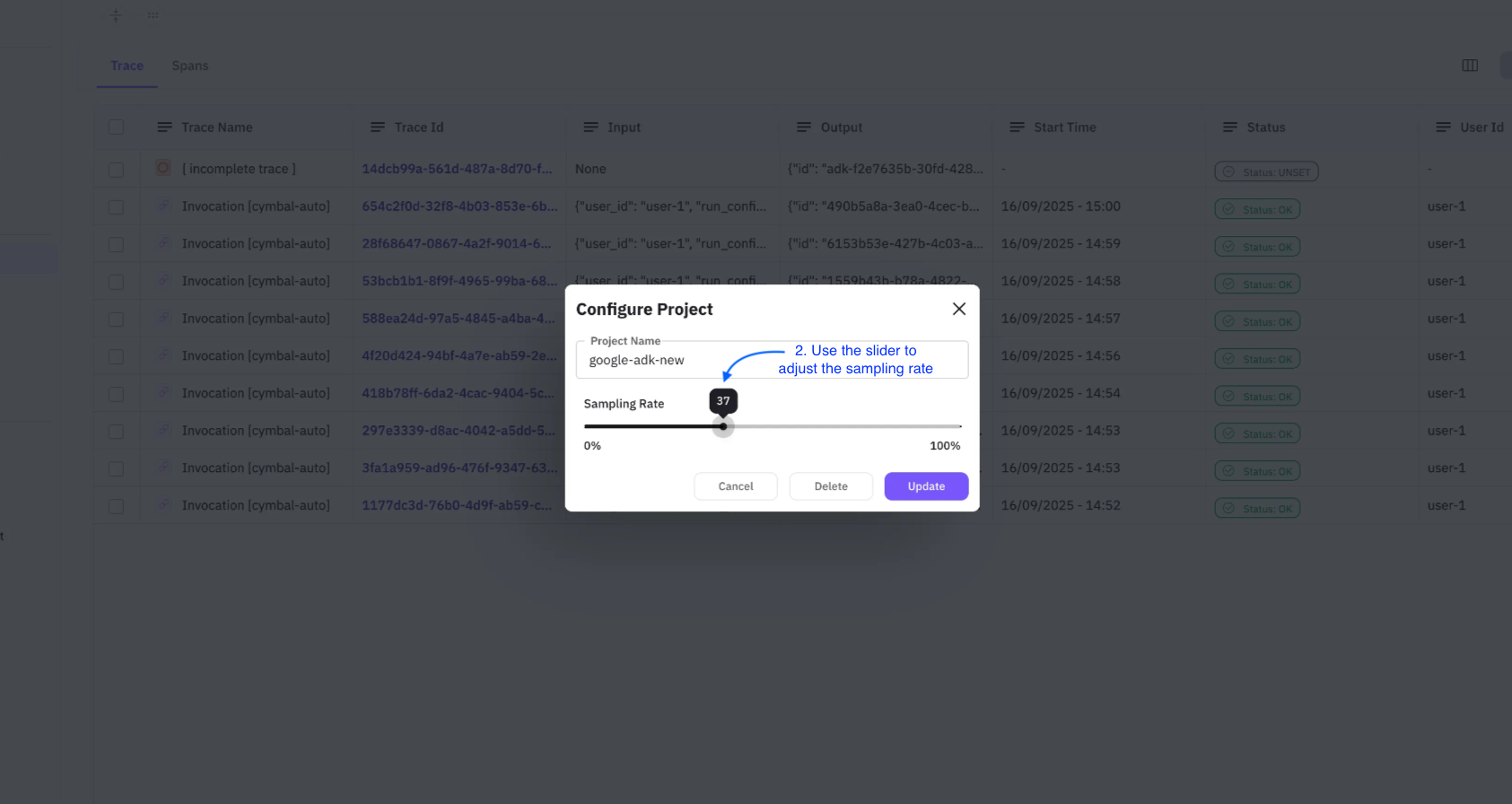
Sampling rate controls what percentage of traces Error Feed analyzes. Configure it in two steps:
Note
The updated sampling rate applies to upcoming traces only.
- Step 1: Click Configure in the top-right corner of the Observe screen.
- Step 2: Use the slider to set your rate, then click Update.
All errors identified by Error Feed are grouped into clusters under the Feed tab.
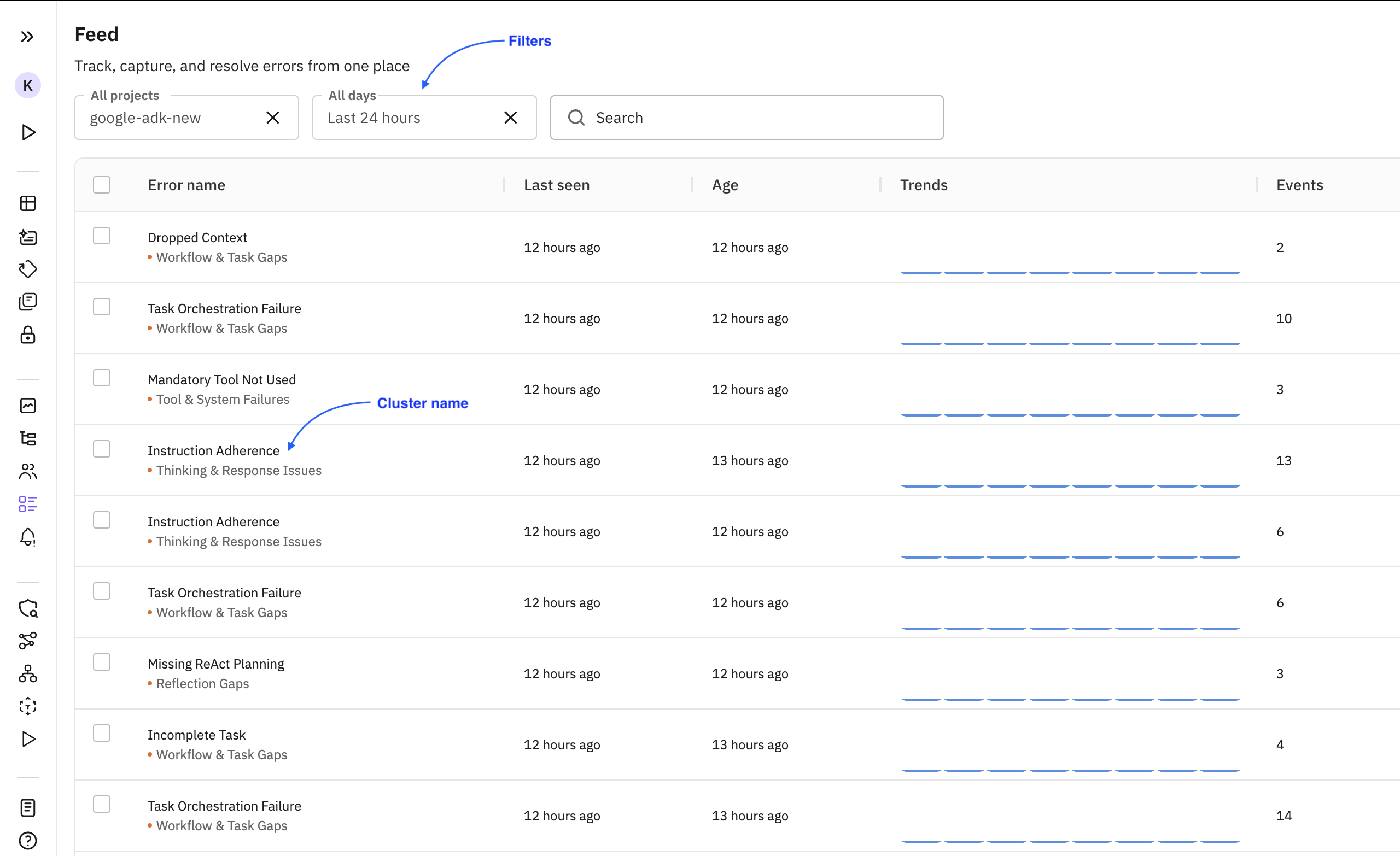
| Term | Description |
|---|---|
| Cluster | A group of traces sharing the same error. The Error Name is the cluster name. |
| Events | Number of times the error has occurred. |
| Trends | How the error frequency is changing over time (increasing, decreasing, stable). |
Clicking a cluster opens its details page with the latest affected trace shown by default.
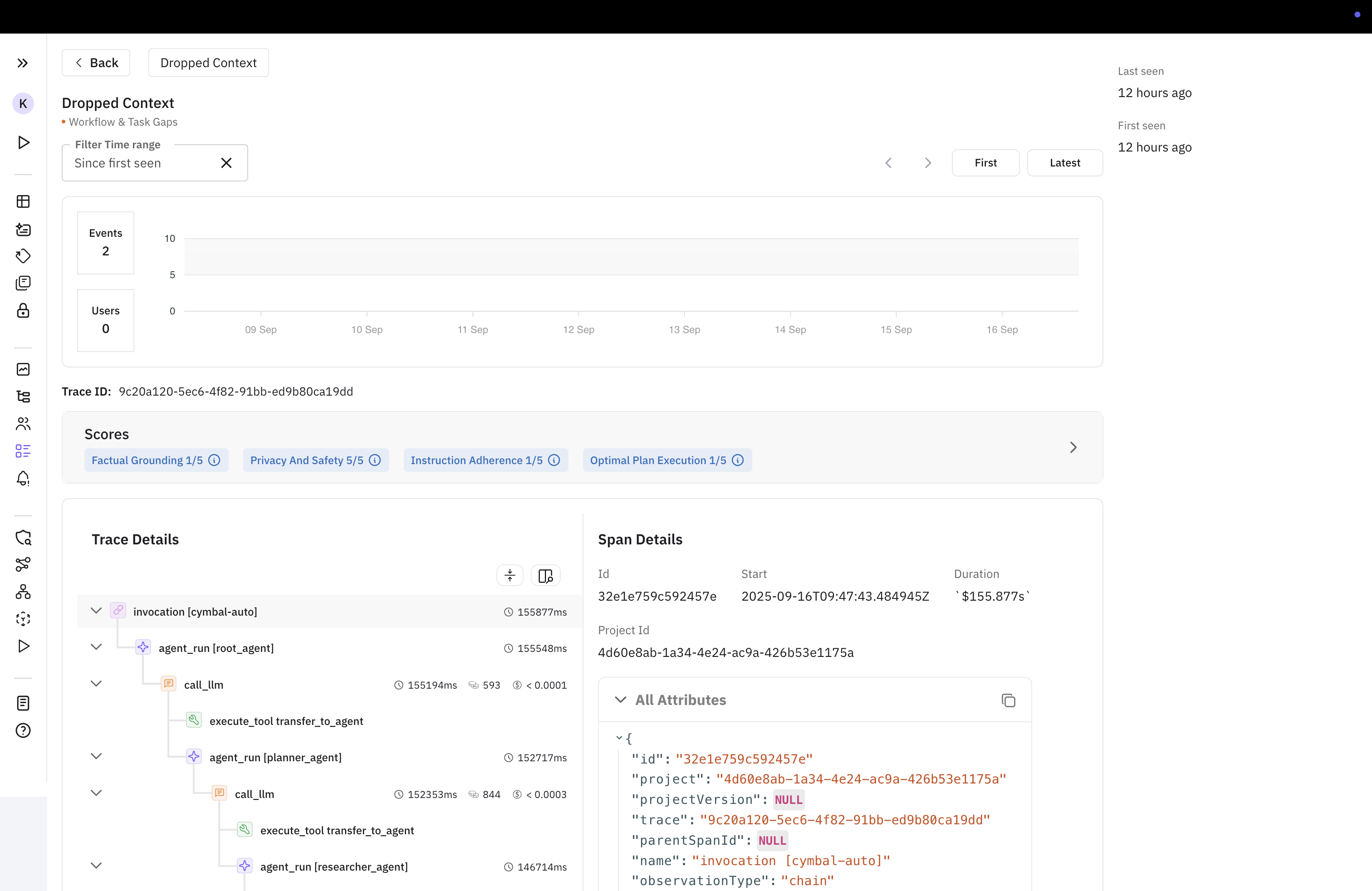
Toggling and filtering — Switch between traces, view first/last occurrence times, and filter by time range. The graph shows error trends.
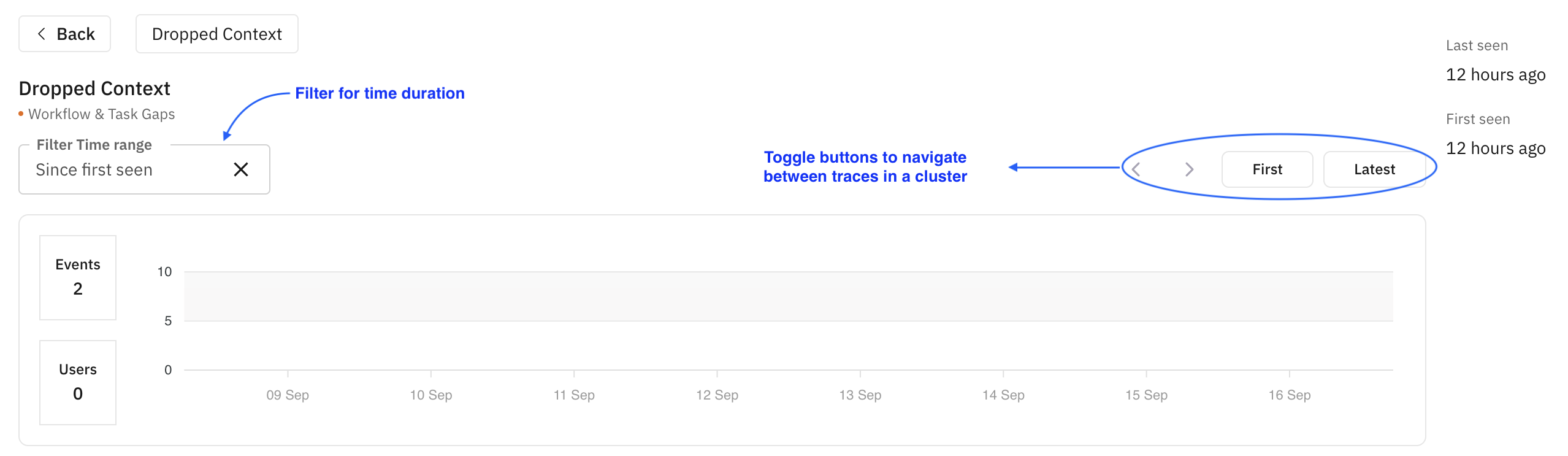
Insights and trace tree — The trace tree, Error Feed insights, and span attributes are shown side by side.