LlamaIndex PDF RAG Chatbot
Instrument a LlamaIndex PDF RAG chatbot with traceAI, score retrieval and generation with Future AGI evals, and alert on quality drops.
Build a PDF-grounded RAG chatbot with LlamaIndex, instrument it with traceAI so every embedding, retrieval, and generation step becomes a span, then attach Future AGI evals to score task completion, hallucination, and context relevance on each trace.
The full application (Gradio UI, ingestion, chat loop) lives in the llamaindex integration repo. This cookbook walks through the instrumentation and evaluation layer you add on top of it.
| Time | Difficulty | Package |
|---|---|---|
| 30 min | Intermediate | traceAI-llamaindex |
- Future AGI account → app.futureagi.com
- API keys:
FI_API_KEYandFI_SECRET_KEY(see Get your API keys) - An
OPENAI_API_KEYfor embeddings and generation - Python 3.11
Install
pip install traceAI-llamaindex llama-indexexport FI_API_KEY="your-api-key"
export FI_SECRET_KEY="your-secret-key"
export OPENAI_API_KEY="your-openai-key"Tutorial
Instrument the app with traceAI
traceAI-llamaindex auto-instruments LlamaIndex so every embedding, retrieval, and LLM call becomes a span with model name, token usage, prompt, and chunk metadata attached.
from fi_instrumentation import register
from fi_instrumentation.fi_types import ProjectType
from traceai_llamaindex import LlamaIndexInstrumentor

trace_provider = register(
    project_type=ProjectType.OBSERVE,
    project_name="llamaindex_project",
)

LlamaIndexInstrumentor().instrument(tracer_provider=trace_provider)
register() sets up an OpenTelemetry tracer that ships spans to Future AGI. LlamaIndexInstrumentor().instrument() patches LlamaIndex so every operation after this call is traced automatically, no manual span code in the app itself.
You should see no output here. The instrumentation is silent until the app runs a query.
Ingest PDFs into a persistent vector index
from pathlib import Path
from llama_index.core import Settings, SimpleDirectoryReader, VectorStoreIndex
from llama_index.embeddings.openai import OpenAIEmbedding

Settings.embed_model = OpenAIEmbedding(model="text-embedding-3-large")

DOCUMENTS_PATH = Path("./documents")   # uploaded PDFs land here
STORAGE_PATH = Path("./vectorstore")   # persisted embeddings, survives restarts

docs = SimpleDirectoryReader(str(DOCUMENTS_PATH), recursive=True).load_data()
index = VectorStoreIndex.from_documents(docs)
index.storage_context.persist(persist_dir=str(STORAGE_PATH))
SimpleDirectoryReader parses each PDF into nodes. VectorStoreIndex embeds every node with text-embedding-3-large and writes the index to ./vectorstore so later runs don’t re-embed the same files.
You should see one embedding span per chunk under the ingestion chain span in the Observe trace view once you open the project. That’s your first trace, before you’ve even sent a chat message.
Query the index and generate a grounded answer
from llama_index.core.memory import ChatMemoryBuffer

CHAT_MEMORY_TOKEN_LIMIT = 3900  # leaves room for retrieved chunks in a 4k-token context window

memory = ChatMemoryBuffer.from_defaults(token_limit=CHAT_MEMORY_TOKEN_LIMIT)
engine = index.as_chat_engine(memory=memory)

response = engine.chat("What is the refund window for a defective product?")
print(response.response)

for node in response.source_nodes:
    print(node.metadata.get("file_name"), node.metadata.get("page_label"), node.score)
engine.chat() embeds the query, retrieves the top-matching chunks, and generates an answer grounded in them. response.source_nodes carries the file name, page, and similarity score for each chunk the assistant used, which is what the app shows as citations.
You should see the answer text printed, followed by one line per cited chunk with its source file and page.
Open the llamaindex_project project in Future AGI Observe now. This question produced a trace containing an Embedding span, a Retriever span, and an LLM span.
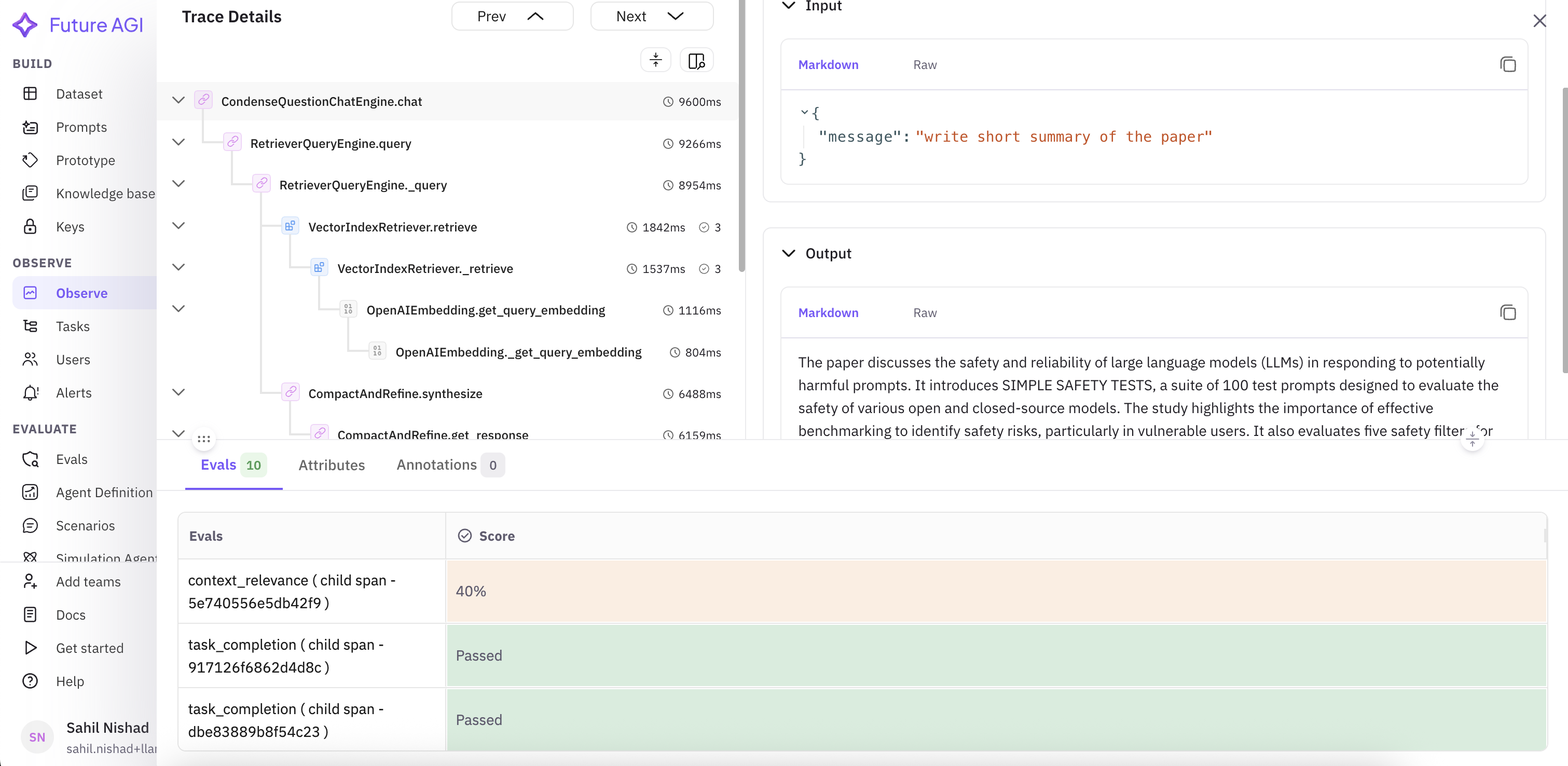
The span hierarchy on the left, query and response on the right, eval results at the bottom
Inspect the trace in Observe
Open that trace and read it span by span.
You should see the retriever span listing the chunks it selected, with file_name, page_label, and a similarity score for each.
Attach evals to spans
In the dashboard, define evals as tasks and attach them to a span type rather than calling evaluate() from code. This scores every trace as it’s generated, not just the ones you happen to test locally.
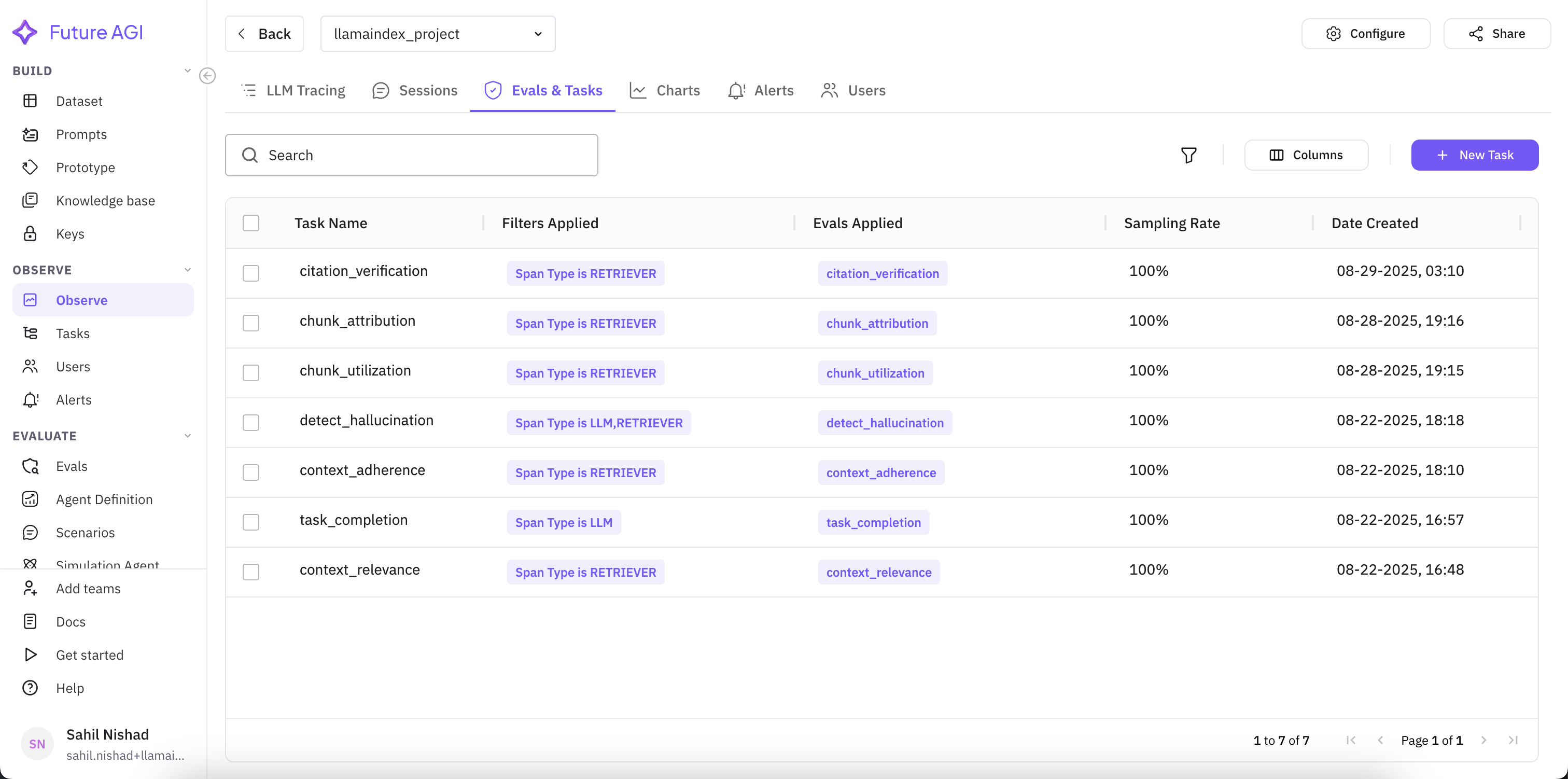
Attaching Task Completion, Detect Hallucination, Context Relevance, and Context Adherence to the LLM span type
You should see the new eval task listed against the span type you selected, and it starts scoring the next trace that hits that span.
Tip
Read more about the built-in evals in Evaluation, and about writing your own in Creating custom evals.
Read the eval results
Reopen a trace after the eval task has run. The bottom panel now shows a score per span.
In one example run: Task Completion passed, Detect Hallucination passed, Context Adherence scored 80% (most of the response stayed within retrieved context), and Context Relevance scored 40% (retrieval surfaced only partially useful chunks). These numbers are illustrative from a single run, not a benchmark.
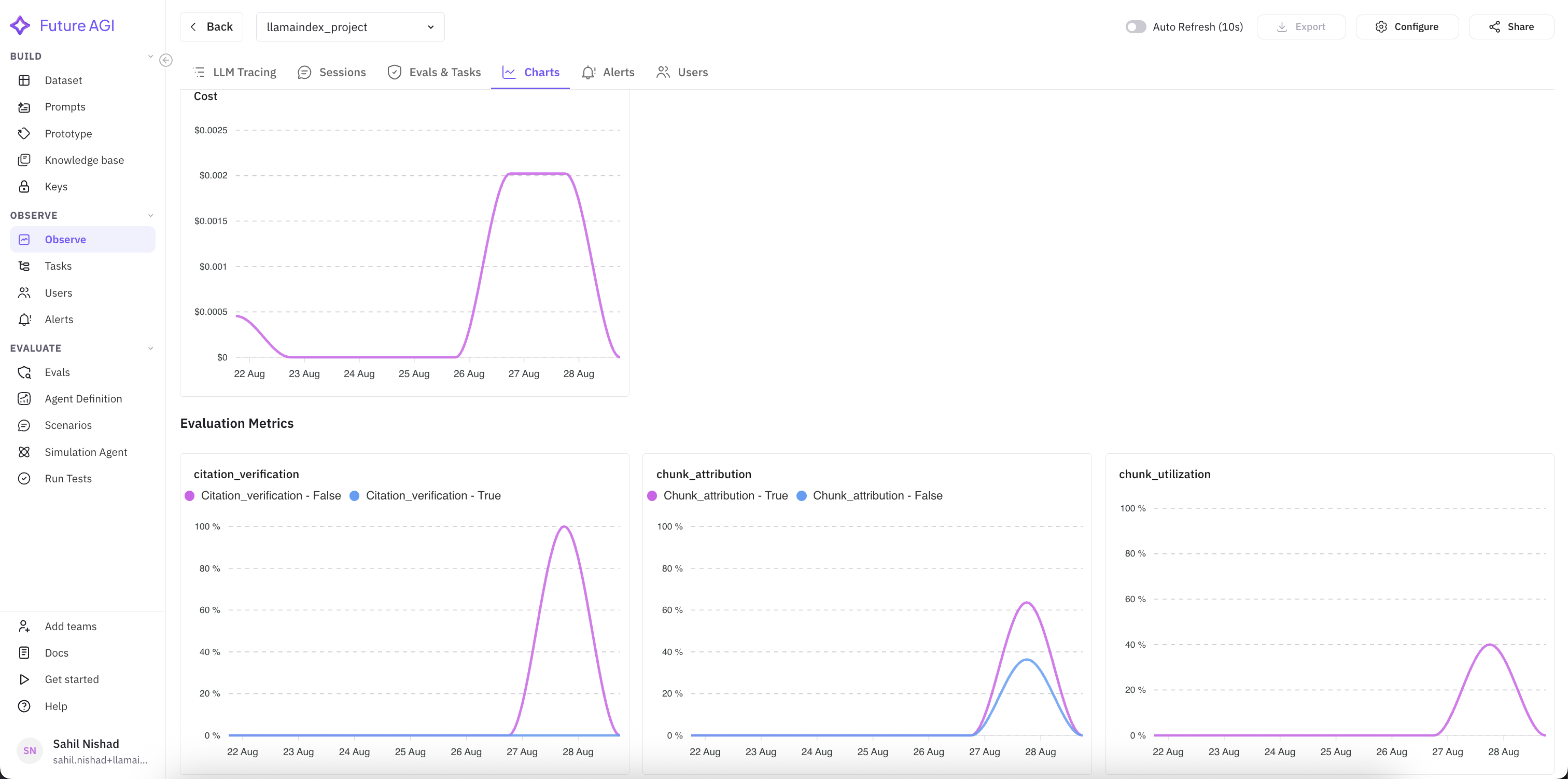
Score trends over time, next to latency and cost, for spotting drift before it reaches customers
You should see a low Context Relevance score point at the retriever, not the generator: the fix is chunking or top_k, not the prompt.
Fix the retriever and rerun
The retriever is the suspect, so change one knob on it: raise similarity_top_k from the default of 2 to 5 so the retriever pulls more candidate chunks per query.
engine = index.as_chat_engine(memory=memory, similarity_top_k=5)

response = engine.chat("What is the refund window for a defective product?")
print(response.response)
Rerun the same question and reopen the new trace. In this run, Context Relevance moved from 40% to 75% with similarity_top_k=5: the extra candidates gave the retriever more of the chunks it needed, at the cost of a slightly larger prompt. This delta is illustrative from a single before/after run, not a benchmark.
You should see the new trace’s Context Relevance score sitting well above the 40% baseline from the previous step.
Set an alert on a quality metric
Once you have a baseline, set a threshold so a drop pages you instead of a customer.
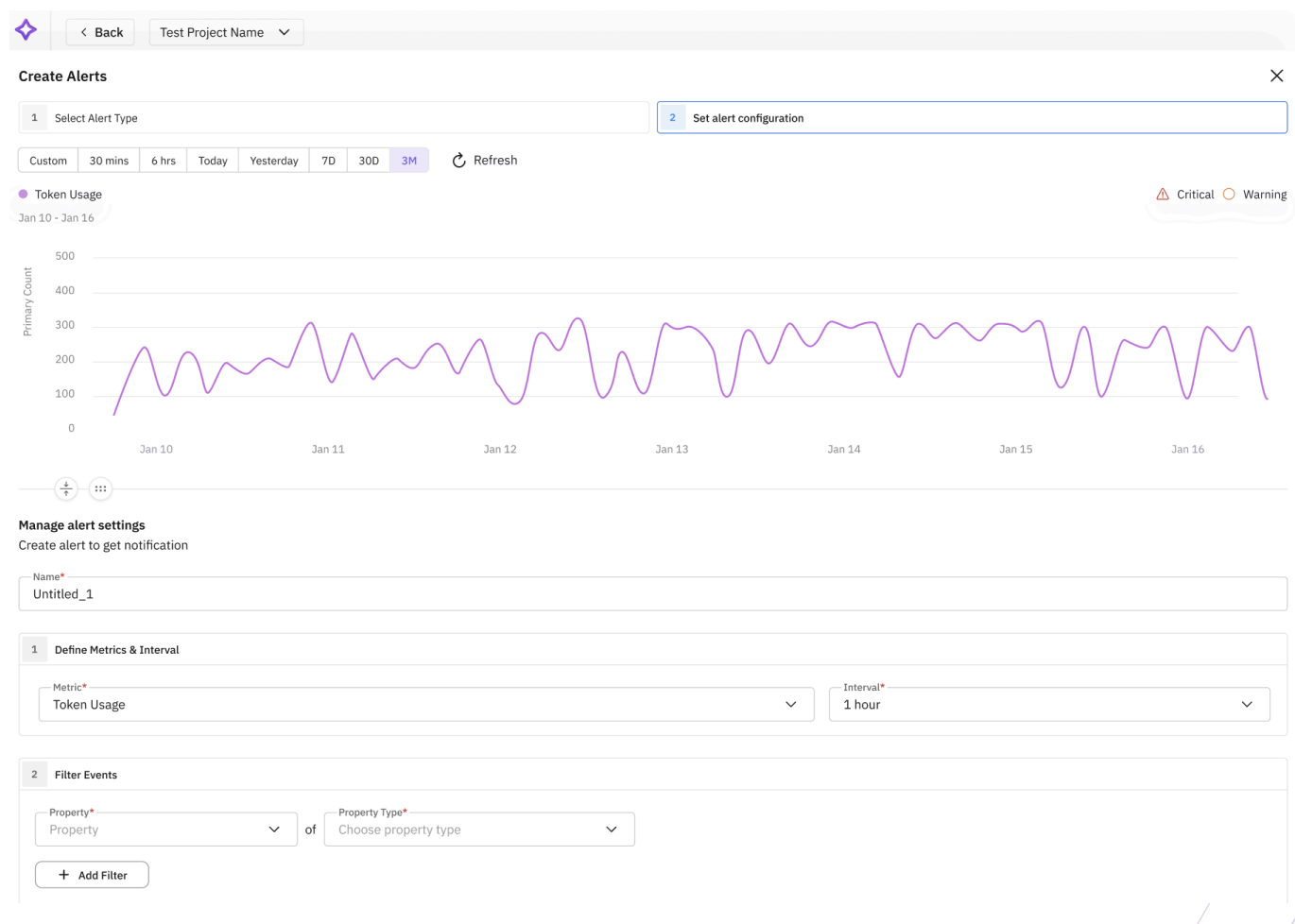
Selecting Context Relevance as the metric, with a threshold below which the alert fires
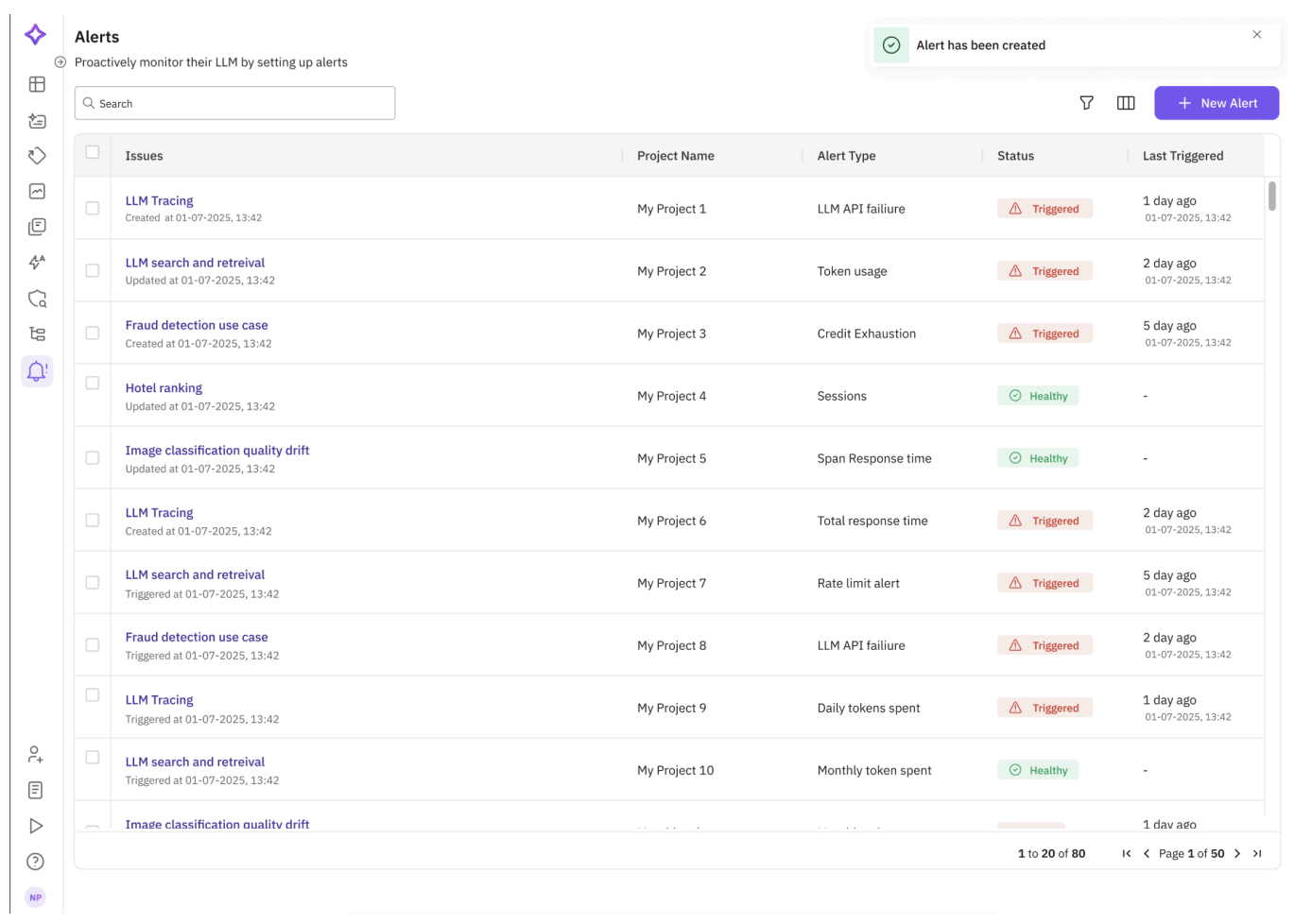
Triggered and healthy alerts across the project, with the time each was last triggered
You should see the alert listed as Healthy until a trace crosses your threshold, at which point it flips to Triggered and notifies the channel you configured.
Troubleshooting
| Symptom | Cause | Fix |
|---|---|---|
NameError: name 'LlamaIndexInstrumentor' is not defined | Instantiated LlamaIndexInstrumentor() without importing it | Add from traceai_llamaindex import LlamaIndexInstrumentor before calling register() |
| No spans appear in the Observe dashboard | register() wasn’t called, or instrument() ran before register() returned | Call register(project_type=ProjectType.OBSERVE, ...) first, then pass its return value into LlamaIndexInstrumentor().instrument(tracer_provider=...) |
401 Unauthorized when spans try to ship | FI_API_KEY or FI_SECRET_KEY not set, or set after the script imports fi_instrumentation | Export both keys before running the script, not inside it |
| Queries return an empty or generic answer | The PDF is scanned or image-only, so SimpleDirectoryReader extracted no text | Run OCR on the file before ingestion, or check docs isn’t empty before building the index |
| New PDFs don’t show up in answers | The old ./vectorstore wasn’t cleared before rebuilding | Delete ./vectorstore (or call your app’s rebuild_index()) before re-ingesting |
| Context Relevance scores stay low across runs | Chunk size doesn’t match the PDFs’ structure, or the query embedding drifts from the chunk embeddings | Tune the chunk size and top_k on the retriever, then rerun the same questions and compare the score |
| Ingesting a large PDF is slow | Every chunk sends a separate embedding call, run sequentially | Batch the embedding calls, or reduce chunk count with a larger chunk size |
Next: score retrieval and generation independently in RAG Evaluation: Retrieval vs Generation.
Questions & Discussion