PDF RAG Chatbot with MongoDB Atlas and Future AGI
Build a PDF RAG chatbot on MongoDB Atlas vector search, instrument it with traceAI, and score every answer with Observe evals.
Build a PDF RAG chatbot that stores chunks and embeddings in MongoDB Atlas vector search and answers with a LangChain RetrievalQA chain. Instrument it with traceAI so every question produces a trace, attach an Observe Eval Task that scores retrieval and grounding, and read a trace where the score catches a wrong answer a healthy-looking pipeline would otherwise hide.
| Time | Difficulty | Package |
|---|---|---|
| 30-40 min | Intermediate | fi-instrumentation-otel + traceAI-langchain |
- Future AGI account → app.futureagi.com
- API keys:
FI_API_KEYandFI_SECRET_KEY(see Get your API keys) - An
OPENAI_API_KEY - A MongoDB Atlas cluster with a connection string (a free M0 cluster works)
- Python 3.11
Install
pip install fi-instrumentation-otel traceAI-langchain langchain langchain-community langchain-openai langchain-text-splitters langchain-mongodb pymongo pypdfexport FI_API_KEY="your-api-key"
export FI_SECRET_KEY="your-secret-key"
export OPENAI_API_KEY="your-openai-api-key"
export MONGODB_ATLAS_URI="your-mongodb-connection-string"Tutorial
Instrument the pipeline with traceAI
Register a trace provider and instrument LangChain before you build anything else, so every chain call you write from here on is traced automatically.
from fi_instrumentation import register
from fi_instrumentation.fi_types import ProjectType
from traceai_langchain import LangChainInstrumentor

trace_provider = register(
    project_type=ProjectType.OBSERVE,
    project_name="langchain_mongodb_project",
)

LangChainInstrumentor().instrument(tracer_provider=trace_provider)register()sets up an OpenTelemetry tracer that ships spans to Future AGI.LangChainInstrumentor().instrument()auto-instruments LangChain so every embedding, retriever, and LLM call in the chain becomes a span with model name, token usage, prompt, and latency attached.
You should see no errors on import, and the langchain_mongodb_project project appear under Observe → Traces once you run the first query in step 4.
Point MongoDB Atlas at your embedding dimension
MongoDB Atlas needs to know the exact vector length before it can index it, and that length depends on the embedding model. Detect it at runtime instead of hardcoding it, so switching models later doesn’t silently break the index.
from langchain_openai import OpenAIEmbeddings

embeddings = OpenAIEmbeddings(model="text-embedding-3-small")
dimension = len(embeddings.embed_query("dimension probe"))
print(f"embedding dimension: {dimension}")
Use that dimension value when you create the Atlas Vector Search index (vector on current Atlas clusters, knnVector as a legacy fallback on older ones), with cosine similarity as the metric. Create the index in the Atlas UI’s Search tab or with the Atlas CLI, using this definition:
{
  "name": "vector_index",
  "type": "vectorSearch",
  "fields": [
    {
      "type": "vector",
      "path": "embedding",
      "numDimensions": 1536,
      "similarity": "cosine"
    }
  ]
}
You should see embedding dimension: 1536 printed for text-embedding-3-small. If Atlas rejects the index definition, the dimension in the index doesn’t match this value.
Ingest a PDF into the vector store
Extract the document, split it into overlapping chunks so context survives page boundaries, embed each chunk, and write it to the Atlas collection you indexed in step 2.
from langchain_community.document_loaders import PyPDFLoader
from langchain_text_splitters import RecursiveCharacterTextSplitter
from langchain_mongodb import MongoDBAtlasVectorSearch
from pymongo import MongoClient
import os

client = MongoClient(os.environ["MONGODB_ATLAS_URI"])
collection = client["rag_demo"]["pdf_chunks"]

pages = PyPDFLoader("refund-policy.pdf").load()
splitter = RecursiveCharacterTextSplitter(chunk_size=1000, chunk_overlap=150)
chunks = splitter.split_documents(pages)

vector_store = MongoDBAtlasVectorSearch.from_documents(
    documents=chunks,
    embedding=embeddings,
    collection=collection,
    index_name="vector_index",
)
print(f"indexed {len(chunks)} chunks")
You should see indexed N chunks printed, and that many documents in the rag_demo.pdf_chunks collection in Atlas.
Answer a question with RetrievalQA
Retrieve the top matching chunks for a question and pass them to the model through a RetrievalQA chain, so answers stay grounded in the document instead of the model’s own knowledge.
from langchain.chains import RetrievalQA
from langchain_openai import ChatOpenAI

retriever = vector_store.as_retriever(search_kwargs={"k": 6})
qa_chain = RetrievalQA.from_chain_type(
    llm=ChatOpenAI(model="gpt-4o-mini", temperature=0),
    retriever=retriever,
    return_source_documents=True,
)

response = qa_chain.invoke({"query": "Can I get a refund on a final-sale item?"})
print(response["result"])

trace_provider.force_flush()
You should see an answer printed, and a new trace in Observe → Traces → langchain_mongodb_project with an embedding span, a retriever span, and an LLM span underneath it.
Score retrieval and grounding with an Eval Task
Configure evals in the platform as an Eval Task, not from the SDK, so every future question through this chain gets scored the same way. Create the task on langchain_mongodb_project and pick evals that isolate each layer of the pipeline:
- Context Relevance: did retrieval fetch chunks that answer the question?
- Context Adherence: did the answer stay inside the retrieved chunks?
- Detect Hallucination: did the model introduce anything not in the source PDF?
- Task Completion: did the answer fully address the question?
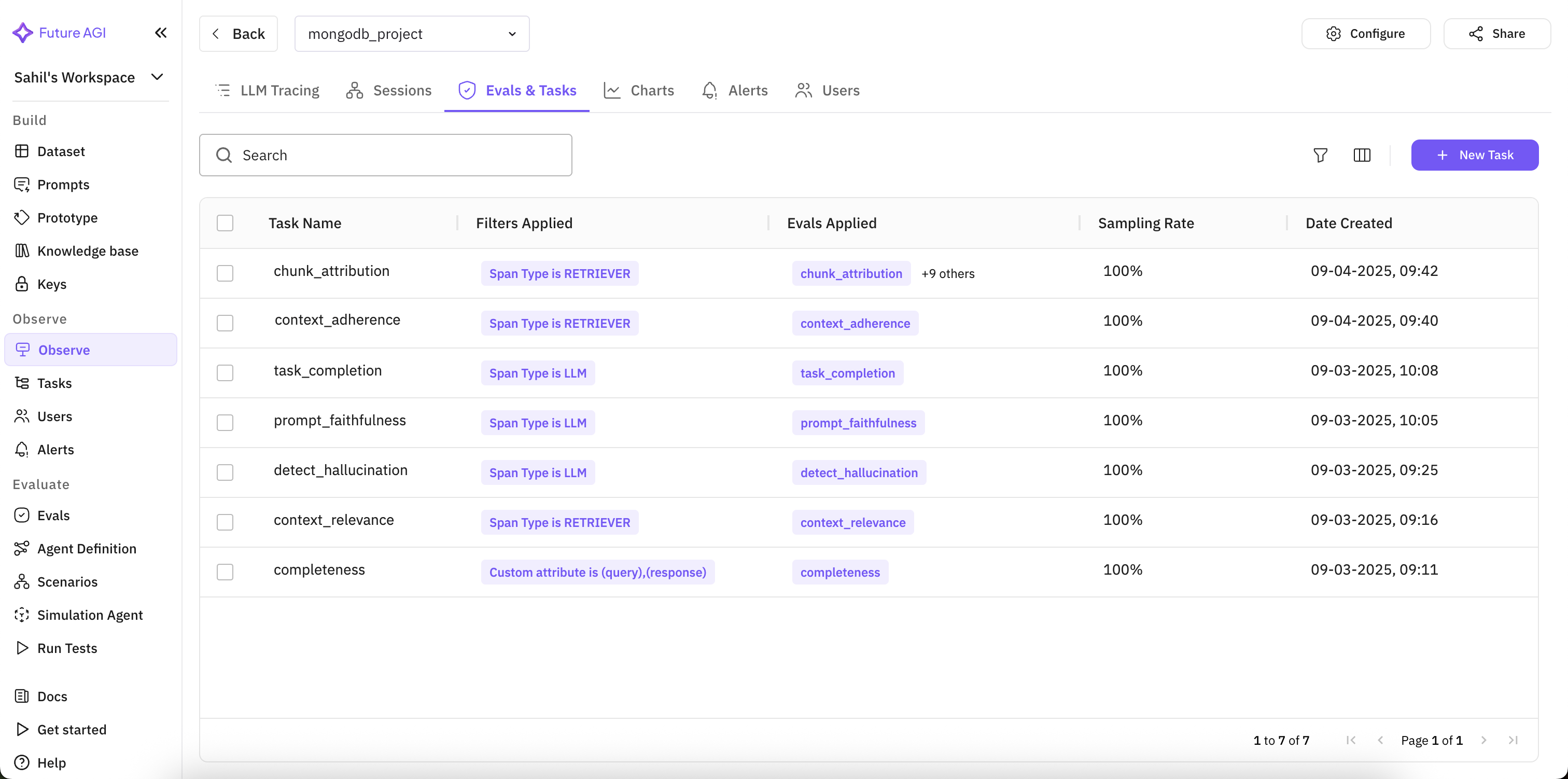
Attaching evals to the span type they should run against
For domain-specific fidelity beyond general hallucination detection, add a custom eval of your own naming (for example, one you call reference_verification) that fails a response unless every claim traces back to a retrieved chunk. See Creating your own evals.
You should see the Eval Task listed as active on the project, and scores start appearing on new traces within a few minutes.
Read the trace where the score catches the failure
Open a trace and compare the retrieved chunk against the answer directly. This is where “the pipeline looked healthy” and “the answer was wrong” split apart.
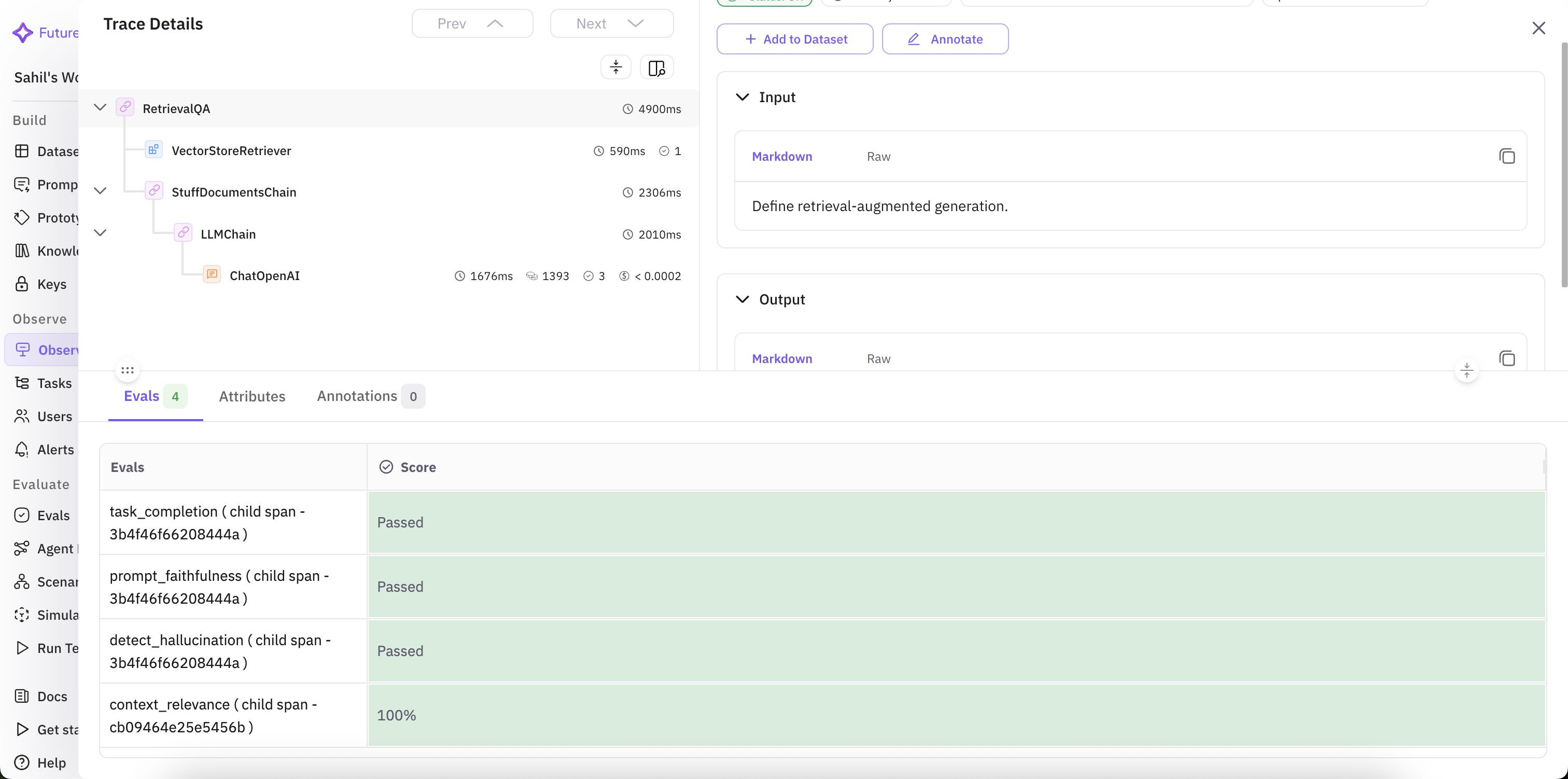
Span hierarchy, input/output, and per-span eval scores on one trace
On the final-sale question, Context Relevance scores high (the refund policy chunk was retrieved) but Context Adherence scores low: the retrieved policy says final-sale items aren’t refundable, and the answer promises a refund anyway. Task Completion alone would have called this a good answer; Context Adherence is what catches it.
You should see a low Context Adherence score on that specific trace, with Context Relevance staying high on the same trace, pointing the failure at generation rather than retrieval.
Alert on the metric that caught the failure
Turn the check from step 6 into a standing monitor instead of something you eyeball per trace. Set an alert on the eval score, an interval to check it over, and a threshold that represents an acceptable answer.
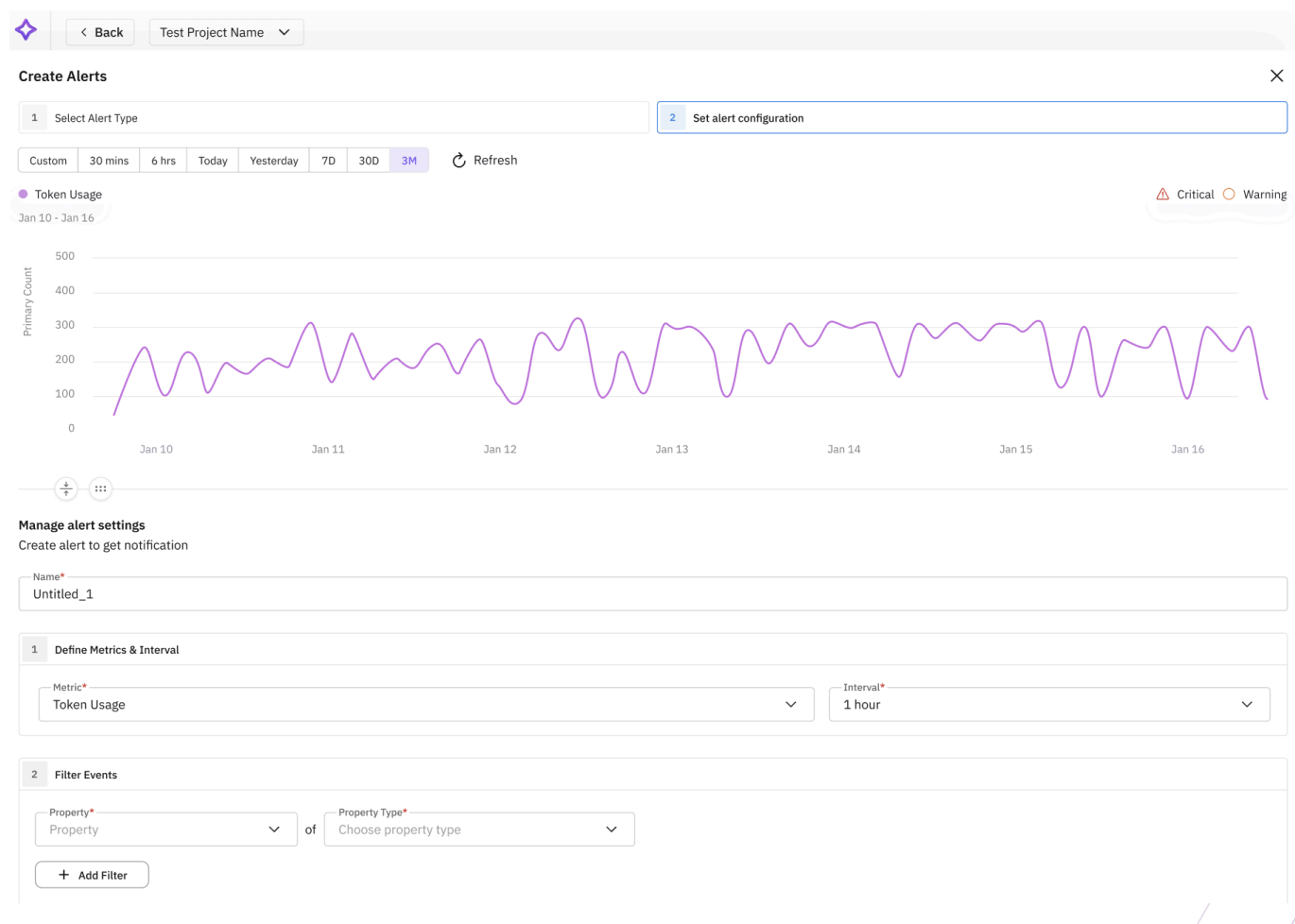
Creating an alert on Context Adherence
Triggered alerts land in a single dashboard across projects, so you can see which ones are healthy and which are firing without opening each trace.
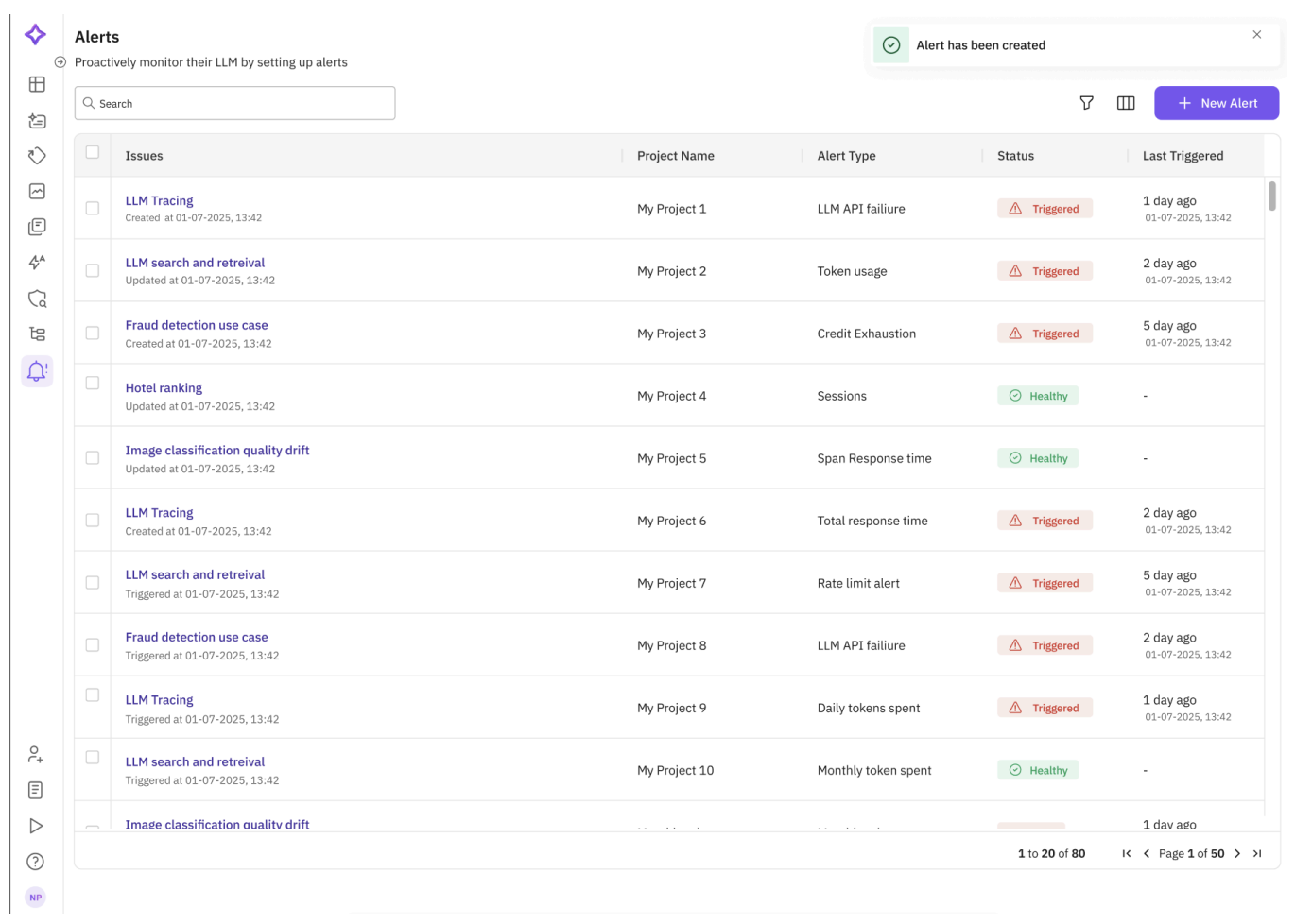
Alerts dashboard across projects
You should see the alert listed as Healthy until Context Adherence drops below the threshold you set, at which point it moves to Triggered and notifies the channel you configured.
Troubleshooting
| Symptom | Cause | Fix |
|---|---|---|
| No trace in Observe after step 4 | register() or .instrument() ran after building the chain, or the script exited before flush | Instrument before any chain call; call trace_provider.force_flush() before exit |
LangChainInstrumentor import error | Ran without traceAI-langchain installed, or imported LangChainInstrumentor from fi_instrumentation instead of traceai_langchain | pip install traceAI-langchain; import from traceai_langchain, not fi_instrumentation |
| Atlas rejects the vector index definition | Index dimensions doesn’t match the embedding model’s output length | Re-run the dimension probe from step 2 and use that exact value |
MongoDBAtlasVectorSearch.from_documents hangs or times out | Cluster network access doesn’t allow your IP, or the URI is missing the database name | Add your IP in Atlas Network Access; confirm MONGODB_ATLAS_URI includes a database name |
| Retrieval returns 0 chunks | index_name in the retriever doesn’t match the Atlas Search index name | Use the exact index name you created in Atlas, not the collection name |
| Eval Task shows no scores after several minutes | It ran before any trace existed, or the span didn’t carry INPUT_VALUE / OUTPUT_VALUE | Send at least one traced query first; confirm the LLM span has input and output set |
| Context Adherence is high but the answer is still wrong | The eval is mapped to the wrong span or the wrong context field | Re-check the Eval Task’s field mapping against the retriever span’s output |
| Alert never fires even when scores are low | Metric alerts only run on observe-type projects, or the threshold direction is inverted | Confirm the project type is Observe; verify the operator is “Less than” for a quality score |
To turn that into an automated fix instead of a manual prompt edit, continue with Improve a prompt automatically.
Questions & Discussion