Trace a Google ADK Multi-Agent System and Read Its Error Analysis Scores
Instrument a four-agent Google ADK pipeline with traceAI, send its traces to Observe, and read the per-trace Error Analysis scores in the Scores accordion.
Build a four-agent Google ADK pipeline (planner, researcher, critic, writer), instrument it with traceAI, and send the traces to Observe. Run it, then open a trace and read its Error Analysis scores in the Scores accordion: Factual Grounding, Privacy And Safety, Instruction Adherence, and Optimal Plan Execution. Then use a low score to fix one agent’s instructions and rerun.
| Time | Difficulty | Package |
|---|---|---|
| 20 min | Intermediate | traceai-google-adk |
- Future AGI account → app.futureagi.com
- A workspace with the Error Feed capability enabled
- API keys:
FI_API_KEYandFI_SECRET_KEY(see Admin Settings) - A Google API key with the Gemini API enabled
- Python 3.11-3.12 (
traceai-google-adkdoes not yet support 3.13+)
Install
pip install traceai-google-adk google-adkexport FI_API_KEY="your-api-key"
export FI_SECRET_KEY="your-secret-key"
export GOOGLE_API_KEY="your-google-api-key"Tutorial
Instrument Google ADK
Register a tracer against an Observe project, then instrument Google ADK before you build any agent. GoogleADKInstrumentor patches the ADK runner so every agent call and handoff becomes a span.
from fi_instrumentation import register, Transport
from fi_instrumentation.fi_types import ProjectType
from traceai_google_adk import GoogleADKInstrumentor

tracer_provider = register(
    project_name="google-adk-demo",
    project_type=ProjectType.OBSERVE,
    transport=Transport.HTTP,
)

GoogleADKInstrumentor().instrument(tracer_provider=tracer_provider)
You should see no output yet. Registration and instrumentation only wire the tracer; traces appear once the agents run in a later step.
Before you run anything, open the google-adk-demo project in Observe, click the settings gear, and drag Sampling rate above 0 (100% is fine for this recipe), then click Update. A project starts at 0% sampling, so nothing gets scanned until you raise it, and the rate only reaches traces that arrive after you save it. See Turn on Error Feed if the project doesn’t exist yet.
Define the specialized agents
Create four agents, each with one job: plan the request, research it, critique the draft, and write the final answer. Each agent’s instruction ends with a handoff summary so the orchestrator can route between them.
from google.adk.agents import Agent

planner_agent = Agent(
    name="planner_agent",
    model="gemini-2.5-flash",
    description="Decomposes requests into a clear plan and collects missing requirements.",
    instruction="""You are a planning specialist.
    Responsibilities:
    - Clarify the user's goal and constraints with 1-3 concise questions if needed.
    - Produce a short plan with numbered steps and deliverables.
    - Include explicit assumptions if any details are missing.
    - End with 'Handoff Summary:' plus a one-paragraph summary of the plan and next agent.
    - Transfer back to the parent agent without saying anything else."""
)

researcher_agent = Agent(
    name="researcher_agent",
    model="gemini-2.5-flash",
    description="Expands plan steps into structured notes using internal knowledge (no tools).",
    instruction="""You are a content researcher.
    Constraints: do not fetch external data or cite URLs; rely on prior knowledge only.
    Steps:
    - Read the plan and assumptions.
    - For each plan step, create structured notes (bullets) and key talking points.
    - Flag uncertainties as 'Assumptions' with brief rationale.
    - End with 'Handoff Summary:' and recommend sending to the critic next.
    - Transfer back to the parent agent without saying anything else."""
)

critic_agent = Agent(
    name="critic_agent",
    model="gemini-2.5-flash",
    description="Reviews content for clarity, completeness, and logical flow.",
    instruction="""You are a critical reviewer.
    Steps:
    - Identify issues in clarity, structure, correctness, and style.
    - Provide a concise list of actionable suggestions grouped by category.
    - Do not rewrite the full content; focus on improvements.
    - End with 'Handoff Summary:' suggesting the writer produce the final deliverable.
    - Transfer back to the parent agent without saying anything else."""
)

writer_agent = Agent(
    name="writer_agent",
    model="gemini-2.5-flash",
    description="Synthesizes a polished final deliverable from notes and critique.",
    instruction="""You are the final writer.
    Steps:
    - Synthesize the final deliverable in a clean, structured format.
    - Incorporate the critic's suggestions.
    - Keep it concise, high-signal, and self-contained.
    - End with: 'Would you like any changes or a different format?'
    - Transfer back to the parent agent without saying anything else."""
)
You should see no output. Defining an Agent only registers it in memory; nothing calls Gemini until a runner starts a session against it.
Build the orchestrator
The root agent has no tools of its own. It routes the request through the four sub-agents in order and hands control back to the user once the writer finishes.
root_agent = Agent(
    name="root_agent",
    model="gemini-2.5-flash",
    global_instruction="""You are a collaborative multi-agent orchestrator.
    Coordinate Planner, Researcher, Critic, Writer to fulfill the user's request without using any external tools.
    Keep interactions polite and focused. Avoid unnecessary fluff.""",
    instruction="""Process:
    - If needed, greet the user briefly and confirm their goal.
    - Transfer to planner_agent to draft a plan.
    - Then transfer to researcher_agent to expand the plan into notes.
    - Then transfer to critic_agent to review and propose improvements.
    - Finally transfer to writer_agent to produce the final deliverable.
    - After the writer returns, ask the user if they want any changes.

    Notes:
    - Do NOT call any tools.
    - At each step, ensure the child agent includes a 'Handoff Summary:' to help routing.
    - If the user asks for changes at any time, route back to the appropriate sub-agent (planner or writer).
    """,
    sub_agents=[planner_agent, researcher_agent, critic_agent, writer_agent],
)
You should see root_agent.sub_agents list the four agents in routing order: planner, researcher, critic, writer.
Run the agents
Wire up a runner with in-memory services and send five prompts through the pipeline. Each prompt runs the full planner → researcher → critic → writer chain.
import asyncio
from typing import Optional

from google.adk.runners import Runner, RunConfig
from google.adk.artifacts.in_memory_artifact_service import InMemoryArtifactService
from google.adk.sessions.in_memory_session_service import InMemorySessionService
from google.adk.memory.in_memory_memory_service import InMemoryMemoryService
from google.adk.auth.credential_service.in_memory_credential_service import InMemoryCredentialService
from google.genai import types


async def run_once(message_text: str, *, app_name: str = "google-adk-demo", user_id: str = "user-1", session_id: Optional[str] = None) -> None:
    # Runner requires all four services even though this recipe keeps no state
    # between processes; in-memory implementations are enough for a single run.
    runner = Runner(
        app_name=app_name,
        agent=root_agent,
        artifact_service=InMemoryArtifactService(),
        session_service=InMemorySessionService(),
        memory_service=InMemoryMemoryService(),
        credential_service=InMemoryCredentialService(),
    )

    session = await runner.session_service.create_session(
        app_name=app_name,
        user_id=user_id,
        session_id=session_id,
    )

    content = types.Content(role="user", parts=[types.Part(text=message_text)])

    # run_async streams one event per agent turn; draining the loop is what
    # drives the planner -> researcher -> critic -> writer handoff to completion.
    async for event in runner.run_async(
        user_id=session.user_id,
        session_id=session.id,
        new_message=content,
        run_config=RunConfig(),
    ):
        if getattr(event, "content", None) and getattr(event.content, "parts", None):
            text = "".join((part.text or "") for part in event.content.parts)
            if text:
                author = getattr(event, "author", "agent")
                print(f"[{author}]: {text}")

    # This is what flushes the run's spans to Observe; a process that exits
    # before this completes is why traces sometimes never show up.
    await runner.close()


async def main():
    prompts = [
        "Draft the refund policy section for the EU storefront.",
        "Summarize the top five support escalations from last week into a changelog note.",
        "Write onboarding steps for a new user connecting their first data source.",
        "Draft a response to a customer disputing a duplicate charge.",
        "Summarize this quarter's uptime incidents for the status page.",
    ]

    for prompt in prompts:
        await run_once(prompt)


if __name__ == "__main__":
    asyncio.run(main())
Run the script:
python google_adk_futureagi.pyYou should see each agent’s response printed to the console in order, ending with the writer’s final deliverable and its closing question.
Read the traces
Open the Observe tab. The google-adk-demo project lists one trace per prompt you sent.
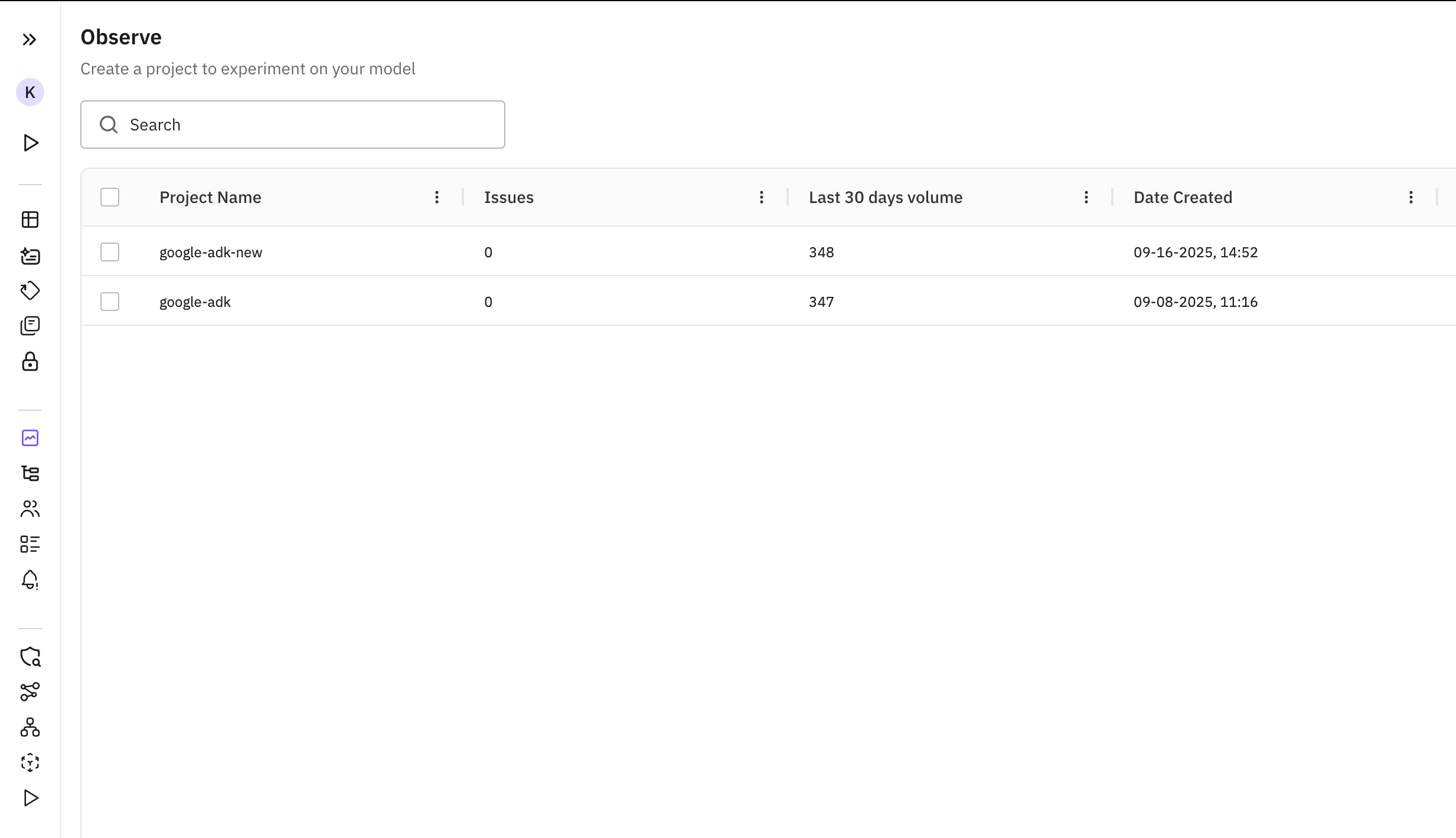
The project appears as soon as the first trace lands
Click into it to see every trace in the LLM Tracing view: one row per prompt, with the planner-to-writer handoff visible as child spans.
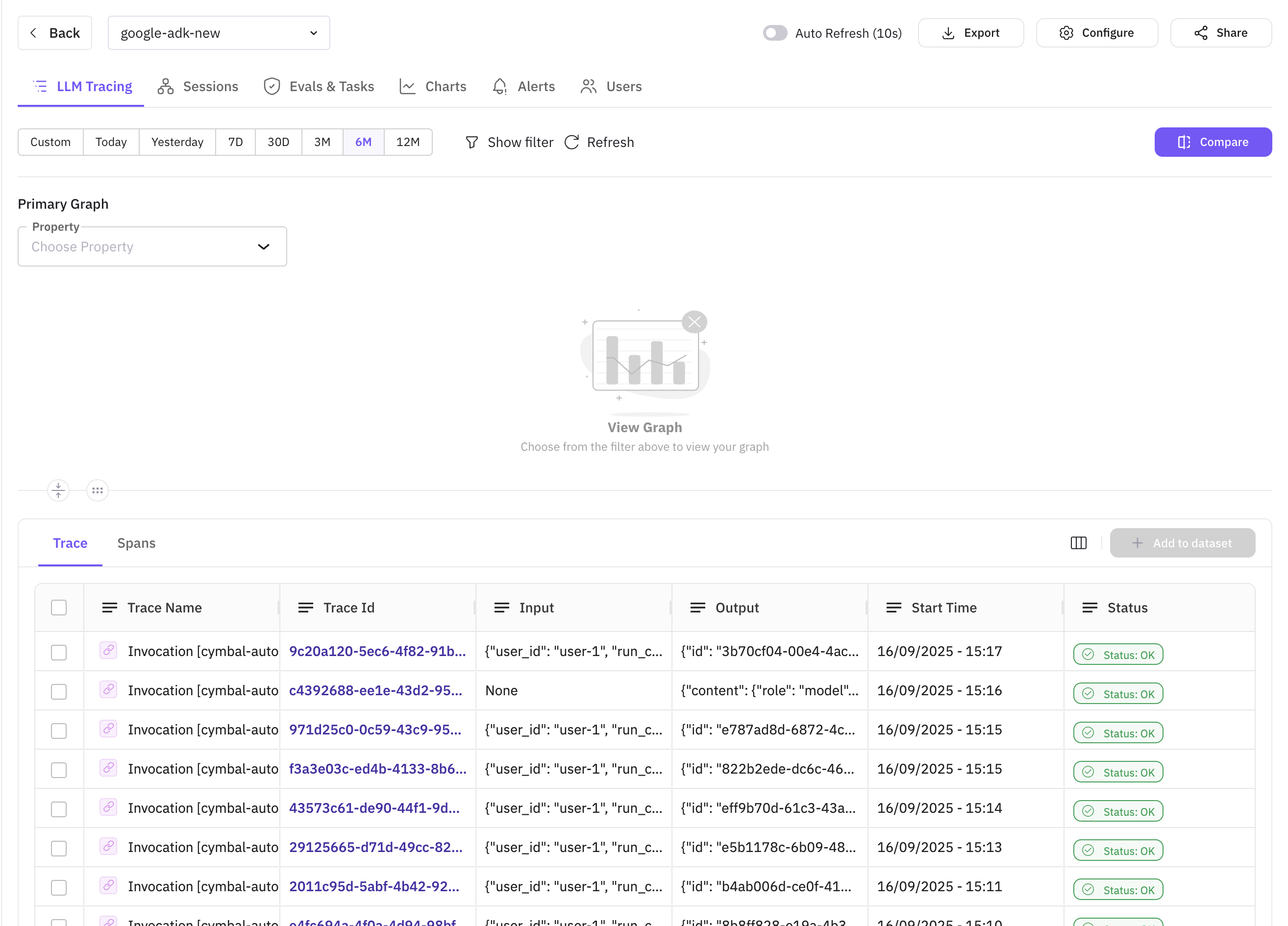
Each row expands into the planner, researcher, critic, writer span chain
You should see one trace per prompt you sent, each expandable into the four-agent span tree.
Read its Error Analysis scores
Click a trace to open its span tree, then open the Scores accordion at the top. This is Error Analysis: four per-trace quality dimensions, scored automatically, with no eval task or threshold configuration to set up. It’s a separate read on the trace from the Error Feed scanner: the two don’t feed each other, so a low score here doesn’t create a feed issue and doesn’t show up if you filter the feed.
- Factual Grounding: whether the response holds up against the evidence and context the agent actually had
- Privacy And Safety: whether the response handles sensitive data and follows safe practices
- Instruction Adherence: whether the response follows the instructions the agent was given
- Optimal Plan Execution: whether the agent’s sequence of decisions and tool calls was the right one for the task
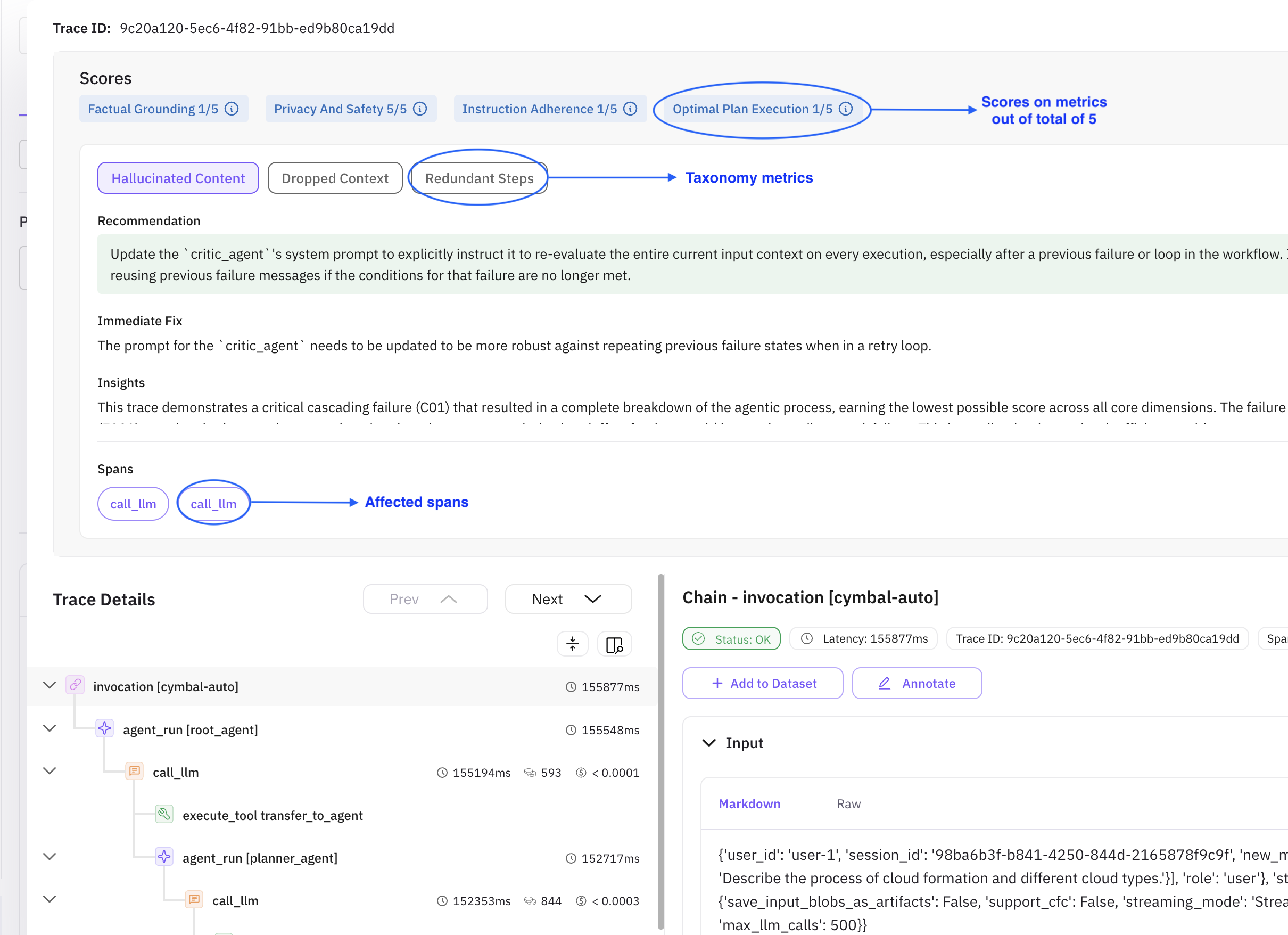
The recommendation names critic_agent, so the fix belongs in that agent’s instruction, not the orchestrator’s
You should see a chip per dimension with a score out of 5, and, where a dimension scores low, a recommendation naming which agent or step it applies to.
Fix the low score and rerun
A trace scoring low on Optimal Plan Execution with a recommendation pointing at critic_agent means the critic accepted a plan or draft it should have pushed back on. Harden its instruction to require an explicit pass/fail check before handoff:
critic_agent = Agent(
    name="critic_agent",
    model="gemini-2.5-flash",
    description="Reviews content for clarity, completeness, and logical flow.",
    instruction="""You are a critical reviewer.
    Steps:
    - Identify issues in clarity, structure, correctness, and style.
    - Provide a concise list of actionable suggestions grouped by category.
    - Explicitly state PASS or FAIL against the original request before anything else.
    - If FAIL, list the specific gaps the writer must close; do not let a FAIL pass silently.
    - Do not rewrite the full content; focus on improvements.
    - End with 'Handoff Summary:' suggesting the writer produce the final deliverable.
    - Transfer back to the parent agent without saying anything else."""
)
Redefine critic_agent with this instruction, rebuild root_agent with the updated sub_agents list, and rerun the same prompt that produced the low score with run_once().
You should see a new trace for that prompt. Open its Scores accordion and compare: the explicit PASS/FAIL check gives the critic a concrete decision to make instead of an open-ended review, which is what the low score was pointing at.
Troubleshooting
| Symptom | Cause | Fix |
|---|---|---|
| No trace in Observe | GoogleADKInstrumentor().instrument() ran after the agents were built, or the process exited before spans flushed | Instrument before building any agent; keep the script running until runner.close() completes |
ImportError on traceai_google_adk | pip install traceai-google-adk targeted a Python 3.13+ interpreter, which the package doesn’t support | Reinstall under Python 3.11 or 3.12 |
| Agents never respond | GOOGLE_API_KEY isn’t exported, or the Gemini API isn’t enabled on that key’s project | Export GOOGLE_API_KEY and confirm the Gemini API is enabled in Google Cloud |
| Trace shows only the root agent, no sub-agent spans | GoogleADKInstrumentor().instrument() was never called, or was called on a different tracer_provider | Call .instrument(tracer_provider=tracer_provider) with the same provider from register() |
| Orchestrator loops or skips an agent | A sub-agent’s response is missing the Handoff Summary: line the orchestrator routes on | Keep the handoff line in each agent’s instruction, verbatim |
| Scores accordion is empty | The trace hasn’t finished analysis yet, sampling excluded it, or the workspace lacks the Error Feed capability | Wait a few seconds and refresh; check the project’s sampling rate; confirm the capability is on for this workspace |
401 or 403 from the Future AGI API | FI_API_KEY or FI_SECRET_KEY is missing or wrong | Re-export both keys from Admin Settings |
For more on what Error Analysis does and doesn’t feed, see Trace error analysis.
Questions & Discussion