Inline Evals in Tracing: Score LLM Responses as Generated
Attach quality scores directly to production traces and see groundedness and toxicity scores alongside every LLM call in Future AGI Tracing.
By the end, the answer-question span carries a groundedness_check score, filterable in the trace grid, alongside toxicity and instruction-adherence checks attached to other spans in the same run.


| Time | Difficulty | Package |
|---|---|---|
| 15 min | Intermediate | fi-instrumentation-otel, ai-evaluation |
- Future AGI account → app.futureagi.com
- API keys:
FI_API_KEYandFI_SECRET_KEY(see Get your API keys) - OpenAI API key (for the LLM calls in this tutorial)
- Python 3.11
Install
pip install fi-instrumentation-otel traceai-openai ai-evaluation openaiexport FI_API_KEY="your-api-key"
export FI_SECRET_KEY="your-secret-key"
export OPENAI_API_KEY="your-openai-api-key"Tutorial
Note
This cookbook covers inline SDK evals: scores computed in your own code path with evaluator.evaluate(trace_eval=True), attached to the span you’re currently inside. For evals the platform runs automatically on spans as they’re ingested, with no code change, configure a platform Eval Task instead: see Configure evals on an Observe project.
Set up tracing and the Evaluator
Inline evals require three components: a tracer (to create spans), OpenAIInstrumentor (to auto-trace LLM calls), and an Evaluator (to run evals and attach results to spans). All are initialized once at startup.
import os
import openai
from fi_instrumentation import register, FITracer
from fi_instrumentation.fi_types import ProjectType
from fi.evals import Evaluator
from traceai_openai import OpenAIInstrumentor

trace_provider = register(
    project_type=ProjectType.OBSERVE,
    project_name="my-rag-app",
    set_global_tracer_provider=True,
)
OpenAIInstrumentor().instrument(tracer_provider=trace_provider)

evaluator = Evaluator(
    fi_api_key=os.environ["FI_API_KEY"],
    fi_secret_key=os.environ["FI_SECRET_KEY"],
)

client = openai.OpenAI()
tracer = FITracer(trace_provider.get_tracer(__name__))
This step produces no visible output. It only wires up the tracer and evaluator. Call OpenAIInstrumentor().instrument() before creating the OpenAI client or making any calls, otherwise those calls trace without input/output attributes.
Attach an eval to a span with trace_eval=True
Inside a span context, call evaluator.evaluate() with trace_eval=True. The eval result is automatically attached to the active span: no manual attribute setting needed.
The first attempt below retrieves the wrong policy chunk on purpose, a common RAG failure, so you can see what a failed groundedness score looks like before fixing it.
question = "What's the refund window for a final sale item?"

# Wrong chunk came back from retrieval: shipping info, not refund policy
context = "Standard shipping takes 3-5 business days within the continental US. Expedited orders arrive in 1-2 business days for an additional fee."

with tracer.start_as_current_span("answer-question") as span:
    response = client.chat.completions.create(
        model="gpt-4o-mini",
        messages=[
            {"role": "system", "content": f"Answer using only this context:\n{context}"},
            {"role": "user",   "content": question},
        ],
    )
    answer = response.choices[0].message.content

    span.set_attribute("raw.input",  question)
    span.set_attribute("raw.output", answer)

    # Run a groundedness check and attach it to this span
    evaluator.evaluate(
        eval_templates="groundedness",
        inputs={
            "input":   question,
            "output":  answer,
            "context": context,
        },
        model_name="turing_large",
        custom_eval_name="groundedness_check",  # label shown in the dashboard
        trace_eval=True,                        # attach result to the active span
    )

print(f"Answer: {answer}")

# Flush spans before the script exits. BatchSpanProcessor buffers for up to 5 seconds
trace_provider.force_flush()
In the dashboard, click the answer-question span to expand its detail panel, then switch to the Evals tab in the bottom section. You will see a row for groundedness_check scored Failed (illustrative, captured from a run against the mismatched chunk above), with reasoning that the answer states a refund window not present in the context.
Fix the retrieval, not the eval: swap in the chunk that actually answers the question and re-run.
context = "Orders can be refunded within 30 days of delivery if the item is unused and in original packaging. Final sale items are not eligible for refunds. Approved refunds are issued to the original payment method within 5-7 business days."

with tracer.start_as_current_span("answer-question") as span:
    response = client.chat.completions.create(
        model="gpt-4o-mini",
        messages=[
            {"role": "system", "content": f"Answer using only this context:\n{context}"},
            {"role": "user",   "content": question},
        ],
    )
    answer = response.choices[0].message.content

    span.set_attribute("raw.input",  question)
    span.set_attribute("raw.output", answer)

    evaluator.evaluate(
        eval_templates="groundedness",
        inputs={
            "input":   question,
            "output":  answer,
            "context": context,
        },
        model_name="turing_large",
        custom_eval_name="groundedness_check",
        trace_eval=True,
    )

print(f"Answer: {answer}")
trace_provider.force_flush()
This second answer-question span shows groundedness_check scored Passed, same eval, same question, corrected context.
Expanding the answer-question span’s Evals tab to see the groundedness_check score and its reasoning.
Run multiple evals on the same span
Call evaluator.evaluate() multiple times within the same span: each call attaches a separate named eval result.
user_input = "The customer says their refund hasn't arrived after 10 days. Draft a short, polite reply explaining our 5-7 business day refund window and the next step."

with tracer.start_as_current_span("explain-concept") as span:
    response = client.chat.completions.create(
        model="gpt-4o-mini",
        messages=[{"role": "user", "content": user_input}],
    )
    answer = response.choices[0].message.content

    span.set_attribute("raw.input",  user_input)
    span.set_attribute("raw.output", answer)

    # Check 1: Is the response toxicity-free?
    evaluator.evaluate(
        eval_templates="toxicity",
        inputs={"output": answer},
        model_name="turing_small",
        custom_eval_name="toxicity_check",
        trace_eval=True,
    )

    # Check 2: Did the response follow the prompt instructions?
    evaluator.evaluate(
        eval_templates="prompt_instruction_adherence",
        inputs={"output": answer, "prompt": user_input},
        model_name="turing_small",
        custom_eval_name="instruction_check",
        trace_eval=True,
    )

print(f"Answer: {answer}")

# Flush spans before the script exits. BatchSpanProcessor buffers for up to 5 seconds
trace_provider.force_flush()
You should see the print statement resolve with the drafted reply, and both toxicity_check and instruction_check appear as separate entries on the explain-concept span’s Evals tab.
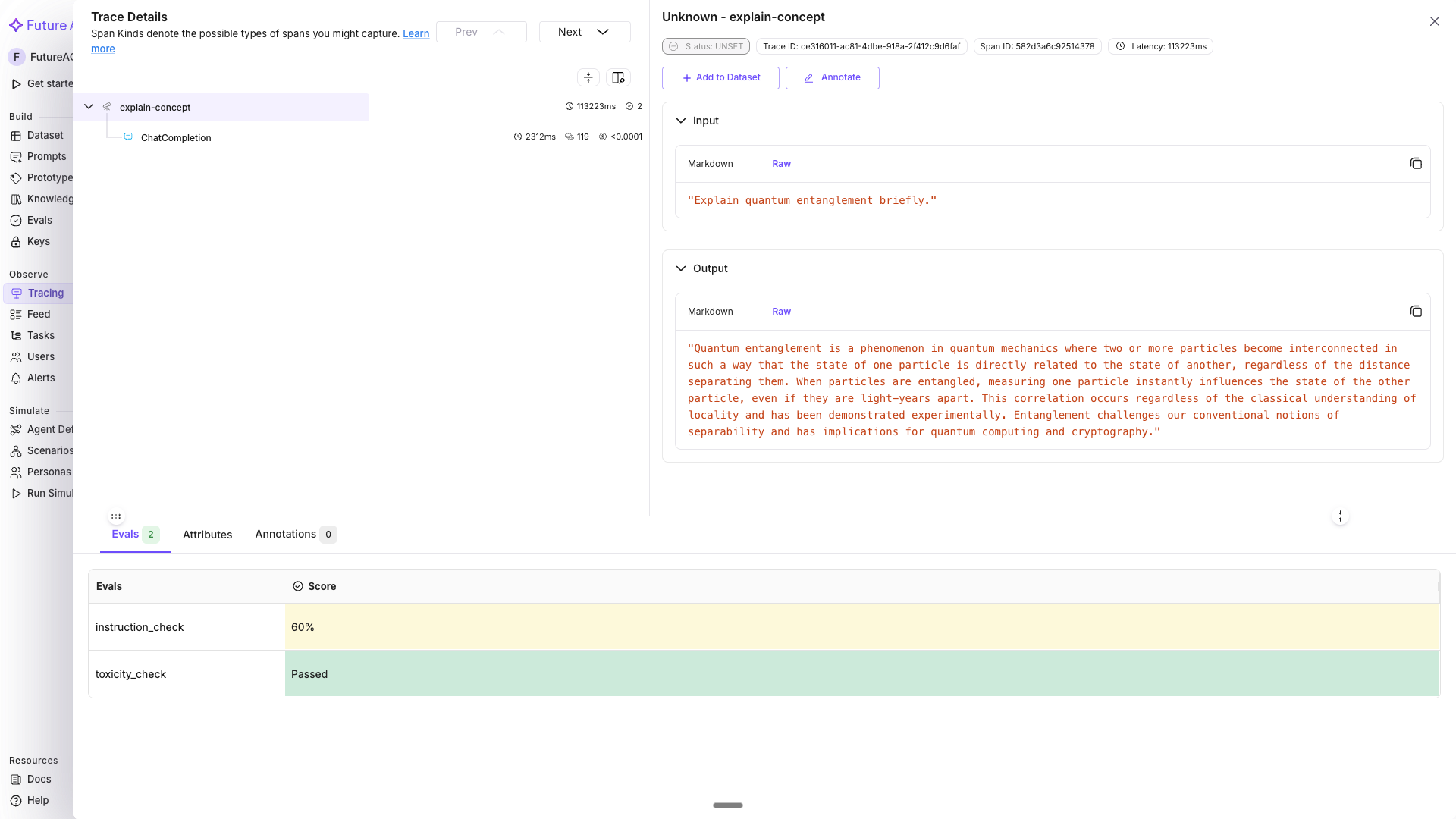
The explain-concept span’s Evals tab with toxicity_check and instruction_check listed as separate rows.
Tip
turing_flash is a fast default for inline evals. Use turing_large for maximum accuracy (it also supports image and audio inputs).
Inline evals on a full RAG pipeline
A realistic example: trace the full pipeline (retrieval and generation) and attach a groundedness eval to the generation span.
from fi_instrumentation import using_user, using_session

def retrieve_docs(query: str) -> list[str]:
    # Simulate vector DB retrieval
    return [
        "Orders can be refunded within 30 days of delivery if the item is unused and in original packaging.",
        "Approved refunds are issued to the original payment method within 5-7 business days.",
    ]


def answer_question(question: str, user_id: str, session_id: str) -> str:
    with using_user(user_id), using_session(session_id):
        with tracer.start_as_current_span("rag-pipeline") as pipeline_span:
            pipeline_span.set_attribute("pipeline.question", question)

            # Retrieval span
            with tracer.start_as_current_span("retrieval") as ret_span:
                docs = retrieve_docs(question)
                ret_span.set_attribute("retrieval.doc_count", len(docs))

            # Generation span - eval attached here
            context = "\n".join(docs)
            with tracer.start_as_current_span("generation") as gen_span:
                response = client.chat.completions.create(
                    model="gpt-4o-mini",
                    messages=[
                        {"role": "system", "content": f"Answer from:\n{context}"},
                        {"role": "user",   "content": question},
                    ],
                )
                answer = response.choices[0].message.content
                gen_span.set_attribute("raw.output", answer)

                # Inline groundedness eval - did the answer stay grounded in the docs?
                evaluator.evaluate(
                    eval_templates="groundedness",
                    inputs={
                        "input":   question,
                        "output":  answer,
                        "context": context,
                    },
                    model_name="turing_large",
                    custom_eval_name="groundedness_check",
                    trace_eval=True,
                )

            return answer


result = answer_question(
    question="What's your refund window and how do I get my money back?",
    user_id="user-abc123",
    session_id="session-xyz789",
)
print(result)

trace_provider.force_flush()
In Tracing, the trace tree shows rag-pipeline with retrieval and generation as children, with the groundedness score visible on the generation span.
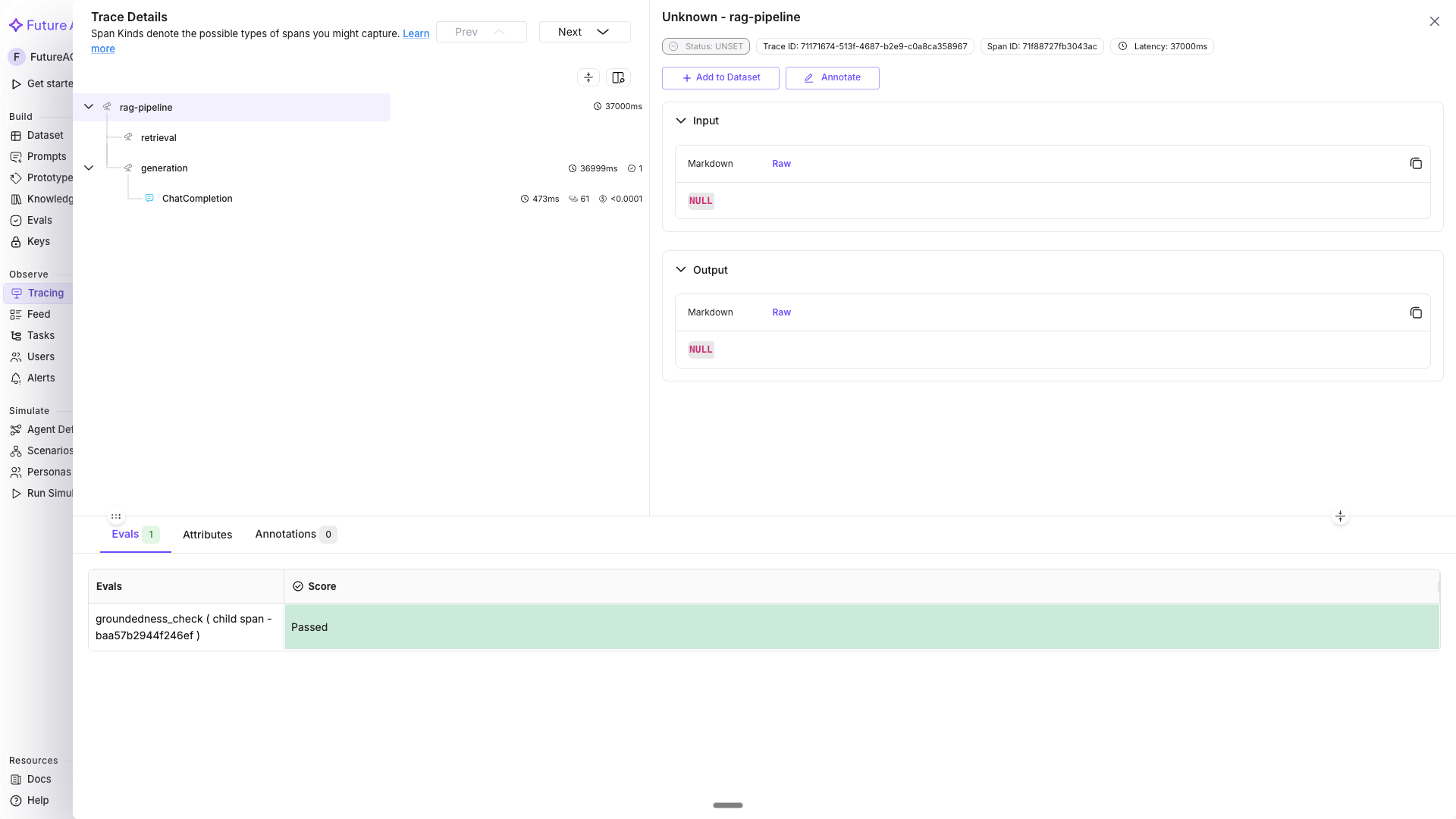
The rag-pipeline trace tree with the groundedness_check score attached to the generation span.
View and filter by eval scores in the dashboard
Once traces are flowing with inline evals, each eval appears as a column under the Evaluation Metrics group in the trace table.
- Go to app.futureagi.com → Tracing (left sidebar under OBSERVE) → open the
my-rag-appproject - Eval columns (e.g.
groundedness_check,toxicity_check) appear in the trace grid; Pass/Fail evals show colored tags, score evals show percentages - To filter: click the filter icon → select Evaluation Metrics → choose the eval name (e.g.
groundedness_check) → set the operator (equals, between) and value (Passed/Failed for Pass/Fail evals, or a numeric range for score evals) - Click any cell value in an eval column to open a quick filter popover for that specific score
- Click a trace row → expand the span detail → switch to the Evals tab to see the score and hover for reasoning
You should see the my-rag-app trace grid with eval columns populated for every span that ran evaluator.evaluate(trace_eval=True).

The my-rag-app trace grid with the groundedness_check and toxicity_check columns populated, filtered to Failed rows.
Troubleshooting
| Symptom | Cause | Fix |
|---|---|---|
| Eval score never shows up on the span | force_flush() wasn’t called before the process exited; BatchSpanProcessor buffers spans for up to 5 seconds | Call trace_provider.force_flush() before the script exits, or keep the process alive long enough for the batch to flush |
evaluator.evaluate() raises an authentication error | FI_API_KEY or FI_SECRET_KEY is missing, blank, or copied from the wrong project | Re-export both keys from Get your API keys and confirm they belong to the project you’re tracing into |
Span has no raw.input / raw.output and the eval scores it incorrectly | OpenAIInstrumentor().instrument() was called after the OpenAI client was created, or not called at all | Call instrument() immediately after register(), before creating openai.OpenAI() |
| Eval result attached to the wrong span, or not attached at all | evaluator.evaluate(trace_eval=True) was called outside the with tracer.start_as_current_span(...) block, after the span already closed | Keep the evaluate() call inside the same with block as the LLM call it’s scoring |
| Eval column doesn’t appear in the dashboard filter list | No trace has landed yet with that custom_eval_name, or the name has a typo that doesn’t match across calls | Wait for a trace to finish ingesting (usually a few seconds), and check custom_eval_name spelling matches exactly everywhere it’s used |
ImportError on fi.evals, fi_instrumentation, or traceai_openai | Only some of the four required packages are installed | Reinstall with the exact line from Install: pip install fi-instrumentation-otel traceai-openai ai-evaluation openai |
| Same trace appears twice in the dashboard | register() was called more than once in the same process (common when re-running a notebook cell) | Call register() once per process; restart the kernel or guard the call so it only runs on first import |
Session-Based Observability covers tagging spans with user_id and session_id so multi-turn conversations group into a single filterable unit: Session-Based Observability.
Questions & Discussion