Manual Tracing: Add Custom Spans to Any Application
Instrument any Python application with custom spans, user context, and metadata and see every call visualized in the Future AGI Tracing dashboard.
Wrap retrieval, tools, and LLM calls in custom spans so one nested trace tree in Tracing carries your user, session, metadata, and tags.


| Time | Difficulty | Package |
|---|---|---|
| 15 min | Intermediate | fi-instrumentation-otel + traceAI-openai |
- Future AGI account → app.futureagi.com
- API keys:
FI_API_KEYandFI_SECRET_KEY(see Get your API keys) - Python 3.11+
- OpenAI API key (for the LLM calls in this tutorial)
Install
pip install fi-instrumentation-otel traceAI-openai openaiexport FI_API_KEY="your-api-key"
export FI_SECRET_KEY="your-secret-key"
export OPENAI_API_KEY="your-openai-api-key"Tutorial
Auto-trace every OpenAI call
register() sets up an OpenTelemetry tracer provider connected to Future AGI. OpenAIInstrumentor patches the OpenAI client so every API call is captured automatically: model, messages, token counts, latency, with no further code changes.
from fi_instrumentation import register
from fi_instrumentation.fi_types import ProjectType
from traceai_openai import OpenAIInstrumentor
from openai import OpenAI

# 1. Register the tracer provider
trace_provider = register(
    project_type=ProjectType.OBSERVE,
    project_name="my-app",
)

# 2. Patch the OpenAI client
OpenAIInstrumentor().instrument(tracer_provider=trace_provider)

# All subsequent OpenAI calls are now traced automatically
client = OpenAI()

response = client.chat.completions.create(
    model="gpt-4o-mini",
    messages=[{"role": "user", "content": "What is the capital of France?"}],
)
print(response.choices[0].message.content)
You should see:
Paris is the capital of France.Go to app.futureagi.com → Tracing (left sidebar under OBSERVE) and the call appears with its full input/output and token usage.
Add a custom span for non-LLM steps
Not every meaningful step calls an LLM. Database lookups, retrieval, validation, and preprocessing are invisible to auto-instrumentation. Wrap them in a custom span to include them in your trace tree.
from fi_instrumentation import FITracer

# Get a tracer scoped to this module. FITracer adds fi.span_kind attributes
tracer = FITracer(trace_provider.get_tracer(__name__))

def retrieve_context(query: str) -> list[str]:
    with tracer.start_as_current_span("retrieve-context") as span:
        span.set_attribute("retrieval.query", query)

        # Simulate a vector DB lookup
        docs = ["Paris is the capital of France.", "France is in Western Europe."]

        span.set_attribute("retrieval.doc_count", len(docs))
        return docs


def answer_with_context(query: str) -> str:
    # Parent span groups retrieval + LLM into one trace
    with tracer.start_as_current_span("answer-with-context") as span:
        docs = retrieve_context(query)
        context = "\n".join(docs)

        response = client.chat.completions.create(
            model="gpt-4o-mini",
            messages=[
                {"role": "system", "content": f"Answer using only this context:\n{context}"},
                {"role": "user", "content": query},
            ],
        )
        return response.choices[0].message.content


print(answer_with_context("Where is Paris?"))
You should see:
Paris is located in north-central France, along the Seine River.In the dashboard, the trace tree shows answer-with-context (parent) → retrieve-context + OpenAI LLM span (children), with per-step timing. Without the parent span, retrieval and the LLM call would appear as separate traces since each top-level span gets its own trace ID.
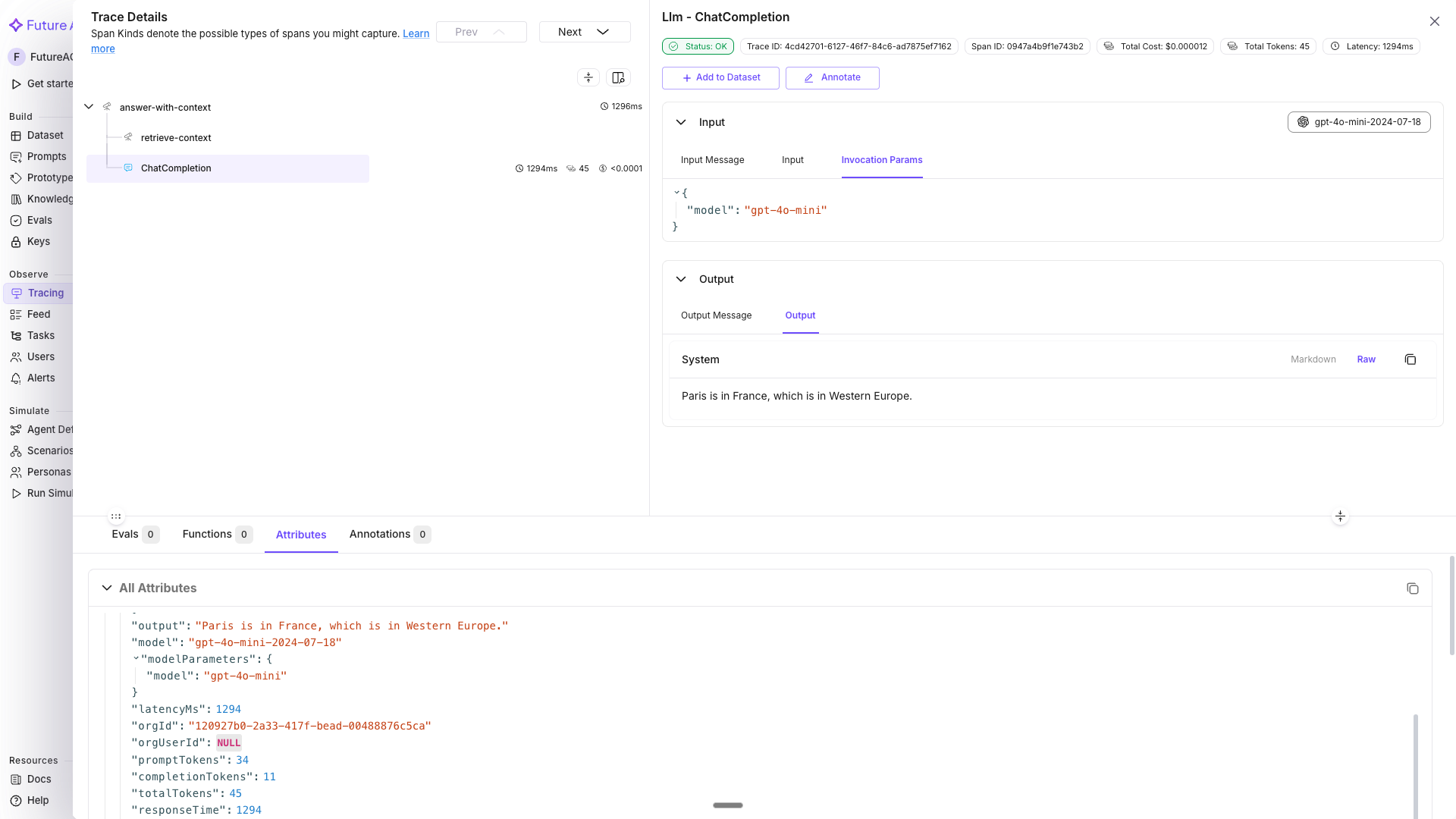
The trace detail view with answer-with-context as the parent row and retrieve-context nested underneath it.
Attach user ID, session ID, and metadata
Context managers from fi_instrumentation propagate attributes to every span created inside them. You don’t set anything on spans manually; any LLM call or custom span inside the with block inherits these values automatically.
from fi_instrumentation import using_user, using_session, using_metadata

user_id = "user-abc123"
session_id = "session-xyz789"
metadata = {"environment": "production", "app_version": "2.1.0"}

with using_user(user_id), using_session(session_id), using_metadata(metadata):
    # Both the retrieval span and the OpenAI span get user.id, session.id, and metadata
    result = answer_with_context("What is the capital of France?")
    print(result)
In the Tracing dashboard, userId is available as a direct filter in the LLM Tracing tab. To filter by session.id or metadata, use the Attribute filter: select Attribute from the Property dropdown, pick the attribute key (for example session.id), choose an operator (Equals, Contains, and so on), then enter the value.
You can also view all traces grouped by session in the Sessions tab (second tab after “LLM Tracing”).
Tip
Use using_user and using_session in your API request handler so every trace from that request is tagged automatically; there’s no need to pass IDs through every function call.
Tag spans for filtering and alerting
Tags are string labels that let you group traces by environment, feature flag, experiment branch, or any other category. Tags are a flat list of labels, where metadata is a key/value map.
from fi_instrumentation import using_tags

# Tag all traces from this run as production + rag-pipeline
with using_tags(["production", "rag-pipeline", "v2"]):
    result = answer_with_context("Who wrote Hamlet?")
    print(result)
In Tracing, filter by tags using the Attribute filter: select Attribute → pick tag.tags → set operator to Contains → enter rag-pipeline. This isolates RAG-specific traces for latency and error analysis.
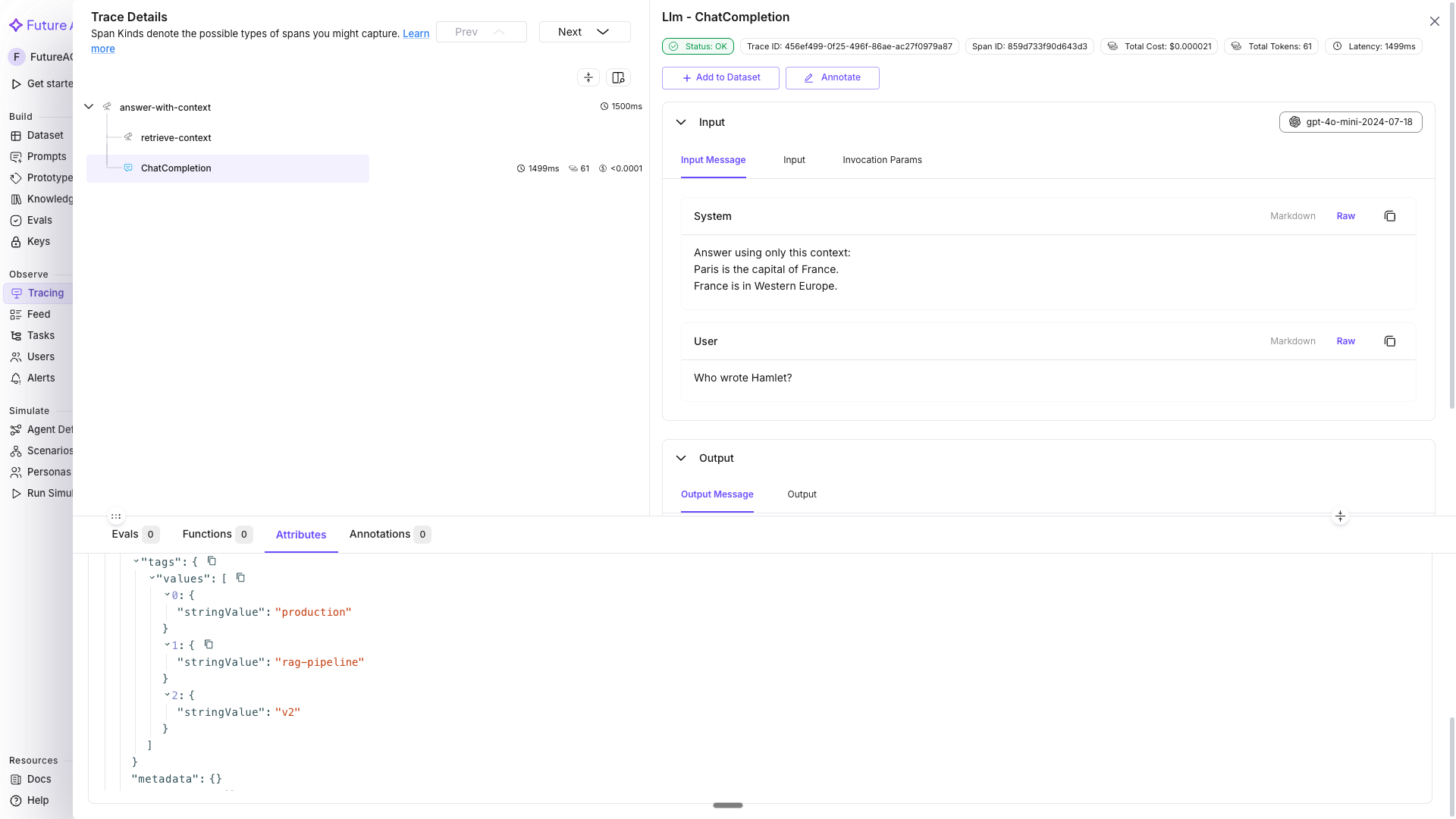
The Attribute filter set to tag.tags Contains rag-pipeline, narrowing the trace list to matching runs.
Tip
Combine using_user, using_session, using_metadata, and using_tags into a single using_attributes() call. See context helpers for details.
Nest spans for complex multi-step pipelines
For multi-step operations, nest spans to show the execution hierarchy. A parent span groups related child spans, and its duration covers everything that ran inside it, so you can see which step took the time.
def run_rag_pipeline(user_query: str, user_id: str, session_id: str) -> str:
    with using_user(user_id), using_session(session_id), using_tags(["rag-pipeline"]):
        with tracer.start_as_current_span("rag-pipeline") as pipeline_span:
            pipeline_span.set_attribute("pipeline.query", user_query)

            # Child span 1: retrieval
            with tracer.start_as_current_span("retrieve") as retrieval_span:
                docs = retrieve_context(user_query)
                retrieval_span.set_attribute("retrieval.doc_count", len(docs))

            # Child span 2: LLM call (auto-instrumented, just call it)
            context_text = "\n".join(docs)
            response = client.chat.completions.create(
                model="gpt-4o-mini",
                messages=[
                    {"role": "system", "content": f"Answer using:\n{context_text}"},
                    {"role": "user", "content": user_query},
                ],
            )
            answer = response.choices[0].message.content
            pipeline_span.set_attribute("pipeline.answer_length", len(answer))
            return answer


result = run_rag_pipeline(
    user_query="What is the population of France?",
    user_id="user-abc123",
    session_id="session-xyz789",
)
print(result)
You should see:
The population of France is approximately 68 million people as of recent estimates.The trace tree in Tracing shows: rag-pipeline → retrieve → OpenAI LLM span, with each step’s duration visible.
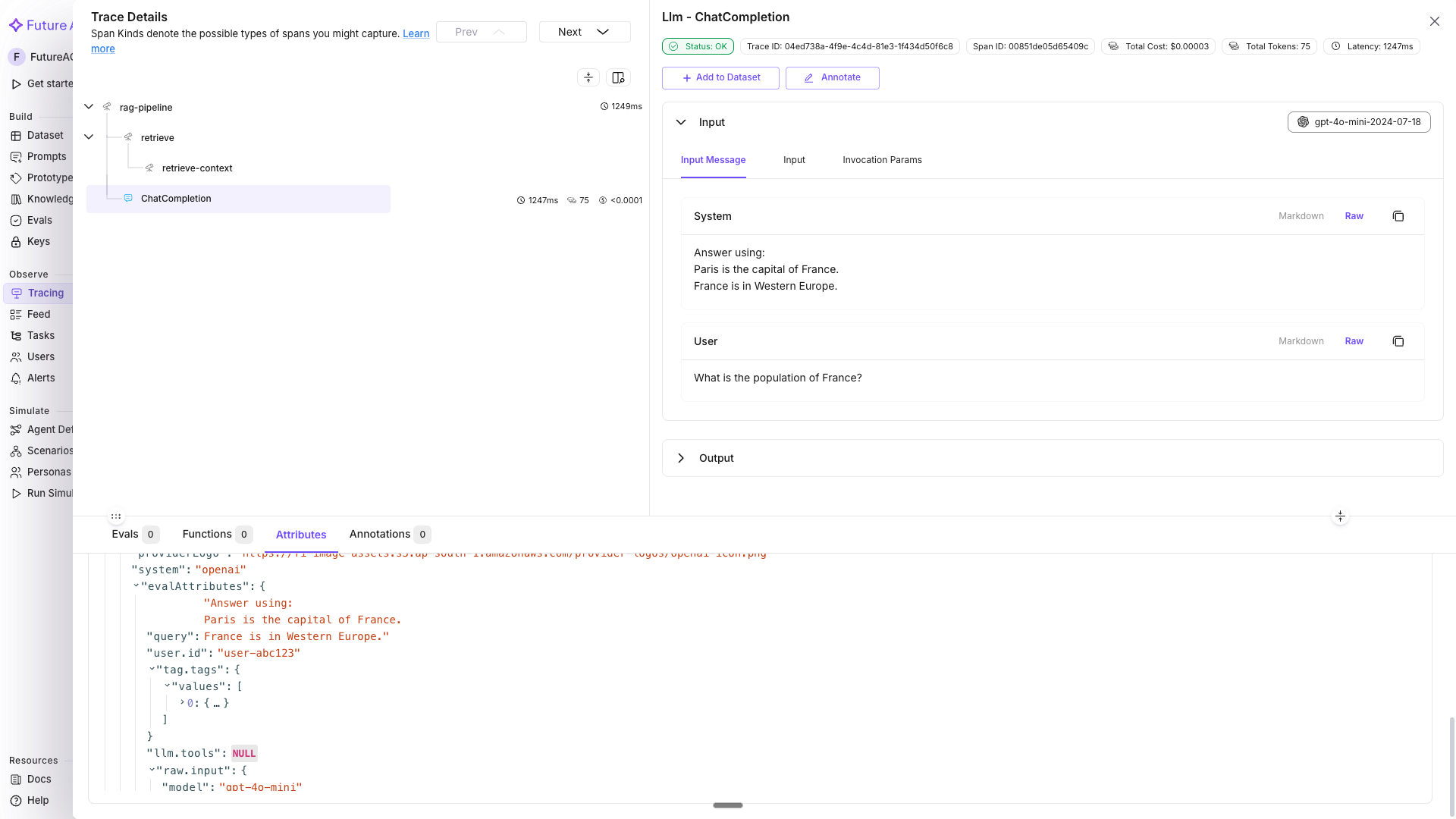
Three levels of nesting in the trace detail view: rag-pipeline, then retrieve, then the OpenAI LLM span.
Log prompt template details with using_prompt_template
If you use prompt versioning, attach the template name, label, and version to every span created inside the block. This lets you filter traces by prompt version in the Tracing dashboard. The template, label, and version values should match a prompt you created in the Prompt Workbench.
from fi_instrumentation import using_prompt_template

# These values should match a prompt created in your Prompt Workbench
with using_prompt_template(
    template="support-response",
    label="production",
    version="v2",
    variables={"question": "What is the return policy?"},
):
    response = client.chat.completions.create(
        model="gpt-4o-mini",
        messages=[{"role": "user", "content": "What is the return policy?"}],
    )
    print(response.choices[0].message.content)
You should see:
Our policy allows returns within 30 days of purchase for unused items.In Tracing, open the trace and select the OpenAI LLM span. In the attributes panel, llm.prompt_template.name reads support-response, llm.prompt_template.label reads production, llm.prompt_template.version reads v2, and llm.prompt_template.variables shows {"question": "What is the return policy?"}.
Use decorators for agent and tool spans
FITracer provides @tracer.agent, @tracer.chain, and @tracer.tool decorators that capture function inputs and outputs as span attributes automatically.
# FITracer was imported in Step 2, reuse it here
# tracer = FITracer(trace_provider.get_tracer(__name__))


@tracer.agent(name="support_agent")
def support_agent(question: str) -> str:
    """Top-level agent that orchestrates retrieval and generation."""
    docs = search_docs(question)
    return generate_answer(question, docs)


@tracer.tool(name="search_docs", description="Search the product documentation")
def search_docs(query: str) -> list[str]:
    return ["30-day return policy for unused items.", "Free shipping on orders over $50."]


@tracer.chain(name="generate_answer")
def generate_answer(question: str, docs: list[str]) -> str:
    context = "\n".join(docs)
    response = client.chat.completions.create(
        model="gpt-4o-mini",
        messages=[
            {"role": "system", "content": f"Answer using:\n{context}"},
            {"role": "user", "content": question},
        ],
    )
    return response.choices[0].message.content


result = support_agent("What is the return policy?")
print(result)

trace_provider.force_flush()
You should see:
Our return policy allows returns within 30 days for unused items. We also offer free shipping on orders over $50.In Tracing, the span tree shows: support_agent (agent) → search_docs (tool) → generate_answer (chain) → OpenAI LLM span. Each decorator sets the fi.span_kind attribute (AGENT, TOOL, or CHAIN) so you can filter by span type in the dashboard. All decorators support both sync and async functions automatically.
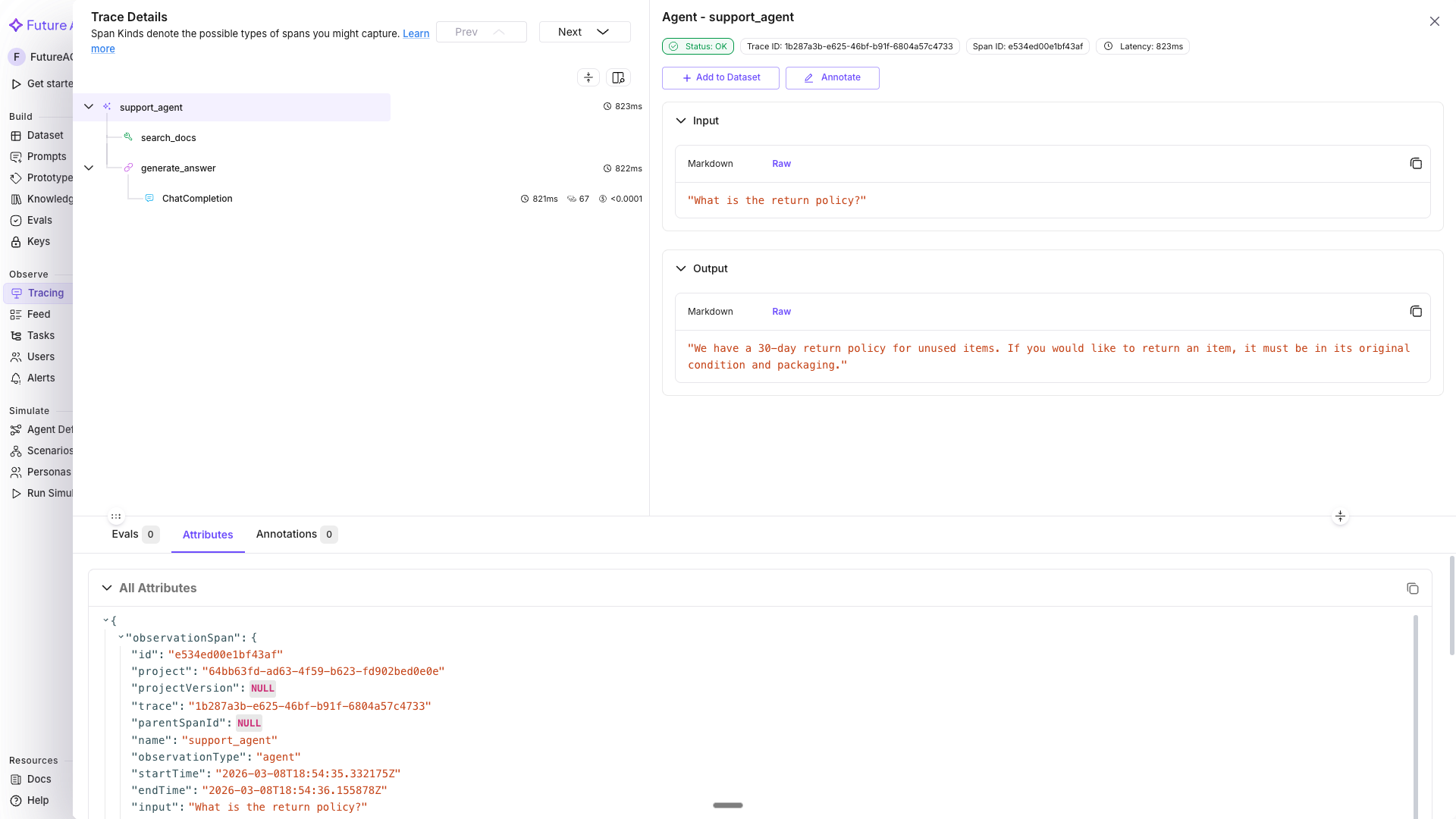
The trace detail view with support_agent, search_docs, and generate_answer labeled by their fi.span_kind.
Troubleshooting
| Symptom | Cause | Fix |
|---|---|---|
| No traces appear in the dashboard | register() wasn’t called before the traced code ran, or trace_provider.force_flush() never fired before the script exited | Call register() first, and end short scripts with trace_provider.force_flush() |
401 Unauthorized from register() | FI_API_KEY or FI_SECRET_KEY isn’t exported, or holds a stale value | Re-run the export commands from Install with your current keys |
| OpenAI calls run but don’t show up as spans | OpenAIInstrumentor().instrument() was called after the OpenAI() client was created | Call instrument() before instantiating the client, as in Step 1 |
| Custom span never appears, or appears as its own top-level trace | tracer.start_as_current_span() was called outside the parent span’s with block | Nest the child span’s with block inside the parent’s, as in Step 5 |
user.id or session.id missing from a span | The LLM call or custom span ran outside the using_user/using_session with block | Move the call inside the context manager, or wrap the whole request handler |
Filtering by session.id or a tag returns nothing | Filtering by Property directly instead of the Attribute filter | Select Attribute from the Property dropdown, then pick the specific key |
ModuleNotFoundError: No module named 'traceai_openai' | traceAI-openai isn’t installed, or a different virtualenv is active | Run pip install fi-instrumentation-otel traceAI-openai openai in the same environment you’re executing from |
| Decorated function’s inputs don’t show in the span | The function was called before OpenAIInstrumentor and register() finished setup | Confirm Step 1’s register() and instrument() calls run first in your script |
Score a traced call with Inline Evals in Tracing.
Questions & Discussion