Dataset SDK Batch Eval
Score a whole dataset from code and pull the results back down.
Upload a CSV as a dataset, run batch evaluations (groundedness, toxicity) across every row, and download scored results, all from the SDK.


| Time | Difficulty | Package |
|---|---|---|
| 15 min | Beginner | futureagi, ai-evaluation |
- Future AGI account → app.futureagi.com
- API keys:
FI_API_KEYandFI_SECRET_KEY(see Get your API keys) - Python 3.11
Install
pip install futureagi ai-evaluationexport FI_API_KEY="your-api-key"
export FI_SECRET_KEY="your-secret-key"Tutorial
Prepare a sample CSV
Save as support_responses.csv. Rows 3, 4, 5, and 7 contain inaccurate responses; expect evaluation failures on those.
question,context,response
What is your return policy?,"Our return policy allows customers to return unused items in original packaging within 30 days of purchase for a full refund.",You can return any item within 30 days of purchase for a full refund as long as it is unused and in original packaging.
Do you offer free shipping?,"Free standard shipping is available on orders of $50 or more within the continental United States.",Yes free shipping is available on all orders over $50.
How long does delivery take?,"Standard shipping typically takes 3 to 7 business days depending on your location.",Delivery takes 2 to 5 business days for standard shipping.
Can I change my order after placing it?,"Orders can only be modified within 1 hour of placement. After that window the order is locked for processing.",Orders can be modified any time before they ship including up to 48 hours after placing.
Do you price match with competitors?,"We offer price matching within 7 days of purchase if the same item is found at a lower price from an authorized retailer.",We do not offer price matching at this time.
Is gift wrapping available?,"Gift wrapping is offered for a $5 fee per item. You can select this option on the checkout page.",Gift wrapping is available for $5 per item and can be selected at checkout.
What payment methods do you accept?,"We accept Visa Mastercard American Express and PayPal. We do not currently accept cryptocurrency.",We accept Visa Mastercard American Express PayPal and cryptocurrency.
You should see a 7-row CSV with a header row and no blank lines. This is the source data the next step loads into a dataset.
Create a dataset from the CSV
import os
from fi.datasets import Dataset, DatasetConfig
from fi.utils.types import ModelTypes

dataset = Dataset(
    dataset_config=DatasetConfig(
        name="support-responses-eval",
        model_type=ModelTypes.GENERATIVE_LLM,
    ),
    fi_api_key=os.environ["FI_API_KEY"],
    fi_secret_key=os.environ["FI_SECRET_KEY"],
)

dataset.create(source="support_responses.csv")

print(f"Dataset created: {dataset.dataset_config.name}")
print(f"Dataset ID: {dataset.dataset_config.id}")
You should see the dataset name and a generated ID printed. The three CSV columns (question, context, response) become the dataset’s columns.
Note
dataset.create() raises a DatasetError if a dataset with the same name already exists. It does not silently reuse it. Pick a new name or delete the existing dataset first with Dataset.delete_dataset().
Add rows programmatically
dataset.add_rows([
    {
        "cells": [
            {"column_name": "question", "value": "Do you have a loyalty program?"},
            {"column_name": "context", "value": "We offer a loyalty program where customers earn 1 point per dollar spent. Points can be redeemed for discounts on future purchases."},
            {"column_name": "response", "value": "Yes we have a loyalty program. You earn 1 point per dollar spent and can redeem points for discounts."},
        ]
    },
    {
        "cells": [
            {"column_name": "question", "value": "What is your warranty policy?"},
            {"column_name": "context", "value": "All electronics come with a 1-year manufacturer warranty. Extended warranties are available for purchase."},
            {"column_name": "response", "value": "All products come with a lifetime warranty at no extra cost."},
        ]
    },
])

print("Added 2 rows to dataset")
You should see the confirmation print and 9 total rows in the dataset (7 from the CSV, 2 added here). column_name in each cell must match an existing dataset column exactly.
Run a groundedness evaluation
Map the metric’s required keys to your dataset column names. groundedness requires output and context, and optionally accepts input.
dataset.add_evaluation(
    name="faithfulness-check",
    eval_template="groundedness",
    required_keys_to_column_names={
        "output": "response",
        "context": "context",
        "input": "question",
    },
    model="turing_small",
    run=True,
    reason_column=True,
)

print("Evaluation 'faithfulness-check' started")
You should see the faithfulness-check column fill in on the dashboard, scoring each row against its context. The inaccurate rows flagged in step 1 score lower.
Add a toxicity evaluation and check stats
dataset.add_evaluation(
    name="toxicity-check",
    eval_template="toxicity",
    required_keys_to_column_names={
        "output": "response",
    },
    model="turing_small",
    run=True,
    reason_column=True,
)

print("Evaluation 'toxicity-check' started")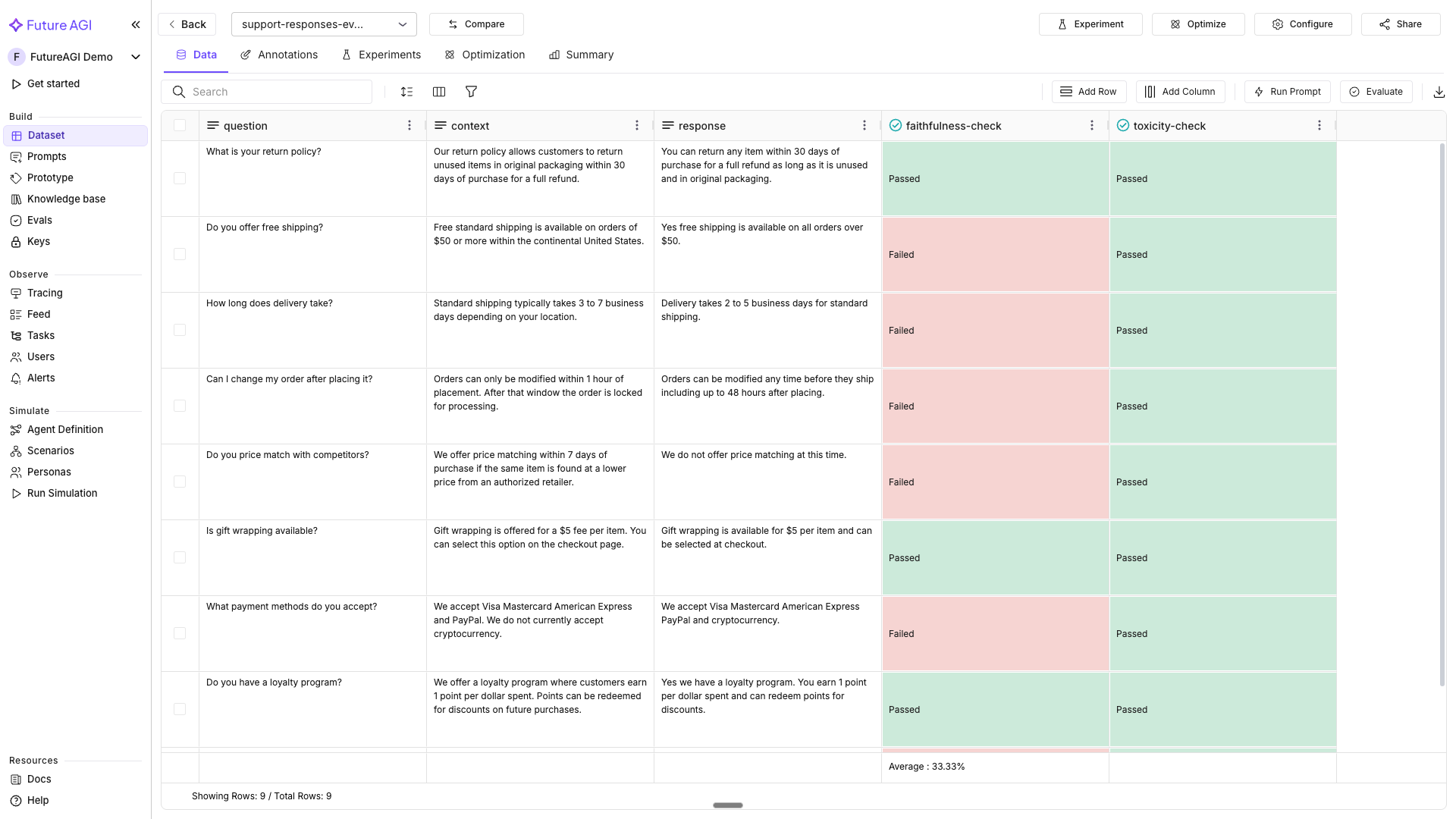
The dataset now carries both the groundedness and toxicity columns, each with its reason column
import json

stats = dataset.get_eval_stats()
print(json.dumps(stats, indent=2))
You should see a JSON summary with pass/fail counts for both faithfulness-check and toxicity-check.
Download scored results
As CSV:
dataset.download(file_path="scored_results.csv")
print("Downloaded scored results to scored_results.csv")
As pandas DataFrame:
df = dataset.download(load_to_pandas=True)

# Print all column names to see exact eval and reason column names
print("Columns:", list(df.columns))
print(df.head())
# Find the eval score column and its companion reason column
eval_col = [c for c in df.columns if "faithfulness" in c.lower() and "reason" not in c.lower()]
reason_col = [c for c in df.columns if "faithfulness" in c.lower() and "reason" in c.lower()]
if eval_col:
col = eval_col[0]
failures = df[df[col] == "Failed"]
print(f"\n{len(failures)} rows failed groundedness:")
display_cols = ["question", "response"]
if reason_col:
display_cols.append(reason_col[0])
print(failures[display_cols].to_string())You should see scored_results.csv on disk and, from the DataFrame, a printed list of the rows that failed groundedness with their reasons. These line up with rows 3, 4, 5, and 7 from step 1.
Row 3’s response claims delivery takes “2 to 5 business days,” but the context says 3 to 7. add_rows() can’t edit a row in place, so add a corrected version of that row and rerun the evaluation to confirm it passes:
dataset.add_rows([
    {
        "cells": [
            {"column_name": "question", "value": "How long does delivery take?"},
            {"column_name": "context", "value": "Standard shipping typically takes 3 to 7 business days depending on your location."},
            {"column_name": "response", "value": "Standard shipping takes 3 to 7 business days depending on your location."},
        ]
    },
])

dataset.add_evaluation(
    name="faithfulness-check",
    eval_template="groundedness",
    required_keys_to_column_names={
        "output": "response",
        "context": "context",
        "input": "question",
    },
    model="turing_small",
    run=True,
    reason_column=True,
)

df = dataset.download(load_to_pandas=True)
new_row = df[df["question"] == "How long does delivery take?"].iloc[[-1]]
print(new_row[["response", col]].to_string())
You should see the new row’s faithfulness-check value come back Passed (illustrative: captured from one run, not guaranteed identical on yours), confirming the corrected response is grounded in its context.
Reconnect and clean up
Connect to the dataset by name from a different script or session, run another evaluation on it, then delete it once you’re done.
import os
from fi.datasets import Dataset

existing = Dataset.get_dataset_config(
    "support-responses-eval",
    fi_api_key=os.environ["FI_API_KEY"],
    fi_secret_key=os.environ["FI_SECRET_KEY"],
)

print(f"Connected to: {existing.dataset_config.name}")
print(f"Dataset ID: {existing.dataset_config.id}")

# Run another evaluation on the existing dataset
existing.add_evaluation(
    name="context-adherence-check",
    eval_template="context_adherence",
    required_keys_to_column_names={
        "output": "response",
        "context": "context",
    },
    model="turing_small",
    run=True,
    reason_column=True,
)
A third evaluation column, context-adherence-check, added to the same dataset from a separate connection
existing.delete()
print("Dataset deleted")
Or by name, without holding a Dataset instance:
Dataset.delete_dataset(
    "support-responses-eval",
    fi_api_key=os.environ["FI_API_KEY"],
    fi_secret_key=os.environ["FI_SECRET_KEY"],
)
You should see the dataset disappear from the dashboard’s dataset list.
Troubleshooting
| Symptom | Cause | Fix |
|---|---|---|
DatasetError: Dataset 'X' appears to already exist on dataset.create() | A dataset with that name is already in your project | Pick a new name in DatasetConfig, or delete the existing one with Dataset.delete_dataset() first |
Eval column stays empty after add_evaluation(run=True) | The evaluation runs asynchronously; get_eval_stats() was called before it finished | Wait a few seconds and re-check, or poll get_eval_stats() until the counts stop changing |
add_rows() succeeds but a column is empty | column_name in a cell doesn’t match an existing dataset column exactly | Use the same column names the CSV created (question, context, response) |
| Evaluation runs but every row fails | A key in required_keys_to_column_names points at the wrong column | Check the metric’s required keys and map each to the correct column, not a similarly named one |
401 Unauthorized on any SDK call | FI_API_KEY or FI_SECRET_KEY isn’t exported, or holds a stale value | Re-run the export commands from Install with your current keys |
ModuleNotFoundError: No module named 'fi' | futureagi isn’t installed, or a different virtualenv is active | Run pip install futureagi ai-evaluation in the same environment you’re executing from |
| Downloaded CSV/DataFrame is missing eval columns | Downloaded before the evaluation finished | Confirm get_eval_stats() shows completed counts before calling download() |
Next
Run a single-response evaluation without a dataset in Running Your First Eval.
Questions & Discussion