Turn on Error Feed
Turn on trace scanning for a project so Error Feed can find its first issues.
Error Feed ships off. A project’s scanner starts at a 0% sampling rate, so nothing gets scanned until you raise it. This guide gets a project from silent to its first issues showing up in the Feed.
Before you start
- The project is already receiving traces in Observe. Error Feed only scans what Observe receives, so send your agent through a request first if none have arrived yet
- Your workspace needs the Error Feed capability; without it, the Error Feed page shows the upgrade message and the API answers 402
Turn on scanning
Open the Observe project you want issues for, then click the settings gear icon, tooltipped Settings, in the project header. A dialog titled Configure Project opens, carrying the project’s name and its sampling rate.
Sampling rate is a slider running 0% to 100%, with the current value in a box beside it. Drag it above 0. 100% is a safe default while you’re trying it out; see Choosing a rate for the cost tradeoff once volume climbs. Click Update to apply it.
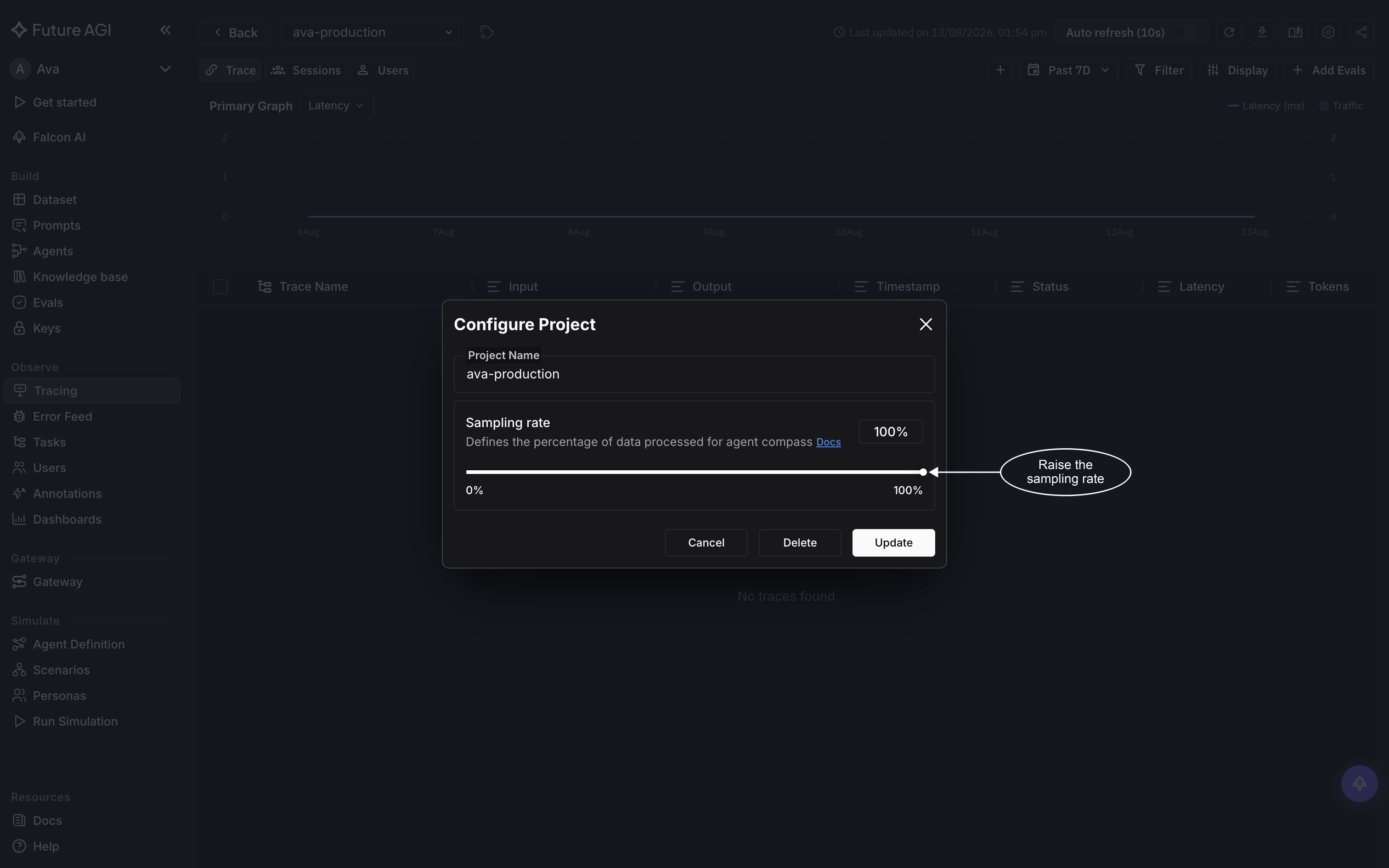
The same dialog also deletes the project, so read the buttons before clicking
Then wait before checking for results, because a new rate only reaches traces that arrive after you save it. Send your agent through a request, give scanning a moment, and go to Error Feed in the left sidebar. A row appearing in the list confirms scanning is live. An upgrade prompt instead of the Feed means the workspace lacks the Error Feed capability.
Choosing a rate
There’s no universally right number; it’s a coverage-versus-cost call: analyze more traces and you catch more, but you pay more for it.
| Situation | Rate |
|---|---|
| Building or testing a project | 100%, so nothing slips past you |
| Low-volume production | 100%, the absolute cost stays low |
| High-volume production | 10–20%, enough to catch recurring issues |
| Cost-constrained, high volume | 5–10%, still catches patterns that repeat |
A rate change only reaches forward. It applies to traces that arrive after you save it, not to anything that already went by.
When scanning runs
Scanning is triggered per trace, not on a timer. Once a trace’s root span completes, Error Feed waits about ten seconds before a scan starts and samples it.
Traces that arrive through the collector instead of the inline path skip that trigger. A periodic sweep picks them up instead, working through them in small batches rather than the moment they land. If your traces go through the collector, expect the first issues to show up in occasional bursts rather than a steady trickle.
If nothing shows up
If you’ve confirmed traces are reaching the project and the rate is saved, see No issues in the Feed for the full list of causes, in order.
Dive deeper
Questions & Discussion