Quickstart
Send your first LLM trace to Future AGI Observe in about five minutes
Get your first trace into Observe in about five minutes, without changing your app’s logic.
In this page
You will install the traceAI instrumentor, register an Observe project, run a single OpenAI call, and confirm the trace in the dashboard with its model, latency, and token cost. The same four steps work for 30+ frameworks, so once OpenAI is traced you have the pattern for the rest of your stack. New to tracing? Read the observability model first.
Prerequisites
- A Future AGI account and your
FI_API_KEYandFI_SECRET_KEY(Dashboard → Build → Keys) - Python 3.10+ (or Node 18+ for the TypeScript path)
- An OpenAI API key
Note
Pin the packages to the version you test against, so a later release cannot change behavior under you
Steps
Install traceAI
Install the core instrumentation package and the OpenAI instrumentor
pip install fi-instrumentation-otel traceAI-openainpm install @traceai/fi-core @traceai/openaiSet your keys
Read keys from the environment, never hardcode them in source
export FI_API_KEY="your-futureagi-api-key"
export FI_SECRET_KEY="your-futureagi-secret-key"
export OPENAI_API_KEY="your-openai-api-key"
Register a project and trace one call
register returns a tracer provider. Set project_type to OBSERVE, attach the OpenAI instrumentor, then call OpenAI exactly as you normally would
from fi_instrumentation import register, Transport
from fi_instrumentation.fi_types import ProjectType
from traceai_openai import OpenAIInstrumentor
from openai import OpenAI

# Connect to Future AGI and create (or reuse) an Observe project
trace_provider = register(
    project_type=ProjectType.OBSERVE,
    project_name="self-improving-agent",
    transport=Transport.GRPC,
)

# Auto-instrument OpenAI: every call is now traced
OpenAIInstrumentor().instrument(tracer_provider=trace_provider)

# Use OpenAI exactly as you normally would
client = OpenAI()
completion = client.chat.completions.create(
    model="gpt-4o",
    messages=[{"role": "user", "content": "Suggest one habit I could build to keep improving every day."}],
)
print(completion.choices[0].message.content)
import { register, ProjectType } from "@traceai/fi-core";
import { OpenAIInstrumentation } from "@traceai/openai";
import { registerInstrumentations } from "@opentelemetry/instrumentation";
import OpenAI from "openai";
// Connect to Future AGI and create (or reuse) an Observe project
const traceProvider = register({
projectType: ProjectType.OBSERVE,
projectName: "self-improving-agent",
});
// Auto-instrument OpenAI: every call is now traced
registerInstrumentations({
instrumentations: [new OpenAIInstrumentation({})],
tracerProvider: traceProvider,
});
// Use OpenAI exactly as you normally would
const client = new OpenAI();
const completion = await client.chat.completions.create({
model: "gpt-4o",
messages: [{ role: "user", content: "Suggest one habit I could build to keep improving every day." }],
});
console.log(completion.choices[0].message.content);Expected terminal output (the wording varies):
Spend five minutes each evening noting one thing you learned that day.
Small daily reflections compound into steady improvement over time.
Confirm the trace
Open Observe → self-improving-agent → Tracing. Within a few seconds you will see one trace row with status OK, the model, the latency, and the token count. Click it to read the prompt, the completion, and the span timing
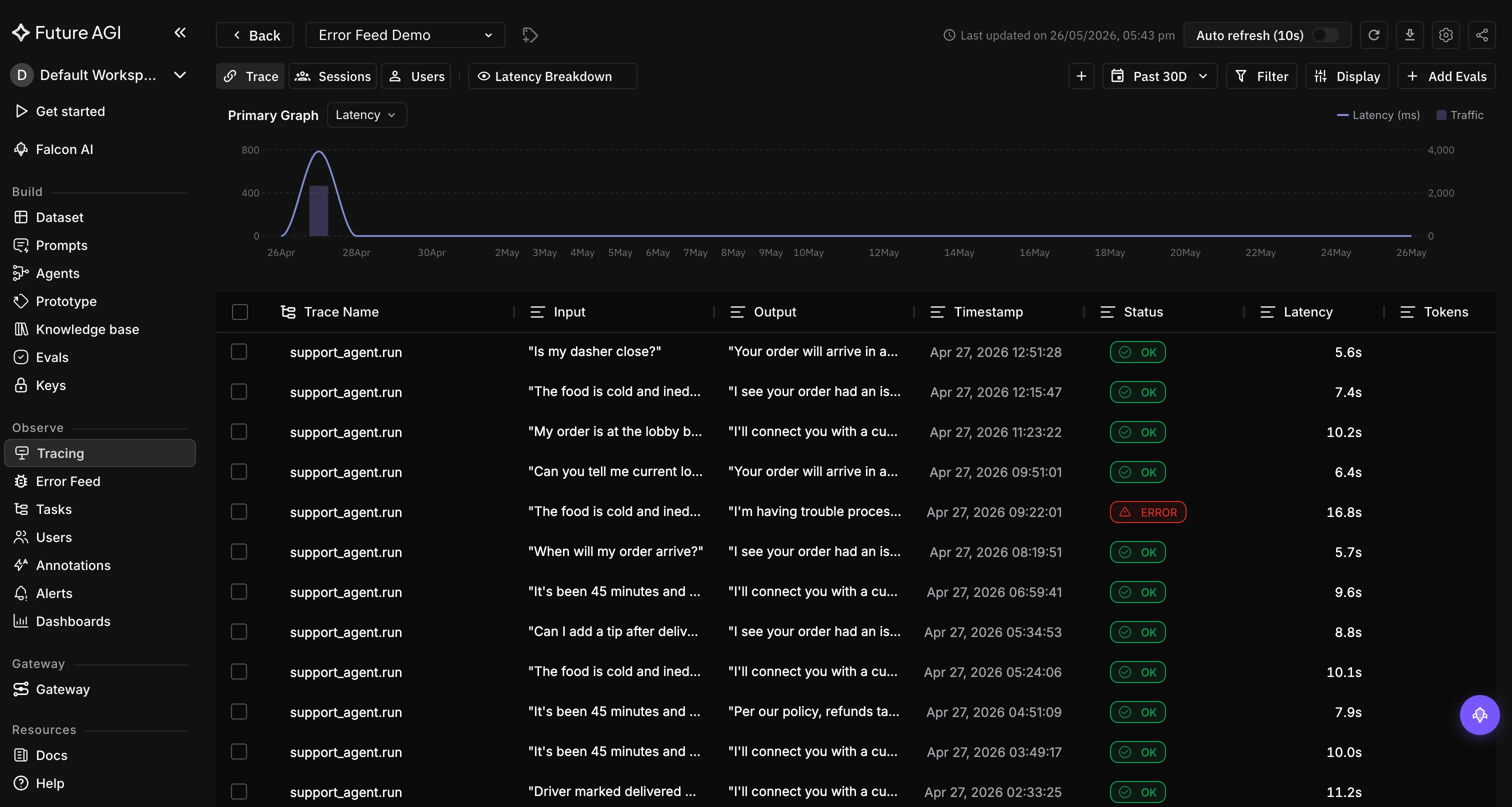
Your request, now a trace. If the row is here with an OK status, instrumentation is working end to end
What you just captured
That row is a trace, the full record of one request. Because this example made a single OpenAI call, the trace holds one span: the llm operation, carrying the model, the prompt and completion, the token counts, and the cost.
The same four steps instrument 30+ frameworks. Swap the instrumentor for your stack and the flow is identical, see all framework integrations.
Not seeing your trace?
- No trace appears: a short script can exit before the exporter flushes. Call
trace_provider.force_flush()before the process ends - Wrong or empty project: confirm
project_namematches the project you are viewing, and thatFI_API_KEYandFI_SECRET_KEYbelong to this workspace - Still nothing: widen the date picker (it defaults to the last 7 days) and turn on Auto refresh. For deeper help see No traces appear
Dive deeper
Questions & Discussion