Configure an Agent node
Reference another agent's saved version in an Agent node and map your workflow's values onto its inputs.
The Agent Node’s configuration form lives in the node drawer, and every field in it sets up which agent this step hands off to. It’s where you tell the node which agent to run, which version of that agent, and which of the parent workflow’s values feed its inputs. Beyond those three, it carries no configuration of its own.
Note
This guide picks up once a workflow with an Agent Node already exists on the canvas; see Build a workflow to add one first.
Open the drawer
Click the Agent Node on the canvas. Its drawer opens with the node’s own configuration form.
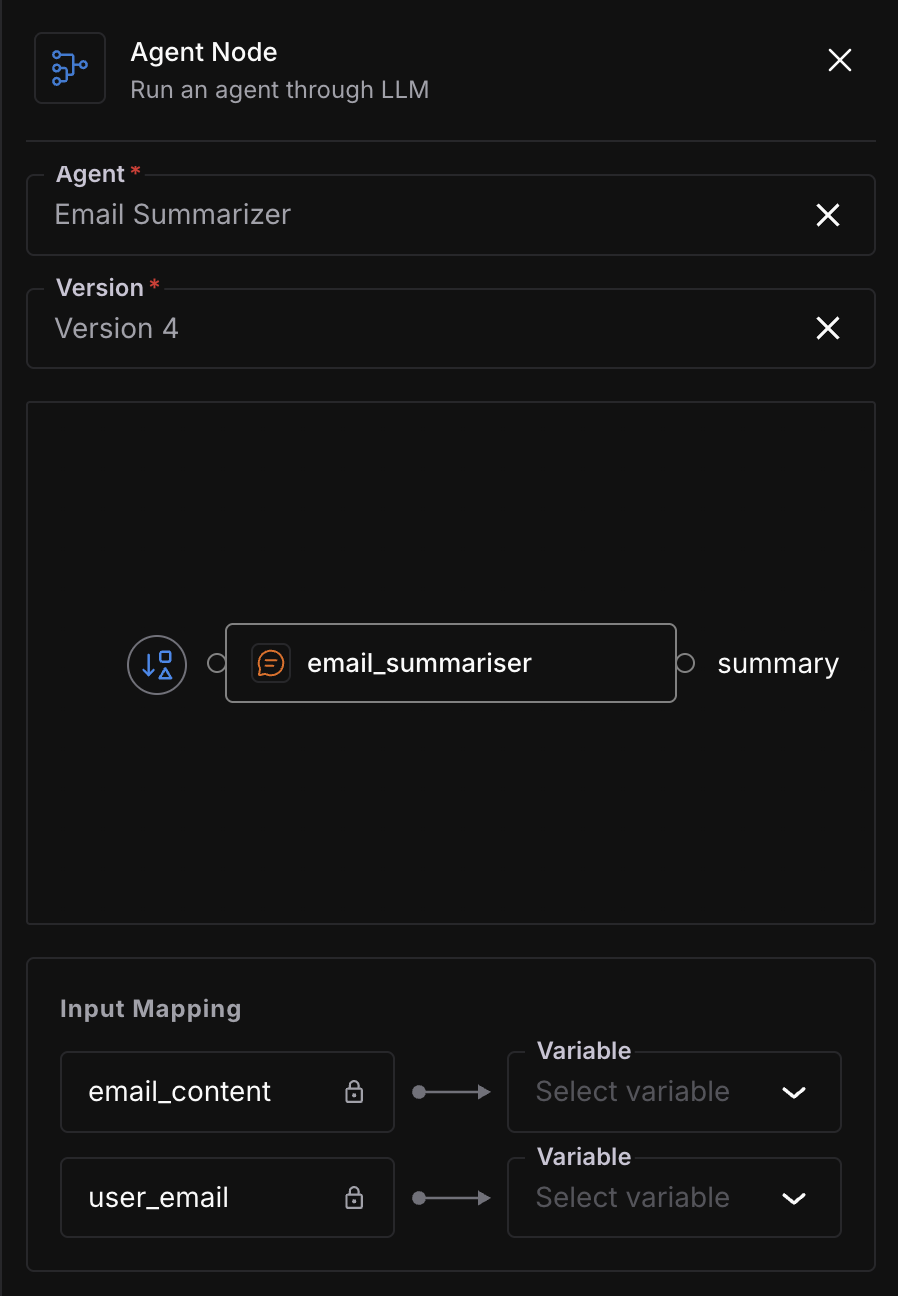
The Agent Node drawer, with an agent and version selected and its Input Mapping rows ready to wire up
Choose the agent and version
Under Agent, select the agent to nest. The field starts empty, with the placeholder “Select agent”.
Under Version, select which version of that agent to run. Until an agent is chosen, this field stays on “Select an agent first”; once you choose an agent, its latest non-draft version is preselected here, and you can change it to any of its other versions.
You can select any active or inactive saved version of a different agent.
Note
The one reference rule Save can still refuse is referencing a second version of an agent you’ve already referenced elsewhere in this workflow.
Map the inputs
Input Mapping lists one row per input the nested agent expects. Row labels are the nested agent’s own input names, set when that agent was built rather than here; they double as the mapping keys. If the nested agent has no inputs, the Input Mapping section doesn’t appear at all.
Each row has a Variable select, with the placeholder “Select variable”, and its options are the output ports of the nodes connected directly into this one, labeled node_name.output_name. Pick the upstream output that should feed that input.
For example, say the nested agent expects an invoice_details input, and a classify_invoice node feeds into this Agent Node. The invoice_details row is where you’d pick classify_invoice.response_1 from the Variable select to pass that output down.
Note
Leave a row unmapped and no edge is created for it; that input becomes one of the parent workflow’s own input variables instead, and per Set input variables, the run refuses to start until it has a value.
Save the node
Click Save. A successful save closes the drawer. If the save fails, a toast reads “Failed to save agent node” and the node reverts.
The nested agent’s own run appears inside the parent run’s results; see Run an agent for what that looks like.
Dive deeper
Questions & Discussion