Instrument and Verify a Voice Agent: Make Your Calls Appear, Then Prove It Worked
Instrument a self-hosted voice agent so Future AGI reads it as a call, then run twelve machine-checked gates that either pass or name exactly which column will be blank.
A voice call is not a trace with audio in it. The Voice tab finds a call by six conditions at once, and a span that misses any one of them is invisible there no matter how healthy it looks in Traces. This guide instruments a self-hosted voice agent, then runs fi_verify_voice.py, which checks twelve gates against the spans your agent really sent and exits 0 or names the gate that failed. The worked example runs with one model key, no LiveKit account, no phone number and no microphone.


| Time | Difficulty | Package |
|---|---|---|
| 25 min | Intermediate | fi-instrumentation-otel |
- Future AGI account → app.futureagi.com
- API keys:
FI_API_KEYandFI_SECRET_KEY(see Get your API keys) - A voice agent you host yourself: LiveKit Agents, Pipecat, or your own STT plus LLM plus TTS loop. If your calls run on Vapi, Retell or Bland.ai, you write no code at all: see If your calls come from a managed provider
- Python 3.11+ to run
fi_verify_voice.py. It imports nothing outside the standard library
Note
Handing this to a coding agent? Point it at this page and say: follow this end to end to GREEN LIGHT, and tell me the one thing you need from me. Install downloads the checker, Step 1 proves your keys with it, and Step 6 decides the result, so the agent never has to claim success on your behalf.
Install
Everything new lands in one directory. Your agent gains one import, one span opened in the right place, and one call as it ends.
your-repo/
├── observability/
│   ├── __init__.py              # empty. Both listings import by package path
│   └── futureagi/
│       ├── __init__.py          # empty
│       ├── setup.py             # provider, mapper, capture             V2
│       ├── fi_verify_voice.py   # the checker, downloaded below         all twelve
│       ├── voice_spans.py       # every voice attribute key, once       V6 V7 V8 V9 V10
│       └── livekit_pii_alias.py # one shim, only on LiveKit             V11
├── agent.py                     # + the conversation span, opened early V3 V4 V5
├── requirements.txt             # + fi-instrumentation-otel
└── .gitignore                   # + .fi_verify/
Every step below offers two tracks, the Future AGI SDK and plain OpenTelemetry. Pick one and stay on it from here to the end. The two tracks write files of the same name that are not interchangeable, so every listing names its own track on the first line.
# Future AGI SDK track
python3.11 -m venv .venv && source .venv/bin/activate   # every listing below says `python`
pip install fi-instrumentation-otel      # not fi-instrumentation. Python 3.11+
pip install traceai-livekit              # or traceai-pipecat, for the framework you run
pip install "livekit-agents[openai]"     # the framework itself. traceai-livekit does not
                                         # depend on it, so nothing else pulls it in
# OpenTelemetry track
python3.11 -m venv .venv && source .venv/bin/activate # every listing below says `python`
pip install opentelemetry-sdk opentelemetry-exporter-otlp-proto-httpThen the checker. One file, pure standard library, nothing to install, and Step 1 runs it.
mkdir -p observability/futureagi
curl -fsSL https://docs.futureagi.com/fi_verify_voice.py -o observability/futureagi/fi_verify_voice.py
shasum -a 256 observability/futureagi/fi_verify_voice.py
# 9e487b4e8eb00c1adfb57e2cfdda182005cb8f99d85e909e6531d7730380be2f

touch observability/__init__.py observability/futureagi/__init__.py
echo ".fi_verify/" >> .gitignore
export FI_API_KEY="your-api-key"
export FI_SECRET_KEY="your-secret-key"
export FI_PROJECT_NAME="my-voice-agent"Note
Self-hosted? Both listings below reach https://api.futureagi.com. Point the SDK at your own deployment with FI_BASE_URL, the plain OpenTelemetry exporter with its own endpoint=, and the checker with FI_ENDPOINT, which is the full path including /tracer/v1/traces.
What a verified integration means
Voice has one failure the text integration does not, and it is the one that costs you the whole product surface.
Your call can be a perfect trace and still not be a call. The Voice tab selects a span that is typed as a conversation, has no parent, sits in the project, is not deleted, and falls inside the window on both its event time and its arrival time. Miss the parent condition alone and the call is in Traces, correctly shaped, fully populated, and absent from the Voice tab, from every voice filter, and from every voice eval. Nothing errors, and no dashboard reads differently.
Two more that look like nothing:
- The Duration, Turns and Talk ratio columns read named attributes off that one span. Nothing derives them from the audio or from the child spans. Miss the name and the column is blank
- The transcript is read under three different keys by three different surfaces, and none of them falls back to another. Write two of the three and the call looks complete on one screen and empty on the next
So the result is decided by a checker rather than by looking. Twelve gates, each tied to the step that closes it:
| Gate | Holds when | Step |
|---|---|---|
| V1 | the keys and route are accepted, and the collector took a conversation-shaped span | 1 |
| V2 | project_name and project_type are on the resource | 2 |
| V3 | exactly one conversation span, and it has no parent | 3 |
| V4 | one call is one trace, one root, no orphans | 3 |
| V5 | session.id and user.id are on the conversation span | 4 |
| V6 | call.duration is a number | 5 |
| V7 | call.total_turns and call.talk_ratio are numbers | 5 |
| V8 | the transcript is present in all three shapes the product reads | 5 |
| V9 | the call names its voice provider | 5 |
| V10 | recording URLs are strings under an alias evals can resolve, or their absence is acknowledged | 5 |
| V11 | every LLM span carries a model, and at least one carries a prompt and a completion | 2 |
| V12 | no credential in any span attribute | 5 |
Eleven gates read a local capture of your spans. V1 reads two receipts written during the run, because a capture says nothing about whether anything arrived.
Warning
fi_verify_voice.attach() captures at the exporter, after export, not with a span processor. A voice instrumentor rewrites its attributes inside the exporter: traceai-livekit sets span._attributes in export(). A processor tee runs before that and reports on attributes that were never sent, so it will show you a span kind of None on every LiveKit span and tell you nothing about the call. Do not substitute your own capture unless it reads the spans back after export.
Tutorial
Prove the keys, the route and the voice shape before writing code
Three values: FI_API_KEY and FI_SECRET_KEY from the console, and FI_PROJECT_NAME, the name this agent appears under. Tracing never needs your model provider key.
python observability/futureagi/fi_verify_voice.py preflightpreflight sends one real span, then three deliberately broken variants. If any broken variant is accepted, nothing is proven and it fails. The span it sends is not a generic ping: it is conversation-shaped, so a 200 here proves the voice path and not just the route.
| Answer | Means |
|---|---|
200 | keys, route and voice payload all valid. Go to Step 2 |
401 authentication failed | the keys arrived and were refused: wrong keys, or keys from another environment |
401 missing credentials | the X-Api-Key and X-Secret-Key headers never arrived: unset, or a proxy strips them |
400 no project_name | keys fine, payload not. It belongs on the resource, not the span |
404 | wrong path. It ends /tracer/v1/traces, with no trailing slash |
One call named futureagi.voice.preflight now sits in the project’s Voice tab. That is the surface this guide is aiming at, and you reached it before writing a line of agent code. Delete it when you are done.
Set up the provider, the mapper and the capture, in that order
Four calls, and the order is load bearing. enable_http_attribute_mapping() replaces the exporter instance, so anything that wraps an exporter has to come after it.
# observability/futureagi/setup.py     Future AGI SDK track
import os

from fi_instrumentation import FITracer, register
from fi_instrumentation.fi_types import ProjectType
from traceai_livekit import enable_http_attribute_mapping

from . import fi_verify_voice, livekit_pii_alias

# Import once at process start, AFTER whatever loads your .env, and before any
# LiveKit import that builds a session. Imported earlier the keys are not there
# yet, and only V1 says so.
provider = register(
    project_name=os.environ["FI_PROJECT_NAME"],
    project_type=ProjectType.OBSERVE,
    set_global_tracer_provider=True,      # LiveKit's own spans need the global provider
)

# 1. swap FI's exporter for the one that maps LiveKit attributes.
enable_http_attribute_mapping()

# 2. put the conversation content back on the keys that mapper reads.
livekit_pii_alias.install(provider)

# 3. capture what was really sent, at the exporter, after the mapping.
if os.getenv("FI_VERIFY", "1") == "1":
    fi_verify_voice.attach(provider)

# FITracer, not get_tracer(): a plain Tracer drops session.id and user.id, failing V5
tracer = FITracer(provider.get_tracer("voice-agent"))
register() puts project_name and project_type on the resource for you, which is V2.
Step 2 of that listing is the shim, and it exists for one reason. LiveKit Agents moved every attribute that carries conversation content behind a pii segment (lk.pii.user_input, lk.pii.chat_ctx, lk.pii.response.text), because that segment is the only marker its own collector honours when stripping user data. traceai-livekit still reads the unprefixed names, so on current LiveKit Agents it maps none of them: your LLM spans arrive with a model and a token count and no prompt and no completion, which is V11. The shim copies each prefixed key onto the name the mapper reads, at export time and before the mapper runs.
# observability/futureagi/livekit_pii_alias.py     Future AGI SDK track
ALIAS = {
    "lk.pii.user_input": "lk.user_input",
    "lk.pii.chat_ctx": "lk.chat_ctx",
    "lk.pii.response.text": "lk.response.text",
    "lk.pii.response.function_calls": "lk.response.function_calls",
    "lk.pii.function_tool.arguments": "lk.function_tool.arguments",
    "lk.pii.function_tool.output": "lk.function_tool.output",
    "lk.pii.input_text": "lk.input_text",
    "lk.pii.instructions": "lk.instructions",
    "lk.pii.room_name": "lk.room_name",
    "lk.pii.user_transcript": "lk.user_transcript",
    "lk.pii.participant_identity": "lk.participant_identity",
}


def install(provider):
    """Wrap every exporter on the provider. Call after enable_http_attribute_mapping()."""
    active = getattr(provider, "_active_span_processor", None)
    procs = list(getattr(active, "_span_processors", ())) or ([active] if active else [])
    for proc in procs:
        exp = getattr(proc, "span_exporter", None) or getattr(proc, "_exporter", None)
        if exp is None or getattr(exp, "_lk_pii_alias", False):
            continue
        real = exp.export

        def export(spans, _real=real):
            for s in spans:
                a = getattr(s, "_attributes", None)
                if not a:
                    continue
                add = {new: a[old] for old, new in ALIAS.items() if old in a and new not in a}
                if add:
                    s._attributes = {**dict(a), **add}
            return _real(spans)

        exp.export = export
        exp._lk_pii_alias = True
It adds keys and never removes them, so a traceai-livekit that reads the prefixed names itself is unaffected, and that is when you delete the file. On Pipecat, skip it: that instrumentor writes its own attribute names and none of them are behind a pii segment.
# observability/futureagi/setup.py     OpenTelemetry track
import os, contextvars

from opentelemetry import trace
from opentelemetry.sdk.resources import Resource
from opentelemetry.sdk.trace import TracerProvider, SpanProcessor
from opentelemetry.sdk.trace.export import BatchSpanProcessor
from opentelemetry.exporter.otlp.proto.http.trace_exporter import OTLPSpanExporter

from . import fi_verify_voice

# Import this AFTER whatever loads your .env, or the keys are not there yet and only V1 says so.
# On the RESOURCE: without it the collector answers 400 and the client still looks healthy
resource = Resource.create({"project_name": os.environ["FI_PROJECT_NAME"],
                            "project_type": "observe"})
provider = TracerProvider(resource=resource)
provider.add_span_processor(BatchSpanProcessor(OTLPSpanExporter(
    endpoint="https://api.futureagi.com/tracer/v1/traces",
    headers={"X-Api-Key": os.environ["FI_API_KEY"],
             "X-Secret-Key": os.environ["FI_SECRET_KEY"]})))

# Step 4 sets this once at the edge; every span picks it up here, so no call site remembers it
_scope = contextvars.ContextVar("fi_scope", default={})


class FiScope(SpanProcessor):     # the base class no-ops the other three methods
    def on_start(self, span, parent_context=None):
        for k, v in _scope.get().items():
            span.set_attribute(k, v)


provider.add_span_processor(FiScope())
trace.set_tracer_provider(provider)
tracer = trace.get_tracer("voice-agent")

if os.getenv("FI_VERIFY", "1") == "1":
    fi_verify_voice.attach(provider)
On this track you type the span kind yourself, with fi.span.kind. The collector reads that name, then gen_ai.span.kind, then llm.request.type, then openinference.span.kind, and the first non-empty one wins. Any of the four works; the value is upper or lower case, and anything the collector does not recognise lands as unknown.
There is no mapper on this track and therefore no shim. Whatever your STT, LLM and TTS calls write is what arrives, so give the LLM span a model and a prompt and a completion yourself, which is V11.
Open the conversation span BEFORE the session starts
This is the step that decides whether you have a product or a trace. Read it twice.
The Voice tab selects a span typed as a conversation with no parent. Your voice framework opens its own root span the moment a session starts. So if you open the conversation span inside a session that is already running, the framework’s span is the root, yours is a child, and nothing lists it.
# agent.py     Future AGI SDK track
from observability.futureagi.setup import provider, tracer     # first import, before livekit
from fi_instrumentation import using_attributes
from livekit.agents import AgentSession

session = AgentSession(stt=..., llm=..., tts=...)

# The conversation span opens BEFORE session.start(). Opened after it, LiveKit's own
# agent_session span is already the root, this one becomes a child, and the Voice tab
# never lists the call.
with tracer.start_as_current_span("voice.call", fi_span_kind="conversation") as call:
    await session.start(agent=Assistant())
    ...
# agent.py OpenTelemetry track
from observability.futureagi.setup import provider, tracer
from livekit.agents import AgentSession
session = AgentSession(stt=..., llm=..., tts=...)
with tracer.start_as_current_span("voice.call") as call:
call.set_attribute("fi.span.kind", "CONVERSATION")
await session.start(agent=Assistant())
...The failure is silent in both directions, which is why V3 exists. Here is the same agent run twice, changing only where that span opens:
  span opened before session.start()      conversation   ROOT    listed in the Voice tab
  span opened after  session.start()      conversation   child   listed nowhere
Every other gate passes on both runs. V3 is the only thing that tells them apart.
On a telephony deployment the same rule reads: open the conversation span when the call is answered, close it when the call ends, and let the framework’s session live inside it.
Attach the session and the caller
session.id groups a caller’s calls into a conversation you can read in order. user.id lets you read cost and quality per customer. Both are read off the conversation span, so set the scope outside it.
# agent.py, around the span from Step 3     Future AGI SDK track
with using_attributes(session_id=session_id, user_id=caller_id, tags=["prod"]):
    with tracer.start_as_current_span("voice.call", fi_span_kind="conversation") as call:
        await session.start(agent=Assistant())
# agent.py, around the span from Step 3 OpenTelemetry track
from observability.futureagi.setup import _scope
_scope.set({"session.id": session_id, "user.id": caller_id})
with tracer.start_as_current_span("voice.call") as call:
call.set_attribute("fi.span.kind", "CONVERSATION")
await session.start(agent=Assistant())Note
Unlike the text integration, do not expect these to reach the child spans on the LiveKit track. Those spans come from LiveKit’s own tracer, not from FITracer, so they never read the Future AGI scope. That is fine and V5 is written for it: the Voice tab reads the conversation span, and that is the span the scope has to reach.
Write what the Voice tab actually reads
Nothing on this list is derived. Every column, filter and voice eval reads a named attribute off the conversation span, and a name that is close is a blank column rather than an error. One module, so a name can be misspelled only once.
# observability/futureagi/voice_spans.py     both tracks
import json, uuid

DURATION = "call.duration"                    # seconds, number. Duration column, duration filter
TURNS = "call.total_turns"                    # number. Turns column, turn_count filter
TALK_RATIO = "call.talk_ratio"                # 0..1, number. Talk ratio filter
STATUS = "call.status"                        # provider status string
PHONE = "call.participant_phone_number"
PROVIDER = "gen_ai.system"                    # which parser the server uses for this call
TRANSCRIPT = "conversation.transcript"        # the whole thing, as JSON. What voice evals bind to
TRANSCRIPT_RENDERED = "fi.conversation.transcript"   # the same list. What the call drawer renders
RECORDING_MONO = "conversation.recording.mono.combined"
RECORDING_STEREO = "conversation.recording.stereo"

AGENT_ROLES = ("assistant", "agent", "bot")
CALLER_ROLES = ("user", "customer", "caller")


def _rows(turns):
    """turns is [(role, text), ...] in order, or [(role, text, start, duration), ...]
    where start is seconds from the beginning of the call and duration is how long
    that utterance took to speak."""
    return [tuple(t) + (None,) * (4 - len(t)) for t in turns]


def write_transcript(span, turns):
    """THREE keys, because three surfaces read it and none of them falls back to
    another. Write two of the three and the call looks complete on one screen and
    empty on the next.

      fi.conversation.transcript          the call drawer renders this one, and
                                          only this one, on a self-hosted agent
      conversation.transcript             what the eval variable picker resolves
      conversation.transcript.N.message.* what the error feed and the I/O panels walk

    The per-turn start and duration are what the Call Analytics strip computes
    Duration, Latency, User / AI and Silence from. Leave them out and those four
    cards read blank while Turns and Words are still right.
    """
    turns = _rows(turns)
    span.set_attribute(TRANSCRIPT_RENDERED, json.dumps(
        [{"id": str(uuid.uuid4()), "role": r, "content": c,
          "time": None if s is None else str(s), "duration": d}
         for r, c, s, d in turns]))
    span.set_attribute(TRANSCRIPT, json.dumps(
        [{"role": r, "content": c} for r, c, _, _ in turns]))
    for i, (role, text, _, _) in enumerate(turns):
        span.set_attribute("conversation.transcript.%d.message.role" % i, role)
        span.set_attribute("conversation.transcript.%d.message.content" % i, text)


def talk_ratio(turns):
    """Agent share of the words spoken. In an audio deployment use talk TIME."""
    turns = _rows(turns)
    agent = sum(len(c.split()) for r, c, _, _ in turns if r in AGENT_ROLES)
    total = sum(len(c.split()) for _, c, _, _ in turns) or 1
    return round(agent / total, 3)


def finish(span, *, turns, duration, provider, status="completed",
           phone=None, recording=None, stereo=None):
    """Close the conversation span with everything the Voice tab reads."""
    rows = _rows(turns)
    write_transcript(span, rows)
    span.set_attribute(TURNS, len(rows))
    span.set_attribute(DURATION, round(duration, 3))
    span.set_attribute(TALK_RATIO, talk_ratio(rows))
    span.set_attribute(PROVIDER, provider)
    span.set_attribute(STATUS, status)
    if phone:
        span.set_attribute(PHONE, phone)
    if recording:
        span.set_attribute(RECORDING_MONO, recording)
    if stereo:
        span.set_attribute(RECORDING_STEREO, stereo)
    span.set_attribute("input.value",
                       next((c for r, c, _, _ in rows if r in CALLER_ROLES), ""))
    span.set_attribute("output.value",
                       next((c for r, c, _, _ in reversed(rows) if r in AGENT_ROLES), ""))
Four things worth knowing before you copy it:
The transcript really is written three times. fi.conversation.transcript is the one the call detail drawer renders, and on a self-hosted agent it is the only one it reads: the drawer’s normal source is the provider’s own call log, which does not exist here. conversation.transcript is what the eval variable picker resolves. The flattened conversation.transcript.0.message.role, .content, .1. and so on is what the error feed and the trace I/O panels walk. Write two of the three and one of those surfaces is silently empty.
Written correctly, the call’s own detail comes back with transcript_available: true and every turn. Written with the first key missing, the same call comes back with no transcript at all and every other field intact.
gen_ai.system decides which parser runs server side. Leave it off and the call is parsed as Vapi by default. Set it to the platform that produced the call: livekit, pipecat, or the managed provider’s name.
Recording URLs have to be strings, under an alias evals can resolve. Those are conversation.recording.stereo, conversation.recording.mono.combined, conversation.recording.mono.customer, conversation.recording.mono.assistant, and the gen_ai.voice.recording.* equivalents. A URL under any other key renders nowhere and binds to nothing. If your deployment keeps no recording, say so with FI_VOICE_NO_RECORDING=1 and V10 passes as acknowledged rather than silently.
The trace list’s Cost column will not read a voice cost key. Pricing reads gen_ai.cost.total or llm.cost.total only. If you want per-call cost in that column, roll your own total onto the conversation span under one of those two names.
Run one call and let the checker decide
export FI_VERIFY=1
export FI_VOICE_NO_RECORDING=1     # only if your deployment keeps no recording, per Step 5
export LLM_API_KEY="your-model-key"   # the agent's own provider key, not a Future AGI one

python observability/futureagi/fi_verify_voice.py preflight
python agent.py                    # pass your own asks as arguments to replace the two below
python observability/futureagi/fi_verify_voice.py check
check reads the capture and the two receipts and exits 0 only if all twelve hold. Nine and eleven both mean not integrated.
The same six steps, run end to end
Everything above was run against LiveKit Agents 1.7.1 with traceai-livekit 0.1.1, on a project created for this page. This walkthrough is the Future AGI SDK track; the OpenTelemetry track writes the same attributes and is not repeated end to end. The whole run needs one model key, in LLM_API_KEY, and it is your model provider’s, never a Future AGI one. The listing calls Groq’s OpenAI-compatible endpoint by default because it serves both the STT and the LLM the example uses. Point it anywhere else with OPENAI_BASE_URL and AGENT_MODEL. No LiveKit account, no room, no phone number, no microphone, and no telephony spend, because AgentSession.run() is LiveKit’s own harness: it drives a real session with a real STT, a real LLM and a real turn, and session.start() takes no room.
pip install "livekit-agents[openai]" fi-instrumentation-otel traceai-livekit# agent.py
"""One call, one conversation span, no room and no phone number.
AgentSession.run() is LiveKit's own harness: it drives a real session with no
room, no LiveKit account and no telephony, so this file is the whole worked
example and anyone can run it.
"""
import asyncio, os, sys, time, uuid
from observability.futureagi.setup import provider, tracer # first import, before livekit
from observability.futureagi import voice_spans
from fi_instrumentation import using_attributes
from livekit.agents import Agent, AgentSession
from livekit.plugins import openai
class Assistant(Agent):
def __init__(self):
super().__init__(instructions=(
"You are a voice assistant for an airline. Answer in one short spoken "
"sentence, and never read out a list."))
async def main():
# A call is a conversation, so the example is two exchanges, not one. Anything
# you pass on the command line replaces them.
asks = sys.argv[1:] or ["How much baggage can I bring?",
"And is a stroller counted separately?"]
session_id = "call_" + uuid.uuid4().hex[:12]
user_id = os.getenv("CALLER_ID", "acct_10427")
base = os.getenv("OPENAI_BASE_URL", "https://api.groq.com/openai/v1")
key = os.environ["LLM_API_KEY"]
session = AgentSession(
stt=openai.STT(model="whisper-large-v3-turbo", base_url=base, api_key=key),
llm=openai.LLM(model=os.getenv("AGENT_MODEL", "openai/gpt-oss-120b"),
base_url=base, api_key=key),
)
started = time.monotonic()
# The conversation span opens BEFORE session.start(). Opened after it, LiveKit's
# own agent_session span is already the root, this one becomes a child, and the
# Voice tab never lists the call: it selects a conversation span with no parent.
with using_attributes(session_id=session_id, user_id=user_id, tags=["prod"]):
with tracer.start_as_current_span("voice.call", fi_span_kind="conversation") as call:
await session.start(agent=Assistant())
for ask in asks:
await session.run(user_input=ask, input_modality="text")
turns = [(m.role, m.text_content) for m in session.history.items
if getattr(m, "role", None) in ("user", "assistant")
and getattr(m, "text_content", None)]
voice_spans.finish(call, turns=turns,
duration=time.monotonic() - started,
provider="livekit")
await session.aclose()
provider.force_flush()
for role, text in turns:
print(" %-9s %s" % (role, text[:100]))
print("\n session.id = " + session_id)
if __name__ == "__main__":
asyncio.run(main())input_modality="text" drives the turn through the LLM without synthesizing audio, which is what makes this runnable anywhere. Everything the gates check is identical on an audio session; only the transcript source changes, from session.history to whatever your STT emits.
What that produced
  PASS  V1   preflight ok, delivery ok
  PASS  V2   project_name='voice-cookbook-page-run' project_type='observe'
  PASS  V3   1 conversation span(s)
  PASS  V4   16 spans, 1 trace(s), 1 root(s), 0 orphan(s)
  PASS  V5   session.id='call_355937e9c818' user.id='acct_10427' on the conversation span
  PASS  V6   call.duration=1.119
  PASS  V7   call.total_turns=4 call.talk_ratio=0.727
  PASS  V8   4 turn(s) flattened; conversation.transcript present; fi.conversation.transcript present
  PASS  V9   provider='livekit'
  PASS  V10  no recording attribute, acknowledged: audio evals cannot bind to this call
  PASS  V11  4 LLM span(s), model on every one, prompt and completion on ['llm_node', 'llm_node']
  PASS  V12  no credential in any span attribute

  Future AGI sees this as a call
  GREEN LIGHT achieved
The call arrives with sixteen spans: the conversation span you wrote, and fifteen from LiveKit around it. llm_node and llm_request are the model call, agent_turn is one exchange, and the rest are session lifecycle.
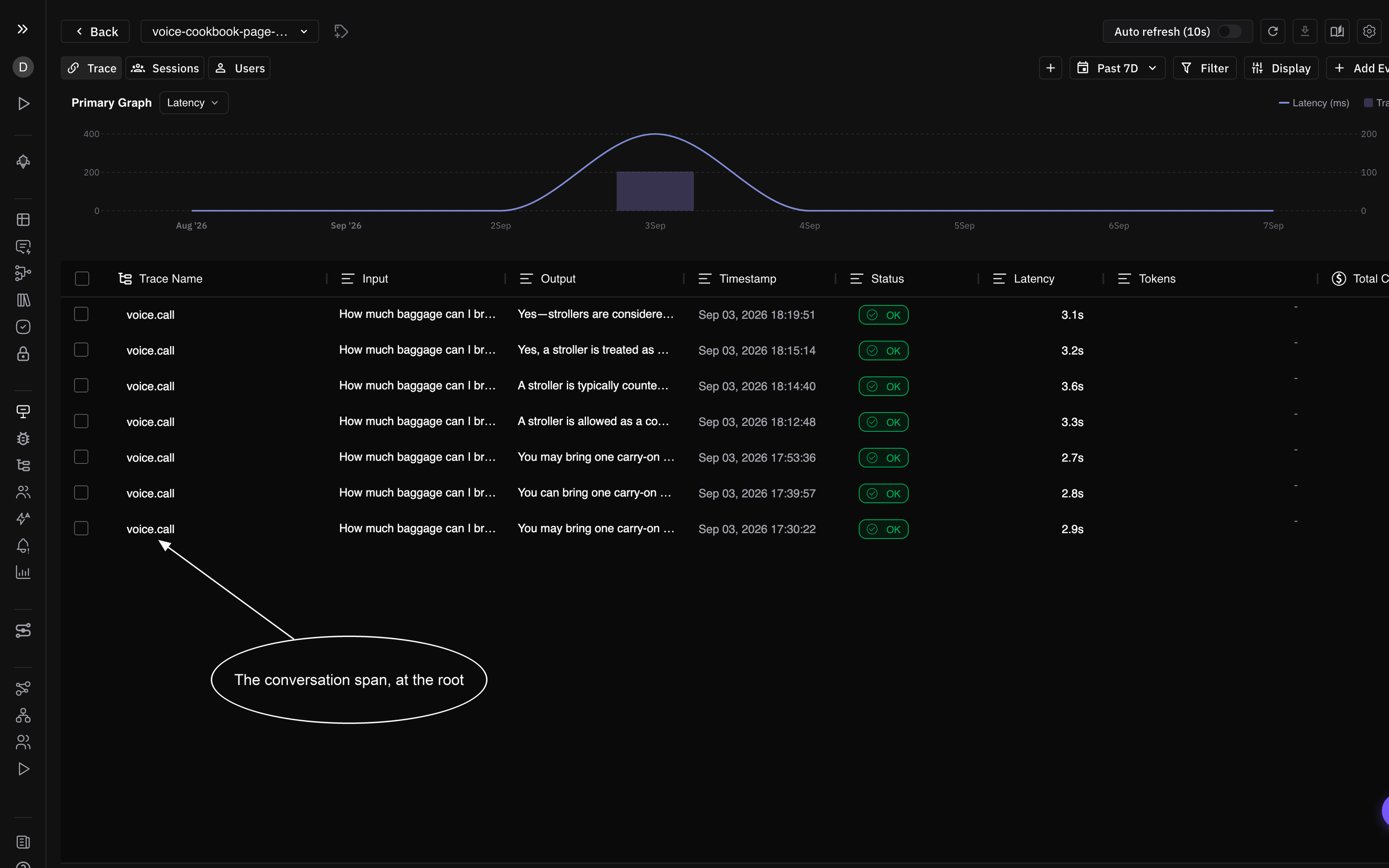
One row per call. The row is the conversation span itself, which is why Step 3 has to open it before session.start(): the fifteen LiveKit spans are its children and never appear here on their own.
Open one and the product reads it as a call rather than a trace. The transcript, the turn count and the word count are the attributes Step 5 wrote, read straight back.
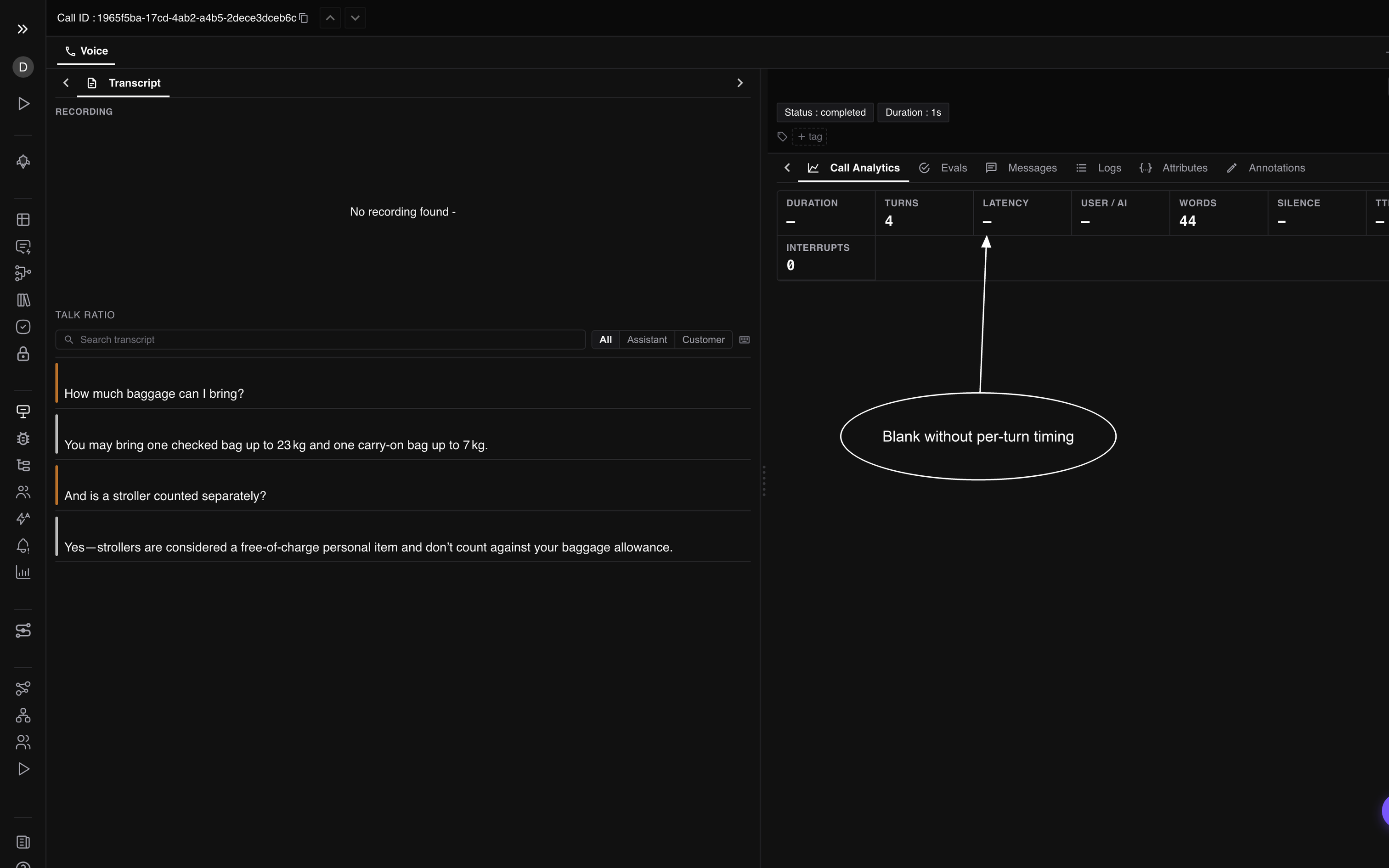
The call this page just produced, transcript and analytics, on call ID 1965f5ba.
Duration, Latency, User / AI and Silence read blank on purpose. Those four are computed from the per-turn time and duration on each transcript entry, which a text-mode run genuinely does not have. In an audio deployment, pass your STT’s utterance start and your TTS playback length as the third and fourth items of each turn, and they fill in.
Filter the attributes to transcript and all three keys are on the span, byte for byte as Step 5 wrote them.
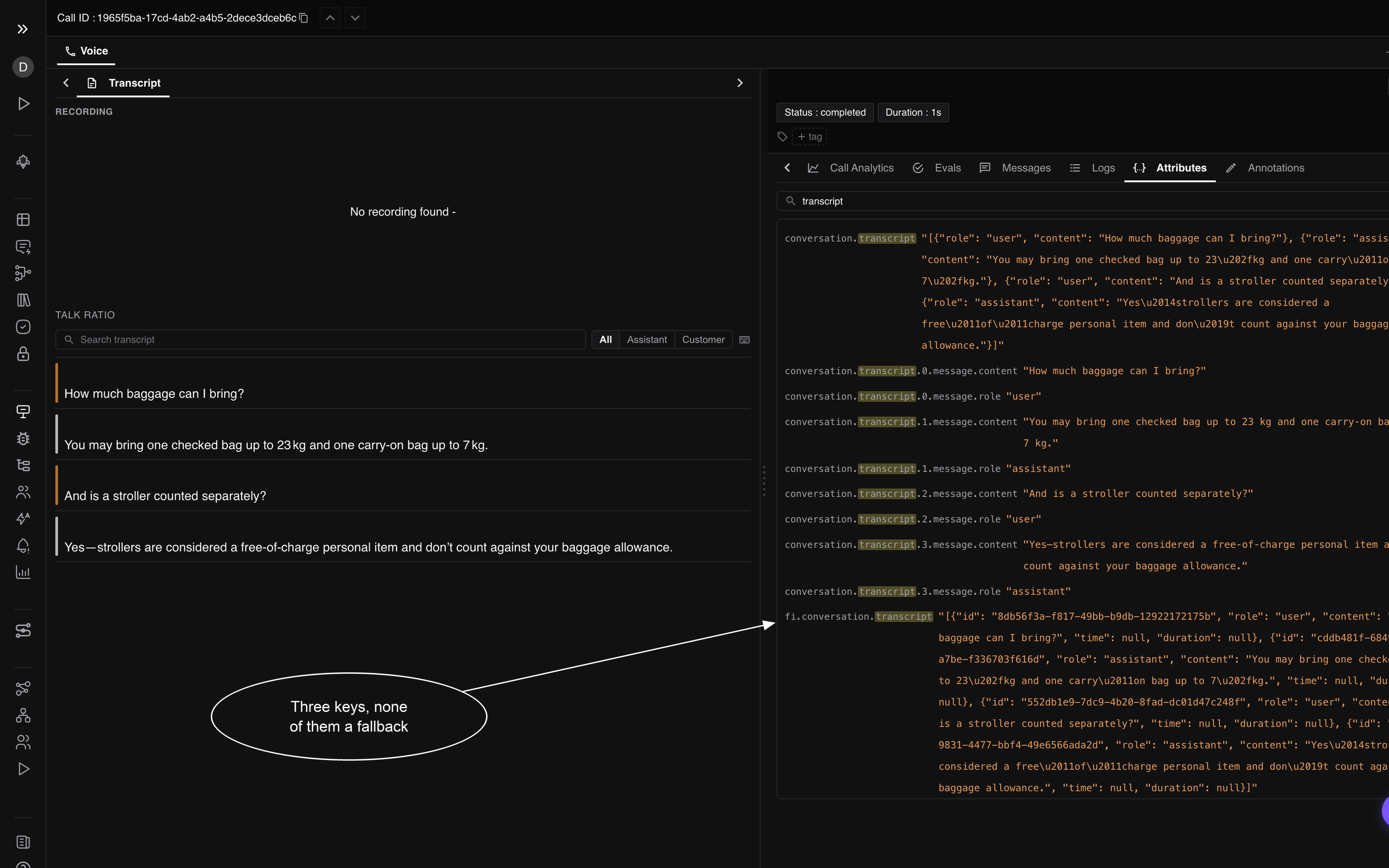
fi.conversation.transcript renders the drawer, conversation.transcript is what a Traces-scope eval binds to, and the numbered keys drive the Messages panel and the error feed. Writing one does not fill the others in.
Read back through the product’s own endpoint, the same call comes out as a call rather than a trace:
  transcript_available = True   message_count = 4   turn_count = 4   talk_ratio = 0.727
    user       How much baggage can I bring?
    assistant  You may bring one checked bag up to 23 kg and one carry-on bag up ...
    user       And is a stroller counted separately?
    assistant  Yes ...
Every one of those fields is an attribute Step 5 wrote by name. Drop fi.conversation.transcript alone and the same call comes back with transcript_available: None and an empty transcript, with every other field unchanged.
Then move the conversation span two lines down, so it opens after session.start(), and run the identical agent again:
FAIL V3 1 conversation span(s), and ['voice.call'] has a parent, so the Voice tab will not list itEleven of twelve gates still pass. The trace is well formed, the transcript is complete, the duration is right, and the call cannot be found in the product. That is the whole reason this page has a checker.
The evals bound to it
Each of these binds only to an attribute the run above already carries.
| Eval | Scope | Bound to |
|---|---|---|
| Conversation Coherence | Traces | conversation.transcript on the conversation span |
| Task Completion | Traces | input.value and output.value on the conversation span |
| Instruction Adherence | Traces | input.value and output.value against the agent’s instructions |
| Detect Hallucination | Traces | input.value and output.value |
| PII Detection | Spans | output.value, which V11 already proved is on an LLM span |
Audio evals are the one family that will not bind to this run, because it produced no recording. That is exactly what V10 reports when you acknowledge it, and it is a real limit rather than a checker being lenient.
If your calls come from a managed provider
If your calls run on Vapi, Retell or Bland.ai, none of the six steps apply, because there is no code of yours in the path. You connect the provider once and Future AGI pulls each call and writes the conversation span for you, already typed, already parented at the root, already carrying the transcript, the recording URLs, the duration and the cost from the provider’s own payload.
Which means V2 through V12 are satisfied on arrival, and the only thing worth verifying is that calls are arriving at all. Run preflight to prove the project and the keys, then check the Voice tab after a real call completes. Some providers emit their call log at the end of the call rather than during it, so a call can arrive minutes after it happened.
The two tracks are not exclusive. A managed provider handles the telephony while your own tools and model calls run in your process, and instrumenting those with the six steps above gives you the child spans the provider’s payload cannot see.
If your agent is not Python
The listings translate line for line, and everything reaches the same endpoint over plain OpenTelemetry. Carry across:
- Both headers,
X-Api-KeyandX-Secret-Key, onhttps://api.futureagi.com/tracer/v1/traces project_nameandproject_typeon the resource, not the span- One conversation-typed span per call, with no parent, opened before the session starts
- The Step 5 attribute keys, byte for byte
The checker still runs. preflight and check are plain Python with no dependency at all, so they work next to an agent in any language. Only fi_verify_voice.attach() is Python-bound. Without it, write the capture yourself: one JSON object per line in .fi_verify/voice_spans.jsonl, each with name, trace_id, span_id, parent_id (null on the root), attrs, and resource.
Warning
On TypeScript, do not go through the FISpanKind enum for this one: releases before the CONVERSATION member shipped will not give you the value, and a call typed anything else is not a call. Set the attribute directly and it works on every version: span.setAttribute("fi.span.kind", "CONVERSATION") on a root span, with the Step 5 keys alongside it. The collector reads the attribute, not the enum.
Troubleshooting
| Symptom | Cause | Fix |
|---|---|---|
| The call is in Traces and absent from the Voice tab | The conversation span has a parent, so the Voice tab’s selection skips it | Open it before session.start(), as Step 3 does. V3 is the gate |
check reports no spans captured | attach() was never called, or FI_VERIFY is not 1 | Export FI_VERIFY=1, re-run the agent, then re-run check |
Every LiveKit span shows a span kind of None in your own capture | You captured with a span processor. traceai-livekit rewrites attributes inside the exporter, after that | Use fi_verify_voice.attach(), which wraps the exporter and reads the spans back after export |
| V11 fails: LLM spans have a model and no prompt or completion | traceai-livekit reads lk.chat_ctx and lk.response.text; LiveKit Agents now writes lk.pii.chat_ctx and lk.pii.response.text | Install livekit_pii_alias from Step 2. Delete it once traceai-livekit reads the prefixed names |
| The Duration, Turns or Talk ratio column is blank | Those columns read call.duration, call.total_turns, call.talk_ratio by name off the conversation span. Nothing derives them | Write them in finish(), as Step 5 does. V6 and V7 are the gates |
| The call detail shows no transcript at all | fi.conversation.transcript is missing. It is the only transcript key the drawer reads on a self-hosted agent | Write all three keys, as write_transcript does. V8 is the gate |
| The call detail shows the transcript and no voice eval binds to it | The single conversation.transcript key was not written | Write all three keys. V8 is the gate |
| Duration reads a whole second lower than the call really was | The detail truncates call.duration to whole seconds | Expected. A 42.7 second call reads 42 |
| The Call Analytics strip shows Turns and Words but Duration, Latency, User / AI and Silence are blank | Those four are computed from the per-turn time and duration on each transcript entry, not from call.duration | Pass a start and a length per turn: ("user", text, 0.0, 1.4). write_transcript takes either shape |
| The Cost column is empty on a call that has a cost | Pricing reads gen_ai.cost.total and llm.cost.total only, and no voice cost key | Roll your call’s total onto the conversation span under one of those two names |
| The call is parsed as a Vapi call and its fields look wrong | gen_ai.system is absent, and Vapi is the default parser | Set gen_ai.system in finish(), as Step 5 does. V9 is the gate |
check says no preflight receipt right after preflight said it passed | .fi_verify/ is relative to the working directory, so the two commands ran from different places | Run preflight, the agent and check from one directory, or set FI_VERIFY_FILE to an absolute path for all three |
| Spans stop arriving as soon as the mapper is enabled | Something wrapped the exporter before enable_http_attribute_mapping() replaced it | Call the mapper first, then anything that wraps an exporter, in the Step 2 order |
Instrument the model calls inside the call with Instrument and Verify.
Questions & Discussion