Adding Annotations to your Spans
Label spans with custom tags, human feedback, and notes using the bulk-annotation API.
Tip
Looking for the new unified Annotations system? Check out the Annotations documentation for annotation queues, managed workflows, and the Scores API.
What it is
Annotations let you label spans with additional information — custom tags, criteria, human feedback, or notes — directly on your trace data. You create annotation labels in the Future AGI UI and then add, update, and retrieve annotations programmatically using the /tracer/bulk-annotation/ API endpoint.
Use cases
- Label your data with custom tags and criteria for filtering and analysis.
- Add custom events to your spans for richer trace context.
- Create a golden dataset for AI training by annotating high-quality examples.
- Add human feedback to spans for RLHF and evaluation workflows.
How to
Create an annotation label
Annotation labels must be created in the UI before you can use them in the API.
- Go to your project in Observe/Prototype.
- Click on any Trace or Span to open the Trace Details page.
- Click on the “Annotations” tab.
- Click on the “Create Annotation Label” button.
- Fill in the form with the following information:
- Name: The name of the annotation label.
- Description: The description of the annotation label.
- Type: The type of the annotation label.
Text: this type is used for free text annotations.Numeric: this type is used for numeric annotations.Categorical: this type is used for categorical annotations.Star: this type is used for star rating annotations.Thumbs up/down: this type is used for thumbs up/down annotations.
- Write the necessary configuration for the annotation label.
- Click on the “Create” button.
- You will be redirected to the Annotation Labels page.
- You can see the created annotation label in the list.
- You can edit the annotation label by clicking on the “Edit” button.
- You can delete the annotation label by clicking on the “Delete” button.
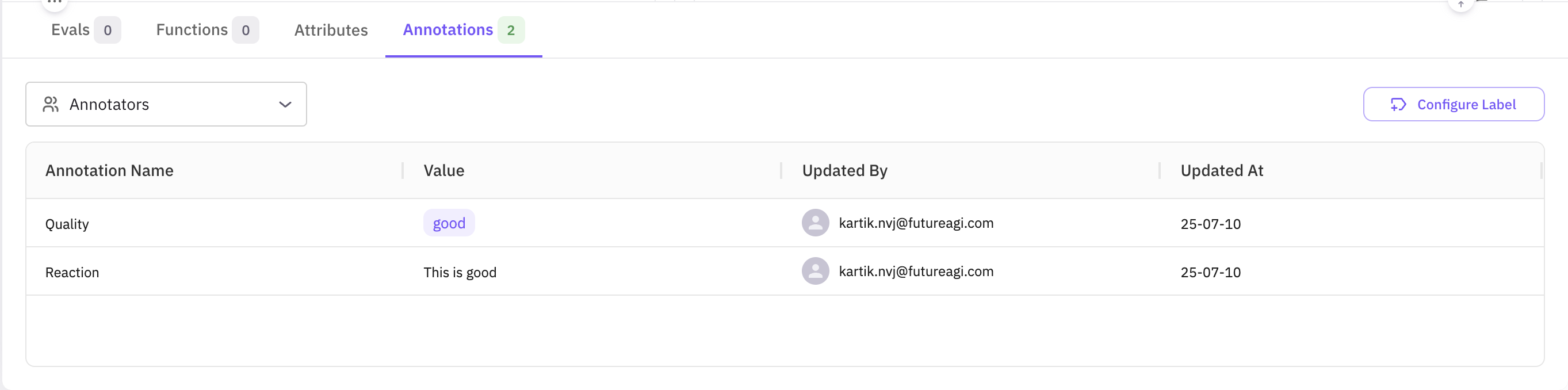
Fetch your annotation label ID
Before attaching annotations via the API, retrieve the annotation_label_id for the label you created. Use the /tracer/get-annotation-labels/ endpoint.
import requests

BASE_URL = "https://api.futureagi.com"
headers = {                       # API-key or JWT, as described above
    "X-Api-Key":     "<API_KEY>",
    "X-Secret-Key":  "<SECRET_KEY>",
    "Content-Type":  "application/json",
}

resp = requests.get(f"{BASE_URL}/tracer/get-annotation-labels/?project_id=<PROJECT_ID>", headers=headers, timeout=20) # replace <PROJECT_ID> with your project id if you want to get the label for a specific project
resp.raise_for_status()

label_id = resp.json()["result"][0]["id"]   # first label in your project, remove the index if you have more than one label
print("Annotation-label ID:", label_id)
The response contains a list of all labels in your project; each item includes id, name, type, and other metadata.
Send annotations via the API
Use the /tracer/bulk-annotation/ endpoint to add annotations to one or more spans. Authenticate with your API key and Secret key.
POST https://api.futureagi.com/tracer/bulk-annotation/ X-Api-Key: <YOUR_API_KEY>
X-Secret-Key: <YOUR_SECRET_KEY>All requests must also include Content-Type: application/json.
The records array targets one or more spans. Inside each record you can add new annotations and notes, update existing annotations (matched by annotation_label_id + annotator_id), and add notes (duplicates are silently ignored).
{
  "records": [
    {
      "observation_span_id": "<SPAN_ID>",     // span to annotate
      "annotations": [
        {
          "annotation_label_id": "lbl_123",          // your label id
          "annotator_id": "human_annotator_2",       // who is annotating
          "value": "good"                            // TEXT label
        },
        {
          "annotation_label_id": "lbl_123",
          "annotator_id": "human_annotator_2",
          "value_float": 4.2                         // NUMERIC label
        },
        {
          "annotation_label_id": "lbl_123",
          "annotator_id": "human_annotator_3",
          "value_bool": true                         // THUMBS label
        },
        {
          "annotation_label_id": "lbl_123",
          "annotator_id": "human_annotator_4",
          "value_str_list": ["option1", "option2"]   // CATEGORICAL label
        }
      ],
      "notes": [
        {
          "text": "First note",
          "annotator_id": "human_annotator_1"
        }
      ]
    },
  ]
}
Supported value keys per label type:
| Label Type | Field to Use | Example Value |
|---|---|---|
| Text | value | "Loved the answer" |
| Numeric | value_float | 4.2 |
| Categorical | value_str_list | ["option1", "option2"] |
| Star rating | value_float | 4.0 (1–5) |
| Thumbs up/down | value_bool | true or false |
End-to-end example
A complete example showing label lookup, payload construction, and the annotation request.
#!/usr/bin/env python3
import json, requests

from datetime import datetime
from rich import print as rprint
from rich.console import Console
from rich.table import Table

BASE_URL      = "https://api.futureagi.com"
FI_API_KEY    = "<YOUR_API_KEY>"
FI_SECRET_KEY = "<YOUR_SECRET_KEY>"

console = Console()

def headers():
    return (
        {
            "X-Api-Key": FI_API_KEY,
            "X-Secret-Key": FI_SECRET_KEY,
            "Content-Type": "application/json",
        }
    )

def get_first_label_id():
    resp = requests.get(f"{BASE_URL}/tracer/get-annotation-labels/", headers=headers(), timeout=20)
    resp.raise_for_status()
    label = resp.json()["result"][0]
    console.log(f"Using label: {label['name']} ({label['type']})")
    return label["id"]

def build_payload(span_id, label_id):
    ts = datetime.utcnow().isoformat(timespec="seconds")
    return {
        "records": [
            {
                "observation_span_id": span_id,
                "annotations": [
                    {"annotation_label_id": label_id, "annotator_id": "human_a", "value": "good"},
                    {"annotation_label_id": label_id, "annotator_id": "human_a", "value_float": 4.2},
                ],
                "notes": [{"text": "First note " + ts, "annotator_id": "human_a"}],
            }
        ]
    }

def pretty(resp_json):
    table = Table(title="Bulk-Annotation Result", show_header=True, header_style="bold cyan")
    table.add_column("Key"); table.add_column("Value", overflow="fold")
    for k, v in resp_json.items():
        table.add_row(k, json.dumps(v, indent=2) if isinstance(v, (dict, list)) else str(v))
    console.print(table)

if __name__ == "__main__":
    SPAN_ID  = "<SPAN_ID>"
    payload  = build_payload(SPAN_ID, get_first_label_id())
    rprint({"payload": payload})

    resp = requests.post(f"{BASE_URL}/tracer/bulk-annotation/", headers=headers(), json=payload, timeout=60)
    resp.raise_for_status()
    pretty(resp.json())
#!/usr/bin/env ts-node
import axios from "axios";
const BASE_URL = "https://api.futureagi.com";
const SPAN_ID = "<SPAN_ID>";
// Choose ONE auth method
const FI_API_KEY = "<YOUR_API_KEY>";
const FI_SECRET_KEY = "<YOUR_SECRET_KEY>";
// ────────────────────────────
function headers(): Record<string, string> {
return {
"X-Api-Key": FI_API_KEY,
"X-Secret-Key": FI_SECRET_KEY,
"Content-Type": "application/json",
};
}
async function getFirstLabelId(): Promise<string> {
const resp = await axios.get(`${BASE_URL}/tracer/get-annotation-labels/`, {
headers: headers(),
timeout: 20000,
});
const label = resp.data.result[0];
console.log(`Using label: ${label.name} (${label.type})`);
return label.id;
}
function buildPayload(spanId: string, labelId: string) {
const ts = new Date().toISOString().slice(0, 19);
const recordNew = {
observation_span_id: spanId,
annotations: [
{ annotation_label_id: labelId, annotator_id: "human_annotator_1", value: "good" },
],
notes: [
{ text: "First note " + ts, annotator_id: "human_annotator_1" },
],
};
return { records: [recordNew] };
}
async function main() {
try {
const labelId = await getFirstLabelId();
const payload = buildPayload(SPAN_ID, labelId);
console.log("\n──── REQUEST PAYLOAD ────");
console.dir(payload, { depth: null });
const resp = await axios.post(`${BASE_URL}/tracer/bulk-annotation/`, payload, {
headers: headers(),
timeout: 60000,
});
console.log("\n──── RESPONSE ────");
console.dir(resp.data, { depth: null });
} catch (err: any) {
if (err.response) {
console.error(`HTTP ${err.response.status}`);
console.error(err.response.data);
} else {
console.error("Error:", err.message);
}
process.exit(1);
}
}
main();curl -X POST https://api.futureagi.com/tracer/bulk-annotation/ \
-H "X-Api-Key: <YOUR_API_KEY>" \
-H "X-Secret-Key: <YOUR_SECRET_KEY>" \
-H "Content-Type: application/json" \
-d '{"records": [{"observation_span_id": "<SPAN_ID>", "annotations": [{"annotation_label_id": "<LABEL_ID>", "annotator_id": "human_annotator_1", "value": "good"}]}]}'Key concepts
Response object
Every call returns a top-level boolean status and a nested result object:
| Field | Type | Meaning |
|---|---|---|
| status | boolean | true if the request itself was processed (even if some records failed). |
| result.message | string | Human-readable summary. |
| result.annotationsCreated | number | How many annotations were created across all records. |
| result.notesCreated | number | How many notes were created across all records. |
| result.succeededCount | number | Number of records that were applied without errors. |
| result.errorsCount | number | Number of records that had at least one error. |
| result.errors | array | Per-error details (see below). |
Error objects
Each element in result.errors contains:
| Field | Type | Example | Description |
|---|---|---|---|
| recordIndex | number | 1 | Position of the offending record in the records array (0-based). |
| spanId | string | ”45635513961540ab” | The span that failed. |
| annotationError | string | ”Annotation label “axdf” does not belong to span’s project” | Error message for the annotation operation (optional). |
| noteError | string | ”Duplicate note” | Error message for the note operation (optional). |
Best practices
- Immutable labels — avoid changing the meaning of an existing label; create a new one instead.
- Consistent annotator IDs — use stable identifiers (
"human_annotator_1","model_v1", …). - Batch updates — updating many spans? Group 100–500 records per request to minimize network overhead.
- Idempotency — sending the same note text twice in a record skips duplicates, keeping data clean.
- Monitor quotas — large annotation operations count toward your project’s API usage.