Use decision models as evaluators
Pick Jev, GPT-6 Luna Decisions, Perplexity Decider or another decision model as an eval's judge, test it, run it on a dataset and call it from code.
About
A decision model answers a typed question about your data instead of writing free text. You give it a Pass/fail question, a set of choices or an ordered rubric, and it returns the answer with its probabilities. The evaluator model picker lists 35 decision models next to the Future AGI models: TypeSafe Jev, OpenAI GPT-6 Luna Decisions, Perplexity Decider, Microsoft Decision 1, Solar Decide, Clef, Reflex and more. Each one runs on your own provider key.
This guide follows one support team. Their assistant answers customers of an outdoor-gear store, and they want three checks on every reply:
| Eval | Question | Output type | Decision model |
|---|---|---|---|
resolves_request | Does the reply resolve the request or give a specific next step? | Pass/fail | GPT-6 Luna Decisions via OpenRouter |
ticket_topic | Which topic is the ticket about? | Choices | Decider 1.2 via Perplexity |
reply_tone | How warm and helpful is the reply? | Scoring | Jev 1.14 via TypeSafe |
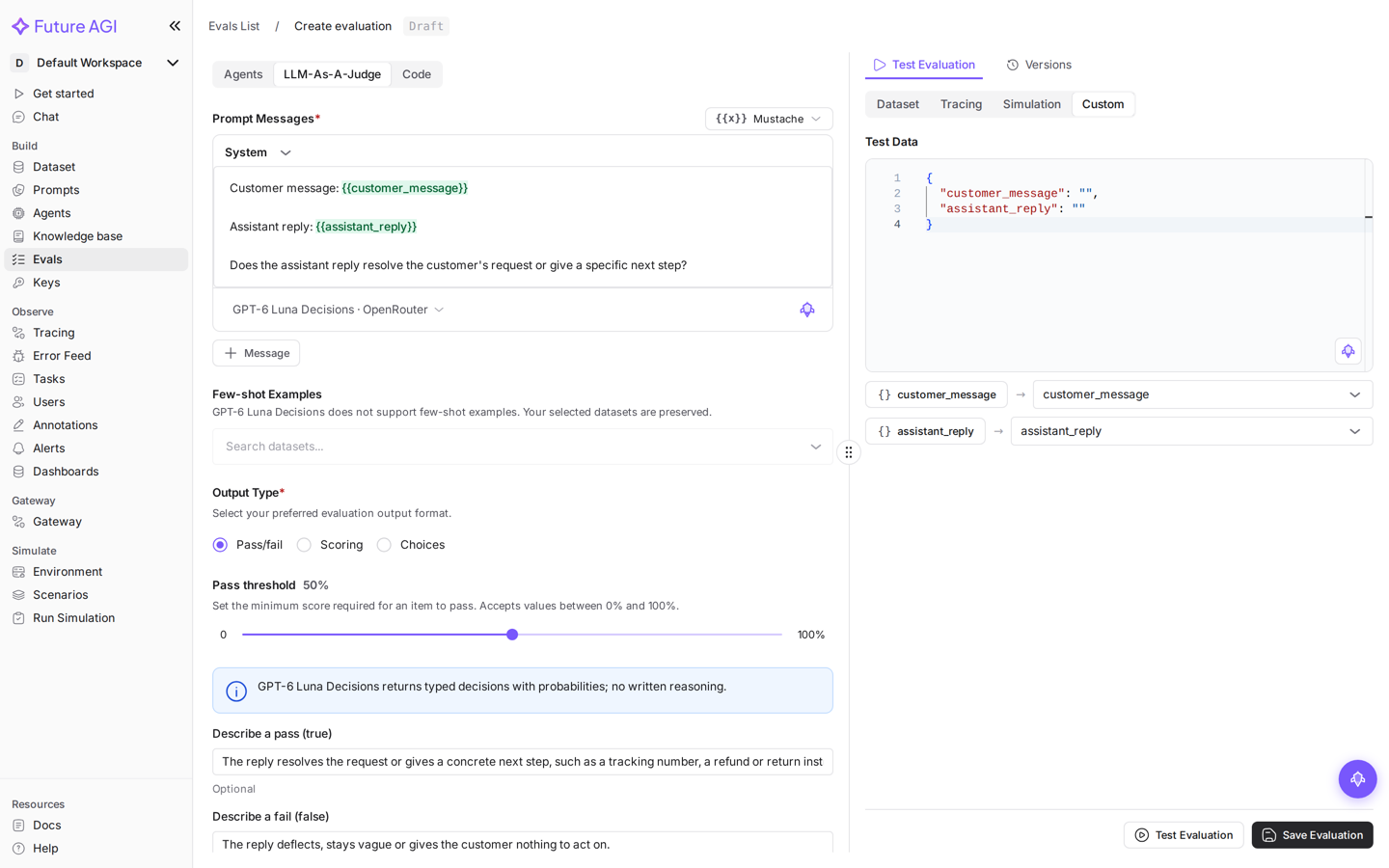
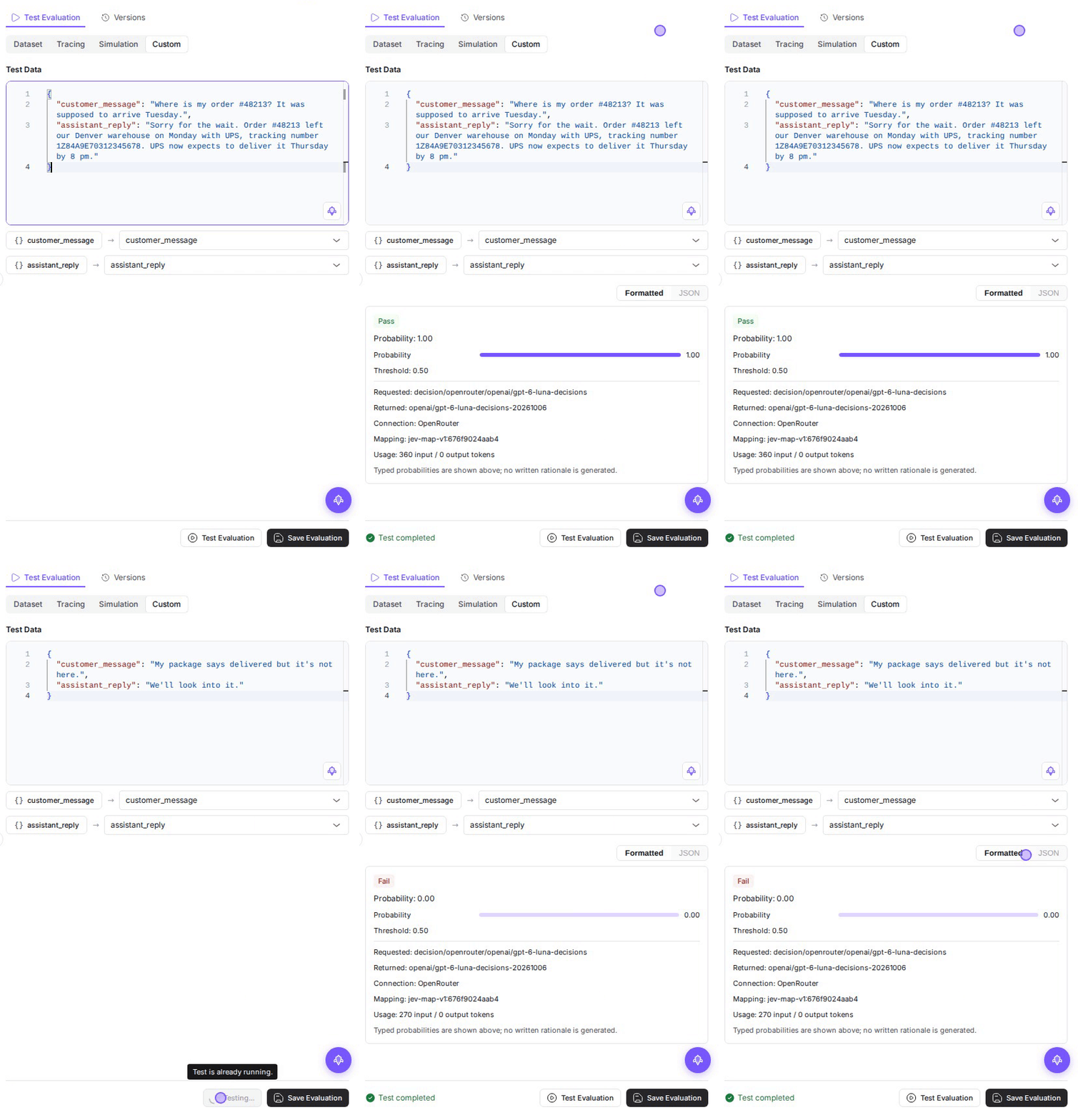
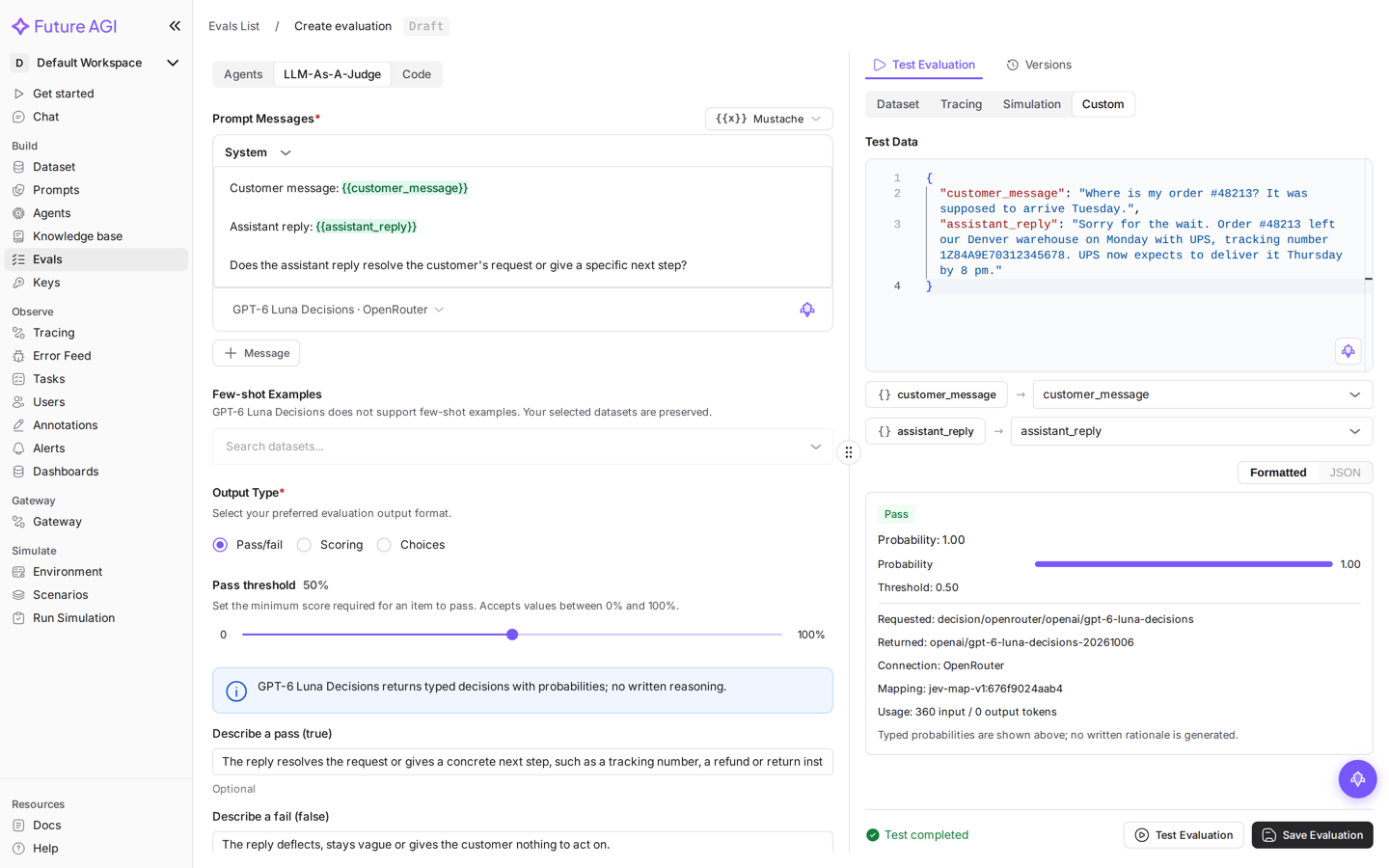
Picking GPT-6 Luna Decisions on its OpenRouter connection and testing the eval on two replies
Decision models return typed decisions, not reasoning. Use an LLM judge such as a Turing model when you need a written explanation for each score.
Before you start
- A Future AGI workspace where you can create evals
- A key for at least one connection: OpenRouter (every decision model), TypeSafe (Jev), OpenAI (GPT-6 Luna Decisions) or Perplexity (Decider)
The model picker never borrows a key or switches to another model. If a key is missing or rejected, the eval stops with an error until you fix the key.
Create a decision-model eval
Start an LLM-as-a-Judge eval
Open Evals, select Create evaluation, then choose the LLM-As-A-Judge tab. Enter a name and write the question in the prompt. Reference your data with mustache variables:
Customer message: {{customer_message}}

Assistant reply: {{assistant_reply}}

Does the assistant reply resolve the customer's request or give a specific next step?
Write the question only. The output type you pick below tells the model how to answer.
Open the model picker
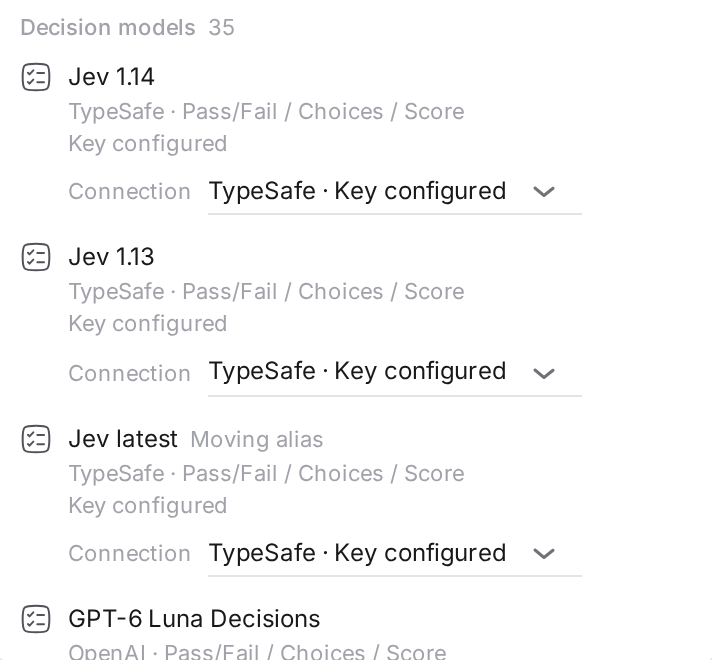
Select Select model under the prompt. Scroll past the Future AGI models to Decision models, or type part of a name, author or connection in Search models….
Each row shows the model, its author, the output types it supports and the key state for the selected connection. A Moving alias badge marks a latest model whose version changes upstream.
Choose the model and its connection
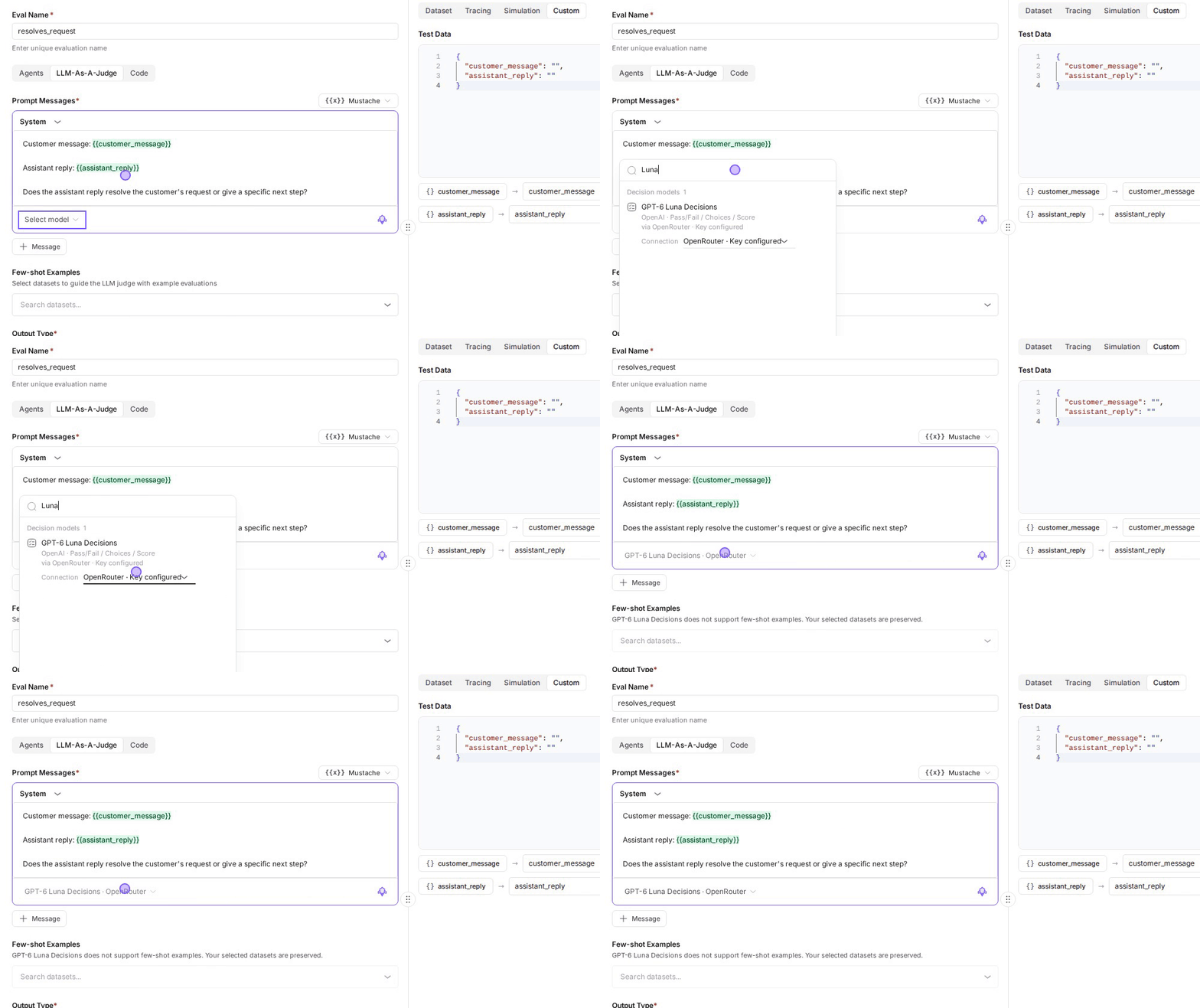
Use the row’s Connection selector to choose how the model is reached. For example, GPT-6 Luna Decisions can run on OpenAI directly or through OpenRouter. Every model is available through OpenRouter; Jev, GPT-6 Luna Decisions and Decider also have a direct connection.
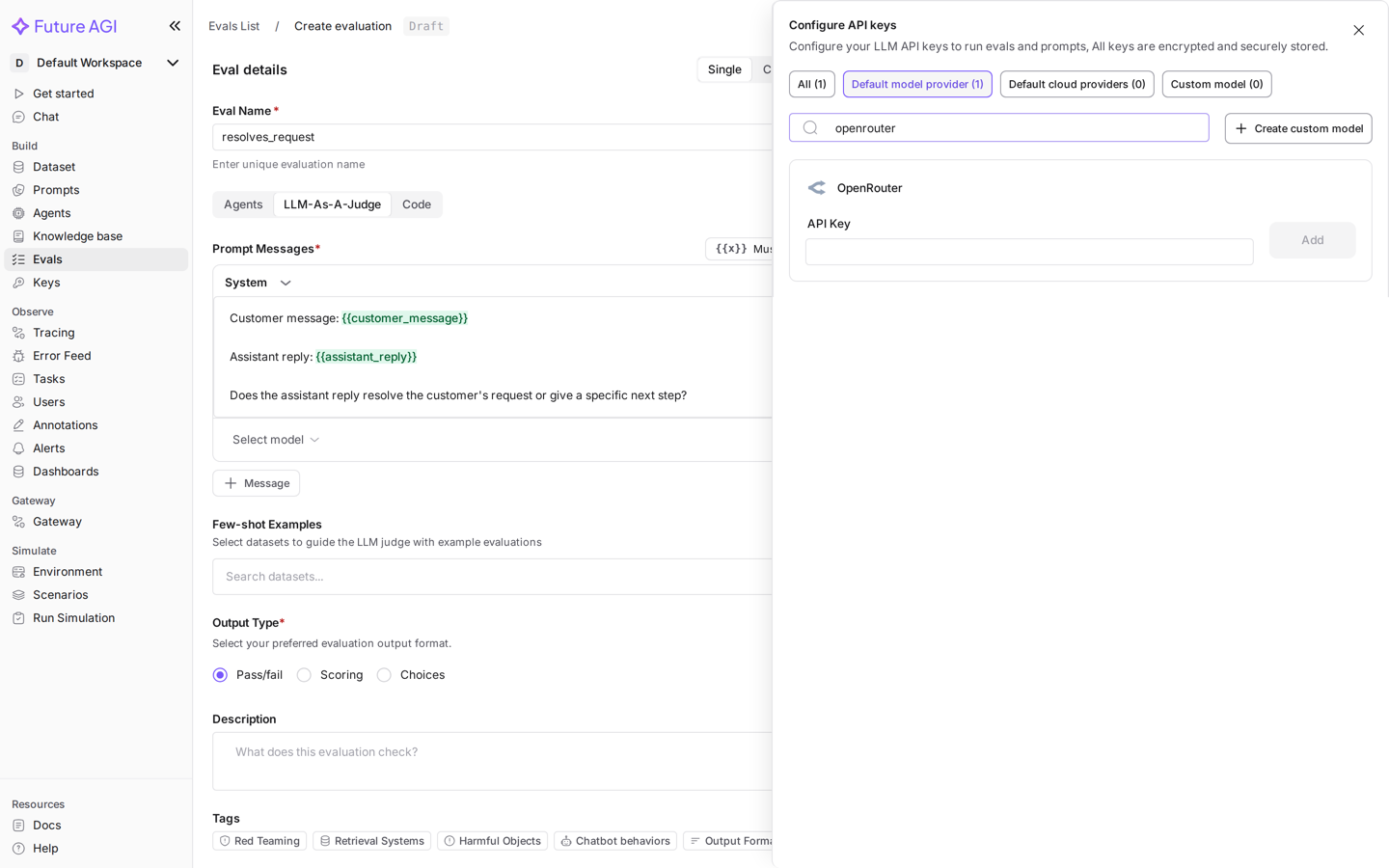
If the connection has no key, choosing it opens Configure API keys in place. Search for the provider, paste the key and select Add. The model is selected once the key is saved. You can also add keys in advance in Settings → AI Providers.
The selected model appears under the prompt as Model · Connection, for example GPT-6 Luna Decisions · OpenRouter.
Configure the output type
Pick Pass/fail, Scoring or Choices under Output Type. Each decision model lists the types it supports; a model that does not support the selected type is locked in the picker with the reason.
| Output type | What you configure | What the model returns |
|---|---|---|
| Pass/fail | A Pass threshold (50% by default) and optional Describe a pass (true) and Describe a fail (false) | The probability that the pass description is true, compared with the threshold to give Passed or Failed |
| Choices | Choice names, each shown as Pass, Neutral or Fail | One choice, with the probability of every choice and a confidence |
| Scoring | 2 to 10 Ordered levels, lowest first, and a Pass threshold | The expected level and a normalized score: the level divided by level count − 1 |
For resolves_request, set the descriptions:
- Describe a pass (true):
The reply resolves the request or gives a concrete next step, such as a tracking number, a refund or return instructions. - Describe a fail (false):
The reply deflects, stays vague or gives the customer nothing to act on.
Test it on real examples
In Test Evaluation, open the Custom tab and paste a JSON object with one key per variable:
{
  "customer_message": "Where is my order #48213? It was supposed to arrive Tuesday.",
  "assistant_reply": "Sorry for the wait. Order #48213 left our Denver warehouse on Monday with UPS, tracking number 1Z84A9E70312345678. UPS now expects to deliver it Thursday by 8 pm."
}
Select Test Evaluation. The result shows the verdict and the decision details: the probability, the model you requested, the model the provider returned, the connection and the token usage.
Test a reply that should fail before you save. "We'll look into it." as the answer to "My package says delivered but it's not here." returns Failed.
Save the eval
Select Save Evaluation. The eval keeps its model and connection, and every place that runs it uses that model unless you choose another one for a run.
Choices: route tickets by topic
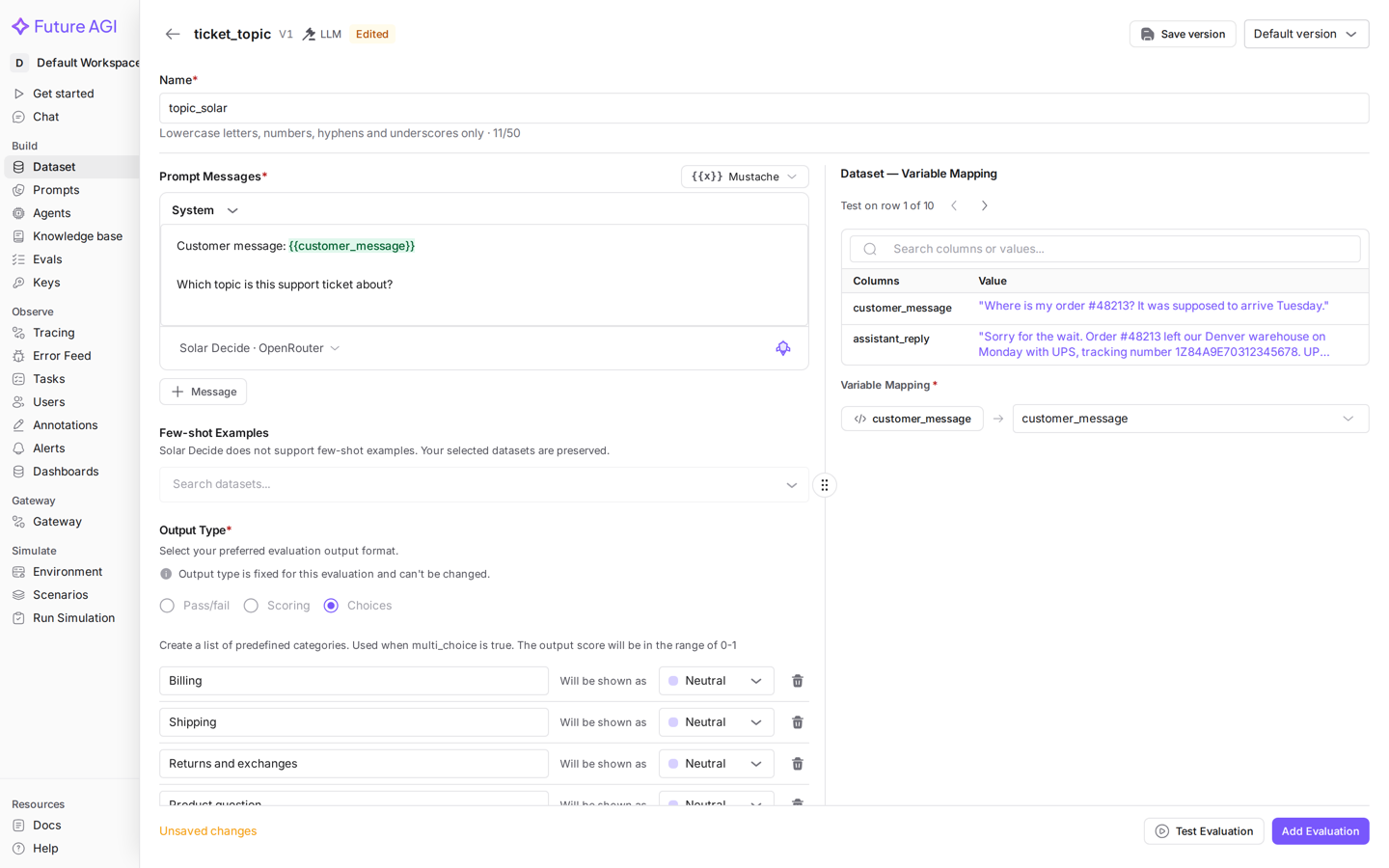
ticket_topic asks only about the customer message:
Customer message: {{customer_message}}

Which topic is this support ticket about?
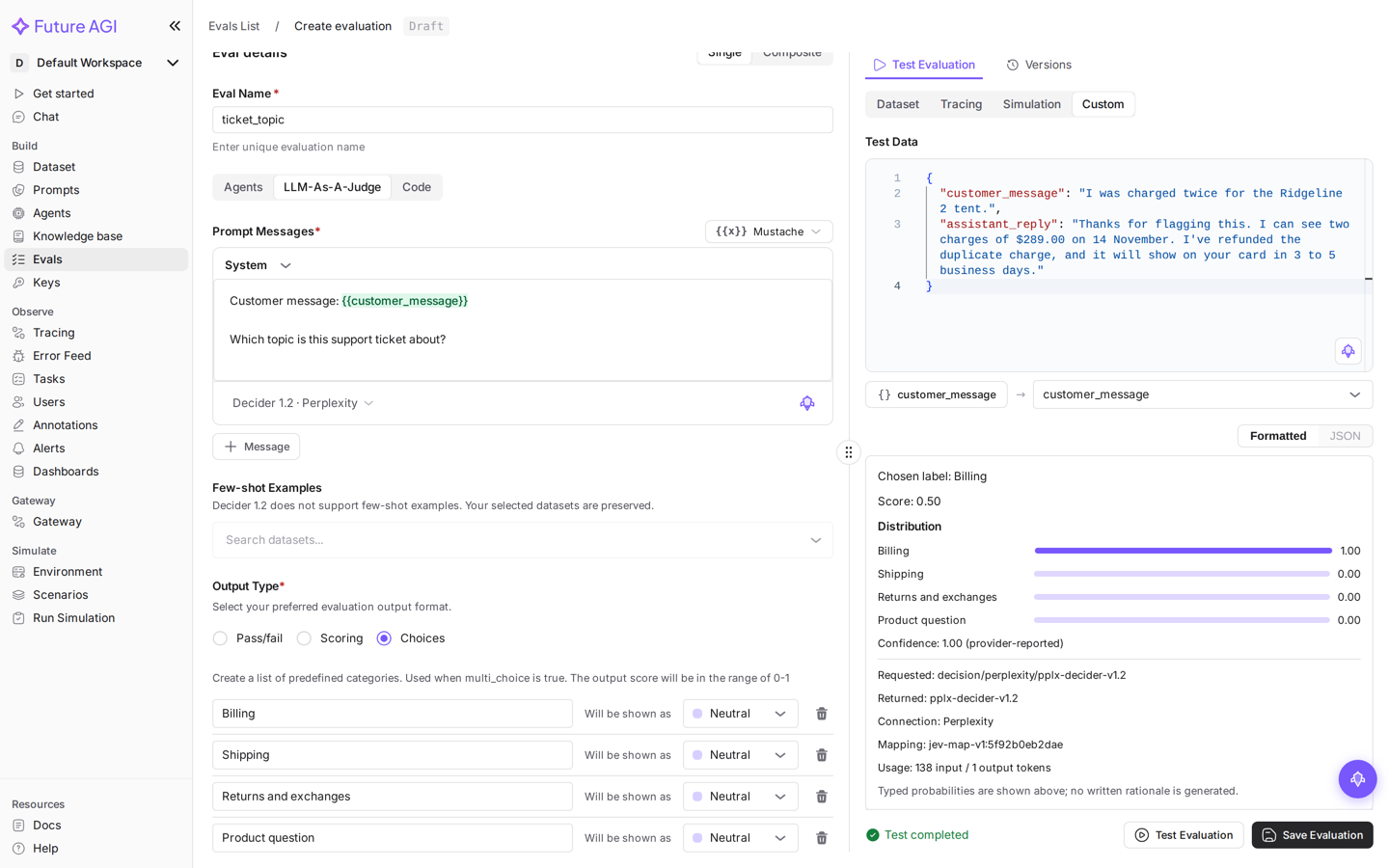
Choose Choices and add four choices: Billing, Shipping, Returns and exchanges and Product question. Topics are neither good nor bad, so show each one as Neutral. Then pick Decider 1.2 with the Perplexity connection.
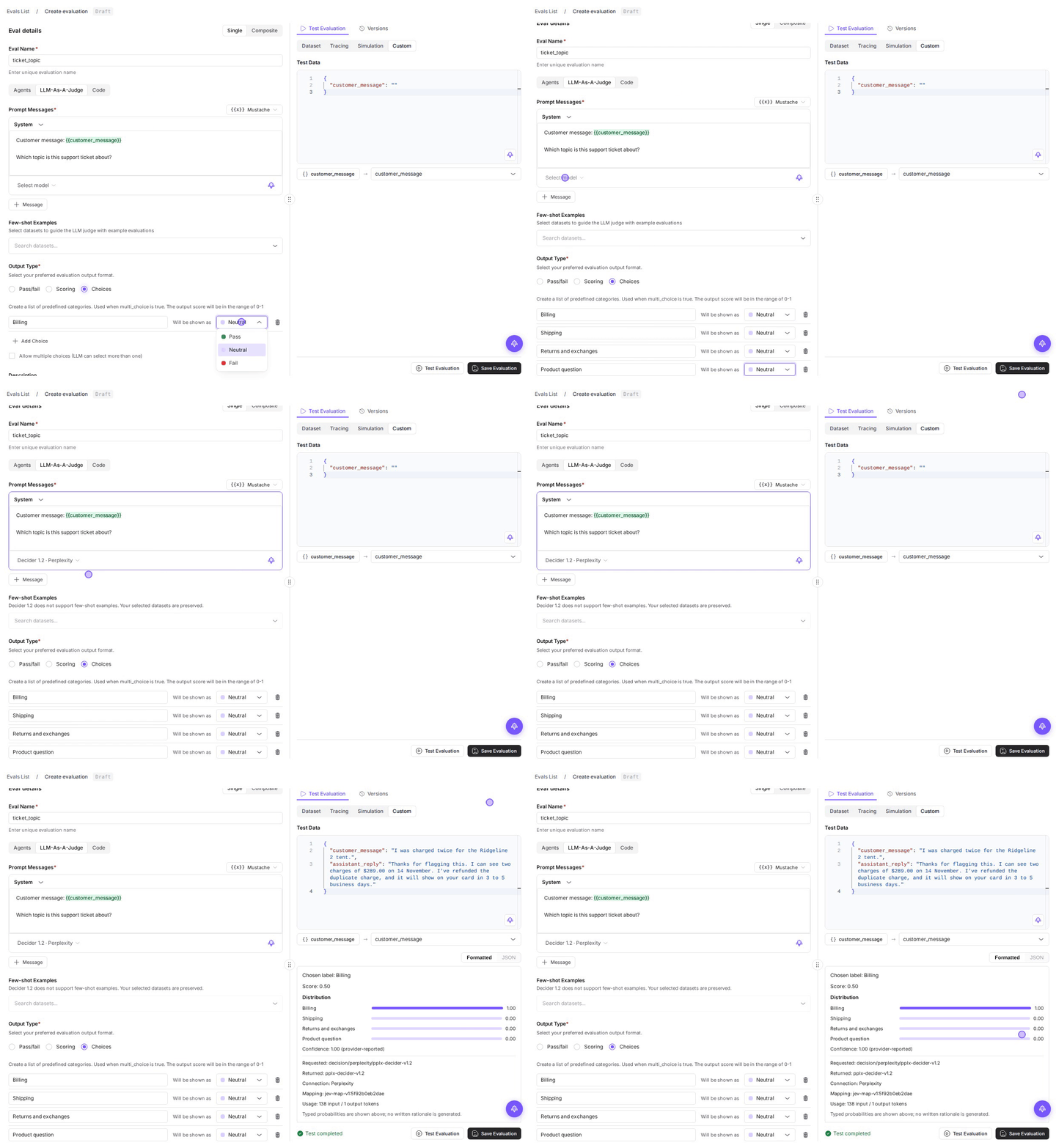
For "I was charged twice for the Ridgeline 2 tent.", Decider 1.2 chooses Billing with a probability of 1.00. The result lists the probability of every choice.
Scoring: rate the tone
reply_tone uses an ordered rubric:
Customer message: {{customer_message}}

Assistant reply: {{assistant_reply}}

How warm and helpful is the tone of the assistant reply?
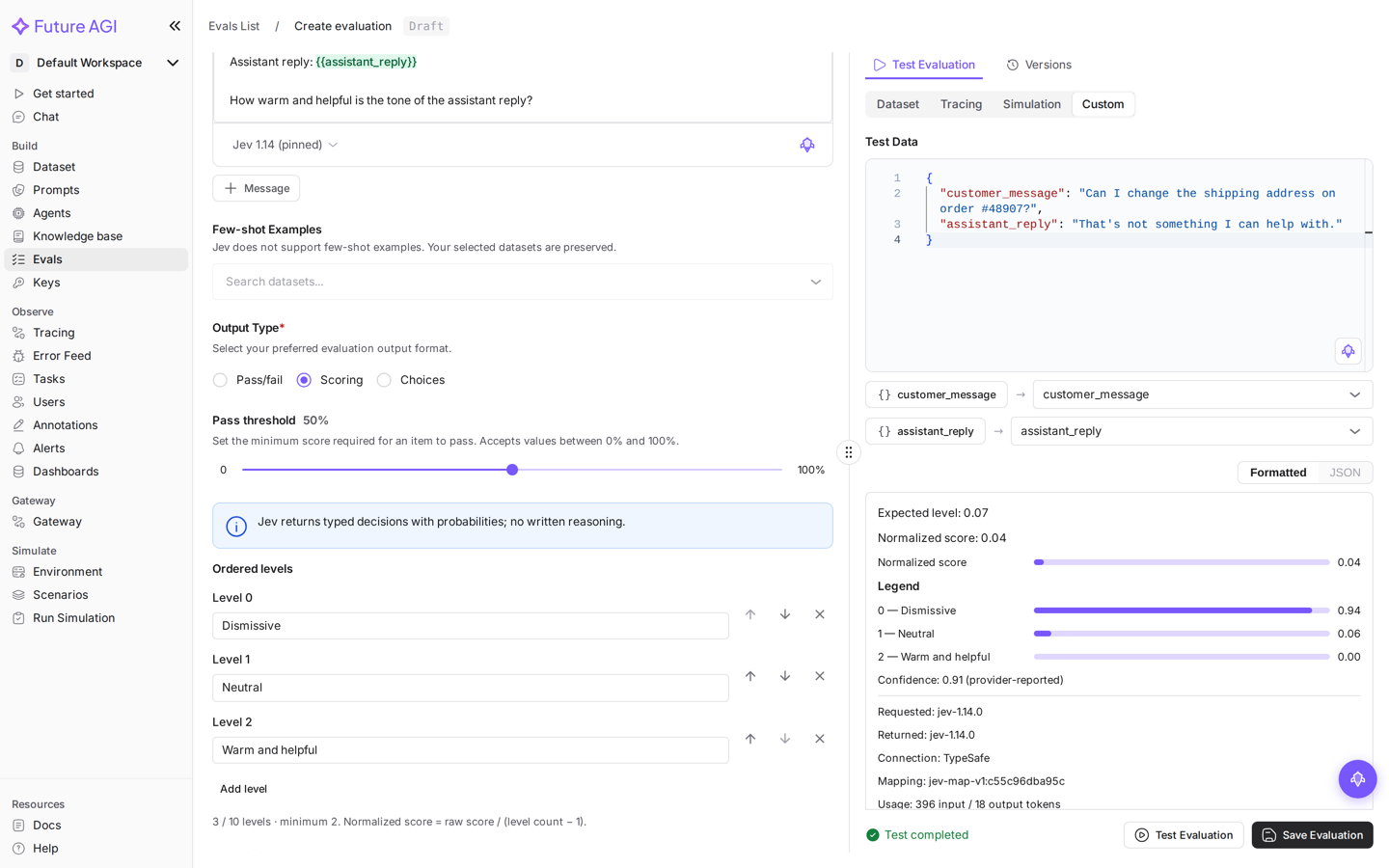
Pick Jev 1.14 with the TypeSafe connection; it shows under the prompt as Jev 1.14 (pinned). Choose Scoring, then add three levels with Add level: Dismissive, Neutral and Warm and helpful.
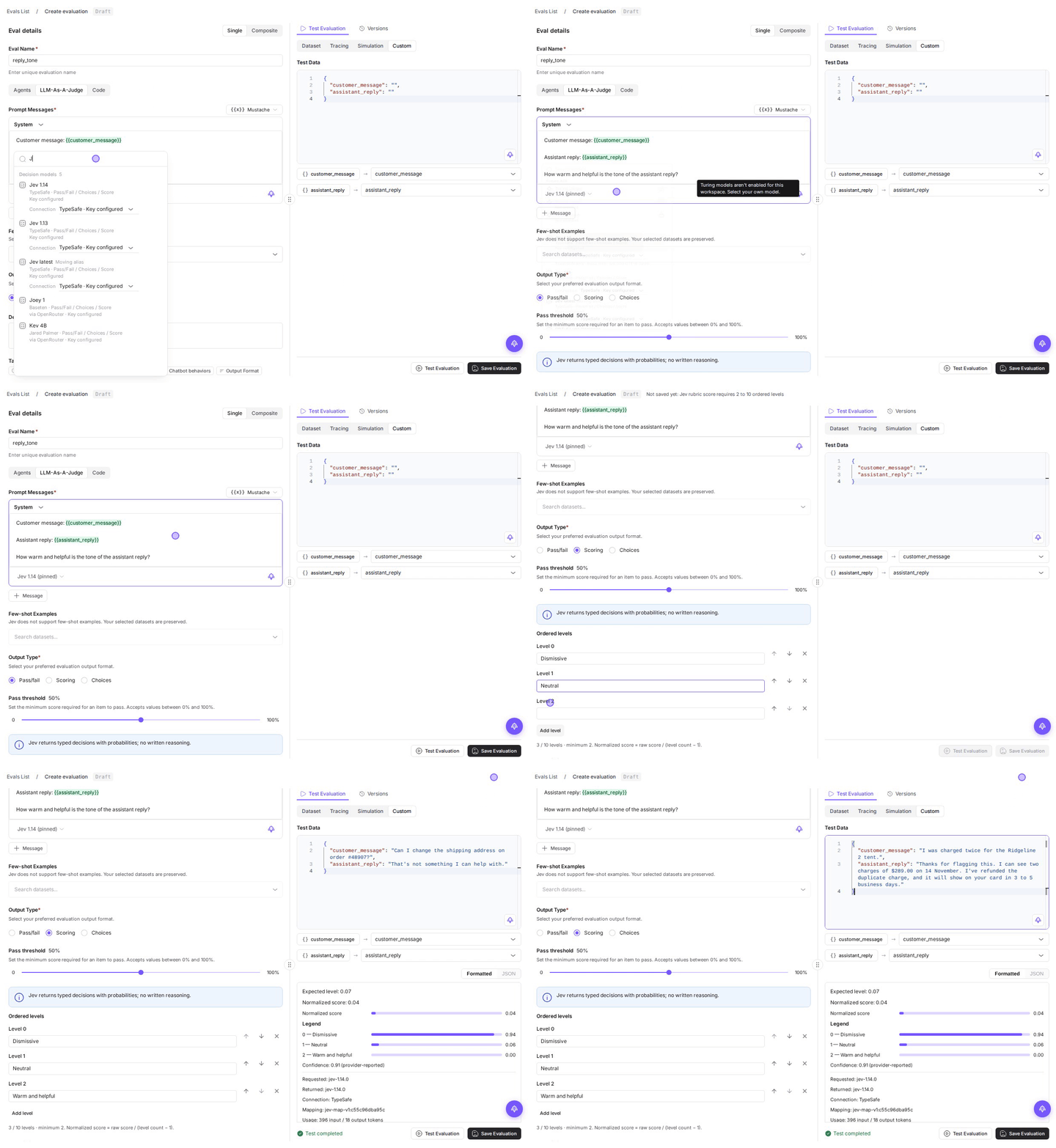
Jev places "That's not something I can help with." at the Dismissive level, and the duplicate-charge refund at Warm and helpful.
Run the evals on a dataset
The team keeps a sample of real conversations in a dataset with customer_message and assistant_reply columns.
| customer_message | assistant_reply |
|---|---|
| Where is my order #48213? It was supposed to arrive Tuesday. | Sorry for the wait. Order #48213 left our Denver warehouse on Monday with UPS, tracking number 1Z84A9E70312345678. UPS now expects to deliver it Thursday by 8 pm. |
| I was charged twice for the Ridgeline 2 tent. | Thanks for flagging this. I can see two charges of $289.00 on 14 November. I’ve refunded the duplicate charge, and it will show on your card in 3 to 5 business days. |
| Is the Summit 45 backpack waterproof? | Please check the product page for details. |
| My package says delivered but it’s not here. | We’ll look into it. |
Add the evals
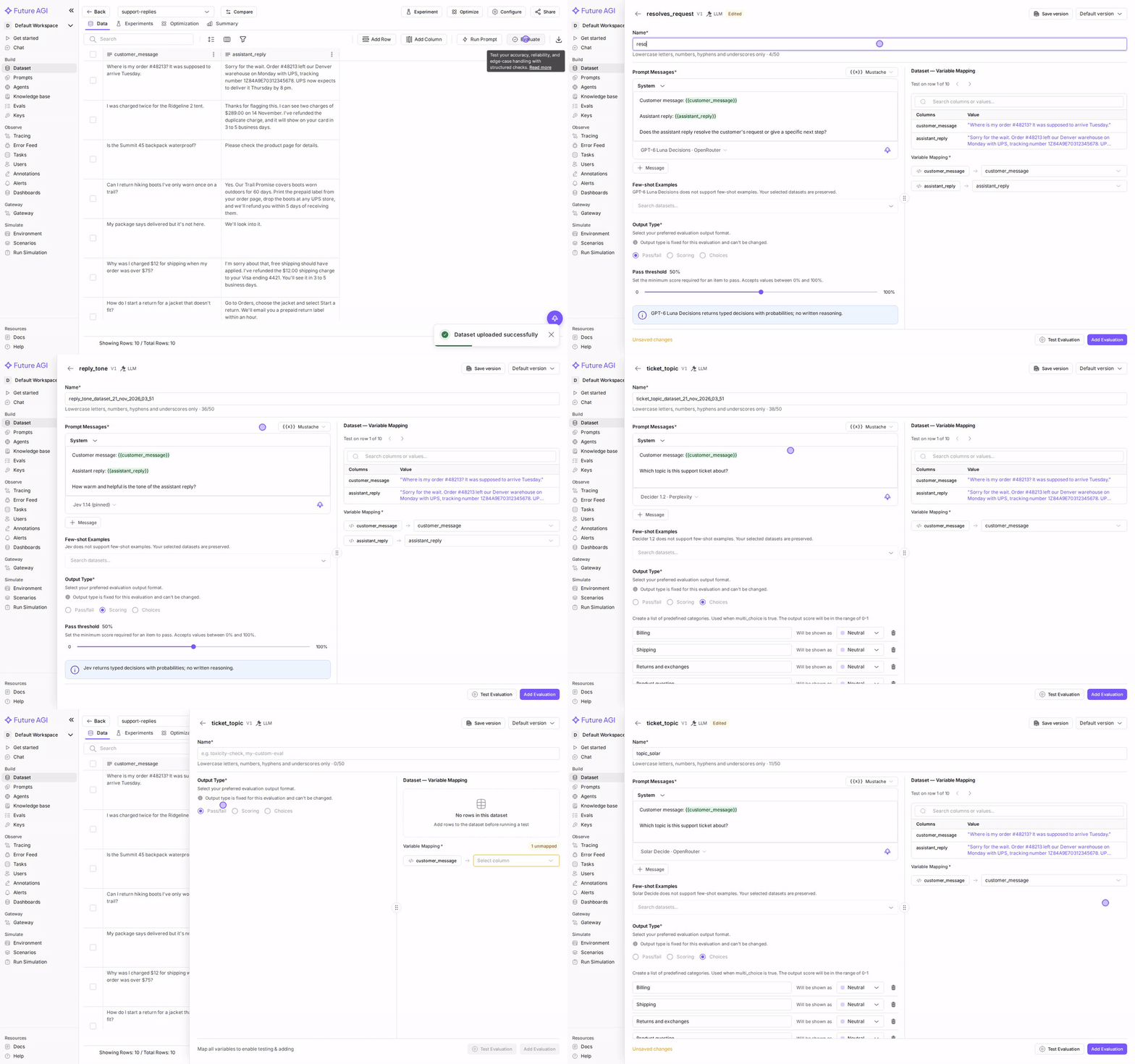
Open the dataset and select Evaluate, then Add Evaluations. Search for resolves_request and select Add.
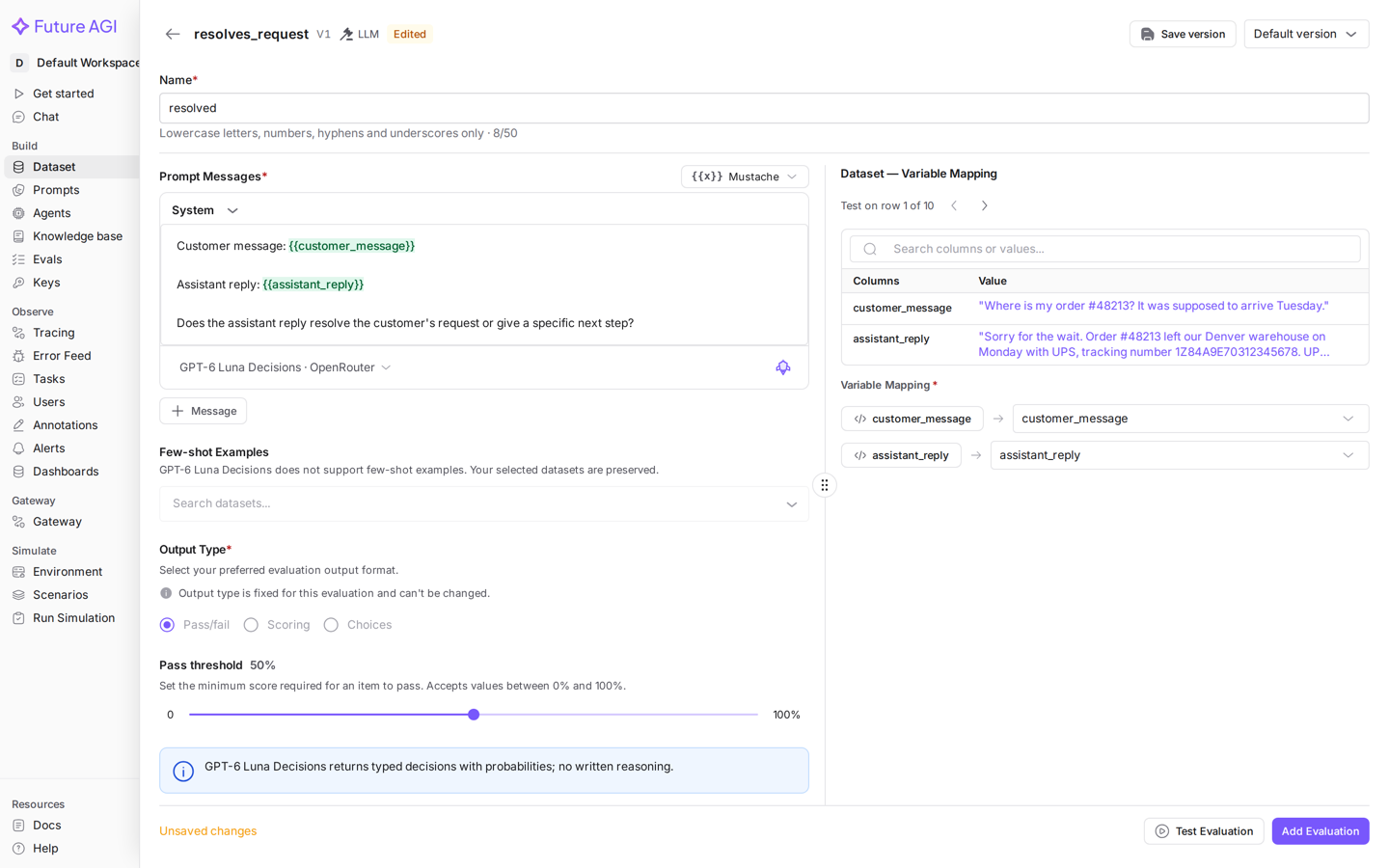
The drawer opens on the eval’s saved decision model. Map each variable to a column under Variable Mapping, and give the result column a short Name, such as resolved. Step through Test on row 1 of 10 to check a few rows, then select Add Evaluation. Repeat for reply_tone (named tone) and ticket_topic (named topic_decider).
Compare two decision models on the same eval
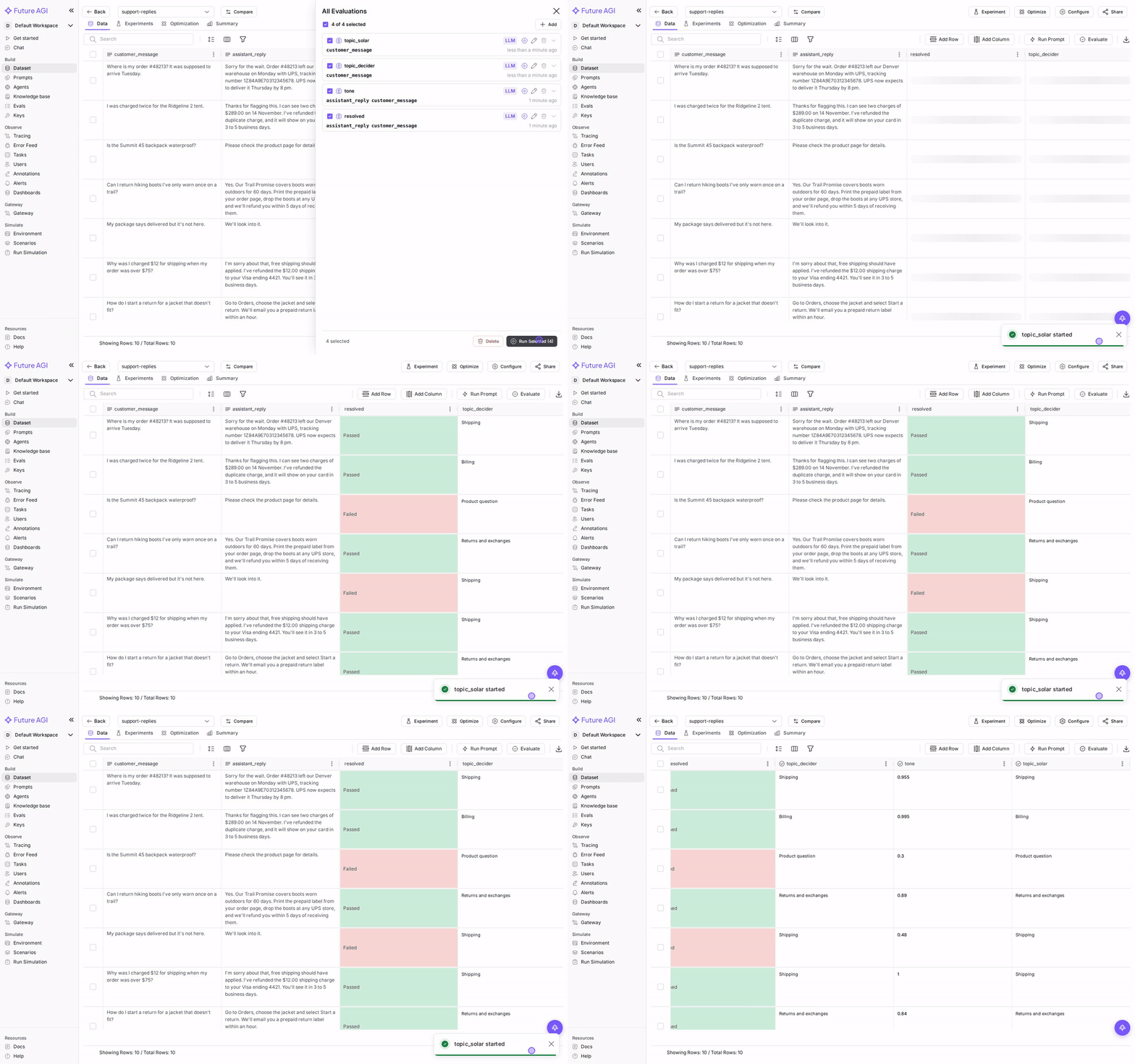
Add ticket_topic a second time, name it topic_solar and choose a different model in the drawer’s model picker, such as Solar Decide · OpenRouter. The saved eval does not change; only this result column uses Solar Decide.
Run them
Select Run All. Each eval fills its own column as rows finish.
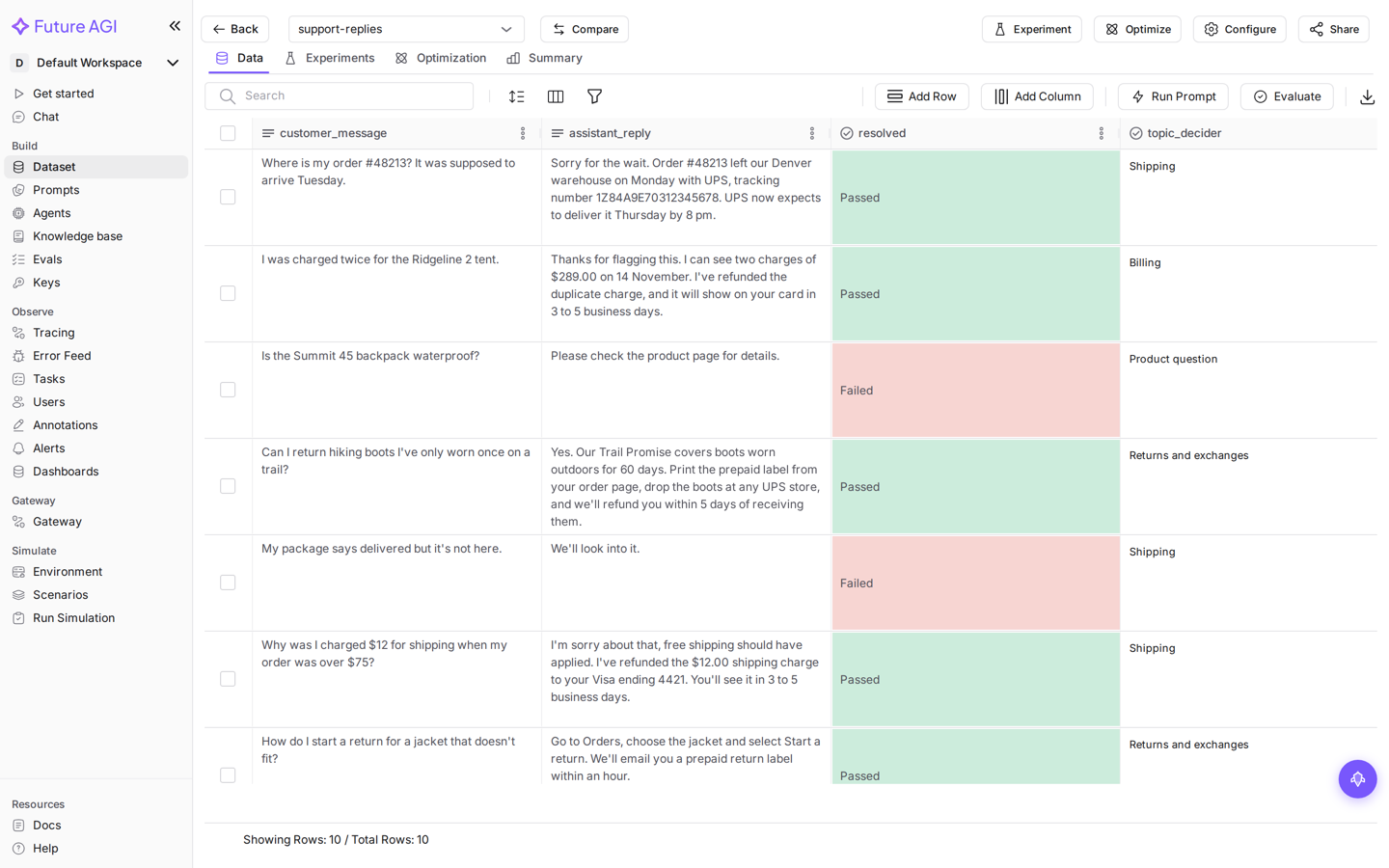
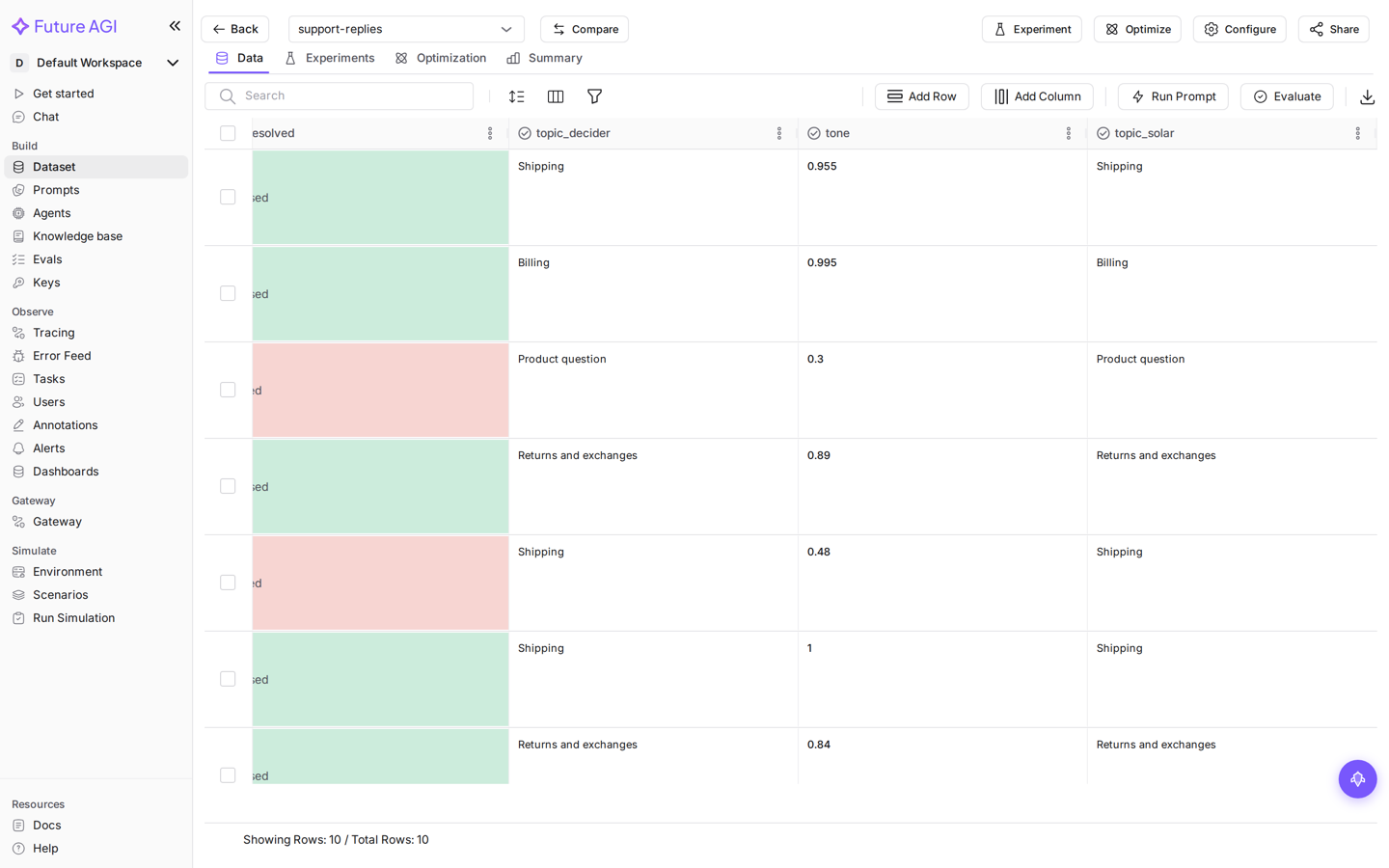
Scroll right to compare the models. In this run, Decider 1.2 and Solar Decide chose the same topic for all 10 tickets, and the four replies that only deflect, such as "We'll look into it." and "Refunds take 5 to 10 business days.", failed resolved and scored lowest on tone.
Run a saved eval from code
Call a saved decision-model eval by name. It runs on the model and connection saved with the eval. Pass a decision model ID as the model to use a different one for that call.
# python -m pip install agent-learning-kit==0.3.7
# export FI_API_KEY=... FI_SECRET_KEY=...
from fi.alk.evals import Evaluator

evaluator = Evaluator()

result = evaluator.evaluate(
    eval_templates="resolves_request",
    inputs={
        "customer_message": "My package says delivered but it's not here.",
        "assistant_reply": "We'll look into it.",
    },
)
print(result.eval_results[0].output)  # Failed
print(result.eval_results[0].reason)  # GPT-6 Luna Decisions probability 0.00 vs threshold 0.50 → Fail

# Same eval inputs, another decision model for this call only
topic = evaluator.evaluate(
    eval_templates="ticket_topic",
    inputs={"customer_message": "My package says delivered but it's not here."},
    model_name="decision/openrouter/upstage/solar-decide",
)
print(topic.eval_results[0].output)  # {'score': 0.5, 'choice': 'Shipping'}
curl -X POST "https://api.futureagi.com/sdk/api/v1/new-eval/" \
-H "X-Api-Key: $FI_API_KEY" \
-H "X-Secret-Key: $FI_SECRET_KEY" \
-H "Content-Type: application/json" \
-d '{
"eval_name": "ticket_topic",
"inputs": {"customer_message": "My package says delivered but it'"'"'s not here."},
"model": "decision/openrouter/upstage/solar-decide"
}'Leave out "model" to use the model saved with the eval. The response lists each result with its output and reason:
{
  "status": true,
  "result": [
    {
      "evaluations": [
        {
          "name": "ticket_topic",
          "reason": "Solar Decide chose \"Shipping\" (probability 1.00)",
          "runtime": 562,
          "output": {"score": 0.5, "choice": "Shipping"},
          "output_type": "choices",
          "eval_id": "a6519263-1b35-4dc1-8c19-b08e41154901"
        }
      ]
    }
  ]
}
Find a model ID
List the decision models with model_type=decision. Add search to filter by name, author or connection, and limit to get more than 10 per page. is_available is true when your workspace has a key for that connection.
curl -G "https://api.futureagi.com/model-hub/api/models_list/" \
  --data-urlencode "model_type=decision" \
  --data-urlencode "search=luna" \
  -H "X-Api-Key: $FI_API_KEY" \
  -H "X-Secret-Key: $FI_SECRET_KEY"
{
"count": 1,
"next": null,
"previous": null,
"results": [
{
"model_name": "openai/gpt-6-luna-decisions",
"label": "GPT-6 Luna Decisions",
"author": "OpenAI",
"version": "versioned",
"question_types": ["noul", "choice", "score"],
"min_choices": 1,
"max_choices": 255,
"max_state_bytes": 120000,
"notice": "Text and JSON inputs only.",
"unavailable_reason": null,
"connections": [
{ "model_name": "decision/openai/gpt-6-luna", "provider": "openai", "label": "OpenAI", "is_available": false },
{ "model_name": "decision/openrouter/openai/gpt-6-luna-decisions", "provider": "openrouter", "label": "OpenRouter", "is_available": true }
],
"type": "decision"
}
],
"total_pages": 1,
"current_page": 1
}Use a connection’s model_name as the model ID. question_types uses the decision API names: noul is Pass/fail, choice is Choices and score is Scoring.
Available decision models
| Author | Models | Connections |
|---|---|---|
| TypeSafe | Jev 1.14, Jev 1.13, Jev latest | TypeSafe, OpenRouter |
| OpenAI | GPT-6 Luna Decisions | OpenAI, OpenRouter |
| Perplexity | Decider 1.2, Decider Flash 1.2, Decider latest, Decider Flash latest | Perplexity, OpenRouter |
| Microsoft | Microsoft Decision 1 | OpenRouter |
| Cloudflare | Clef, Clef Flash, Clef Omni | OpenRouter |
| Liquid AI | d1.1, d1, d1-ultra, d1 latest, d1-ultra latest | OpenRouter |
| Baseten | Joey 1, Elephant 1, Mammoth 1 | OpenRouter |
| Nace.AI | Drex Max, Drex 2.0, Drex 1.5 | OpenRouter |
| Respan | Span-02, Span-01, Span-01 Lite, Span-01 Lite (free) | OpenRouter |
| Upstage | Solar Decide, Solar Decide Flash | OpenRouter |
| Inception | Mercury Decide | OpenRouter |
| Morph | Reflex | OpenRouter |
| ScaleDown | Classify-1 | OpenRouter |
| Together | Tev1 4B Experimental | OpenRouter |
| Jared Palmer | Kev 4B | OpenRouter |
| Parallel | Decisions Fast (free) | OpenRouter |
Model IDs follow three patterns:
| Connection | ID pattern | Example |
|---|---|---|
| OpenRouter | decision/openrouter/<author>/<model> | decision/openrouter/upstage/solar-decide |
| OpenAI, Perplexity | decision/<connection>/<model> | decision/perplexity/pplx-decider-v1.2 |
| TypeSafe | jev-<version> | jev-1.14.0, jev-latest |
Inputs and limits
Decision models read text and JSON only. The mapped input can be up to 120,000 UTF-8 bytes, except for these models:
| Model | Limit or behavior |
|---|---|
| Clef, Clef Flash | 2,000 UTF-8 bytes of input. A larger input is refused rather than truncated. |
| Joey 1, Elephant 1, Mammoth 1 | 48,000 UTF-8 bytes of input |
| Kev 4B | 24,000 UTF-8 bytes of input |
| Span-01, Span-01 Lite, Span-01 Lite (free) | Pass/fail only |
| Tev1 4B Experimental | 2 to 24 choices |
| Decisions Fast (free) | Researches the live web, so your inputs may be used in web queries |
| Mercury Decide | Listed but not selectable: OpenRouter has no active endpoint for it |
Decision models do not use few-shot examples, tools, knowledge bases or internet checks. If the eval already has few-shot datasets selected, the editor keeps them, and the decision model does not use them. See Jev evaluators for the controls the editor disables.
A Moving alias (Jev latest, Decider latest, d1 latest) follows the provider’s newest version of that model, never a different model. Pick a versioned model when you need results that stay comparable over time.
Costs
Each call is billed by the provider to the key you saved. For the free models, the picker notes: “Provider inference is free; FutureAGI evaluation charges still apply.” Jev’s Cloud fee is described in Evaluator models.
Troubleshooting
A test or run fails
| Message | What to do |
|---|---|
OpenAI rejected the request with the saved API key. Check the key and its model permissions in Settings → AI Providers. | The provider refused the key for this model. Update the key in Settings → AI Providers, or choose another connection, such as OpenRouter, in the model picker. |
Decision evaluators are not available in this build. | The deployment was built without Future AGI’s ee code, which runs decision models. Use a standard Future AGI build. |
A model is locked in the picker
A locked row shows the reason in place of its key state:
| Reason | What to do |
|---|---|
Span-01 does not support Choices. Choose another model or output type. | The model cannot answer the selected output type. Change the output type or the model. |
Tev1 4B Experimental requires 2 to 24 choices. | Add or remove choices to fit the model’s range. |
No active OpenRouter endpoint. Choose another decision model. | The model has no working endpoint. Choose another decision model. |
Next steps
Questions & Discussion