Trace OpenAI Codex CLI with Future AGI
Connect Codex CLI with one setup command and inspect prompts, model calls, tokens, tools, subagents, and sessions in Future AGI.
Trace each Codex prompt in Future AGI, with model calls, token usage, tool calls, and nested subagents beneath it. Prompts in the same conversation appear together in Sessions.
What it traces
One trace per prompt groups model calls, token usage, tools and nested subagents. Prompts in the same conversation share a session. Model request attempts own usage once; missing cost is not estimated.
Before you start
Use local Codex CLI 0.167.0 on Linux with Node.js 22.16 or later in the 22.x series, or 24.x. Compatible newer Codex 0.x releases are accepted when their hook payloads match the supported schema. Codex must already be installed and connected to your model provider. For an application using the Codex SDK, use the separate Codex SDK integration.
Quick start
Get your Future AGI keys
Open API keys in Future AGI. You need an API key and its secret key. Keep them out of Codex conversations and source control.
Set up tracing
Run this command from your repository in an interactive terminal:
npx @traceai/agents setup codex --project coding-agentsSetup asks for your keys without echoing them, validates the destination, saves a private configuration, and installs the native Codex plugin. It does not change your model provider or project permissions.
Open Codex and use /hooks to review the Future AGI hook definitions. Setup reports TRUST_REQUIRED until you approve the exact definitions in Codex. Restart an existing Codex session after installation or review.
Content capture is on by default. Prompts, model responses, and tool input/output may include file text or secrets Codex reads. To collect structure and usage without this content, add --no-capture-content to the setup command.
Run the agent and open the trace
Use Codex normally, or run a prompt from your repository:
codex exec "Read README.md and summarize the setup steps."In Future AGI, open Observe, select coding-agents, and open the codex trace. Expand a codex.model_attempt to inspect its reported tokens, and its model when Codex reports one, or a tool span to inspect its outcome and, when Codex provides them, its input and output. When Codex delegates work, codex.subagent spans group the child’s model and tool calls, including nested children. Open Sessions to follow subsequent prompts in the conversation.
Each prompt exports when Codex finishes it; you do not need to send another prompt. Model inputs contain the context Codex makes available, such as the user prompt or environment context; they are not a complete provider request body. Model output is reconstructed from Codex’s rollout when available. Usage belongs to model request attempts and is not counted again on the parent trace; costs are omitted when Codex does not report them.
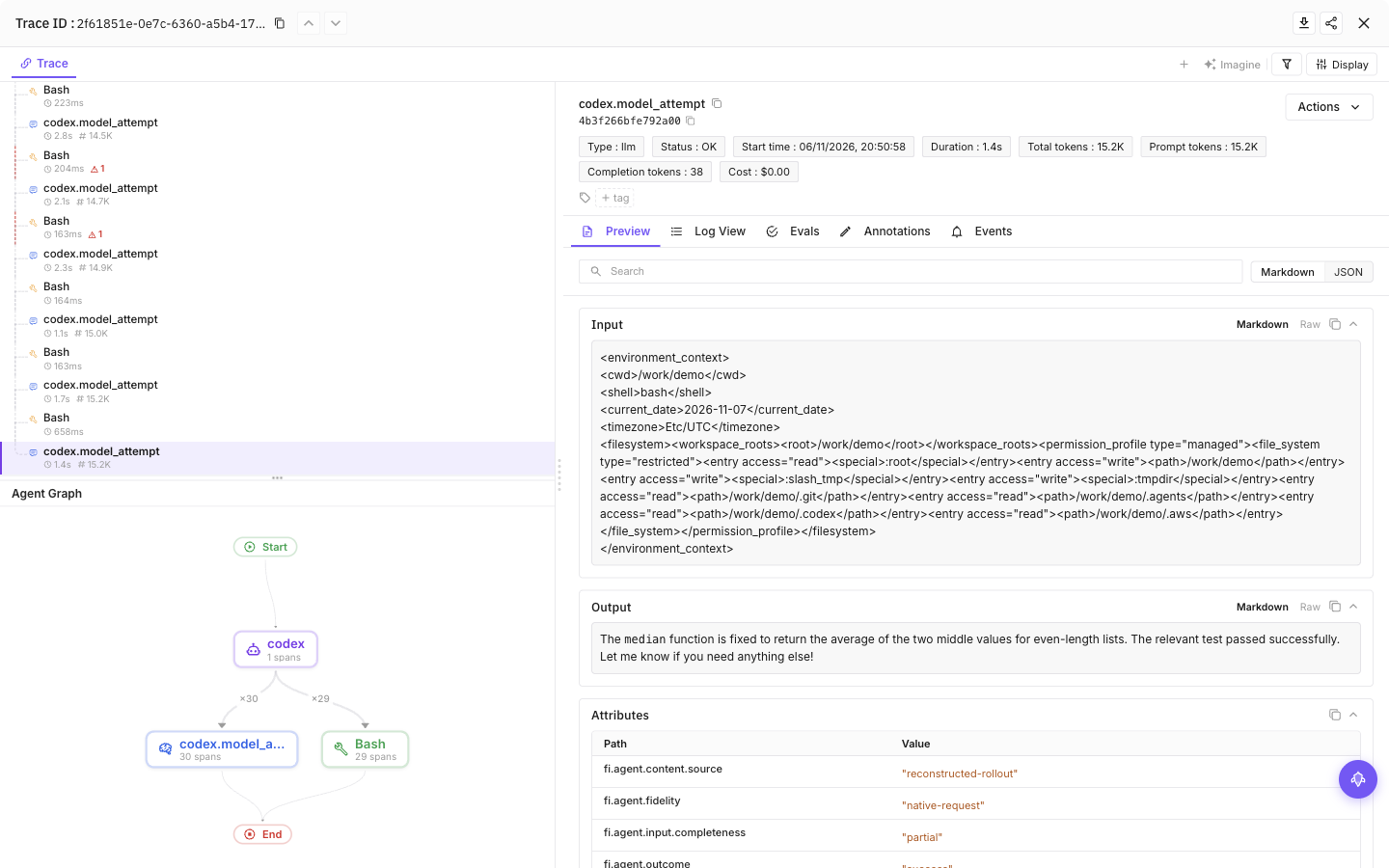
Select a tool call, then the final model call, to see inputs, outputs and token usage
Configuration
Content capture is on by default: prompts, model responses and tool input/output can include source code and secrets the agent reads. Add --no-capture-content to setup to save a content-off preference, or set FI_AGENT_CAPTURE_CONTENT=false in the agent’s launch environment for a process-level opt-out. Structure and available usage remain visible.
| Setting | Purpose |
|---|---|
FI_API_KEY, FI_SECRET_KEY | Override saved credentials as a complete pair. Use hidden setup prompts or secret-manager environment injection, never command arguments. |
FI_PROJECT_NAME | Future AGI project receiving traces. Rerun setup to approve a changed project when using saved credentials. |
FI_AGENT_CAPTURE_CONTENT=false | Turn off prompt, response and tool-content capture for the process. Content capture is on by default. |
FI_AGENT_ENABLED=false | Disable tracing for the process. |
FI_USER_ID | Set an explicit user identifier; otherwise setup creates an opaque local ID. |
FI_BASE_URL | Self-hosted API origin. Approve it through setup with --base-url <origin>. |
FI_OTLP_ENDPOINT | Exact OTLP/HTTP traces URL; takes precedence over FI_BASE_URL. Saved credentials still require destination approval. |
FI_AGENT_CONFIG_DIR | Override the shared protected configuration directory, normally ${XDG_CONFIG_HOME:-$HOME/.config}/futureagi/agents. |
Agent-specific settings
| Setting | Purpose |
|---|---|
~/.config/futureagi/agents/credentials.json | Shared, owner-only credentials store. XDG_CONFIG_HOME changes the config root; FI_AGENT_CONFIG_DIR overrides the shared agents directory. |
$CODEX_HOME/futureagi.json | User settings; defaults to ~/.codex/futureagi.json. Credentials are stored separately. |
.codex/futureagi.json | Optional repository settings, without credentials. |
Environment variables override saved settings, but saved credentials are approved only for the project and endpoint selected during setup. Changing only FI_PROJECT_NAME, FI_OTLP_ENDPOINT, or FI_BASE_URL pauses tracing with DESTINATION_NOT_APPROVED; it does not approve sending your saved keys to the new destination.
To change the project, run setup again and approve reuse of the saved credentials when asked:
npx @traceai/agents setup codex --project another-projectFor a different API origin, add --base-url https://your-api.example.com. Check the displayed destination before approving. In a noninteractive environment, provide both FI_API_KEY and FI_SECRET_KEY alongside the explicitly selected project and endpoint. A repository-controlled route still requires approval through setup.
User and project scope
The native Codex plugin installs at user scope. --project coding-agents names the destination in Future AGI; it does not limit installation to that repository. Project-scoped plugin installation with --scope project is not supported. Use the user installation with repository configuration overrides instead.
--project-dir <path> selects a different repository. --user-only ignores repository settings for this CLI invocation. It does not disable repository settings in subsequent Codex hooks.
The CLI reads the current repository by default. To set up using only your user settings, add --user-only to setup. To inspect those settings independently of a repository, run npx @traceai/agents status codex --user-only.
For a per-repository content opt-out, create .codex/futureagi.json in that repository without credentials:
{
  "schemaVersion": 1,
  "captureContent": false
}
A repository can reduce content capture, but cannot increase your saved privacy setting or silently redirect saved credentials. Existing FI_HIDE_* restrictions remain effective, including FI_HIDE_ERROR_DETAILS.
Manage tracing
npx @traceai/agents status codex --check
npx @traceai/agents doctor codex
npx @traceai/agents disable codex
npx @traceai/agents enable codex
npx @traceai/agents update codex
npx @traceai/agents uninstall codex
Run these commands from the repository you use with Codex:
Status reports configuration, plugin registration, hook review, observed activation, and recent exports. Doctor also checks connectivity and credential acceptance; status codex --check performs the same connection check. After a successful export, open Observe to inspect the trace.
Disable tracing, re-enable it, or remove the native plugin. The disable operation does not contact Future AGI; npx needs the package available in its local cache to run offline.
Uninstall disables tracing first and removes unchanged integration-owned settings and runtime files. It preserves saved credentials, preexisting settings, and your edits.
Troubleshooting
TRUST_REQUIRED: open Codex’s/hooksview and review Future AGI’s exact hook definitions. Changed definitions require another review.- No trace after installation: restart Codex, submit a prompt, and let it finish. Check that the plugin and hooks are enabled, then run
doctor codexfrom the same repository. - Unsupported version or
UNKNOWN_HOOK_SHAPE: use Codex 0.167.0 or a compatible newer 0.x release. Update the integration if your Codex release changes the hook schema; a new major version is not accepted automatically. - Missing content: check
FI_AGENT_CAPTURE_CONTENT,FI_HIDE_*, and your repository override. Model output also requires an available Codex rollout. AUTH_REJECTED: run setup again in an interactive terminal. Setup offers hidden replacement-key entry and retains the saved profile until the new pair validates. For noninteractive setup, supply both replacement environment credentials. Do not put keys in command arguments.DESTINATION_NOT_APPROVEDorDESTINATION_APPROVAL_REQUIRED: run setup for the intended project and endpoint, verify the displayed destination, and approve reuse of your saved credentials.PROJECT_CONFIG_IGNORED: the repository configuration could not be read safely, for example on a group-writable external drive. Tracing continues with your user profile. UseFI_AGENT_CAPTURE_CONTENT=falsein Codex’s environment to opt out without relying on that repository file.NODE_INTERPRETER_MISSING: restore Node or rerun setup using your current Node installation. The plugin uses your existing interpreter rather than copying a private Node binary.
Privacy
The plugin reads rollout paths supplied by Codex hooks under Codex’s session directory. It does not search unrelated transcripts or read model-provider authentication caches.
Content is redacted on a best-effort basis and capped at 20,000 characters per field. Cross-hook state is sanitized, encrypted, and stored in owner-only local files with bounded journals. State older than 24 hours is removed when a subsequent session starts. Redaction cannot guarantee removal of every secret from arbitrary file contents; use --no-capture-content during setup when you only need structure and usage.
Exports have a bounded deadline and fail open. Tracing cannot approve tool calls or change Codex’s result. Killed hooks and failed exports can lose trace data. Missing lifecycle data is marked incomplete rather than assumed successful.
Hosted Codex task tracing is not yet available through this plugin. Local hooks do not run in hosted tasks.
Questions & Discussion