GitHub Copilot tracing
Set up Future AGI tracing for GitHub Copilot CLI and Copilot Chat in VS Code with one command, then explore model calls, token usage, and tools grouped by conversation.
Trace GitHub Copilot CLI prompts and Copilot Chat in VS Code in Future AGI with the maintained @traceai/agents package. Both use Copilot’s native telemetry: the CLI through a launcher, and VS Code through a small Future AGI extension that setup installs. There is no copied script, shell function, or background service.
Each prompt produces a turn trace with model calls and token usage, tool calls and their results, and subagent relationships when Copilot emits them. Turns share a session ID so you can follow a conversation across prompts. Content capture is on by default.
What it traces
Each prompt produces a turn trace with model calls and token usage, tool calls and their results, and subagent relationships when Copilot emits them. Turns share a session ID so you can follow a conversation across prompts. For Copilot CLI, native aggregate usage does not duplicate model usage.
Before you start
- Node.js 22.16+ on 22.x, or 24.x, on macOS or Linux with
mkfifoavailable. - For Copilot CLI: GitHub Copilot CLI 1.x on your
PATH, using the native telemetry format supported by 1.0.106. To install that version, runnpm install -g @github/copilot@1.0.106. - Copilot’s normal login or BYOK model configuration. Tracing does not supply model access or change your organization’s Copilot policies.
- For VS Code: Visual Studio Code with GitHub Copilot Chat signed in, using the Default profile, because Copilot’s telemetry settings apply to the whole application. Tested with VS Code 1.143.1 and 1.145.2 on macOS.
Quick start
Get your Future AGI keys
Create an API key and secret key on the Future AGI keys page. Setup asks for them using hidden terminal entry. Do not paste keys into Copilot or pass them as command-line arguments.
Set up tracing
For Copilot CLI:
npx @traceai/agents setup copilot --project coding-agentsFor Copilot Chat in VS Code:
npx @traceai/agents setup copilot-vscode --project coding-agentsSetup validates your credentials and destination and saves owner-only configuration files (0600). It leaves Copilot’s provider settings, permissions, repository hooks, and your shell profile unchanged. For VS Code, it also installs the Future AGI Tracing extension and points Copilot’s OpenTelemetry settings at the extension’s local relay. Your keys stay in the protected Future AGI store and are never written to VS Code settings.
Note
Prompts, model responses, and tool input/output can include source code and secrets the agent reads. To keep only structure and usage, add --no-capture-content to the setup command.
Run the agent and open the trace
Copilot CLI: from your project directory, start a traced session:
npx @traceai/agents run copilotAsk Copilot to list the top-level files and summarize the project’s purpose. Keep its normal permission prompts and approve only the access you intend.
VS Code: reload the window (Developer: Reload Window) or quit and reopen VS Code. The status bar shows Future AGI: tracing. Open your project, make sure the folder is trusted, and send the same prompt in Copilot Chat.
Open Future AGI, select the coding-agents project in Observe, and expand the latest turn trace. Model spans show the request, response, model, and token counts; tool spans show the tool name and input/output. Turns from the same conversation share session.id.
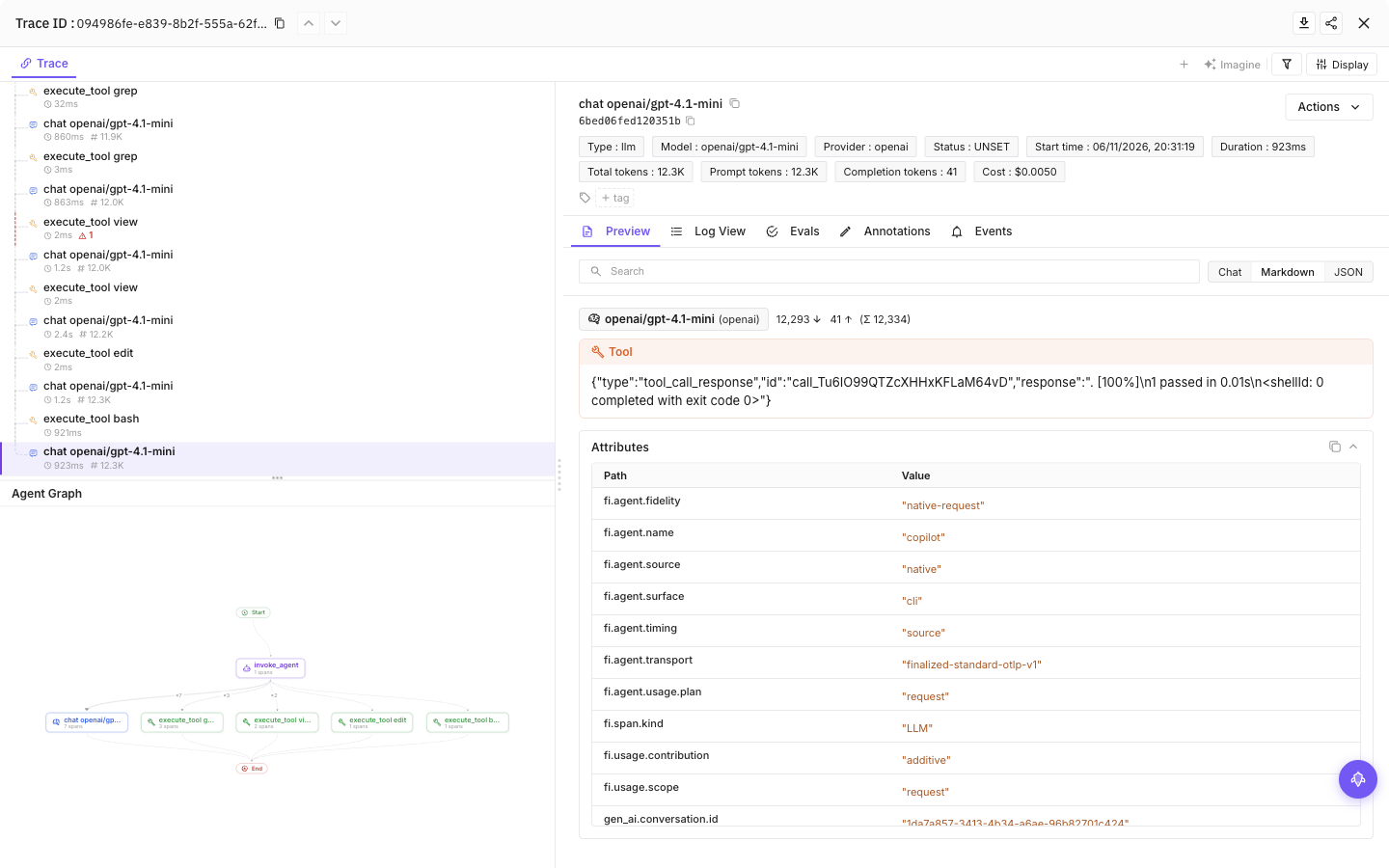
Select a tool call, then the final model call, to see inputs, outputs and token usage
Start traced sessions through run copilot; plain copilot does not activate this integration. Pass Copilot arguments after --. If you prefer a global install, npm install -g @traceai/agents provides the equivalent fi-agent command.
Configuration
Content capture is on by default: prompts, model responses and tool input/output can include source code and secrets the agent reads. Add --no-capture-content to setup to save a content-off preference, or set FI_AGENT_CAPTURE_CONTENT=false in the agent’s launch environment for a process-level opt-out. Structure and available usage remain visible.
| Setting | Purpose |
|---|---|
FI_API_KEY, FI_SECRET_KEY | Override saved credentials as a complete pair. Use hidden setup prompts or secret-manager environment injection, never command arguments. |
FI_PROJECT_NAME | Future AGI project receiving traces. Rerun setup to approve a changed project when using saved credentials. |
FI_AGENT_CAPTURE_CONTENT=false | Turn off prompt, response and tool-content capture for the process. Content capture is on by default. |
FI_AGENT_ENABLED=false | Disable tracing for the process. |
FI_USER_ID | Set an explicit user identifier; otherwise setup creates an opaque local ID. |
FI_BASE_URL | Self-hosted API origin. Approve it through setup with --base-url <origin>. |
FI_OTLP_ENDPOINT | Exact OTLP/HTTP traces URL; takes precedence over FI_BASE_URL. Saved credentials still require destination approval. |
FI_AGENT_CONFIG_DIR | Override the shared protected configuration directory, normally ${XDG_CONFIG_HOME:-$HOME/.config}/futureagi/agents. |
Environment variables override saved configuration, subject to destination approval and privacy restrictions. Supply both credential variables together; one alone is rejected.
Agent-specific settings
| Setting | Purpose |
|---|---|
FI_HIDE_INPUTS=true, FI_HIDE_OUTPUTS=true | Omit input or output content. |
FI_HIDE_ERROR_DETAILS=true | Omit error details and failed-tool output while retaining failure status and exit code. |
OTEL_EXPORTER_OTLP_PROTOCOL=http/protobuf | Use protobuf instead of the default http/json; OTEL_EXPORTER_OTLP_TRACES_PROTOCOL takes precedence. |
Cloud uses https://api.futureagi.com/tracer/v1/traces. For self-hosting, run setup with --base-url https://your-futureagi.example. The launcher does not use inherited OTEL_EXPORTER_OTLP_* destinations or authentication headers.
Credentials are saved in ${XDG_CONFIG_HOME:-$HOME/.config}/futureagi/agents/credentials.json with owner-only permissions (0600), separate from repository settings. FI_AGENT_CONFIG_DIR can relocate this shared store.
User and project scope
Setup saves a user profile by default. To give a repository its own project and privacy settings, run this inside the repository:
npx @traceai/agents setup copilot --scope project --project my-project
npx @traceai/agents run copilot| File | Contents |
|---|---|
~/.copilot/futureagi.json | User-level tracing settings. COPILOT_HOME changes the parent directory. |
.copilot/futureagi.json in the repository | Project-scoped settings, created by --scope project; no raw credentials. |
~/.config/futureagi/agents/credentials.json | Protected credential profiles shared by the tracing integrations. XDG_CONFIG_HOME changes the config root; FI_AGENT_CONFIG_DIR overrides the agents directory. |
Repeating project-scoped setup preserves its destination, project, and content preference unless you explicitly change them. Do not commit the credential store to a repository.
Commands inspect the current directory’s project configuration by default. Run from the repository, or use --project-dir /path/to/project. Use this option instead of Copilot’s -C flag so the tracing configuration and working directory agree.
Use --user-only to ignore repository settings, for example npx @traceai/agents run copilot --user-only. Add it to setup, status, or doctor to use only your user profile from inside a repository. Do not combine it with --project-dir, which explicitly selects a project.
Repository settings cannot redirect saved or environment-supplied credentials to an unapproved endpoint, or raise capture above your user-level privacy setting. Approve destination changes through setup rather than editing the repository’s transport settings.
Manage tracing
npx @traceai/agents status copilot --check
npx @traceai/agents doctor copilot
npx @traceai/agents disable copilot
npx @traceai/agents enable copilot
npx @traceai/agents update copilot
npx @traceai/agents uninstall copilot
Status shows the resolved destination, project, privacy policy, host version, launcher registration, and recent accepted/dropped export counts. --check performs a fresh connection check; --json provides machine-readable output. Doctor also checks connectivity. A successful connection check does not prove that a trace is already visible in the UI.
Status and doctor inspect the active project; use the same directory as your traced session or pass --project-dir.
Disable stops Copilot tracing across your user and project profiles and drops queued spans from active launchers. For a single-process opt-out instead, use FI_AGENT_ENABLED=false. Re-enabling does not revive old queues; start a new session to resume tracing.
Uninstall also disables Copilot tracing and removes launcher registration without changing Copilot’s provider settings or deleting shared credentials.
For VS Code, use the same commands with copilot-vscode, for example npx @traceai/agents disable copilot-vscode. Disable and enable take effect immediately, without a reload: while tracing is disabled, the extension drops Copilot’s spans on your machine. You can also run Future AGI: Disable/Enable tracing from the Command Palette. Uninstall removes the tracing settings it owns and the extension if setup installed it, and keeps your other edits. If you changed a managed setting, doctor copilot-vscode reports the conflict; restore or remove that setting and retry uninstall.
VS Code Copilot
setup copilot-vscode traces Copilot Chat requests in VS Code, with model calls and token usage, tool calls, and permission steps. Copilot sends its native telemetry to the Future AGI Tracing extension on 127.0.0.1; the extension checks your tracing and privacy settings for every export, adds your credentials, and sends the spans to Future AGI.
- Setup writes only Copilot’s OpenTelemetry settings (
github.copilot.chat.otel.*andchat.agentHost.otel.*) to your usersettings.json, keeps your comments and other settings, and adds those keys tosettingsSync.ignoredSettingsso Settings Sync does not copy them to other machines. - Copilot runs AI features only in trusted folders. The extension also runs in Restricted Mode, so tracing starts as soon as you trust a folder.
- Several VS Code windows share one relay. If the window that owns it closes, another open window takes over within a few seconds.
- Changing content capture with
--no-capture-contentupdates Copilot’s own setting; reload VS Code when it asks. - Inline completions are not traced. Remote windows (SSH, containers, WSL) and GitHub’s hosted coding agent are not yet available.
- Until the next Future AGI release reaches your workspace, a VS Code trace can show its total token count twice, label its agent as Unknown, and list Copilot’s timing spans in the trace tree. Each model call’s token usage is already correct.
Troubleshooting
| Symptom | What to do |
|---|---|
| Unsupported host version | Check copilot --version reports a stable 1.x release. If status reports NATIVE_RECORD_REJECTED after an update, update the tracing package or use Copilot CLI 1.0.106. The launcher disables auto-update for each invocation. |
| No traces appear | Start through run copilot, then run status copilot --check. Remove COPILOT_OFFLINE=true when you want telemetry. |
PROJECT_CONFIG_UNSAFE | Tracing has ignored an unsafe or unreadable project layer and used the protected user profile instead. Repair the directory permissions before relying on project settings. Use FI_AGENT_CAPTURE_CONTENT=false or FI_AGENT_ENABLED=false for an immediate process-level opt-out. |
| Keys rejected or revoked | Run npx @traceai/agents setup copilot --replace-credentials for hidden replacement-key entry. Keep --scope project for a project profile. Headless runs must supply a new FI_API_KEY and FI_SECRET_KEY environment pair. Old settings remain unchanged until the new keys validate. |
| Destination not approved | Rerun setup for the selected scope and destination. A repository file or credential pair alone cannot approve a repository-controlled endpoint. Copilot continues without tracing. |
| Prompts are visible unexpectedly | Content is on by default. Rerun setup with --no-capture-content, or set FI_AGENT_CAPTURE_CONTENT=false for the next process. |
| A field is missing | Check content/privacy settings and whether Copilot emits the field. Oversized native records can be dropped. Token counts do not require content capture. |
| BYOK fails | Check Copilot’s provider settings and your organization’s policy; tracing does not change model access. |
| VS Code status bar shows Future AGI: unavailable | Run npx @traceai/agents doctor copilot-vscode. If setup has just run, reload VS Code. |
| No VS Code traces | Use the Default profile, reload VS Code after setup, and trust the folder. Future AGI: shared relay means another window owns the relay, which is expected. |
Privacy
The launcher reads native spans through a private named pipe, preserves their IDs and parent relationships, filters content, and exports directly to Future AGI. It writes no raw telemetry file. Its in-memory queue is bounded; telemetry failures do not change Copilot’s exit status. Failed exports are not durably retried, and dropped spans are reported in status.
Captured text is limited to 20,000 characters per field. Known Future AGI credentials are redacted, and unknown native attributes are dropped. Redaction is best effort, not a guarantee that arbitrary secrets in source files are removed. Use --no-capture-content for sensitive repositories; token counts do not require content capture.
The launcher removes Future AGI credentials and inherited OTLP headers from Copilot’s environment. This is not a security sandbox: tools you authorize still run as your user and can read files accessible to you. Copilot controls its own session history and logs.
- Model requests contribute token, cache, and reasoning counts when Copilot provides them. Parent aggregate counters are diagnostic only, so they do not double session totals.
- Tool failures retain error status and native exit codes even when error details are hidden.
- Native subagent ancestry and compaction markers are preserved when emitted. Missing spans and usage are not estimated.
- Native billing multipliers are not converted into dollar costs.
session.idgroups conversation turns;user.idsupports user attribution.
Next steps
- Observe overview to filter, search, and evaluate traces.
- traceAI integrations for tracing your own application code.
Questions & Discussion