OpenClaw agent tracing with Future AGI
Set up local OpenClaw tracing with one command, then inspect each prompt's model calls, tools, token usage and errors in Future AGI.
Trace each local OpenClaw prompt in Future AGI, with model calls, token usage and tool results beneath it. The maintained @traceai/openclaw integration uses OpenClaw’s official diagnostics-otel plugin; no collector or copied instrumentation scripts are required.
What it traces
| Trace detail | What it shows |
|---|---|
One openclaw.prompt trace per launcher invocation | The prompt’s overall duration and outcome, with retries beneath the same root. |
| Model calls | Model/provider, input/output when exposed, input/output/cache tokens, reported time to first byte and error status. |
| Tool calls | Tool names, input/output when exposed, duration and error status. |
| Sessions | An opaque session identifier groups prompts that use the same --session-id; each prompt remains a separate trace. |
| Native lifecycle spans | Run and context-assembly timings. Subagent and compaction visibility is limited to the spans OpenClaw’s official plugin emits. |
Content is included only when OpenClaw exposes it and your privacy settings allow it. Native timings and internal parent relationships are preserved beneath the prompt root; the integration does not instrument model calls twice.
Request tokens are counted once. The repeated openclaw.model.usage rollup is removed, and usage is not assigned to failed attempts. If an external harness exposes only turn-level usage, the prompt root owns that usage once instead of inventing model calls. OpenClaw exports cost estimates as metrics, which this integration does not send. System prompts and external-harness internals are not available as content.
Before you start
Use OpenClaw 2026.10.5 or later in the 2026.x line, Node 24.16 or newer in the 24.x line, and macOS or Linux. Configure your agent and model provider in OpenClaw first. Gateway, channels, TUI, Control UI and agent exec tracing are not yet available through this integration.
Quick start
Get your Future AGI keys
Create an API key and secret key at Future AGI → Keys. Setup asks for both with hidden terminal input. Do not paste them into an agent conversation.
Set up tracing
npx @traceai/agents setup openclaw --project coding-agentsSetup validates your credentials, saves private settings and installs the diagnostics and integration plugins through OpenClaw’s own installer. Review OpenClaw’s source and capability prompts in your terminal. Setup does not accept those prompts or grant conversation-access hooks for you, and preserves existing plugin allowlists and model settings.
Content capture is on by default. Messages and tool results can include source files or secrets that the agent reads. To keep structure and usage without content, add --no-capture-content:
npx @traceai/agents setup openclaw --project coding-agents --no-capture-contentRun the agent and open the trace
npx @traceai/agents run openclaw -- agent --local --agent main \
  --session-id readme-review --message "Read README.md and summarize the project."
Replace main with your configured agent ID if needed. Reuse --session-id for later prompts in the same conversation; without it, the launcher creates a new session ID for each invocation.
Open your coding-agents project in Future AGI and select an openclaw.prompt trace. Expand its model and tool spans to inspect the requests, results, usage and errors.
Use the launcher for traced runs. An ordinary openclaw launch is not redirected to Future AGI. Setup does not restart a running Gateway.
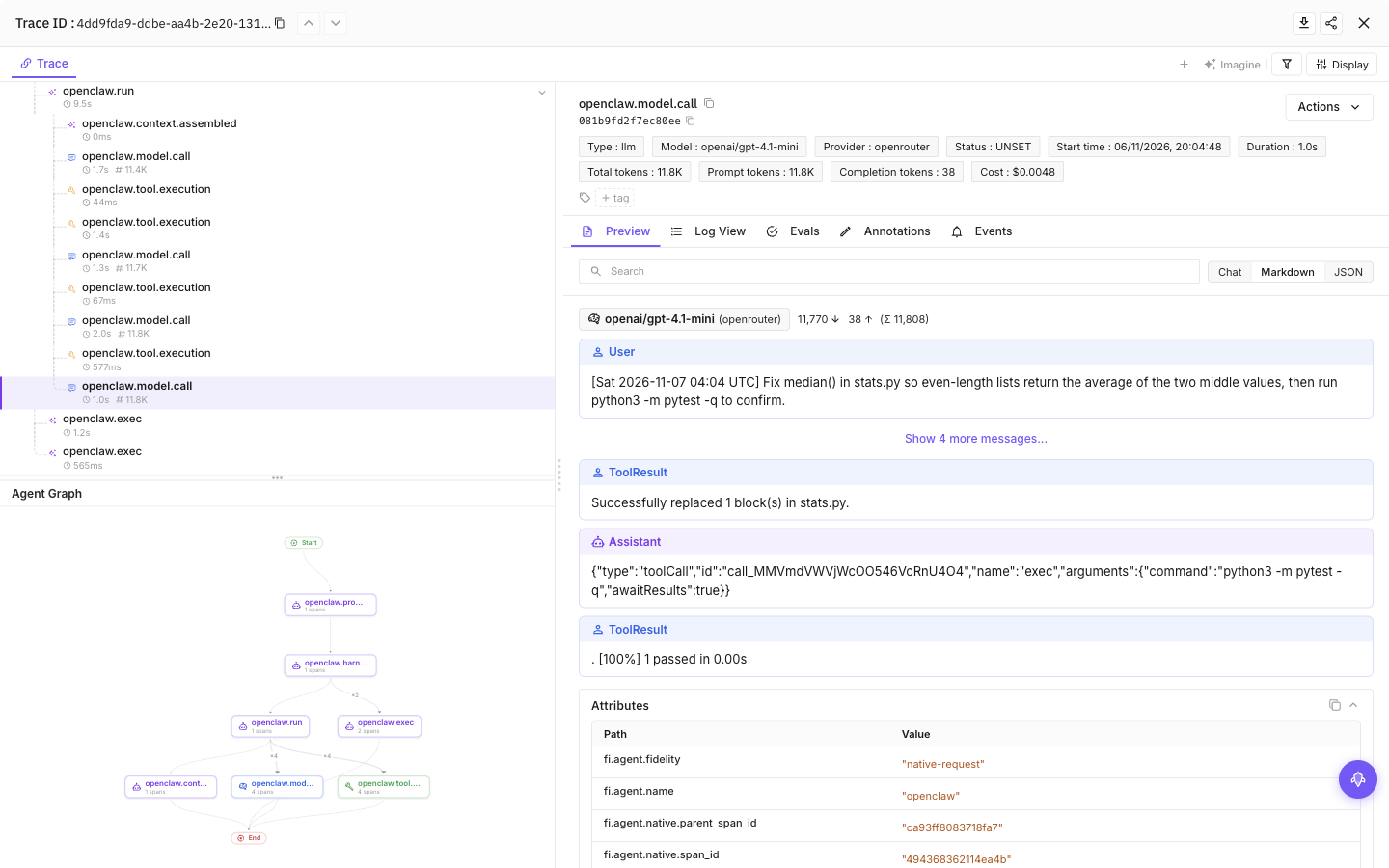
Select a tool call, then the final model call, to see inputs, outputs and token usage
Configuration
Content capture is on by default: prompts, model responses and tool input/output can include source code and secrets the agent reads. Add --no-capture-content to setup to save a content-off preference, or set FI_AGENT_CAPTURE_CONTENT=false in the agent’s launch environment for a process-level opt-out. Structure and available usage remain visible.
| Setting | Purpose |
|---|---|
FI_API_KEY, FI_SECRET_KEY | Override saved credentials as a complete pair. Use hidden setup prompts or secret-manager environment injection, never command arguments. |
FI_PROJECT_NAME | Future AGI project receiving traces. Rerun setup to approve a changed project when using saved credentials. |
FI_AGENT_CAPTURE_CONTENT=false | Turn off prompt, response and tool-content capture for the process. Content capture is on by default. |
FI_AGENT_ENABLED=false | Disable tracing for the process. |
FI_USER_ID | Set an explicit user identifier; otherwise setup creates an opaque local ID. |
FI_BASE_URL | Self-hosted API origin. Approve it through setup with --base-url <origin>. |
FI_OTLP_ENDPOINT | Exact OTLP/HTTP traces URL; takes precedence over FI_BASE_URL. Saved credentials still require destination approval. |
FI_AGENT_CONFIG_DIR | Override the shared protected configuration directory, normally ${XDG_CONFIG_HOME:-$HOME/.config}/futureagi/agents. |
Setup saves user-level settings by default. Credentials are separate from preferences and are never written into your repository.
| File | Purpose |
|---|---|
~/.config/futureagi/agents/credentials.json | Saved credentials, protected with file mode 0600. XDG_CONFIG_HOME replaces ~/.config; FI_AGENT_CONFIG_DIR overrides the shared directory. |
~/.openclaw/futureagi.json | User preferences beside OpenClaw’s host configuration. Discovery respects OPENCLAW_CONFIG_PATH, then OPENCLAW_STATE_DIR, then OPENCLAW_HOME/.openclaw, before the default path. |
.futureagi/agents.json | Repository preferences when you choose project scope; contains no credentials. |
Agent-specific settings
| Setting | Purpose |
|---|---|
FI_HIDE_INPUTS=true / FI_HIDE_OUTPUTS=true | Apply stricter input/output privacy. |
FI_HIDE_ERROR_DETAILS=true | Keep error status without its details. |
The Cloud destination is https://api.futureagi.com/tracer/v1/traces. The integration sends X-Api-Key, X-Secret-Key and X-Project-Name, with resource attributes project_name and project_type=observe. Metrics and logs stay off.
User and project scope
Commands read the current directory’s project configuration by default. For a separate project destination, run these commands from your repository:
npx @traceai/agents setup openclaw --scope project --project my-project
npx @traceai/agents run openclaw -- agent --local --agent main --message "Summarize README.md"
Use --project-dir /path/to/repo on setup, run and status commands when working from elsewhere. Use --user-only without --project-dir to ignore repository settings and use only your user configuration. A repository cannot silently increase content capture or redirect saved credentials to an unapproved destination; rerun setup to approve the intended destination.
Manage tracing
npx @traceai/agents status openclaw --check
npx @traceai/agents doctor openclaw
npx @traceai/agents disable openclaw
npx @traceai/agents enable openclaw
npx @traceai/agents update openclaw
npx @traceai/agents uninstall openclaw
Status reports configuration, plugin registration, credential acceptance and recent exports. After setup, activation remains unobserved until you run a traced prompt. Use doctor to check configuration and connectivity.
Disable works without credentials or network and stops already-running exporters and queued work. It cannot recall data already accepted by a server. After upgrading the CLI, run update; if the integration plugin changed, follow OpenClaw’s interactive replacement prompts and rerun update. Headless update prints the commands to complete that review.
Uninstall restores only unchanged settings owned by the integration. Shared native plugins remain installed, but do not export through Future AGI without the launcher. Settings you modified after installation are not overwritten.
Troubleshooting
Setup returns TRUST_REQUIRED. Complete OpenClaw’s interactive source and capability review for the integration plugin, then rerun setup. Enabling diagnostics does not authorize conversation-access hooks.
Registered, but no exports. Run through npx @traceai/agents run openclaw -- agent --local ..., not an ordinary OpenClaw launch or an existing Gateway. Check your agent/provider configuration in OpenClaw, then run doctor openclaw.
Unsupported host version. Check openclaw --version and node --version. Use OpenClaw 2026.10.5 or later in the 2026.x line with Node 24.16 or newer in the 24.x line.
Existing exporter or preload. Keep your existing tracing route or explicitly remove it before setup. Do not run two tracing routes together; setup will not disable an existing exporter for you.
Project config is ignored. PROJECT_CONFIG_IGNORED means the repository settings are malformed or their location is unsafe. Tracing continues with protected user settings. Fix the file or use an owner-controlled directory for project overrides.
Destination is not approved or registration changed. Rerun setup for the intended project and endpoint. Inspect host-config changes before updating; the integration will not overwrite settings you changed after installation.
Content is missing. Check FI_AGENT_CAPTURE_CONTENT, input/output privacy settings and OpenClaw’s own access policy. The official plugin does not expose system prompts or external-harness internals.
Privacy
Content capture includes what the agent reads or produces. The integration removes host/process metadata, arbitrary attributes, event payloads and tool definitions, bounds captured fields to 20,000 characters and applies best-effort redaction, including known Future AGI credentials. Redaction cannot reliably detect every application secret. Turn content capture off for sensitive work.
Environment-supplied Future AGI keys are removed before the model/tool runtime starts. Programs running as your OS user can still access the credential store. This package does not read .env files, shell profiles or keychains; OpenClaw’s own environment and access policies still apply.
The launcher handles delivery without a background daemon, local receiver or model proxy. Temporary capture records are encrypted with a per-run, memory-only key in an immediately unlinked private file, capped at 4 MiB per invocation. No plaintext capture file or reusable key is saved. The launcher drains delivery for up to five seconds after the agent exits. Network failures drop telemetry rather than failing model/tool calls; force-killing the launcher can lose queued spans. Delivery is not exactly-once.
Questions & Discussion