Trace Pi with Future AGI
Connect Pi with one setup command. See each prompt, model request, tool call, and conversation in Future AGI.
Run npx @traceai/agents setup pi --project coding-agents, restart Pi, and use it normally. Each prompt becomes a trace with model and tool spans; prompts in the same conversation stay grouped in Sessions.
What it traces
- One trace per prompt. Multiple model requests and tools belong to the same prompt, not separate root traces. Resuming a Pi conversation preserves its session grouping.
- Model requests. Provider, model, available input/output, token counts, cache usage, reasoning usage, and observed time to first streamed text or reasoning token. Costs are estimates from Pi’s model pricing; unpriced models have no cost field.
- Tool calls. Arguments, results, timing, failures, and nested tool relationships when Pi exposes them.
- Automatic compaction. Compaction during a running prompt appears beneath that prompt. Manual compaction between prompts and branch-summary model calls are not represented as new user prompts.
- Cancellation. Interrupted requests and prompts are distinguished from successful completion.
Pi does not have a universal subagent API. A subagent extension must explicitly report its own child boundaries through the plugin’s event-bus contract for those requests to appear below the spawning tool; unrelated child processes are not traced automatically.
Before you start
Use Pi 1.5.0 or later in the 1.x line and Node.js 22.19 or later in the 22.x line, or Node.js 24.x. Pi must already have a working model configuration. This integration is for the pi terminal application; see the separate guides for Oh My Pi and the Pi SDK.
Quick start
Get your Future AGI keys
Open API keys and create an API key and secret key. Keep the keys available for the setup prompt; do not paste them into a Pi conversation.
Set up tracing
npx @traceai/agents setup pi --project coding-agentsSetup asks for your keys with hidden terminal input, validates the destination, saves private configuration, and installs @traceai/pi-plugin through Pi’s native package installer. An existing Future AGI profile is reused.
Warning
Prompt text, model input/output, and tool input/output are captured by default. Tool output can include file contents and secrets the agent reads. To record only structure, timing, and usage, add --no-capture-content to the setup command.
If you already have a configured Future AGI profile, the native alternative is:
pi install npm:@traceai/pi-pluginInstall only one tracing extension. Remove the old futureagi-otlp.ts file if you previously used the copied-file integration.
Run the agent and open the trace
Restart Pi, or use /reload in an existing Pi session. Then submit a prompt:
pi -p "Read README.md and summarize how to run this project" < /dev/nullIn Future AGI, open Observe, select coding-agents, and open the newest pi trace. Expand a pi.generation span to inspect the model request, response, and usage, or a tool span to inspect its arguments and result. Open Sessions to follow the conversation across prompts and restarts.
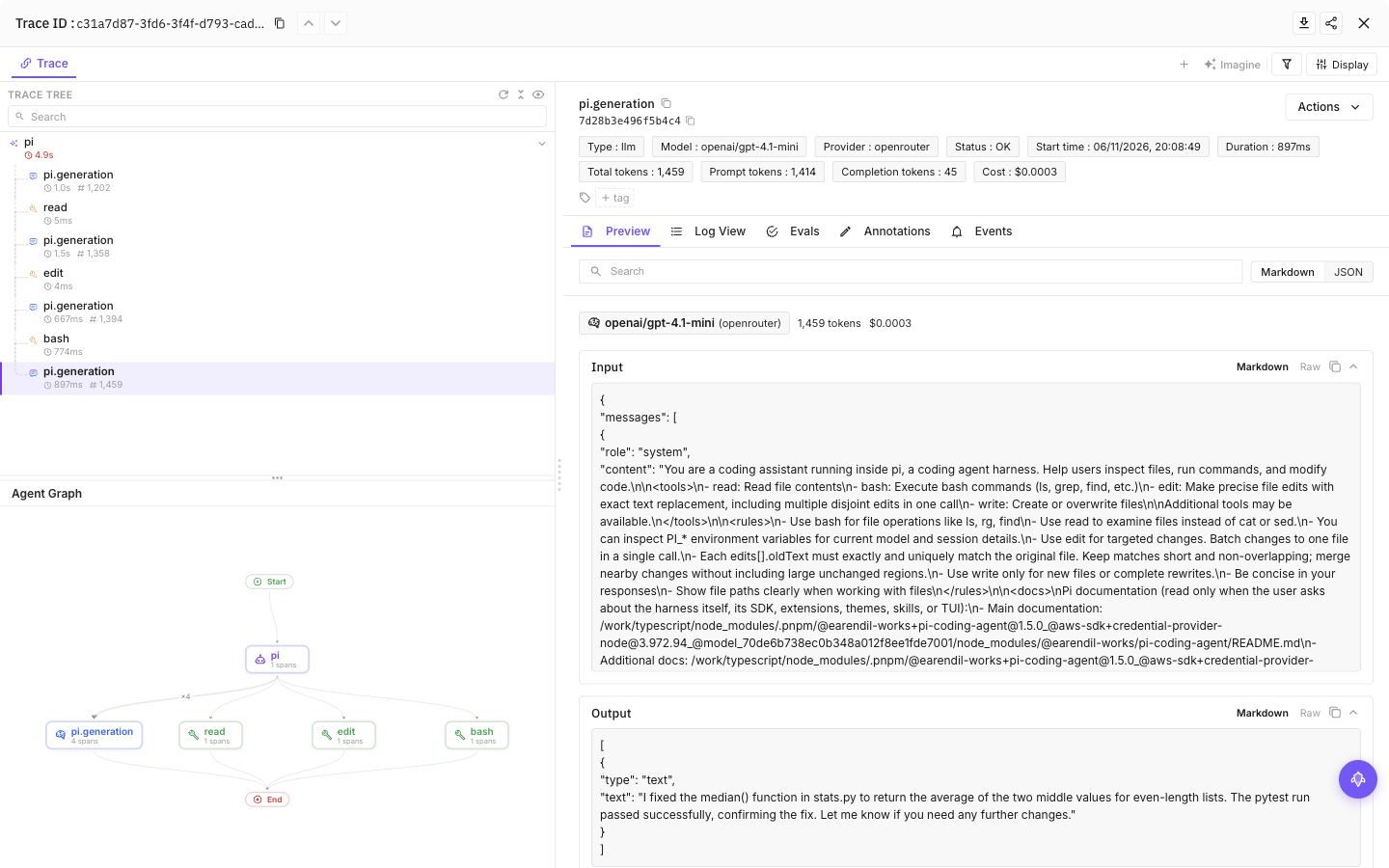
Select a tool call, then the final model call, to see inputs, outputs and token usage
Configuration
Content capture is on by default: prompts, model responses and tool input/output can include source code and secrets the agent reads. Add --no-capture-content to setup to save a content-off preference, or set FI_AGENT_CAPTURE_CONTENT=false in the agent’s launch environment for a process-level opt-out. Structure and available usage remain visible.
| Setting | Purpose |
|---|---|
FI_API_KEY, FI_SECRET_KEY | Override saved credentials as a complete pair. Use hidden setup prompts or secret-manager environment injection, never command arguments. |
FI_PROJECT_NAME | Future AGI project receiving traces. Rerun setup to approve a changed project when using saved credentials. |
FI_AGENT_CAPTURE_CONTENT=false | Turn off prompt, response and tool-content capture for the process. Content capture is on by default. |
FI_AGENT_ENABLED=false | Disable tracing for the process. |
FI_USER_ID | Set an explicit user identifier; otherwise setup creates an opaque local ID. |
FI_BASE_URL | Self-hosted API origin. Approve it through setup with --base-url <origin>. |
FI_OTLP_ENDPOINT | Exact OTLP/HTTP traces URL; takes precedence over FI_BASE_URL. Saved credentials still require destination approval. |
FI_AGENT_CONFIG_DIR | Override the shared protected configuration directory, normally ${XDG_CONFIG_HOME:-$HOME/.config}/futureagi/agents. |
Setup stores credentials outside your repository in ${XDG_CONFIG_HOME:-$HOME/.config}/futureagi/agents/credentials.json with owner-only permissions. Pi settings are saved in futureagi.json inside Pi’s agent directory, normally ~/.pi/agent. PI_CODING_AGENT_DIR is respected.
Environment variables override saved settings. A repository can reduce content capture, but cannot raise your saved privacy ceiling or redirect credentials—including environment credentials—to an unapproved destination. Approve a new destination through setup, or explicitly set the endpoint and project in your environment.
User and project scope
npx @traceai/agents setup pi --project coding-agents \
  --scope project --project-dir /path/to/project
This uses Pi’s local package installation and .pi/futureagi.json. Credentials remain outside the repository. Pi’s normal project-trust rules still apply; setup does not grant trust. The default setup is user-scoped and does not require trusting a project just to load the extension.
For self-hosted Future AGI, add --base-url https://api.example.com to setup.
Commands read the current repository by default. Use --user-only without --project-dir to ignore the repository layer for this CLI invocation. It does not permanently disable project discovery when the agent runs.
Manage tracing
npx @traceai/agents status pi --check
npx @traceai/agents doctor pi
npx @traceai/agents disable pi
npx @traceai/agents enable pi
npx @traceai/agents update pi
npx @traceai/agents uninstall pi
Run status from the project directory to include its configuration, or pass --project-dir /path/to/project. Use --user-only without --project-dir to resolve the user profile without repository settings. This flag affects the tracing CLI, not how Pi discovers extensions at launch.
doctor runs configuration and connectivity diagnostics, like status --check. Status separates registration, observed activation, credential acceptance, and export delivery. HTTP acceptance does not prove the trace has appeared in the product. In interactive Pi, /futureagi shows local status and the last trace ID without making a model request. It does not emit UI messages in print, JSON, or RPC mode.
disable is an agent-wide switch across projects using this Future AGI configuration directory; it is not project-scoped. It fences new collection and queued exports, including in a running Pi process. For just one process, use FI_AGENT_ENABLED=false in its launch environment. To resume tracing, run npx @traceai/agents enable pi from the same project and reload Pi. uninstall pi removes only a package registration owned by setup. For a project-scoped install, run npx @traceai/agents uninstall pi --scope project in that project, or add --project-dir /path/to/project. Use pi remove npm:@traceai/pi-plugin (with -l for a local install) for a package you installed yourself.
Troubleshooting
No traces appear
Run npx @traceai/agents status pi --check. If registration is missing, rerun setup. If activation has not been observed, restart Pi or use /reload, then submit a prompt. For a project-scoped install, check Pi’s project trust. Check that Observe is showing the configured project.
Authentication is rejected
Run npx @traceai/agents setup pi --replace-credentials in an interactive terminal and enter a valid pair at the hidden prompts. Invalid replacements leave your saved profile unchanged. For project-scoped setup, keep --scope project; if environment keys are set, replace or unset that pair first because environment keys take precedence. Restart or reload Pi after replacing credentials.
Project settings are ignored
PROJECT_CONFIG_IGNORED means the project configuration could not be safely read, for example on a shared external volume. Tracing continues with the user profile. Do not loosen credential-file permissions. For a sensitive project, set FI_AGENT_CAPTURE_CONTENT=false in Pi’s launch environment or disable tracing rather than relying on an ignored project override.
The package is installed but tracing is off
A native pi install without a Future AGI profile starts disabled. Run the setup command. Check FI_AGENT_ENABLED and whether you previously used disable pi.
Every span appears twice
Remove any old copied futureagi-otlp.ts observer, duplicate -e loading, or overlapping SDK instrumentation. Keep one native extension registration. Do not add a provider SDK instrumentor to Pi’s model calls.
Token or cost totals differ from Pi's raw fields
Input tokens include uncached input plus cache reads and writes. Those cache counts are also shown separately. Usage belongs to the model request, not an additive copy on the prompt root. Pi model-catalog costs are estimates, not provider billing. Unknown usage and zero-price estimates are omitted.
Setup reports an unsupported Pi version
Check pi --version. Use Pi 1.5.0 or later in the 1.x line. Earlier releases do not provide the request and settlement events this plugin needs; a new major version requires a compatible plugin release.
Privacy
Content fields are capped at 20,000 characters. Known Future AGI credentials and common key patterns are redacted on a best-effort basis; this is not a data-loss-prevention guarantee. Images, provider headers, session names, and your account email are not collected. Content can still contain paths, file text, and secrets from your prompts or tools.
FI_HIDE_INPUTS, FI_HIDE_OUTPUTS, the corresponding message/text privacy settings, and FI_HIDE_ERROR_DETAILS remain effective when stricter than the plugin’s capture policy. Hiding outputs also omits generation inputs that mix prompts with earlier outputs. With error details hidden, generation history and compaction summaries are omitted after a failure, including when the conversation is resumed. The prompt root still contains the user input unless inputs are hidden too.
The extension uses a private tracing provider without replacing Pi’s global OpenTelemetry provider. Finished spans are exported through a bounded in-memory queue; it does not maintain a transcript journal. Export failures do not change model requests, tool permissions, or Pi’s exit status. Shutdown flushing is bounded, and a forced kill can lose pending spans.
Related guides
Questions & Discussion