Trace OpenCode with Future AGI
Connect OpenCode V1 or V2 with one setup command to inspect prompts, model calls, tokens, tools, and subagents in Future AGI.
See each OpenCode prompt as a trace in Future AGI, with model calls and tools underneath it. Prompts from the same conversation appear together in Sessions.
What it traces
- One trace per prompt, rather than one continually rewritten trace for an entire session.
- Model calls with available model/provider identifiers, input/output, and token counts. Usage belongs to model steps, not both the steps and the turn root. Cached input and reasoning usage are included when OpenCode supplies them.
- Tools with names, input/output, timing, and failures.
- Subagents linked to the spawning work when OpenCode provides the parent relationship. V1 task children require an explicit spawning-tool session ID; V2 background children and their continuations stay with the original prompt.
- Sessions grouping turns from the same conversation, including resumed conversations.
Captured model context is the bounded context OpenCode exposes, not a byte-for-byte provider request. OpenCode’s catalog-derived costs are estimates, not provider billing. Auxiliary session-title requests are not included.
Compaction stays within the active turn. V2 records automatic compaction’s summary usage separately without inventing a model request. A manual compaction without an active prompt does not create a new prompt trace.
Before you start
You need OpenCode installed and connected to a model provider, plus Node.js 22.16 or newer in the 22.x line, or 24.x for setup. Choose the integration that matches opencode --version:
| OpenCode | Setup name | Maintained package |
|---|---|---|
| V2, version 2.2.5 | opencode | @traceai/opencode-plugin |
| V1, version 1.19.0 or newer below 2.0.0, on Linux | opencode-v1 | @traceai/opencode-v1-plugin |
Use only the package for your OpenCode major version. If you previously installed the copied futureagi-otlp.ts observer, remove it before setup to avoid duplicate traces.
Quick start
Get your Future AGI keys
Open API keys and create an API key and secret key. Keep them ready for the setup prompts; do not paste them into an OpenCode conversation or commit them to your repository.
Set up tracing
Run one command from the project you use with OpenCode.
OpenCode V2:
npx @traceai/agents setup opencode --project coding-agentsOpenCode V1:
npx @traceai/agents setup opencode-v1 --project coding-agentsSetup asks for your keys without echoing them, validates the destination, saves credentials outside your repository, and registers the maintained plugin. V2 uses OpenCode’s native plugin installer; V1 adds the package to OpenCode’s plugin array for its native loader to install. Existing unrelated settings are preserved.
Warning
Content capture is on by default, including prompts, model messages, and tool input/output. These can contain source files and secrets. To keep structure and usage without those bodies, add --no-capture-content to your setup command.
Restart OpenCode after setup. If you use V2’s shared background service, also run opencode service restart.
Run the agent and open the trace
opencode run "Read README.md and explain how to run this project"In Future AGI, open Observe, select coding-agents, and open the newest trace after the turn finishes. Expand a model call to see its messages and token counts, or a tool to inspect its input, output, or error. Open Sessions to follow the conversation across prompts and resumed conversations.
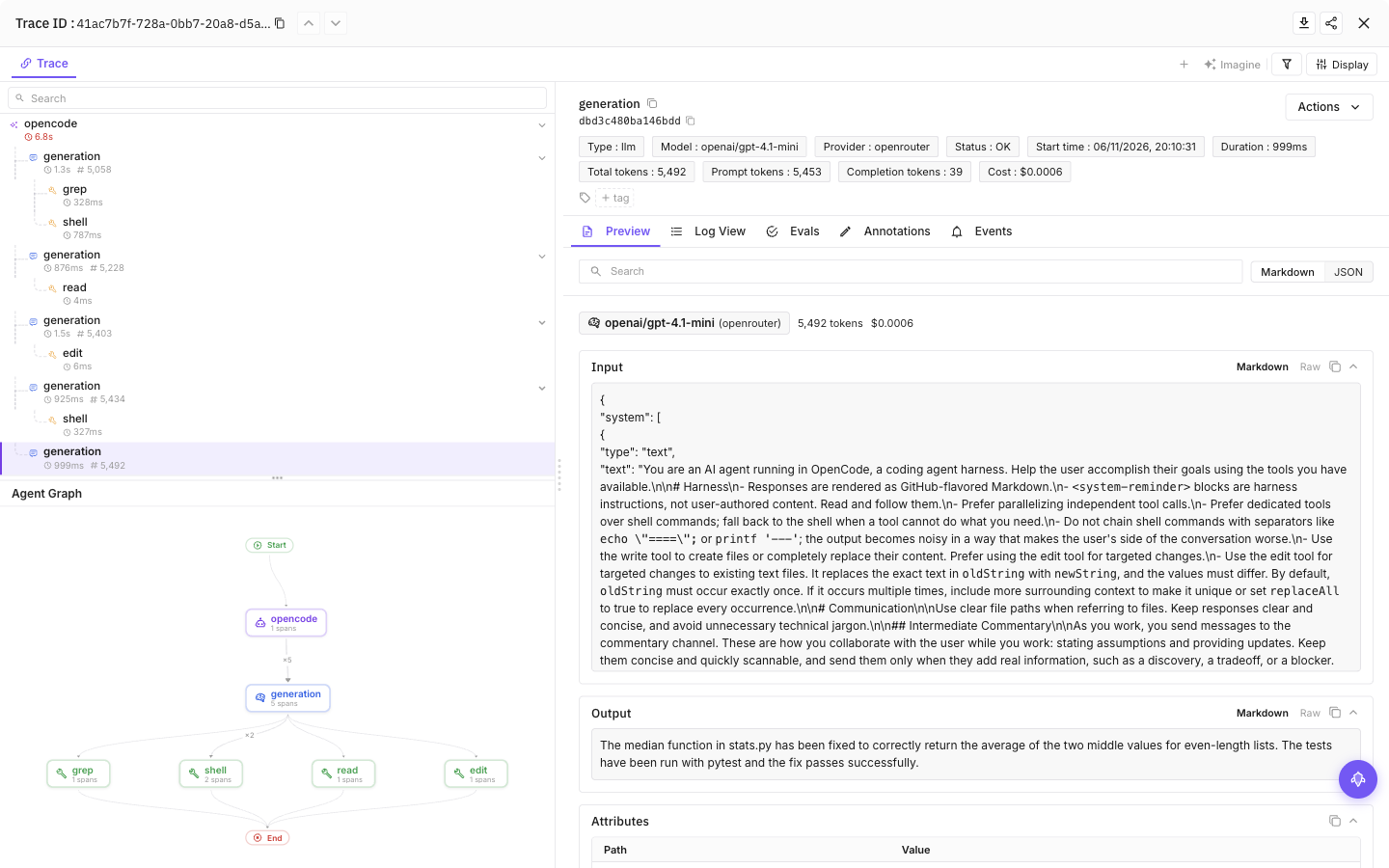
Select a tool call, then the final model call, to see inputs, outputs and token usage
Configuration
Content capture is on by default: prompts, model responses and tool input/output can include source code and secrets the agent reads. Add --no-capture-content to setup to save a content-off preference, or set FI_AGENT_CAPTURE_CONTENT=false in the agent’s launch environment for a process-level opt-out. Structure and available usage remain visible.
| Setting | Purpose |
|---|---|
FI_API_KEY, FI_SECRET_KEY | Override saved credentials as a complete pair. Use hidden setup prompts or secret-manager environment injection, never command arguments. |
FI_PROJECT_NAME | Future AGI project receiving traces. Rerun setup to approve a changed project when using saved credentials. |
FI_AGENT_CAPTURE_CONTENT=false | Turn off prompt, response and tool-content capture for the process. Content capture is on by default. |
FI_AGENT_ENABLED=false | Disable tracing for the process. |
FI_USER_ID | Set an explicit user identifier; otherwise setup creates an opaque local ID. |
FI_BASE_URL | Self-hosted API origin. Approve it through setup with --base-url <origin>. |
FI_OTLP_ENDPOINT | Exact OTLP/HTTP traces URL; takes precedence over FI_BASE_URL. Saved credentials still require destination approval. |
FI_AGENT_CONFIG_DIR | Override the shared protected configuration directory, normally ${XDG_CONFIG_HOME:-$HOME/.config}/futureagi/agents. |
Environment variables override saved settings, subject to destination approval and privacy limits. For headless use, supply FI_API_KEY and FI_SECRET_KEY together through your secret manager; never pass keys as command arguments.
XDG_CONFIG_HOME defaults to $HOME/.config. With the standard OpenCode configuration location:
| File | Purpose |
|---|---|
$XDG_CONFIG_HOME/futureagi/agents/credentials.json | Shared credential profiles, stored with owner-only permissions (0600). |
$XDG_CONFIG_HOME/opencode/futureagi.json | User-level tracing settings. |
.opencode/futureagi.json | Project-level tracing settings, with no keys. |
User and project scope
Setup installs at user scope by default and considers the current project’s settings. Add --user-only to ignore the repository layer during setup or diagnostics. This flag does not disable project settings when OpenCode later runs.
For a project-specific destination in V2, first complete the quick start, then configure this checkout without reinstalling the user-level plugin:
npx @traceai/agents setup opencode --scope project --project-dir . \
  --project my-project --configure-only
For a project-scoped installation in V1:
npx @traceai/agents setup opencode-v1 --scope project --project-dir . \
  --project my-project
Use one V1 registration: if you already installed it at user scope, uninstall that registration before switching to project scope. Keep using the same scope and project directory when updating configuration.
Project settings can reduce content capture but cannot raise your user-approved privacy ceiling. Saved keys are bound to the approved endpoint and Future AGI project. To change either, rerun setup with the new destination, review the displayed destination, and approve reuse of your keys. Restart OpenCode afterward. A complete environment key pair does not authorize a destination or profile selected by a repository.
Manage tracing
npx @traceai/agents status opencode --check
npx @traceai/agents doctor opencode
npx @traceai/agents disable opencode
npx @traceai/agents enable opencode
npx @traceai/agents update opencode
npx @traceai/agents uninstall opencode
Run these from your OpenCode project directory. Replace opencode with opencode-v1 for V1.
Status distinguishes plugin registration, observed activation, credential validation, and accepted exports. Submit a new prompt after setup to observe activation, then open Observe to inspect the result. Use --json for machine-readable status, --project-dir /path/to/project to inspect another checkout, or --user-only to inspect just the user configuration.
Disable stops collection and fences queued exports in an already-running plugin. Restart OpenCode after enabling or updating. Uninstall removes the registration owned by setup and preserves unrelated plugins and settings.
Troubleshooting
No traces appear
Run status opencode --check or status opencode-v1 --check through npx @traceai/agents. Check registration, activation, and delivery separately. Restart OpenCode, submit a new prompt, and wait for it to finish; historical sessions are not imported. For V2, check opencode plugin list and restart the shared service with opencode service restart. A native plugin disable in the project configuration can prevent activation even when user-level registration exists.
Setup reports an unsupported host or scope
Check opencode --version against the version table above. V1 and V2 use different plugin APIs and must not be installed together. V2 native installation is user-scoped; for a project destination, install once at user scope and then use --scope project --configure-only.
Authentication fails or the destination is not approved
If saved keys are rejected, rerun setup interactively without --json; it prompts for replacement keys and saves them only after successful validation. If environment credentials are present, replace both there or unset both to use saved-profile recovery. For DESTINATION_NOT_APPROVED, rerun setup for the intended project and endpoint and approve the displayed destination. Remove stale FI_PROJECT_NAME, FI_BASE_URL, or FI_OTLP_ENDPOINT overrides first.
Traces are duplicated or content is missing
Keep a single plugin registration and remove the legacy copied observer. If model or tool bodies are absent, check FI_AGENT_CAPTURE_CONTENT, user/project privacy settings, and stricter FI_HIDE_* policies. Structure and available usage remain visible with content capture disabled. Cached tokens are included in input usage and also reported separately; do not add the cache breakdown to input a second time.
Project configuration is ignored or installation fails
For PROJECT_CONFIG_IGNORED_UNSAFE, tracing falls back to protected user settings. Check file ownership, symlinks, directory permissions, and OpenCode JSON/JSONC syntax; do not loosen credential-file permissions. V1 setup does not support inline OPENCODE_CONFIG_CONTENT; use an OpenCode configuration file instead.
Privacy
Content capture is on by default. Text fields are bounded to 20,000 characters and recognizable secrets are redacted on a best-effort basis; redaction is not a data-loss-prevention guarantee. Use --no-capture-content during setup, or set FI_AGENT_CAPTURE_CONTENT=false before starting OpenCode, when project content must not leave your machine. Stricter FI_HIDE_* policies remain in force.
Credentials stay outside the repository. The plugins observe OpenCode events without replacing your model provider or routing requests through a gateway. Export failures do not change the agent’s responses or tool decisions. Pending telemetry is held in bounded memory, so a forced process kill can lose unfinished or unsent traces.
Next steps
Questions & Discussion