Claude Code tracing
Connect Claude Code to Future AGI with one setup command. See each prompt, model generations, tools, subagents and token usage grouped by session.
See each Claude Code prompt, its model calls, tools and subagents in Future AGI, grouped by session. The maintained @traceai/claude-code integration installs through the @traceai/agents CLI; you do not need a collector or copied hook scripts.
What it traces
| Trace element | Captured information |
|---|---|
| One trace per prompt | Turn input, final answer, outcome and session identifier. |
| Model generations | Model, available input/output and cache-read/cache-write token counts, and visible input/output when content capture is enabled. Streamed fragments do not duplicate usage. |
| Tools | Tool name, input/output when enabled, observed hook timing and failure status. |
| Subagents | Nested work linked to the Agent tool that started it. Background completion stays with the originating turn. |
| Sessions | Prompts from one conversation grouped under the same session identifier. |
Generations are reconstructed from actual assistant messages and request identifiers. Their inputs contain bounded visible transcript history, not full API requests or hidden system prompts. Generation timing comes from message timestamps, not measured API latency. The integration does not report Anthropic billing costs. A provider failure without an assistant generation is an error on the turn, not an invented model call.
This guide covers the claude CLI. For applications that embed Claude Code, use the Claude Agent SDK integration.
Before you start
Use Claude Code 2.x, signed in and ready to run, and Node.js 22.16–22.x or 24.x. Keep Claude Code’s transcript persistence enabled; do not launch with --no-session-persistence.
If you already use collector-based Claude Code tracing, follow the migration steps before setup to avoid duplicate observations.
Quick start
Get your Future AGI keys
Create an API key and secret key on the Future AGI keys page. Keep them ready for the hidden terminal prompts in the next step. Do not put keys in Claude prompts, command arguments or repository files.
Set up tracing
Run this command from your repository:
npx @traceai/agents setup claude --project coding-agentsEnter your keys when prompted. Setup validates the destination, saves credentials in an owner-only file, and installs the packaged user hooks without replacing unrelated settings. Restart any Claude Code session that was already open.
Warning
Content capture is on by default: prompts, model responses and tool input/output can include file text and secrets the agent reads. To send structure, timing and token usage without content, add --no-capture-content to the setup command before starting Claude Code.
For unattended setup, inject FI_API_KEY and FI_SECRET_KEY through your secret manager’s environment injection instead of entering them interactively.
Run the agent and open the trace
claudeTry “Read README.md and summarize the setup steps.” When Claude finishes, end the session or send your next prompt. Open Observe in Future AGI, select coding-agents, and open the trace. Use Sessions to see prompts from the same conversation together.
Each Stop sends new generations and tools. The completed turn and final answer are sent when the next human prompt arrives or the session ends, because another Stop hook can still make Claude continue.
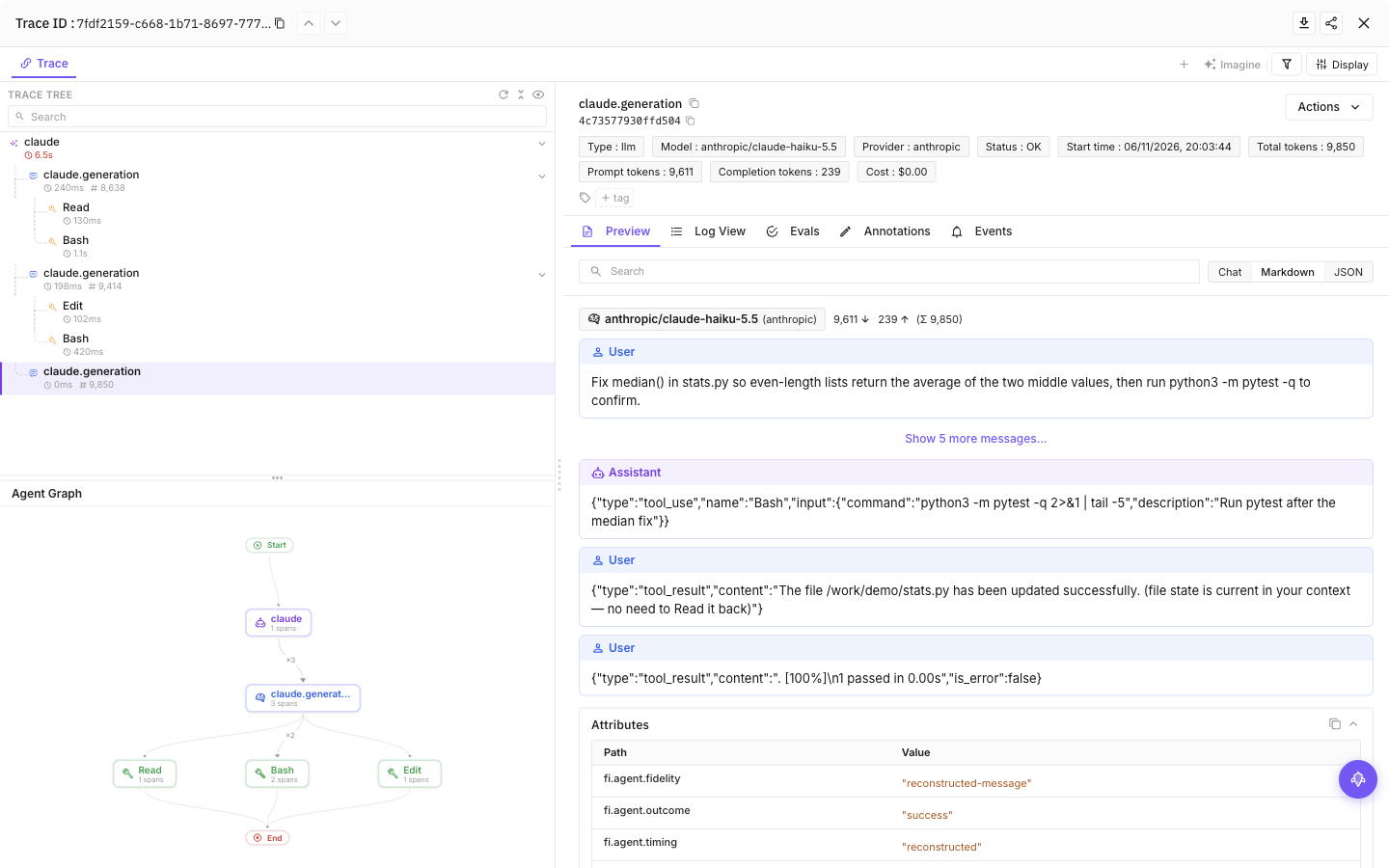
Select a tool call, then the final model call, to see inputs, outputs and token usage
Configuration
Content capture is on by default: prompts, model responses and tool input/output can include source code and secrets the agent reads. Add --no-capture-content to setup to save a content-off preference, or set FI_AGENT_CAPTURE_CONTENT=false in the agent’s launch environment for a process-level opt-out. Structure and available usage remain visible.
| Setting | Purpose |
|---|---|
FI_API_KEY, FI_SECRET_KEY | Override saved credentials as a complete pair. Use hidden setup prompts or secret-manager environment injection, never command arguments. |
FI_PROJECT_NAME | Future AGI project receiving traces. Rerun setup to approve a changed project when using saved credentials. |
FI_AGENT_CAPTURE_CONTENT=false | Turn off prompt, response and tool-content capture for the process. Content capture is on by default. |
FI_AGENT_ENABLED=false | Disable tracing for the process. |
FI_USER_ID | Set an explicit user identifier; otherwise setup creates an opaque local ID. |
FI_BASE_URL | Self-hosted API origin. Approve it through setup with --base-url <origin>. |
FI_OTLP_ENDPOINT | Exact OTLP/HTTP traces URL; takes precedence over FI_BASE_URL. Saved credentials still require destination approval. |
FI_AGENT_CONFIG_DIR | Override the shared protected configuration directory, normally ${XDG_CONFIG_HOME:-$HOME/.config}/futureagi/agents. |
Agent-specific settings
| Setting | Purpose |
|---|---|
CLAUDE_CONFIG_DIR | Claude Code configuration directory; defaults to ~/.claude. |
Environment settings override integration files, subject to destination approval and privacy restrictions. A repository cannot redirect saved credentials to an unapproved destination or increase the user-approved level of content capture. Existing FI_HIDE_INPUTS, FI_HIDE_OUTPUTS and FI_HIDE_ERROR_DETAILS restrictions remain in effect.
| File | What it stores |
|---|---|
~/.claude/settings.json | Packaged hook registrations. Respects CLAUDE_CONFIG_DIR. |
~/.claude/futureagi.json | User-level integration configuration. Respects CLAUDE_CONFIG_DIR. |
.claude/futureagi.json in a repository | Optional project configuration, without credentials. |
${XDG_CONFIG_HOME:-$HOME/.config}/futureagi/agents/credentials.json | Credentials in an owner-only file, separate from repository configuration. Relocated by FI_AGENT_CONFIG_DIR. |
User and project scope
To route a repository to a different Future AGI project, run this command from its root:
npx @traceai/agents setup claude --scope project --project my-projectHooks remain user-scoped. The repository’s .claude/futureagi.json selects its approved project and can reduce content capture. Launching from a subdirectory uses the nearest enclosing configuration without crossing a repository boundary. Repeating setup retains the approved destination and content opt-out unless you explicitly change them.
Commands use the current repository configuration by default. Use --project-dir /path/to/repository to target another repository, or --user-only to ignore the repository layer and work with user configuration.
Manage tracing
npx @traceai/agents status claude --check
npx @traceai/agents doctor claude
npx @traceai/agents disable claude
npx @traceai/agents enable claude
npx @traceai/agents update claude
npx @traceai/agents uninstall claude
Status reports configuration, hook registration, observed activation and recent export information. Doctor also checks the destination. An accepted export means the endpoint accepted the request; open Observe to confirm the trace is visible.
Disable works offline. Uninstall removes this integration’s owned registrations without removing unrelated hooks.
Migrate from collector-based tracing
Remove or disable CLAUDE_CODE_ENHANCED_TELEMETRY_BETA, ENABLE_ENHANCED_TELEMETRY_BETA and ENABLE_BETA_TRACING_DETAILED in both Claude Code settings and the launching environment, then run setup. Stop the old collector only if it was dedicated to this integration; keep unrelated metrics or application collectors unchanged.
The package uses hooks and transcripts instead of native beta generation tracing. Running both would duplicate observations, so setup reports NATIVE_TRACING_CONFLICT rather than changing your telemetry settings for you.
Troubleshooting
No trace appears. Run the status and doctor commands above. Check registration, the reported Claude Code version, export diagnostics and the last accepted export. Restart sessions opened before setup and keep transcript persistence enabled. If generations appear but the completed turn is missing, end the session or submit your next prompt.
NATIVE_TRACING_CONFLICT. Follow the migration steps, then repeat setup.
HOST_HOOKS_DISABLED. Claude Code’s disableAllHooks setting prevents tracing hooks from running. Review that setting and re-enable hooks if your organization permits it. Setup does not change it; an earlier export does not mean hooks are currently enabled.
PROJECT_CONFIG_IGNORED. The repository configuration is malformed or unsafe. Tracing falls back to the protected user configuration. Correct the configuration or permissions before relying on repository-specific routing or privacy; use the process-level content-off switch for sensitive work in the meantime.
RUNTIME_MISSING_OR_CHANGED. Restore your Node.js installation, then run npx @traceai/agents update claude. Hooks reuse your existing interpreter rather than copying it.
AUTH_REJECTED. Run npx @traceai/agents setup claude --project coding-agents --replace-credentials for hidden entry of a replacement key pair. Keep --scope project when replacing project credentials. For unattended setup, inject a new FI_API_KEY and FI_SECRET_KEY pair. Saved credentials stay unchanged unless validation succeeds.
Settings cannot be updated. Keep settings valid JSON and owned by your user. The installer refuses unsafe, symlinked or malformed files rather than overwriting them. Organization policy can also prevent user hooks from running.
Learn more about session grouping.
Privacy
Content fields are limited to 20,000 characters and receive best-effort credential redaction. Redaction cannot guarantee removal of arbitrary secrets: use --no-capture-content during setup, or set FI_AGENT_CAPTURE_CONTENT=false before launching Claude Code, for sensitive work. Thinking blocks, images, native account identifiers and unknown transcript metadata are not exported.
The integration reads host-supplied transcript paths within Claude Code’s project storage. Its own cross-hook files contain metadata and checkpoints, not a second copy of conversation content. Claude Code controls retention of its original transcripts. Re-enabling tracing or content capture does not backfill turns observed while those settings were off.
No background service is installed. Export has a bounded deadline and does not change Claude Code’s answer or exit status. Delivery is best effort: process termination, oversized turns and an unavailable destination can lose spans.
Questions & Discussion