Cursor IDE and CLI tracing
Trace Cursor prompts, model generations, token usage and tools in Future AGI with one setup command for the IDE and interactive CLI.
See each Cursor prompt as a trace in Future AGI, with model generations, token usage, tool calls and session context. The maintained @traceai/cursor-plugin installs through @traceai/agents; you do not need to write hooks or run a collector.
What it traces
| Data | How it appears in Future AGI |
|---|---|
| Prompts and sessions | One trace per prompt, linked to the conversation through session.id. |
| Model generations | LLM spans reconstructed from Cursor’s transcript, with bounded input context and responses, including tool-call-only outputs. These are not direct provider-request measurements. |
| Tokens | Cursor’s input/output and cache usage, when supplied. Turn totals are counted once on the final generation, or on the root if generations cannot be reconstructed. They are not individual model-call token counts. |
| Tools | Named spans for actions such as Read, Write and Shell, with input/output, timing and failure status when Cursor supplies them. |
| Subagents | Child agent spans when Cursor supplies both the subagent ID and its parent Task call ID. Missing relationships are not guessed; separate subagent transcript internals are not reconstructed. |
| Outcomes | Completed, interrupted or failed turns and tool errors, based on Cursor events. |
Auto mode reports the model as default. This is the value Cursor provides, not the name of the underlying routed model. Select a specific model in Cursor if you need its reported model name.
Cursor does not provide per-request billing cost through this integration. Missing usage or cost is not evidence that a turn was free. Tab completions are not traced.
CLI print mode
Use the interactive CLI for complete prompt and generation traces. In cursor-agent -p print mode, Cursor’s hook stream can contain only tool events and session end. That produces a partial trace without prompt text, reconstructed generations or token totals; those missing values are not inferred.
Cursor Cloud
Cursor Cloud tracing is not yet available. This setup is for local IDE and CLI sessions. For agents launched from your own Node.js application, use the separate Cursor SDK integration.
Before you start
You need Node.js 22.16+, Cursor IDE 3.x on macOS, and a Future AGI account. For terminal use, also install and sign in to Cursor CLI (cursor-agent). The IDE and interactive CLI use the same user hooks and the same cursor tracing profile; keep the IDE installed even if you work primarily in the CLI.
Quick start
Get your Future AGI keys
Open API keys and create an API key and secret key. Keep them ready for the hidden prompts in the next step; do not paste them into a shell command or commit them to your repository.
Set up tracing
From your project directory, run:
npx @traceai/agents setup cursor --project coding-agentsEnter each key when prompted. Setup checks the connection, saves the credentials privately, and registers the package’s hooks in ~/.cursor/hooks.json while preserving unrelated hooks. The saved configuration also works when you launch Cursor from the Dock.
Note
Content capture is on by default, including prompts, responses and tool input/output. To keep content out of traces from the first prompt, add --no-capture-content to the setup command. See Privacy.
Run the agent and open the trace
IDE: restart Cursor, open your project, and send an Agent prompt such as:
List the files in this folder and read README.md. Summarize what the project does.Interactive CLI: start Cursor from the same project and send the same prompt:
cursor-agentIf your Cursor installation exposes the command as agent, use that instead. No second tracing setup or wrapper is needed.
After the turn completes, open Observe in Future AGI, select coding-agents, and open its trace. Inspect the model generations and the file-read tool call. Send a follow-up prompt to create another trace with the same session ID. CLI transcripts can arrive after the turn ends, so allow about 30 seconds for the full trace to appear.
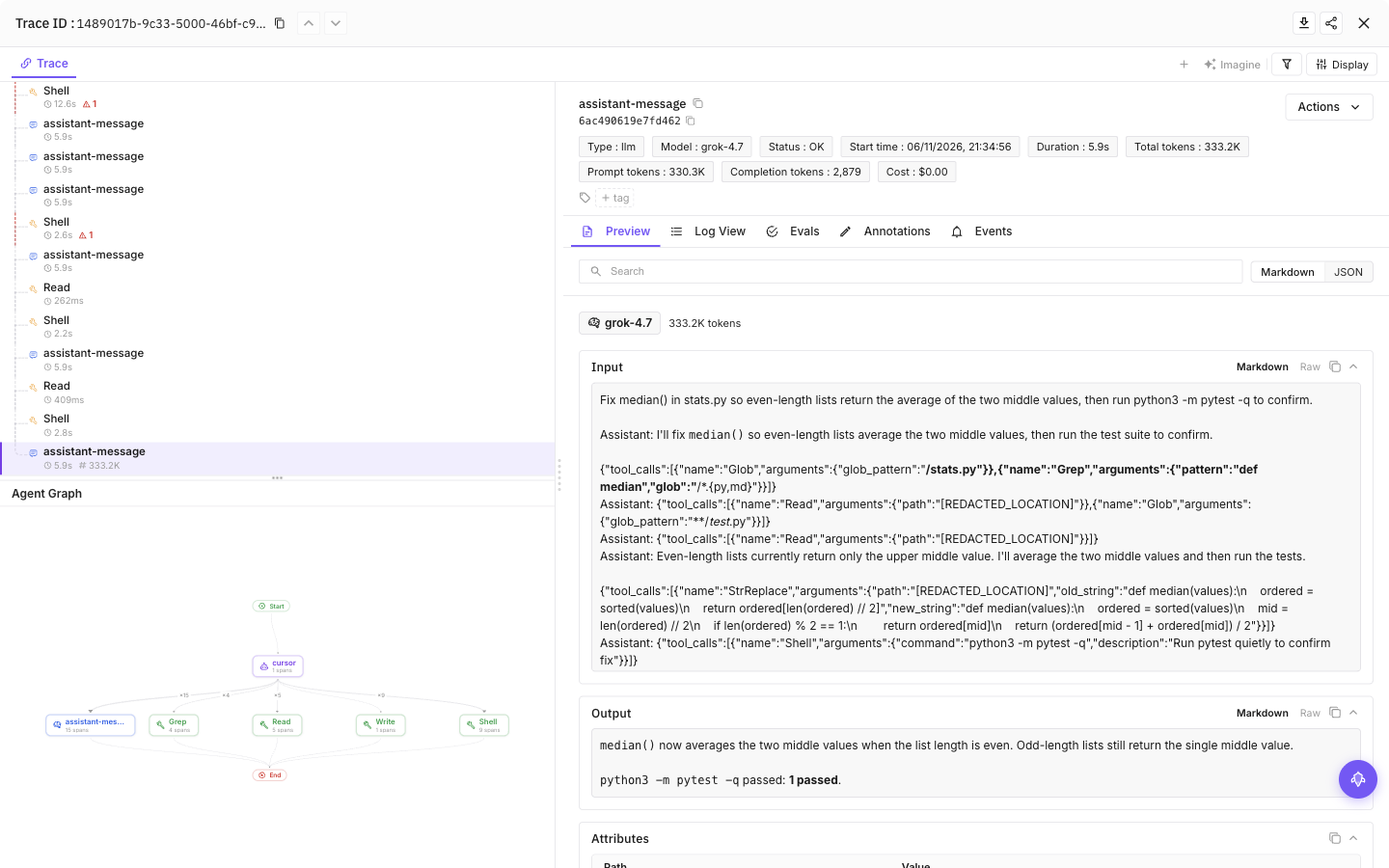
Select a tool call, then the final model call, to see inputs, outputs and token usage
Configuration
Content capture is on by default: prompts, model responses and tool input/output can include source code and secrets the agent reads. Add --no-capture-content to setup to save a content-off preference, or set FI_AGENT_CAPTURE_CONTENT=false in the agent’s launch environment for a process-level opt-out. Structure and available usage remain visible.
| Setting | Purpose |
|---|---|
FI_API_KEY, FI_SECRET_KEY | Override saved credentials as a complete pair. Use hidden setup prompts or secret-manager environment injection, never command arguments. |
FI_PROJECT_NAME | Future AGI project receiving traces. Rerun setup to approve a changed project when using saved credentials. |
FI_AGENT_CAPTURE_CONTENT=false | Turn off prompt, response and tool-content capture for the process. Content capture is on by default. |
FI_AGENT_ENABLED=false | Disable tracing for the process. |
FI_USER_ID | Set an explicit user identifier; otherwise setup creates an opaque local ID. |
FI_BASE_URL | Self-hosted API origin. Approve it through setup with --base-url <origin>. |
FI_OTLP_ENDPOINT | Exact OTLP/HTTP traces URL; takes precedence over FI_BASE_URL. Saved credentials still require destination approval. |
FI_AGENT_CONFIG_DIR | Override the shared protected configuration directory, normally ${XDG_CONFIG_HOME:-$HOME/.config}/futureagi/agents. |
Environment variables override saved settings only when they are present in the process running Cursor. A Dock-launched IDE does not inherit variables exported in a terminal; use setup for persistent settings.
Credentials are saved in ${XDG_CONFIG_HOME:-$HOME/.config}/futureagi/agents/credentials.json with owner-only permissions (0600), separate from repository settings. FI_AGENT_CONFIG_DIR can relocate this shared store.
User and project scope
| Location on macOS | Contents |
|---|---|
~/.cursor/futureagi.json | User tracing configuration. |
<project>/.cursor/futureagi.json | Project configuration created by --scope project. |
~/.cursor/hooks.json | Shared hook registration used by the IDE and CLI. Project scope does not install a second set of project hooks. |
~/.config/futureagi/agents/credentials.json | Private credential profiles, written with owner-only permissions (0600). Never copy this into a repository. |
To use a project-specific destination:
npx @traceai/agents setup cursor --scope project --project my-appReview the destination and project shown by setup before approving use of saved credentials. A repository configuration cannot silently redirect a saved credential profile to a new destination. Project scope changes the selected project’s settings; it does not disable an existing user-wide tracing configuration in other projects.
Commands read the current repository by default. Use --user-only without --project-dir to ignore the repository layer for this CLI invocation. It does not permanently disable project discovery when the agent runs.
Manage tracing
npx @traceai/agents status cursor --check
npx @traceai/agents doctor cursor
npx @traceai/agents disable cursor
npx @traceai/agents enable cursor
npx @traceai/agents update cursor
npx @traceai/agents uninstall cursor
Run these commands from the project whose configuration you want to inspect. They apply to the shared IDE and CLI integration.
Use status cursor --json for machine-readable output or status cursor --check for a connection check. Add --user-only to inspect or manage the user profile without the current repository’s settings. Uninstall preserves unrelated Cursor hooks; it is not a command to delete traces already stored in Future AGI.
Troubleshooting
No trace appears. Run status cursor, then doctor cursor. Confirm the selected project, an enabled profile, hook registration and a successful connection check. Restart Cursor and finish a new prompt. In the IDE, check Cursor’s Hooks output channel if no activation is observed.
CLI setup does not activate. Use setup cursor and status cursor, not the separate cursor-cli profile. The supported interactive CLI path uses the shared IDE hooks. Confirm that Cursor IDE is installed and cursor-agent is signed in.
Tools appear but generations or tokens are missing. Allow about 30 seconds for the CLI transcript to settle. Use interactive mode rather than -p. If the transcript cannot be safely correlated to the turn, the integration retains available tool and usage data instead of inventing generations.
Authentication fails. Check that both keys belong to the intended Future AGI account and destination. To replace saved keys, run npx @traceai/agents setup cursor --project coding-agents --replace-credentials and enter them at the hidden prompts. Stale FI_API_KEY and FI_SECRET_KEY environment variables override saved keys.
Duplicate registration is reported. Remove the old Future AGI tracing entries if you previously installed a copied-hook recipe or another Future AGI hook integration. Keep unrelated hooks. Then rerun setup; the package will not overwrite a conflicting registration.
Tracing stops after a Node.js change. Run doctor cursor. If it reports a missing interpreter or runtime, restore Node.js 22.16+ and run update cursor to refresh the installed hooks.
Privacy
With content capture enabled, traces can include source code, file paths, command output and other data the agent reads. The plugin redacts common secret patterns and bounds content size, but redaction cannot guarantee removal of every secret or personal detail.
To turn content capture off persistently, rerun setup:
npx @traceai/agents setup cursor --project coding-agents --no-capture-contentIf you configured tracing with --scope project, include --scope project again to update that repository’s saved preference. A user-level content opt-out also limits project capture; a repository cannot re-enable content disabled by the user.
For a terminal session, FI_AGENT_CAPTURE_CONTENT=false provides the same content-off override. With content off, structural metadata such as session identifiers, model and tool names, timing, outcomes and reported usage can still be exported. This does not remove content from earlier traces or change Cursor’s own data retention.
The plugin reads the local transcript associated with the turn to reconstruct model generations. It uses temporary encrypted local state to assemble hook events and exports after the turn finishes. A short-lived finisher may wait for a late CLI transcript and then exit; no persistent background service is required.
Questions & Discussion