Goose tracing
Trace Goose CLI conversations, model generations, and tool calls in Future AGI with one setup command and no collector.
See each Goose prompt as a trace, with model generations and tool calls grouped into a conversation in Future AGI.
What it traces
- One trace per prompt, exported on the next prompt or normal session exit. Turn duration ends at the confirmed Stop; it does not include your idle time before delivery. A stable pseudonymous session ID groups the conversation; a locally generated user ID connects it to the Users view.
- Model generations from Goose’s saved provider-response records, with provider, model, token usage, and costs when recorded. Estimated costs remain labeled as estimated. Model inputs show the prompt or preceding tool result, not the complete provider context.
- Tool calls nested beneath the generation that requested them, including arguments, results, and error status. Tool hook intervals measure elapsed tool time. Model placement uses Goose’s second-resolution message timestamps, not native request timings.
- Usage counted once on model records. Session and agent summary totals are not added again.
The plugin reads the current turn from Goose’s local session database in read-only mode. It does not export Goose’s OS-user/host attributes, log events, logs, or metrics. Goose Desktop tracing and cross-session subagent nesting are not yet available. Use normal session-backed CLI runs: --no-session runs cannot be traced. Individual provider retry attempts are not present in the saved records.
Before you start
Use Goose CLI 1.54 or later in the 1.x line and Node.js 22.16+ in the 22.x line, or Node.js 24.x, on Linux or macOS. Configure your model provider in Goose as usual. The integration does not change your provider or route model requests through Future AGI.
Quick start
Get your Future AGI keys
Open API keys in Future AGI. Keep your API key and secret key ready for the setup prompt; do not paste them into a Goose conversation.
Set up tracing
npx @traceai/agents setup goose --project coding-agentsEnter your keys at the hidden prompts. Setup checks the connection before saving credentials in an owner-only configuration file, then registers a native Goose hook plugin. It installs its runtime automatically: no scripts to copy, collector to start, or background service to manage.
Warning
Prompt text, model responses, and tool arguments/results are captured by default. They can include source code, file contents, and secrets that Goose reads. To capture structure and usage without content, add --no-capture-content to the setup command.
If you previously used Goose’s OpenTelemetry collector configuration, switch off that export first. The plugin refuses to run alongside an active native trace exporter.
Run the agent and open the trace
For your first trace, run a task directly and let the command finish:
goose run -t "List the files in this folder and summarize README.md"In an interactive Goose session, submit another prompt or exit normally before looking for the preceding turn’s trace. A Stop hook can still be rejected by another policy, so the plugin waits for that next prompt or session exit to confirm completion. A completed goose run exports before the command exits.
Open Observe → Tracing in Future AGI and select coding-agents. Open the goose trace to inspect its generations and tools. The Sessions tab groups prompts from the same Goose conversation, including resumed conversations.
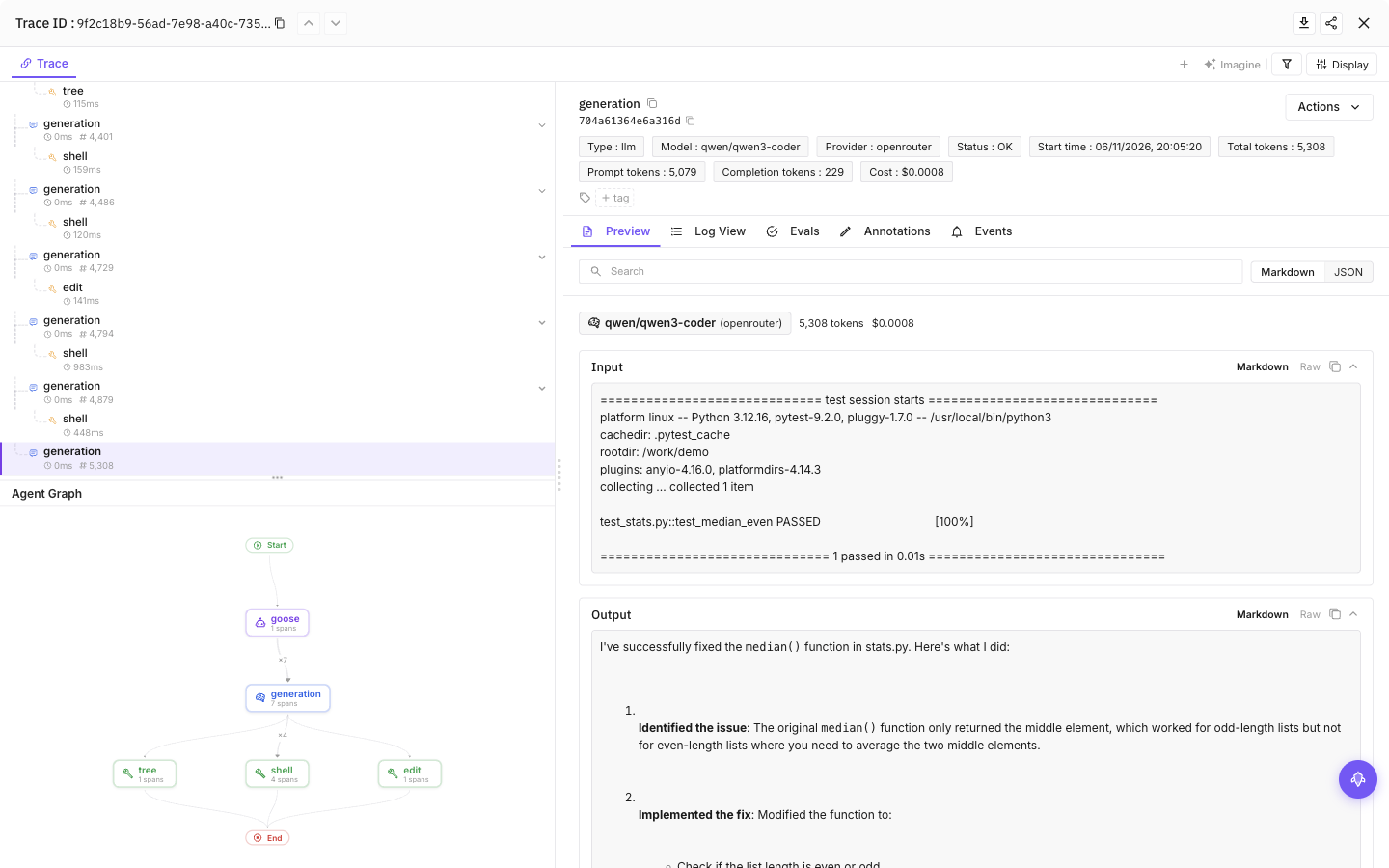
Select a tool call, then the final model call, to see inputs, outputs and token usage
Configuration
Content capture is on by default: prompts, model responses and tool input/output can include source code and secrets the agent reads. Add --no-capture-content to setup to save a content-off preference, or set FI_AGENT_CAPTURE_CONTENT=false in the agent’s launch environment for a process-level opt-out. Structure and available usage remain visible.
| Setting | Purpose |
|---|---|
FI_API_KEY, FI_SECRET_KEY | Override saved credentials as a complete pair. Use hidden setup prompts or secret-manager environment injection, never command arguments. |
FI_PROJECT_NAME | Future AGI project receiving traces. Rerun setup to approve a changed project when using saved credentials. |
FI_AGENT_CAPTURE_CONTENT=false | Turn off prompt, response and tool-content capture for the process. Content capture is on by default. |
FI_AGENT_ENABLED=false | Disable tracing for the process. |
FI_USER_ID | Set an explicit user identifier; otherwise setup creates an opaque local ID. |
FI_BASE_URL | Self-hosted API origin. Approve it through setup with --base-url <origin>. |
FI_OTLP_ENDPOINT | Exact OTLP/HTTP traces URL; takes precedence over FI_BASE_URL. Saved credentials still require destination approval. |
FI_AGENT_CONFIG_DIR | Override the shared protected configuration directory, normally ${XDG_CONFIG_HOME:-$HOME/.config}/futureagi/agents. |
Environment variables override saved settings.
Credentials are saved in ${XDG_CONFIG_HOME:-$HOME/.config}/futureagi/agents/credentials.json with owner-only permissions (0600), separate from repository settings. FI_AGENT_CONFIG_DIR can relocate this shared store.
User and project scope
Setup is user-scoped by default. It also reads the current directory’s project settings when resolving the destination. Use --user-only to ignore that repository layer:
npx @traceai/agents setup goose --user-only --project coding-agentsFor tracing restricted to one project, run setup from that project’s root:
npx @traceai/agents setup goose --scope project --project-dir . --project my-projectThe hook is discovered globally, but a project-only installation collects only in explicitly registered canonical project directories. If you also have user-scoped Goose setup, that user configuration continues to apply elsewhere. Another agent’s saved credentials do not enable Goose tracing.
Credentials remain in the protected user store; the project configuration contains only settings and a profile reference. A repository cannot redirect saved credentials to a different destination or raise your content-capture permission. Status, doctor, enable, and update resolve the current directory; use --project-dir /path/to/project to select another project or --user-only to ignore project settings.
Configuration files
These are the default locations on both Linux and macOS. Setup manages them for you.
| File or directory | Purpose |
|---|---|
~/.config/goose/futureagi.json | User-level Goose tracing settings and profile reference. |
<project>/.futureagi/agents.json | Project-level settings written by --scope project; no API keys. |
~/.config/futureagi/agents/credentials.json | Owner-only credential store. Never commit or share this file. |
~/.agents/plugins/futureagi-goose | Native Goose plugin registration. |
XDG_CONFIG_HOME replaces ~/.config. If you set GOOSE_PATH_ROOT, Goose settings live under its config directory and the plugin under its .agents/plugins/futureagi-goose directory; the shared Future AGI credential store is unchanged. Use the same environment when running setup and Goose.
For self-hosted Future AGI:
npx @traceai/agents setup goose --base-url https://futureagi.example.com --project coding-agentsManage tracing
npx @traceai/agents status goose --check
npx @traceai/agents doctor goose
npx @traceai/agents disable goose
npx @traceai/agents enable goose
npx @traceai/agents update goose
npx @traceai/agents uninstall goose
Status shows the resolved destination, privacy mode, registration, activation, recent exports, and connection check. A successful export means the endpoint accepted the batch; it is not a confirmation that you have opened the trace in the UI.
Disabling takes effect for active hook processes too. Uninstall removes only the plugin registration it owns and leaves your Goose provider settings alone.
Switch from the collector setup
Do not point Goose’s native OTLP exporter directly at Future AGI as a shortcut: that bypasses the old collector’s identity filtering and duplicate-usage protection.
Instead, stop native trace export in the shell that launches Goose:
export OTEL_TRACES_EXPORTER=none
export OTEL_METRICS_EXPORTER=none
export OTEL_LOGS_EXPORTER=none
npx @traceai/agents setup goose --project coding-agents
Remove the old tracing exports from your shell startup configuration, or keep the three none settings there. You can stop the old collector once no other integration needs it. The new plugin exports through its own bounded HTTP client and does not need Goose’s OTLP variables.
Troubleshooting
| Symptom | What to do |
|---|---|
| Configured but no traces | In an interactive session, submit another prompt or exit normally to deliver the preceding turn. For an immediate first trace, finish the goose run example above. If still missing, start a new Goose process, run status goose --check, and confirm the plugin is not in Goose’s disabledPlugins list. |
| Native tracing conflict | Follow Switch from the collector setup. The plugin will not rewrite an existing native destination. |
| Unsupported host version or session schema | Use a stable Goose CLI 1.x release from 1.54 onward. An incompatible saved-message format needs an integration update; run setup again after updating the integration. |
| Runtime unavailable | Run setup again with a supported Node.js version installed. Setup uses your installed interpreter; it does not copy Node. |
| Project configuration ignored | Run doctor goose to identify unsafe directory permissions. Use a safely owned project directory or user-scoped setup; unsafe project settings are ignored rather than trusted. |
| Content is missing | Check FI_AGENT_CAPTURE_CONTENT and the saved privacy mode. A project cannot override a user-level content opt-out. |
| No trace for a very large turn | Capture is bounded to 256 saved messages and 48 generation/tool records per turn. Status reports the capture limit; split the task into smaller prompts. |
| Export fails or times out | Goose continues. The hook has a bounded export window and does not replay ambiguous deliveries. Check credentials, destination, and network access, then run a new prompt. |
| Turn ends before a model response is saved | The plugin can report an incomplete turn, but does not invent a model generation or token count. |
Learn more about sessions and spans.
Privacy
Captured text is capped at 20,000 characters per field and receives best-effort credential and path redaction. Redaction cannot guarantee removal of every secret; use --no-capture-content or FI_AGENT_CAPTURE_CONTENT=false for sensitive work. The plugin stores only bounded session cursors and tool timing metadata, not another copy of your conversation. Goose still maintains its own session history.
Questions & Discussion