Trace Oh My Pi with Future AGI
Connect Oh My Pi with one setup command. See each prompt, model generation, tool call, and subagent in Future AGI.
Run npx @traceai/agents setup oh-my-pi --project coding-agents, restart Oh My Pi, and use it normally. Each prompt becomes a trace with model and tool spans; prompts in the same conversation stay grouped in Sessions.
What it traces
- One trace per prompt. Each dequeued user prompt gets its own trace. Model and tool continuations stay inside that trace; conversation turns share a session.
- Model generations. Primary-agent and task-agent assistant messages supply reconstructed generations with the prompt and bounded observed context when available. Tool-call-only messages include their tool calls. These are not full provider requests or measured network durations.
- Usage and cost. Available input/output tokens, cache counts, and Oh My Pi’s model-pricing estimates. Estimates are not provider invoices; unknown usage or unpriced calls have no invented totals.
- Tools and subagents. Tool inputs, outputs, timing, and failures. Task subagents’ generations and tools appear under the spawning tool, including nested tasks. Background completion can appear as a linked continuation after the original prompt has ended. A child without a verifiable parent tool ID is not attached to an unrelated trace.
- Compaction. Compaction events during a prompt appear within that prompt’s trace.
Advisor and other auxiliary generations are not yet available. Oh My Pi does not provide enough request identity to attribute them safely, so their usage is also excluded. Hidden provider retries are not reconstructed as additional model calls.
Before you start
Use Oh My Pi 18.17.0 or later in the 18.x line and Bun 1.4.4 or later. The setup CLI requires Node.js 22.16 or later in the 22.x line, or Node.js 24.x. Oh My Pi must already have a working model configuration. For the upstream pi terminal application, use the Pi integration instead.
Quick start
Get your Future AGI keys
Open API keys and create an API key and secret key. Keep them available for the setup prompt; do not paste them into an agent conversation.
Set up tracing
npx @traceai/agents setup oh-my-pi --project coding-agentsSetup asks for your keys with hidden terminal input, validates the destination, saves private configuration, and installs @traceai/oh-my-pi-plugin through Oh My Pi’s native package installer. An existing Future AGI profile is reused.
Warning
Prompts, model outputs, and tool input/output are captured by default. Tool output can include file contents and secrets the agent reads. To record only structure, timing, and usage, add --no-capture-content to the setup command.
If you already have a configured Future AGI profile, the native alternative is:
omp install npm:@traceai/oh-my-pi-pluginRemove the old futureagi-otlp.ts hook if you previously used the copied-file integration. Keep only one tracing plugin, and do not also send Oh My Pi’s built-in OpenTelemetry traces to Future AGI. See avoiding duplicate exports.
Run the agent and open the trace
Restart Oh My Pi, then submit a prompt:
omp --print "Read README.md and summarize how to run this project."In Future AGI, open Observe, select coding-agents, and open the newest Oh My Pi trace. Expand a generation to inspect the model’s output and usage, or a tool span to inspect its arguments and result. Open Sessions to follow the conversation across prompts.
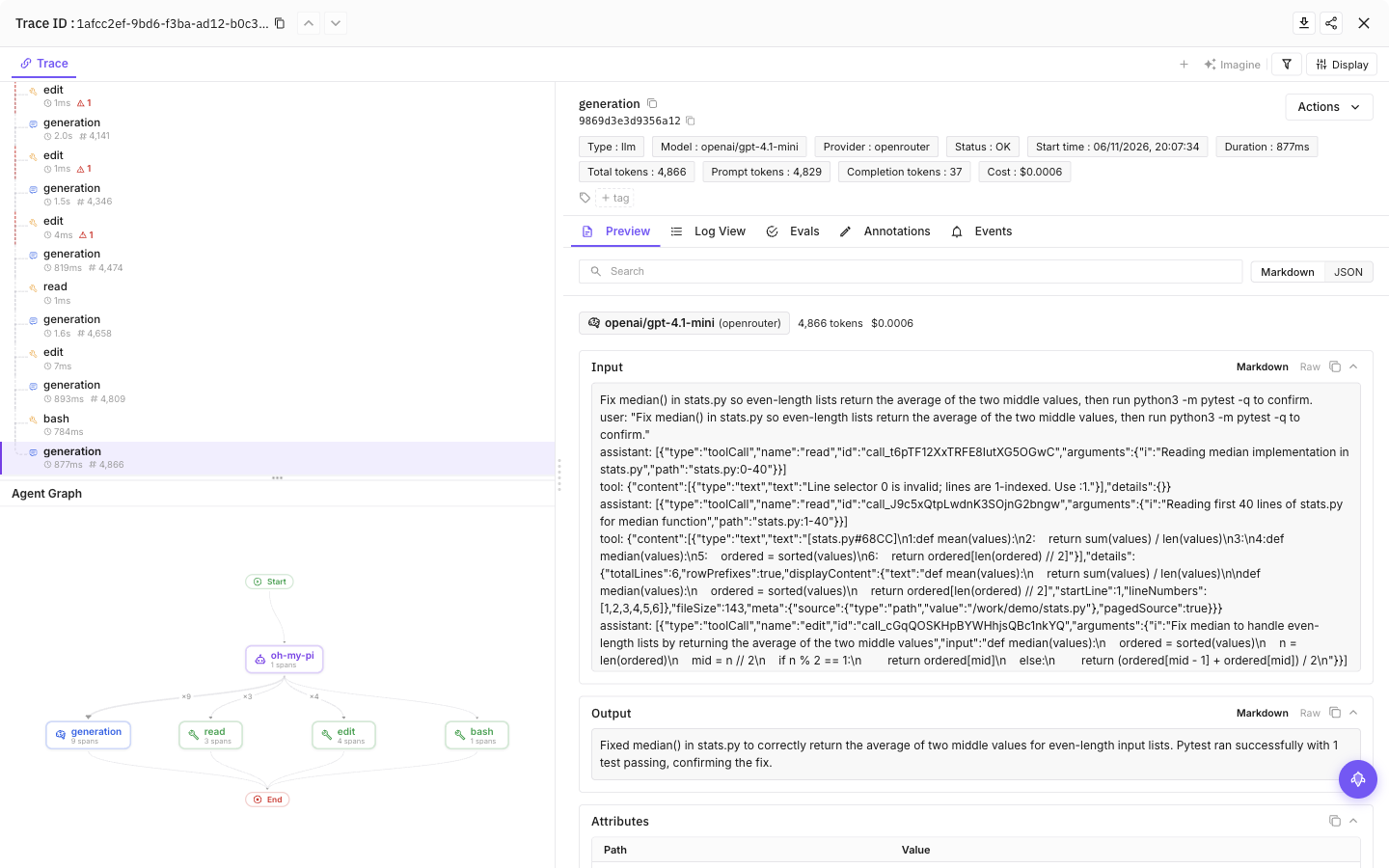
Select a tool call, then the final model call, to see inputs, outputs and token usage
Configuration
Content capture is on by default: prompts, model responses and tool input/output can include source code and secrets the agent reads. Add --no-capture-content to setup to save a content-off preference, or set FI_AGENT_CAPTURE_CONTENT=false in the agent’s launch environment for a process-level opt-out. Structure and available usage remain visible.
| Setting | Purpose |
|---|---|
FI_API_KEY, FI_SECRET_KEY | Override saved credentials as a complete pair. Use hidden setup prompts or secret-manager environment injection, never command arguments. |
FI_PROJECT_NAME | Future AGI project receiving traces. Rerun setup to approve a changed project when using saved credentials. |
FI_AGENT_CAPTURE_CONTENT=false | Turn off prompt, response and tool-content capture for the process. Content capture is on by default. |
FI_AGENT_ENABLED=false | Disable tracing for the process. |
FI_USER_ID | Set an explicit user identifier; otherwise setup creates an opaque local ID. |
FI_BASE_URL | Self-hosted API origin. Approve it through setup with --base-url <origin>. |
FI_OTLP_ENDPOINT | Exact OTLP/HTTP traces URL; takes precedence over FI_BASE_URL. Saved credentials still require destination approval. |
FI_AGENT_CONFIG_DIR | Override the shared protected configuration directory, normally ${XDG_CONFIG_HOME:-$HOME/.config}/futureagi/agents. |
Setup stores credentials outside your repository in ${XDG_CONFIG_HOME:-$HOME/.config}/futureagi/agents/credentials.json with owner-only (0600) permissions. User tracing settings live in ~/.omp/agent/futureagi.json; PI_CODING_AGENT_DIR overrides that agent directory.
Environment variables override saved settings. A repository can reduce content capture, but cannot raise your saved privacy ceiling or redirect credentials to an unapproved destination. Approve a new destination through setup, or explicitly set the endpoint and project in your environment.
User and project scope
Run setup from the project’s directory:
npx @traceai/agents setup oh-my-pi --project my-project --scope projectThis writes the tracing override to .omp/futureagi.json; credentials remain outside the repository. Oh My Pi’s native npm plugin installation is always user-scoped, even when its tracing configuration is project-specific. The default setup creates a user-scoped profile.
For another directory, add --project-dir /path/to/project. For self-hosted Future AGI, add --base-url https://api.example.com.
Commands read the current repository by default. Use --user-only without --project-dir to ignore the repository layer for this CLI invocation. It does not permanently disable project discovery when the agent runs.
Manage tracing
npx @traceai/agents status oh-my-pi --check
npx @traceai/agents doctor oh-my-pi
npx @traceai/agents disable oh-my-pi
npx @traceai/agents enable oh-my-pi
npx @traceai/agents update oh-my-pi
npx @traceai/agents uninstall oh-my-pi
Run these commands from the project directory to include its tracing configuration. Use --user-only without --project-dir to resolve the user profile without repository settings. This flag affects the tracing CLI, not Oh My Pi’s extension discovery.
doctor runs configuration and connectivity diagnostics, like status --check. Status separates native registration, observed activation, credential acceptance, and export delivery. A registered plugin has not necessarily loaded in a running session: restart Oh My Pi and send a prompt. HTTP acceptance does not prove the trace has appeared in the product.
disable is an agent-wide switch across projects using this Future AGI configuration directory; it is not project-scoped. For just one process, use FI_AGENT_ENABLED=false in its launch environment. After re-enabling tracing, restart Oh My Pi. Uninstall removes only an unchanged native registration created by setup. For a plugin you installed or changed yourself, use omp plugin uninstall @traceai/oh-my-pi-plugin. Removing the user-scoped plugin stops it loading in every project, not just the current project.
Troubleshooting
No traces appear
Run npx @traceai/agents doctor oh-my-pi and check omp plugin list. Confirm the plugin is enabled, restart Oh My Pi, and send a prompt. Project-level plugin overrides or starting Oh My Pi with extension discovery disabled can prevent loading. Check that Observe is showing the configured project.
Authentication is rejected
Run npx @traceai/agents setup oh-my-pi --replace-credentials and enter a valid pair at the hidden prompts. For a project-scoped profile, run this from the project with --scope project. Replace or unset old FI_API_KEY and FI_SECRET_KEY overrides first, because environment credentials take precedence. Replacement keys are validated before the saved profile is overwritten. Restart Oh My Pi afterward.
Project settings are ignored
PROJECT_CONFIG_IGNORED means the project configuration could not be safely read, for example on a shared external volume. Tracing continues with the user profile. Do not loosen credential-file permissions. For a sensitive project, set FI_AGENT_CAPTURE_CONTENT=false in the launch environment or disable tracing rather than relying on an ignored project override.
Every span appears twice
Remove any old copied futureagi-otlp.ts hook or duplicate extension registration. Keep one native plugin and stop Oh My Pi’s own trace exporter from sending the same session to Future AGI; see avoiding duplicate exports.
Token or cost totals differ from the provider bill
Input tokens include uncached input plus cache reads and writes; cache counts are also shown separately. Advisor and auxiliary model usage is not available. Costs come from Oh My Pi’s model pricing, not provider billing.
Setup reports an unsupported Oh My Pi version
Check omp --version. Use the omp.sh CLI, version 18.17.0 or later in the 18.x line, with Bun 1.4.4 or later. The upstream pi binary and other forks use different extension APIs.
Privacy
Content capture is on by default. Use --no-capture-content during setup or FI_AGENT_CAPTURE_CONTENT=false in Oh My Pi’s launch environment for metadata-only tracing. Content is bounded and common secret patterns are redacted on a best-effort basis; this is not a data-loss-prevention guarantee. Images, binary payloads, transport headers, and thinking signatures are not exported. Captured text can still contain paths, file contents, and secrets.
Export failures do not block normal agent work. Exports use a bounded in-memory queue rather than persisting prompt content for later replay; failed delivery or a forced shutdown can lose pending spans.
Avoiding duplicate exports
Use either this plugin or Oh My Pi’s built-in OpenTelemetry export, not both for the same destination. To stop Oh My Pi’s own trace exporter while leaving the Future AGI plugin active:
OTEL_TRACES_EXPORTER=none ompThis disables only Oh My Pi’s native traces, not its logs or metrics. If you also need to stop those signals, turn off OTLP Telemetry Export in Oh My Pi’s /settings. Variables set on the command line are inherited by tools launched from that process.
Related guides
Questions & Discussion