Zero-code Node.js tracing
Trace Node.js AI calls in Future AGI with @traceai/auto. Install once, preload at startup, and inspect model requests, responses, timing and token usage.
See your Node.js application’s AI requests, responses, timing and token usage in Future AGI without adding tracing imports or wrapping model calls.
Before you start
- Node.js 20.6 or later, running on the server. The preload does not run in browsers or edge runtimes.
- A Future AGI API key and secret key from API keys.
- Your model provider’s credentials. Future AGI tracing does not supply a model key.
Trace your application
Use your existing app, or start with the minimal OpenAI example below.
Install the package
Run in your application’s directory:
npm install @traceai/autoOpenAI instrumentation and a global-fetch observer are included. Other dedicated integrations are optional; see supported libraries.
Configure your project
Set both keys in your process environment, preferably through your deployment’s secret manager. For a terminal session, replace these placeholders; do not commit credentials:
export FI_API_KEY="your-api-key"
export FI_SECRET_KEY="your-secret-key"
export FI_PROJECT_NAME="my-ai-app"
Warning
Prompts, responses and supported tool content are captured by default. Before handling sensitive data, set FI_HIDE_INPUTS=true, FI_HIDE_OUTPUTS=true and FI_HIDE_ERROR_DETAILS=true in the same environment. See privacy controls.
Start with the preload
Replace app.mjs with your application’s entry file:
node --import @traceai/auto/register app.mjsThe preload runs before your application imports its AI libraries. Keep your existing provider configuration and application code unchanged.
Using an npm start script? Pass the preload through NODE_OPTIONS instead:
NODE_OPTIONS="--import @traceai/auto/register" npm startPreserve any other Node flags you already use. For a CommonJS application, --import also works, or use:
node --require @traceai/auto/register app.cjsChoose one startup method. Do not combine duplicate preloads or manually instrument the same client. Preload each worker or child process you want to trace.
Open the trace
Make an AI request and consume its response. Open Future AGI, select Observe → my-ai-app, then open the model-call span to inspect its inputs, outputs and available usage.
Completed spans flush when an ordinary Node process exits naturally. For explicit exits or serverless invocations, follow the flush and lifecycle guidance; hard termination can lose spans.
Try a minimal OpenAI app
If you do not have an application yet, install the OpenAI SDK alongside @traceai/auto:
npm install openaiSet OPENAI_API_KEY through your environment and OPENAI_MODEL to a model your provider account can use. Save this as app.mjs, then run the preload command above:
import OpenAI from "openai";

const response = await new OpenAI().chat.completions.create({
  model: process.env.OPENAI_MODEL,
  messages: [{ role: "user", content: "Say hello in one word." }],
});
console.log(response.choices[0].message.content);
This is ordinary application code—there are no tracing imports. OpenAI SDK versions 4–7 are supported. For an OpenAI-compatible gateway, configure OPENAI_BASE_URL and the provider’s key and model as usual.
What you get
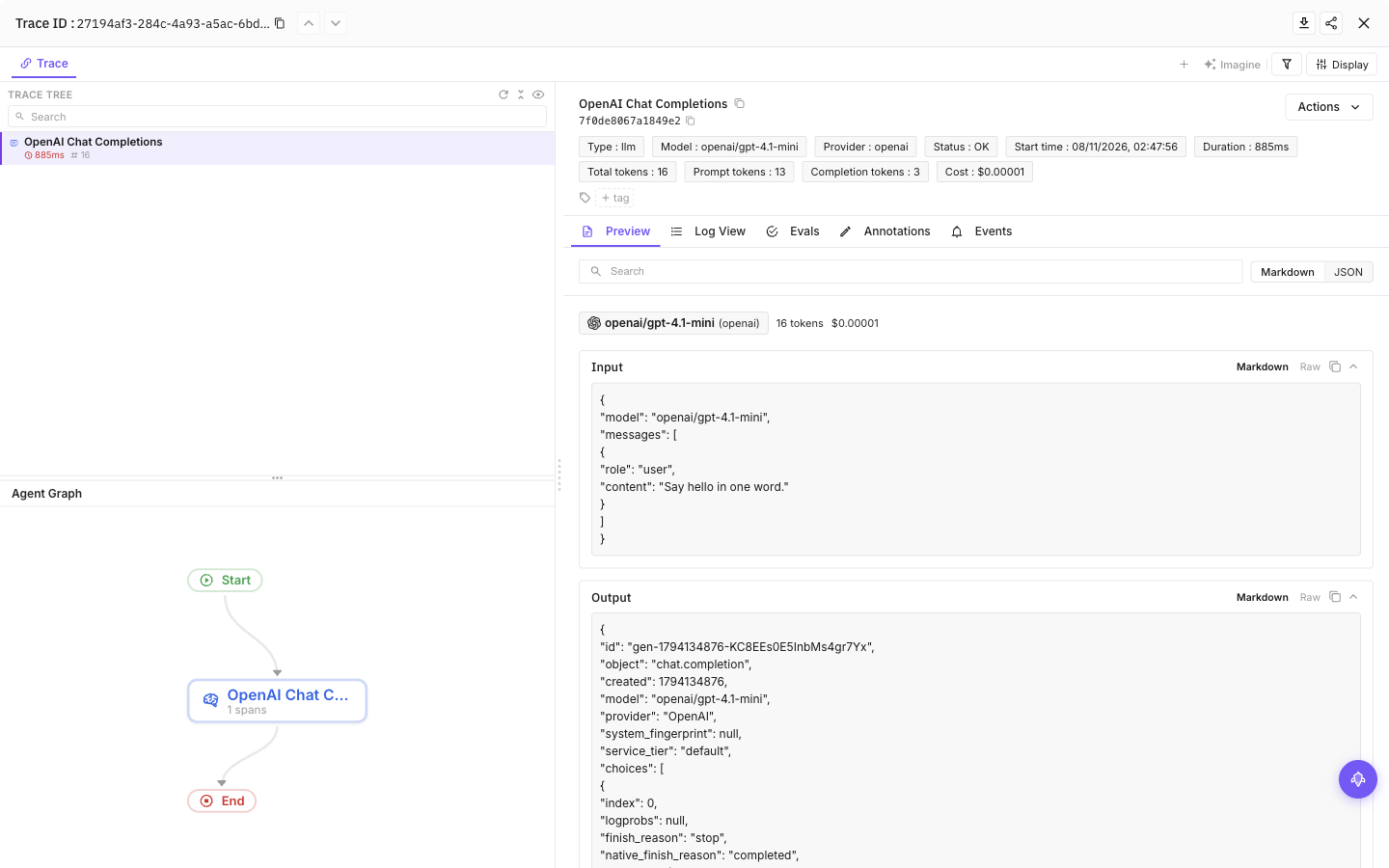
The example above in the my-ai-app project, using OpenAI SDK 7 with openai/gpt-4.1-mini through OpenRouter.
- Model-call detail: provider, model, input/output and duration for supported calls.
- Usage when supplied: token counts returned by the provider; missing usage is not inferred. Streaming timing depends on the transport.
- More application context: installed dedicated integrations can add agent, tool, retrieval or database spans within their supported APIs.
- OpenTelemetry compatibility: keep an existing provider, or use an application-owned exporter.
This is AI instrumentation, not a general-purpose APM agent: arbitrary functions and outgoing non-AI HTTP calls are not automatically traced. If the optional @opentelemetry/instrumentation-http package is installed, the preload can also add incoming HTTP server spans. Set FI_DISABLED_INSTRUMENTATIONS=http to disable that integration. The wire observer yields to covered model spans to avoid duplicate capture.
Supported libraries
Included: OpenAI library hooks and observation of recognized AI protocols through the process’s global fetch. Recognition requires a matching endpoint and request shape; not every transport is covered.
Optional: install the dedicated instrumentor alongside its target library for additional coverage. Use the generated library table to find the package and setup mode. An import hook, an enable entry and a manual integration are different paths; auto-registration does not expand an integration’s supported methods or versions.
To see detected libraries and suggested packages, without installing anything:
npx --no-install traceai-auto bootstrapRun from the application directory, then install any suggested instrumentors you need and restart. Libraries reported as manual still need their explicit API. See the transport and capture limits for wire coverage.
Privacy controls
Content capture is on by default. To hide inputs, outputs and error details from the first request:
FI_HIDE_INPUTS=true FI_HIDE_OUTPUTS=true FI_HIDE_ERROR_DETAILS=true \
node --import @traceai/auto/register app.mjs| Data | Default and control |
|---|---|
| Prompts, responses, tool content and transcripts | Captured where supported. Use FI_HIDE_INPUTS and FI_HIDE_OUTPUTS; granular message and text flags are also available. |
| Error details | Visible unless input/output value, message, text or invocation-parameter hiding implies error hiding. Set FI_HIDE_ERROR_DETAILS=true explicitly to hide details. Explicit false overrides the derived setting, not secret/media scrubbing. |
| Known credentials and signed URL values | Scrubbed in traceAI’s export view. Unknown or transformed secrets may not be recognized; use hide flags for sensitive content. |
| PII pattern redaction | Off by default. Enable with FI_PII_REDACTION=true; pattern matching is not comprehensive PII detection. |
| Base64 media and raw audio | Recognized payloads are omitted; raw audio bytes are not exported. FI_BASE64_IMAGE_MAX_LENGTH defaults to 0; raising it does not enable base64 image export. |
| Embedding vectors | Catalog wire formats retain dimensions, not vectors. FI_HIDE_EMBEDDING_VECTORS=true also hides vectors on library, forwarded and generic-JSON routes. |
These controls apply to traceAI-authored values and its export view. Other exporters retain their own privacy policies; application-owned processors are not silently rewritten. See all privacy flags and defaults.
Configuration essentials
Set configuration before startup and restart to change it. Later initialization calls do not reconfigure the agent.
| Variable | Purpose |
|---|---|
FI_API_KEY, FI_SECRET_KEY | Complete credential pair for the default Future AGI destination. Both must come from the same configuration source. |
FI_PROJECT_NAME | Set an explicit Observe project name for stable routing. |
FI_BASE_URL | Future AGI collector base URL or full traces endpoint. Defaults to https://api.futureagi.com. |
FI_INSTRUMENTATIONS | Comma-separated allowlist, such as openai,wire. By default, all eligible integrations are considered. |
FI_DISABLED_INSTRUMENTATIONS | Denylist; takes precedence over the allowlist. |
FI_WIRE_CAPTURE | Global-fetch capture and transport credential observation; defaults to true. |
FI_SAMPLE_RATE | Root sampling ratio on agent-owned providers; defaults to 1. Existing providers keep their sampler. |
FI_AUTO_DEBUG | Set to true for a masked startup report. |
OTEL_SDK_DISABLED | Set to true to disable initialization. |
Use literal true or false for boolean settings, not 1 or 0. The configuration reference covers config files, profiles, precedence and custom OpenTelemetry destinations.
Frameworks and deployment
| Runtime | Setup |
|---|---|
| Next.js | Use a guarded instrumentation.ts in the Node runtime and keep the agent and target SDKs external. Never expose FI keys as NEXT_PUBLIC_*. Next.js recipe. |
| esbuild, Vite SSR, Rollup or webpack | Opt into the Node-server adapter; plugins are inactive until configured. Keep AI SDKs external for library hooks and deploy the complete agent payload, not only the entry file. Bundler recipes. |
| AWS Lambda | Initialize once outside the handler and flush at each invocation boundary. Do not rely on process exit or stack duplicate invocation wrappers. Lambda recipe. |
| Browser or edge runtime | The Node preload is not supported. The /edge subpath is a low-level fetch observer, not a configured tracing SDK. Edge boundaries. |
Troubleshooting
Run diagnostics from the app directory with the same FI environment as your app:
npx --no-install traceai-auto doctorDoctor sends one test span when enabled. Inspect the JSON active and collector fields: accepted means the collector accepted the test export; failed and not_tested (...) are not success signals. A zero exit code alone does not prove export health. Doctor is a separate process, so its pending hooks do not tell you whether your running app has imported a library.
| Symptom | Next step |
|---|---|
| Tracing is disabled | Supply both FI keys in the same source. Check OTEL_SDK_DISABLED, the allowlist and denylist. |
| Collector export fails | Check FI_BASE_URL, credentials and outbound connectivity. Initialization itself does not probe the collector. |
missing_instrumentor or manual | Use bootstrap’s suggested package, or the integration’s explicit API, then restart. |
Library remains pending | Load the agent before the SDK; check supported versions and keep the SDK external when bundling. |
| No wire span appears | Consume or cancel the response. Direct undici.fetch, node-fetch, WebSocket and gRPC are not global-fetch capture. Unread responses do not produce completed wire spans. |
| Output is missing or unknown | Check hide flags, the body cap and host OpenTelemetry attribute limits. Truncated or dropped content cannot be reconstructed. |
| Duplicate spans | Remove duplicate preloads or manual instrumentation of the same client; keep one global OpenTelemetry provider and one export route per destination. |
When to use manual instrumentation
Use @traceai/auto for supported AI calls with minimal application changes. Choose fi-core and manual tracing when you need custom parent spans, application-specific attributes or precise control over what is traced. Use an integration’s explicit wrapper or processor when its setup mode is manual.
You can add custom spans around automatically traced work, but do not register a second instrumentor for the same client. Browse the integration guides for library-specific APIs.
Questions & Discussion