Apollo Router tracing with Future AGI
Send Apollo Router's native OpenTelemetry traces to Future AGI with YAML configuration. Inspect GraphQL request timing, query planning, and subgraph fetches in Observe.
Send Apollo Router’s request, query-planning, and subgraph-fetch spans to Observe using its built-in OTLP exporter. You do not need a traceAI package or application tracing helper.
Before you start
- Use Apollo Router v2.19.0 for this configuration. Upgrade older Router installations before using these privacy settings.
- Have a composed
supergraph.graphqland its subgraphs running. Keep your existing schema delivery and authentication settings if you already operate Router. - Get your Future AGI API key and secret key from Keys.
This guide is for the Router gateway binary, not Apollo Server, which runs your resolvers. The configuration below works without GraphOS credentials when you supply a local supergraph file.
Configure native tracing
Set credentials and a project name in the environment of the Router process:
export FI_API_KEY="your-api-key"
export FI_SECRET_KEY="your-secret-key"
export FI_PROJECT_NAME="apollo-router"
Remove conflicting OpenTelemetry settings from that process before starting it:
unset OTEL_EXPORTER_OTLP_ENDPOINT OTEL_EXPORTER_OTLP_TRACES_ENDPOINT
unset OTEL_EXPORTER_OTLP_PROTOCOL OTEL_EXPORTER_OTLP_TRACES_PROTOCOL
unset OTEL_RESOURCE_ATTRIBUTES OTEL_SERVICE_NAME
Router rejects the endpoint environment variables. Protocol variables can override protocol: http, while resource variables can override your project or service name. Configure these values in YAML instead. Apply the same environment changes to your deployment, not just your interactive shell.
Add the following to router.yaml. Merge the telemetry settings into your existing configuration rather than adding a second telemetry key. Preserve your existing listener in a deployed Router; the loopback listener here is for a local run.
supergraph:
  listen: 127.0.0.1:4000
telemetry:
  instrumentation:
    spans:
      mode: spec_compliant
      default_attribute_requirement_level: none
      router:
        attributes:
          http.request.method: true
          http.response.status_code: true
          http.route: true
  exporters:
    tracing:
      common:
        service_name: apollo-router
        sampler: always_on
        parent_based_sampler: true
        resource:
          project_name: ${env.FI_PROJECT_NAME}
          project_type: observe
      propagation:
        trace_context: true
      otlp:
        enabled: true
        protocol: http
        batch_processor:
          scheduled_delay: 1s
          max_export_timeout: 5s
          max_queue_size: 2048
          max_export_batch_size: 512
        endpoint: https://api.futureagi.com/tracer/v1/traces
        http:
          headers:
            X-Api-Key: ${env.FI_API_KEY}
            X-Secret-Key: ${env.FI_SECRET_KEY}
Use the complete /tracer/v1/traces URL. Router preserves an explicit path: setting the endpoint to /tracer does not add /v1/traces for you. For self-hosted Future AGI, use your deployment’s OTLP/HTTP trace endpoint.
Both authentication headers belong on the exporter, not on subgraph requests or span attributes. project_name and project_type must be resource attributes. Future AGI accepts traces only; do not point Router’s metrics or log exporters at this endpoint.
Warning
Keep default_attribute_requirement_level: none and enable only the attributes you need. Router’s required defaults can include URL query strings; recommended can include GraphQL documents. Remove existing document, variable, header, baggage, and error-content selectors if you want the structure-only configuration above.
This configuration retains operation names, subgraph names, HTTP method/status, route templates, timing, and Router’s internal diagnostic attributes. It does not enable GraphQL documents or variable values. Keep personal data and credentials out of operation names, schema names, resource attributes, and any custom telemetry you add.
Send a request
Start the downloaded Router binary with your composed schema:
./router --config router.yaml --supergraph supergraph.graphqlIn another terminal, send a schema-independent query:
curl --fail-with-body http://127.0.0.1:4000/ \
  -H 'Content-Type: application/json' \
  --data '{"query":"query RouterCheck { __typename }"}'
The response contains your root query type name, usually Query. Then send one of your application’s federated operations to see subgraph fetch timings; __typename alone does not need a subgraph fetch.
Inspect the trace
Open Observe → Tracing, select the project named by FI_PROJECT_NAME, and open query RouterCheck or your application’s operation. Allow a few seconds for batching and ingestion.
For a federated request, the trace includes the request root, supergraph, query planning, execution, and subgraph/http_request spans. Router also emits internal spans and a separate starting trace. These are generic spans in Observe and appear with type unknown; they do not supply model inputs, token usage, cost, or conversation sessions.
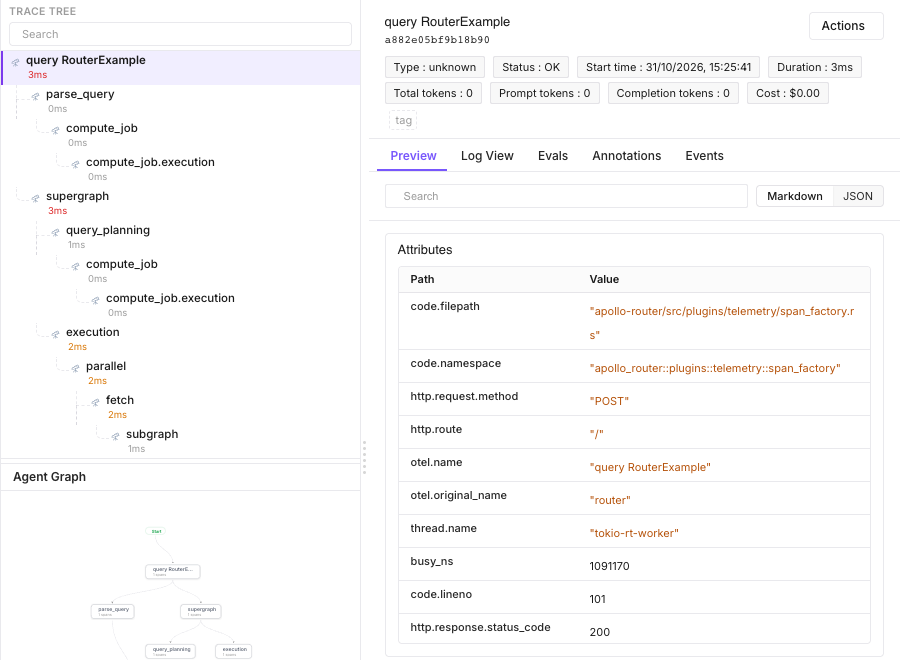
A sample federated operation in Observe. Your span tree depends on the operation’s query plan.
Router propagates W3C trace context to subgraphs. To see resolver internals or model calls, instrument those services separately and export their spans to the same Future AGI project. If an upstream service sends a traceparent, export that upstream trace too so Observe has its root span.
Sampling and errors
always_on records new requests, while parent_based_sampler: true respects an incoming unsampled parent. For production sampling, use Apollo’s tracing configuration. Keep GraphOS field-level instrumentation sampling no higher than the tracing sampler.
A GraphQL response can contain errors with HTTP 200. That does not necessarily mark the request span as an error. Syntax and validation failures produce an error request span; a subgraph HTTP failure or timeout can mark its subgraph span as an error while the request span remains OK. Inspect the relevant child span rather than relying only on the request status.
Shutdown and delivery
The exporter batches every second, with a bounded queue of 2,048 spans and a five-second export timeout. Stop Router gracefully with SIGTERM or Ctrl-C so it can flush pending spans. Leave time for shutdown in your process supervisor; a forced kill, full queue, or failed export can lose telemetry. This is not a durable delivery queue.
Troubleshooting
| Symptom | What to check |
|---|---|
| No traces arrive | Use the complete HTTP trace endpoint, both key headers, and the resource attributes above. Confirm that the Router process has the intended environment and that export requests succeed. |
| Router refuses to start | Remove OTEL_EXPORTER_OTLP_ENDPOINT and OTEL_EXPORTER_OTLP_TRACES_ENDPOINT; use the YAML endpoint. Use v2.19.0 for this configuration. |
| Router runs but nothing reaches the HTTP endpoint | Remove OTEL_EXPORTER_OTLP_PROTOCOL and OTEL_EXPORTER_OTLP_TRACES_PROTOCOL; they can switch the exporter to gRPC. |
| Traces appear under a different project or service | Remove conflicting OTEL_RESOURCE_ATTRIBUTES and OTEL_SERVICE_NAME from the Router process. Keep project routing in the YAML resource. |
| One distributed request is missing | Check the incoming sampling decision and ensure the upstream root is also exported to the project. |
| A failed GraphQL operation appears OK | HTTP 200 and GraphQL application errors are different. Inspect child spans and your application’s error handling. |
For other native settings, see Apollo’s OTLP exporter reference.
Questions & Discussion