Google Antigravity tracing
Trace Antigravity CLI and desktop-app prompts, model responses, token usage, tools and subagents in Future AGI with one-command plugin setup.
Connect the Antigravity CLI or desktop app to Future AGI to see one trace per prompt, with model responses, token usage, tools and native subagents. Messages in the same conversation share a session, including when you resume it.
The maintained @traceai/antigravity-plugin uses Antigravity’s native plugin mechanism. You do not need to copy hook scripts or change your model provider.
What it traces
| Activity | In Future AGI |
|---|---|
| User prompt | One root trace per turn, with its outcome and session identity. |
| Model responses | Generations reconstructed from the CLI transcript, with model name, current-turn input context, response and reported token usage. |
| Tool calls | Tool names, available input/output and errors, grouped with the turn that invoked them. |
| Native subagents | Child work nested under the invoking tool in the original prompt trace, sharing its session. |
| Resumed conversation | New prompt traces grouped into the same session, rather than one growing conversation trace. |
Generation input is reconstructed context, not a complete provider request or system prompt. Tokens are counted once on model generations; turn and session summaries are not added again. Reported output tokens include thinking tokens. Unavailable costs and token breakdowns are left absent, not estimated.
A completion-only tool hook does not establish tool execution duration. If the CLI exits before a turn finishes, the trace is marked incomplete, not successful. Model generations and token usage require the conversation transcript; hooks alone can still provide invocation and tool structure.
Before you start
- Antigravity CLI 1.x on Linux, or the Antigravity desktop app on macOS (tested with 2.28.2 and its
agy1.4.2), installed and signed in, withagyon yourPATH. - Node.js 22.16+ within 22.x, or 24.x, with
npxavailable. - A Future AGI account.
This setup covers the Antigravity CLI and the macOS desktop app, not Gemini CLI. See Desktop app for what differs in the app.
Quick start
Get your Future AGI keys
Create an API key and secret key at Future AGI API keys. Keep them ready for the terminal prompts; do not put them in your agent conversation or repository.
Set up tracing
Run this command from the workspace you use with Antigravity:
npx @traceai/agents setup antigravity --project coding-agentsEnter the two keys at the hidden terminal prompts. Setup validates them, saves them in an owner-only credential file, and installs the futureagi-tracing plugin through agy plugin install. It does not change model settings or tool permissions.
Content capture is on by default, including prompts, responses and available tool input/output. To keep structure and usage without content, add --no-capture-content to the setup command. You can also set FI_AGENT_CAPTURE_CONTENT=false before launching agy.
If you previously installed the hook-to-OTLP recipe, remove its fi-hook-to-otlp registration from your user and workspace hooks first. Keep unrelated hooks. Setup checks for a duplicate exporter in the current workspace.
Run the agent and open the trace
Start a new session with agy, or send one prompt from your project directory:
agy -p "Read README.md and summarize the project"In the desktop app, restart Antigravity after setup and send a prompt in a new conversation.
Open Observe in Future AGI and select coding-agents. Open the prompt’s trace to inspect model responses, tokens and tool activity. Use Sessions to follow the conversation across prompts.
To continue a conversation, replace the ID below with the one from Antigravity:
agy --conversation <conversation-id> -p "What should I change next?"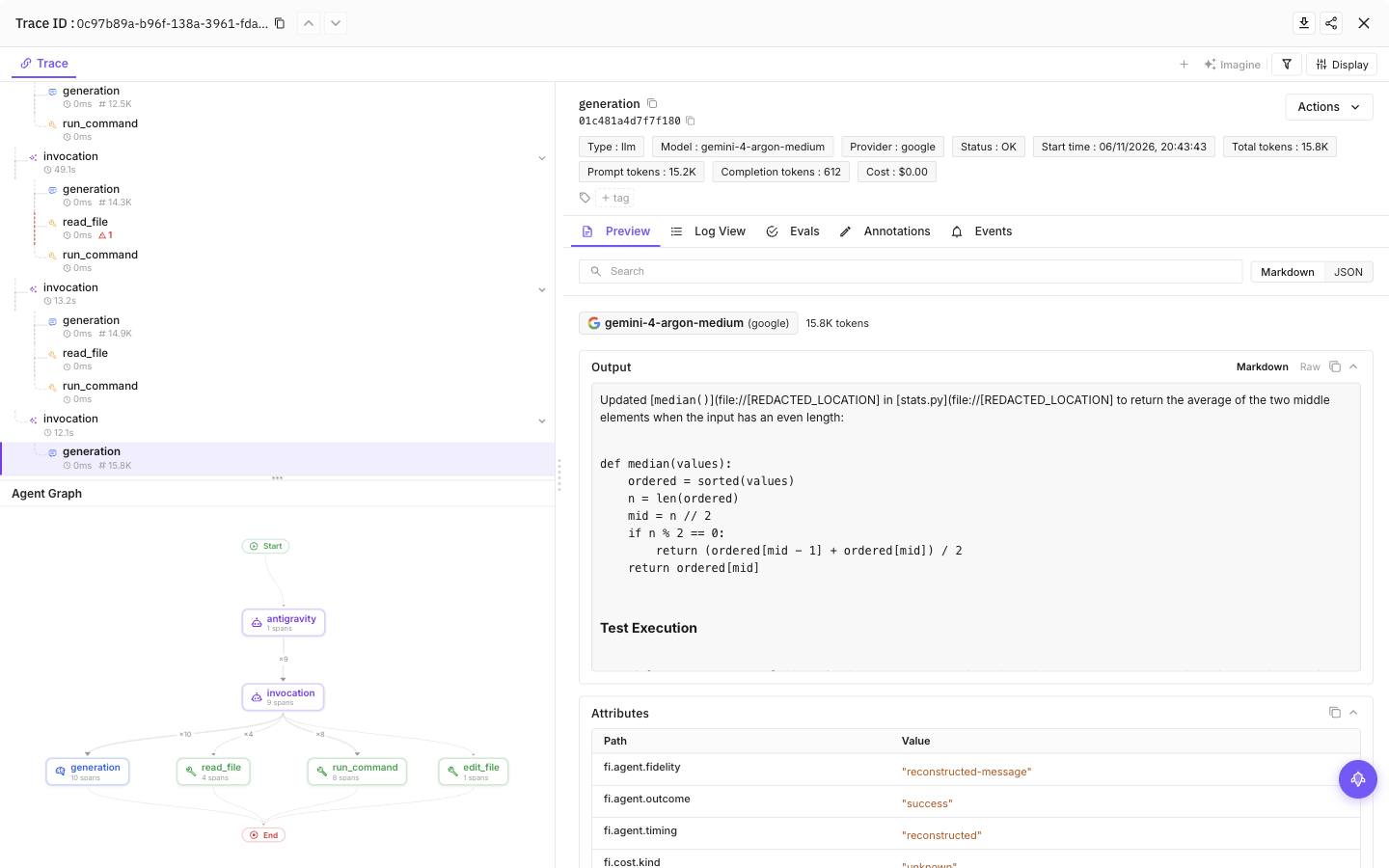
Select a tool call, then the final model call, to see tool activity, the model’s response and token usage
Configuration
Content capture is on by default: prompts, model responses and tool input/output can include source code and secrets the agent reads. Add --no-capture-content to setup to save a content-off preference, or set FI_AGENT_CAPTURE_CONTENT=false in the agent’s launch environment for a process-level opt-out. Structure and available usage remain visible.
| Setting | Purpose |
|---|---|
FI_API_KEY, FI_SECRET_KEY | Override saved credentials as a complete pair. Use hidden setup prompts or secret-manager environment injection, never command arguments. |
FI_PROJECT_NAME | Future AGI project receiving traces. Rerun setup to approve a changed project when using saved credentials. |
FI_AGENT_CAPTURE_CONTENT=false | Turn off prompt, response and tool-content capture for the process. Content capture is on by default. |
FI_AGENT_ENABLED=false | Disable tracing for the process. |
FI_USER_ID | Set an explicit user identifier; otherwise setup creates an opaque local ID. |
FI_BASE_URL | Self-hosted API origin. Approve it through setup with --base-url <origin>. |
FI_OTLP_ENDPOINT | Exact OTLP/HTTP traces URL; takes precedence over FI_BASE_URL. Saved credentials still require destination approval. |
FI_AGENT_CONFIG_DIR | Override the shared protected configuration directory, normally ${XDG_CONFIG_HOME:-$HOME/.config}/futureagi/agents. |
Environment variables override saved configuration, subject to privacy and destination safeguards. Supply both keys together when overriding credentials.
Credentials are saved in ${XDG_CONFIG_HOME:-$HOME/.config}/futureagi/agents/credentials.json with owner-only permissions (0600), separate from repository settings. FI_AGENT_CONFIG_DIR can relocate this shared store.
User and project scope
- Credentials:
${XDG_CONFIG_HOME:-$HOME/.config}/futureagi/agents/credentials.json, protected with mode0600. - User settings:
~/.gemini/config/futureagi.json, containing non-secret Antigravity configuration. - Project settings:
.futureagi/agents.jsonin the workspace. Never put credentials here.
Setup saves user settings by default. Commands inspect the current workspace; --project-dir <path> selects a different workspace. Add --user-only to ignore that repository layer for the command, without changing the plugin’s workspace discovery for future agent runs.
The native installer does not support --scope project. After the user-level setup, add a non-secret .futureagi/agents.json for a project-specific privacy override instead:
{
  "antigravity": {
    "schemaVersion": 1,
    "captureContent": false
  }
}
The native plugin registration remains user-global. Hooks apply project settings only when they identify one workspace; multi-root sessions use user settings. A repository cannot turn content capture back on when user settings disable it or silently redirect saved credentials. Use the environment kill switch or content switch before launching agy when you need that policy across workspaces.
Manage tracing
npx @traceai/agents status antigravity --check
npx @traceai/agents doctor antigravity
npx @traceai/agents disable antigravity
npx @traceai/agents enable antigravity
npx @traceai/agents update antigravity
npx @traceai/agents uninstall antigravity
These commands check registration, credentials, effective configuration and recent exports.
Use status antigravity --json for machine-readable diagnostics. An accepted export means the endpoint accepted it; confirm the trace in Observe to verify it is visible in your project.
Uninstall preserves unrelated plugins and modified files. If Antigravity itself has disabled the plugin, enable it in Antigravity; setup does not silently override that choice.
Desktop app
The Antigravity desktop app runs the same plugin hooks as the CLI, so setup antigravity traces its agent conversations too: one trace per prompt, with model steps, Gemini token usage and tools such as run_command and read_file, including failed tool calls.
In the app, earlier model steps in a turn may lack input or response text; their model, token usage and tool activity remain visible.
The desktop app on Windows and Linux is not yet available.
Troubleshooting
No trace appears. Run status antigravity --check from the same workspace, confirm futureagi-tracing is listed and enabled in agy plugin list --json, then start a new session. Check that your selected Future AGI project matches the setup project. Network failures do not fail the agent’s work; export attempts have a bounded deadline and failed or ambiguous batches are not automatically replayed.
Credentials are rejected. Run setup again with --replace-credentials to enter a replacement pair in hidden prompts. For an existing project credential profile, add --scope project --configure-only to update its settings without attempting project-only plugin installation. Saved credentials remain unchanged unless validation succeeds.
PROJECT_CONFIG_IGNORED appears. The workspace configuration could not be read safely, for example because its directory permissions are too broad. Tracing continues with user settings. Correct the permissions or set FI_AGENT_CAPTURE_CONTENT=false before launching agy if content must stay off.
PINNED_NODE_MISSING appears. The Node interpreter used by the hooks has moved or been removed. Install a supported Node version and rerun setup.
PENDING_TURNS appears. An active session may still be working. Wait for the turn and its subagents to finish. A session-scoped observer recovers unfinished turns after CLI exit; it is not a persistent background service. If a turn remains pending, inspect the status diagnostics rather than starting a second exporter.
Tools appear without model responses or tokens. The plugin could not correlate a completed transcript response. Start a new turn after setup and check diagnostics with doctor antigravity; invocation hooks alone are not model-request spans.
Privacy
With content capture on, prompts, responses, tool input/output and errors can include file text or secrets the agent reads. Recognizable credential fields and known Future AGI keys are redacted, but redaction is best effort, not a guarantee that arbitrary secrets are removed. Disable content before working with sensitive data:
export FI_AGENT_CAPTURE_CONTENT=false
agy
Structure-only traces still include metadata such as model and tool names, session identity, outcomes, timing and token usage. Existing stricter FI_HIDE_* settings remain effective. Pending-turn state is encrypted, stored in owner-only files, bounded in size and expires after 24 hours. The plugin reads the conversation transcript that the CLI or desktop app writes in your home directory to reconstruct generations; it does not read arbitrary transcript paths or artifacts.
Questions & Discussion